Product case study · November 12, 2026
Choose a Higgsfield video workflow that fits the job
Choose Genjutsu, Katana, API with Codex, Ads Studio, character tools, Blender, After Effects or HyperFrames using real Superbash production examples.
Choose the workflow around what you must preserve: performance, identity, product accuracy, story order or editable explanation.
Choose the workflow by the part of the video you cannot afford to lose. A filmed performance calls for a different tool from a new scene. A recurring character needs approved references. A product ad needs accurate packaging and a reason to click. A tutorial needs readable evidence and timing you can revise.
The Superbash experiments make those differences concrete. A bag swap fails because the replacement is much smaller than the filmed prop. A detailed Blender animation barely changes after video generation. A zombie film works as separate shots but loses its story order in a long generation. These are useful clues for deciding where to spend the next hour and the next batch of credits.
Start with the realistic AI video beginner guide and watch the exact tutorial if you are making your first scene from a photo. The sections below help you choose the next workflow when you need more control. They synthesize the full linked guides and their source demonstrations; proposed exercises are suggestions, not new production tests. Sponsorship and promotional links remain disclosed in the individual guides, and the model showdown explicitly used Higgsfield-supplied credits.
Choose by the material you already have
Before opening a generator, identify the strongest input you have: a performance, an approved product photo, a character sheet, a shot plan or recorded narration. Then decide which parts may change.
| Starting material and goal | Workflow to investigate | First acceptance check |
|---|---|---|
| A performance or edit worth preserving | Genjutsu | The motion and intended timing survive the new look |
| A reference edit to recreate with assistant-led repairs | Katana in Claude | The remake follows the reference and repairs the named shots |
| Many shots whose history you need to retain | Higgsfield API with Codex | One request produces a saved, playable clip with recoverable inputs |
| A website or product needing creative variations | Ads Studio or ChatGPT plus Higgsfield | Every claim and product detail matches the destination |
| A recurring persona | AI Influencer and character references | The same face, outfit and proportions survive a turn |
| Precise staging or camera movement | Blender preview, then video generation | The rough preview already communicates the required action |
| Real footage needing compositing or editable highlights | After Effects | The effect improves the explanation without obscuring evidence |
| Narration needing timed cards and diagrams | HyperFrames | The exported sequence stays readable and synchronized |
Use the Genjutsu guide and its source video to see why the input matters. A stationary talking head remained a stationary performance after a fantasy transformation. A better filmed and edited source gave the tool more useful movement to preserve.
Build characters and voices before asking for a complex scene
A recurring character needs agreement across its references. The Lincoln influencer experiment begins by choosing one appearance, then adding views for the motion the clip will expose. Mixing several attractive but incompatible variants gives the video model conflicting instructions. A turnaround sheet also needs inspection: a different coat in the back view can become a continuity problem later.
The newer beginner workflow makes the same principle practical for your own photo. Prepare a face close-up and full-body views, use a background that makes clothing edges easy to inspect, and bind the voice to the intended character. Gray can help separate light clothing from the background; it does not guarantee identity through every frame.
For a first exercise, make one short turn or simple interaction. Watch the face and outfit during the movement, not just at the beginning. If the character changes, improve the relevant reference before expanding to several scenes. Keep voice identity separate from delivery: a narrator speaking over action is different from a character addressing the camera.
Read the AI influencer guide and watch the Lincoln experiment for reference selection and credit budgeting. Use the beginner character-and-voice guide and its complete video for action, UGC and talking-review examples. Neither source establishes an audience-growth formula or a profitable account.
Use Genjutsu when the performance already works
Genjutsu makes sense when you can point to movement worth keeping. Motion transfer rebuilds a scene around source motion; Objects swap targets a person, prop or other element within an existing shot. That choice changes how you prepare the material.
For motion transfer, edit the source first. The balcony experiment became more useful after adding the desired slide, shake and blur transitions. If a transition is absent from the source, a style reference does not supply it. When the team could not film professional action, it generated an action source first, then transformed that. Both stages still needed review.
For an object swap, match the source proxy to the replacement. The handbag failure is a useful warning: a small reference bag did not replace a much larger source bag convincingly. Size, grip, orientation and occlusion are part of the shot. For a phone campaign, film a phone-shaped proxy that fits the intended product instead of expecting a bulky box to preserve every finger position.
A practical first test changes one thing. Keep the camera, setting and performance, replace the intended object, then inspect the entire lift or turn. Add wardrobe or location changes only after that works. The full Genjutsu article and exact demonstration include the source preparation, office fight and failed bag replacement.
Use Katana when you want an assistant to reconstruct and repair an edit
Katana moves more of the reference analysis and production conversation into Claude. It is useful when you want to start from a preset or custom edit, keep the sequence recognizable and request corrections by shot. It does not remove the need to inspect what the assistant actually produced.
The Lincoln anime intro kept recognizable visual cues but used still artwork with animated framing, shakes and flashes. That can work for a graphic title sequence. It does not establish continuous character animation. The fashion example required a revision to add leg movement, and the product example needed a label correction.
Choose a reference whose surrounding footage fits your brief. A preset can retain a watch or car while replacing the central character; that retained material may be wrong for your campaign. After generation, compare the reference and remake for action, timing, framing and sound separately.
Keep the earlier version when requesting a repair. “Replace the moving still in the walking shot with visible leg movement; preserve the approved outfit and timing” gives you a concrete result to check. If the assistant switches to custom code or omits checks, record that change in method. The Katana guide and source video show both successful revisions and unresolved differences.
Use Ads Studio for a campaign idea, then check the product and destination
Start by writing the reason someone should visit the destination. DogDogHK’s park-planning ad and food-review story serve different needs. A visually attractive creative is wasted if the linked page cannot answer the question or support the claim.
Ads Studio can turn website context into a reusable brand kit and creative directions. Review that kit before generating a batch. An unsupported selling point can spread into every variation. For a video variation, begin with a usable source clip, crop it to preserve the important action, then decide whether you are changing an object, the opening hook or the call to action.
The bowl and pet-carrier examples demonstrate object changes. They do not demonstrate higher click-through or sales. If the business question is why people should visit, a different bowl color may be less informative than a clearer opening message. Keep production review and campaign measurement separate.
For a product-photo workflow, ChatGPT plus Higgsfield produced four visual directions, then corrected branding and animated a selected image. The guide notes a collar-versus-leash discrepancy and a failed animation with a retry. Check the physical item before approving the composition, and supply unseen views if a rotation would otherwise invent the back of the product.
Read the Ads Studio and Ad Multiplier guide and watch the DogDogHK walkthrough. For the connected-chat route, use the product-photo guide and its exact video.
The optional 19-second property-video hook briefly suggests photos plus a connected assistant. It supplies no full walkthrough, verified client outcome or earnings evidence. A property exercise would need authorized photographs and a review that the generated movement does not invent rooms or amenities; the clip alone is not a tutorial for selling that service.
Use the API and Codex when revision history becomes the bottleneck
A growing folder of unnamed clips makes every correction expensive. The API route is useful when you need each shot tied to its prompt, references, settings, request ID and review decision. Start with one generation and a verified download before building a dashboard.
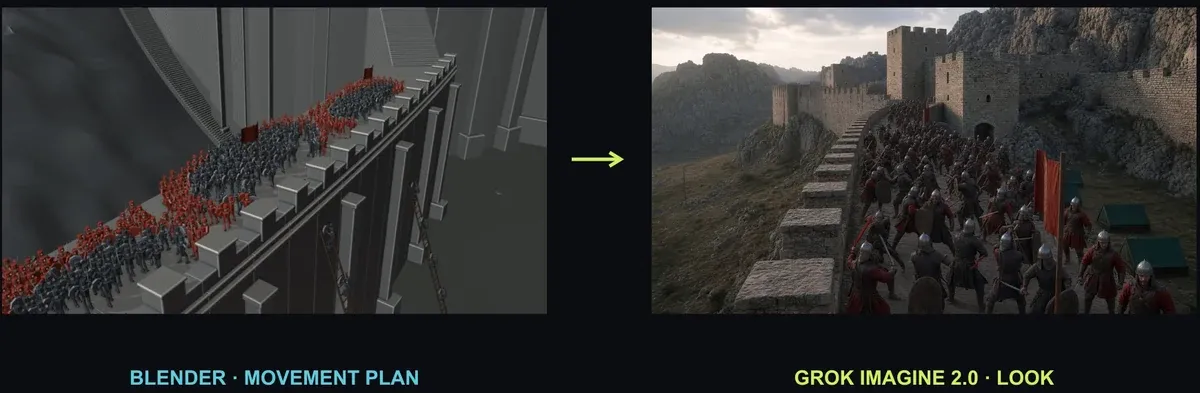
The Ashfall project demonstrates this order. Codex runs jobs; a custom gallery reviews saved results. The gallery is not presented as a demonstrated submission interface. Its value is that a reviewer can find a rejected battle shot and recover the exact request instead of searching through old chat messages.
Keep API billing separate from the website subscription. Preserve the accepted request ID before polling, and recover that job after a connection failure rather than blindly submitting another paid request. Download completed media into storage you control. A remote output URL is not a durable project archive.
Then build the smallest useful library: preview, shot name, model, clearly labeled estimate, full prompt and original download. The Ashfall battle remained creatively unfinished even though the infrastructure worked. That is a healthy distinction. A completed API request proves delivery, not convincing crowd choreography.
Follow the API and Codex guide and watch the Ashfall workspace. The hero image above comes from that exact source at 5:10, where a Blender movement reference sits beside a photographic appearance reference.
Use Blender when staging and camera movement need to be explicit
A rough preview lets you settle where characters move and how the camera sees them before paying for the final treatment. Separate those instructions. A camera orbiting a stationary figure is not a character performing an action.
The detailed toy-car preview was already close to a finished animation. The generated version mainly changed lighting and stretched the timing. For that attempt, the extra generation added little. The rougher five-shot sequence gained a richer Hong Kong environment, but the character stood awkwardly still in its opening shots.
Decide what the next stage should contribute. If you like the Blender render as it is, it may be your final output. If you want a new visual treatment, keep the preview focused on staging and movement, and state what the model should add. Review the simple figure’s action before expecting the model to invent it.
A proposed exercise is a character walking toward a car while the camera rises overhead. Approve the walk, stop and camera path in the rough preview, then generate the chosen setting around it. Save the editable scene so a later timing correction does not require rebuilding the whole shot.
The Blender planning guide and exact demonstration explain the Bridge connection and both outcomes. They do not establish that the suggested repair to the static opening was successfully rerun.
Keep story order in the edit and choose models by the difficult shot
The zombie short begins with a real running performance, then adds a story: pursuit, shop entry, a door under attack and a threat already inside. Its successful complete version uses separate generated shots assembled with FFmpeg. The long-generation attempt loses that order, and an Edit video correction does not resolve it.
Use the model for the action it handles well and retain direct control over sequence when that produces a clearer film. Write a visible acceptance condition for each shot: the survivor gets through before the door closes; the zombie hits the door without conveniently slowing; the interior reveal comes after the escape. That is more useful than “make it cinematic.”
For model selection, the showdown’s prop, storm and dog tests show why a single score is inadequate. A convincing spill can coexist with a duplicated cup. A detailed kitchen can add another dog. Kling and Seedance were the source’s co-picks, with disclosed failures and input differences. Use a representative shot from your own project before committing a whole film to one model.
Read the zombie production case study and watch both assembled and long-generation versions. Then use the model comparison guide and watch the showdown alongside its linked prompt workbench. Compare total accepted-output cost, including retries, rather than treating an old per-minute quote as a current guarantee.
Choose After Effects or HyperFrames for the explanation you need to edit
After Effects is useful when a composition needs editable layers, compositing and precise visual emphasis. The tutorial experiment records actual commands on the machine where they run, then adds highlights around the evidence. The output remains a real screen recording; the editor does not animate a fabricated success message.
The fire experiment exposes another kind of failure: incomplete reference coverage. The agent had not followed the whole supporting tutorial. Reading more of the source and recovering its project materials improved the test, but the article does not pretend to supply a complete effect recipe. An editable project helps you repair a flame boundary or reflected glow without regenerating the whole performer.
HyperFrames is a useful route for short narrated explanations built from media and timed graphics. In the recorded tests, it reconstructs project cards and a tool-role diagram while preserving narration. It still needs crop, readability and timing review. Roughly one-minute exports of short clips do not establish a matched full-episode speed advantage over After Effects.
Choose a twenty-second passage for a fair comparison. Supply the same narration and evidence, require editable labels, and inspect the exported file with sound. Then change one label and one cue. The tool that handles that revision cleanly may be more useful than the one that produces the fastest first render.
Use the After Effects guide and source video for genuine tutorial footage and compositing review. For cards, diagrams and the file-based editing loop, read the HyperFrames guide and watch its comparison.
Add agent coordination after one reviewed production works
Supercomputer can coordinate a faceless explainer’s planning, images, narration and animation. The Lord Yapper attempt also shows why completed assets and an ordered scene record matter: verification loops repeatedly lost temporary working files. Current storage features differ from that recording, so use the source to understand the failure rather than assume every present job behaves the same way.
Approve the script before generation, retain the files needed to resume, and review the full export before requesting publication. The faceless-video guide and full source video cover that production path without promising unattended uploads or channel income.
A separate agent can help organize briefs or review notes, but it needs a working communication path. The Hermes Discord guide and setup video show how to establish one bot and a real message round trip. Discord is a place to coordinate the work; connecting it does not create a video pipeline by itself.
If you want to experiment with local text drafting, the Qwen 3.5 setup guide and local-computer video explain model loading and the difference between responsive output and correct answers. Qwen in that demonstration is a local language model, not the renderer for these video scenes, and no complete Qwen-to-Higgsfield integration is demonstrated.
Finish one scene, save its sources and watch the exported result before automating a series. You should be able to explain what the generator contributed, what an editor changed, which checks passed and what remains wrong. That record is what makes the next revision manageable.
Put this to work
Choose the production route for the part of the video you need to control.
Try
Make one short scene with named references and a written list of visible success conditions.
Prove it worked
Watch the saved export, compare it with the brief and record the cost of rejected attempts as well as the chosen result.
Keep in view
- A strong source performance makes motion transfer more useful; a new style cannot supply missing action.
- Keep approved characters, products and shot records so revisions target a known problem.
- Use an editor when story order, precise text or later revisions need direct control.