I Turned My Boss Into a Zombie With Kling 4.0 (Short Film)

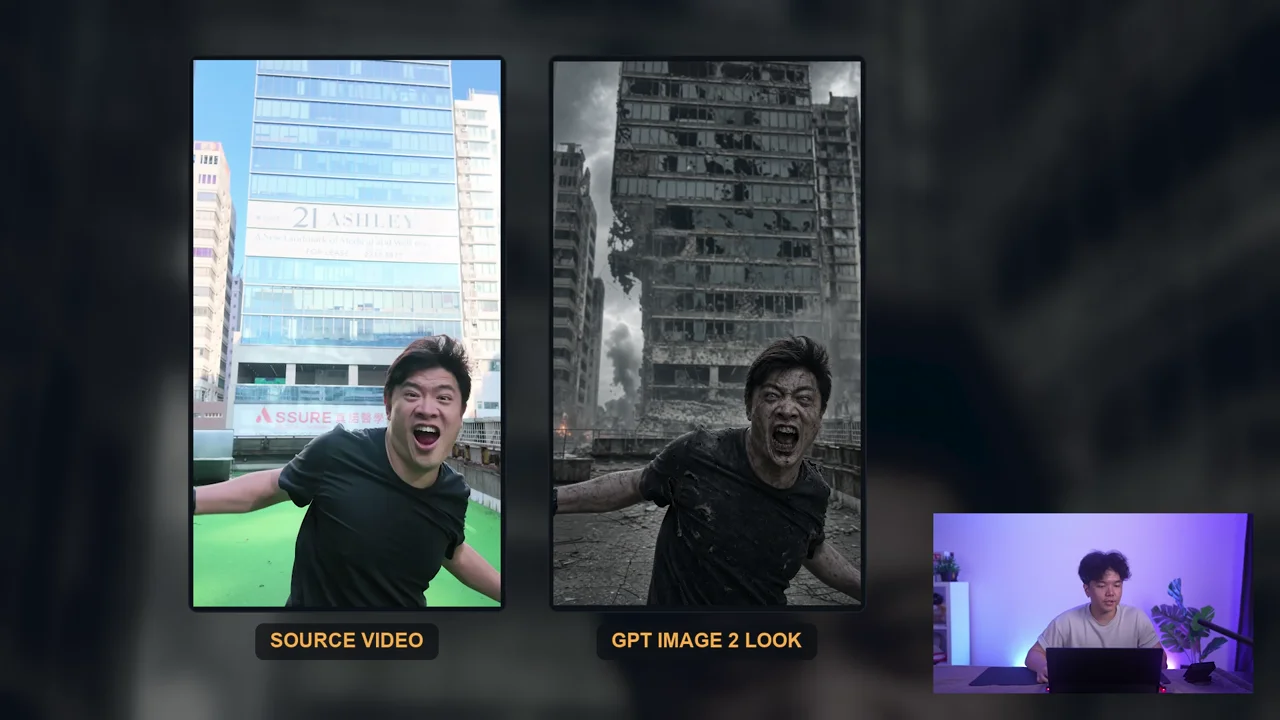
The zombie chase began with an ordinary recording: Michael running toward the camera. That performance supplied something a text prompt has to invent from scratch: the timing and physical energy of a person rushing forward. The production then changed the appearance, setting and sound, and built a short story around the result.
The revealing failure came later. The separate scenes produced a satisfying edited film, but asking Kling to connect the whole story in one generation scrambled the intended order. Watch the complete short-film case study to compare both versions. A still image cannot show why one sequence works and the other does not.
This guide follows the full registered final transcript and the exact matched video. It adds practical planning exercises, not newly generated test results. The source promotes Higgsfield through this creator link; check current terms and quotes before spending credits.
Before you start
Prepare a short performance clip you have permission to transform, a few clear appearance references and a place to assemble the finished shots. A simple action is a better first test than a crowded scene with several characters speaking and moving independently.
Write down what the source clip contributes. Here it provides a run and a rush toward the camera. The zombie face, ruined city, snarls and footsteps are requested changes. Keeping those roles separate helps you judge whether the generation preserved the useful performance or merely made an attractive new shot.
You also need a short story with an ending. The example’s structure is a pursuit, a narrow escape into a shop, a door under attack and a reveal that another zombie is already inside. The closing reveal changes the meaning of the escape. Without it, the film is only a sequence of chase images.
The official Kling 4.0 guide, checked November 12, 2026, documents References, Frames and Edit video, clips up to 30 seconds and up to ten keyframes. Those controls describe what you can submit. They do not guarantee continuity or adherence to a storyboard.
Preserve the performance and replace its setting
The production removes the source audio because it contains laughter. It then makes two visual references: Michael’s zombie appearance and the damaged city. The prompt asks to carry over the running performance while adding snarls and footsteps. See the reference preparation.
This is a useful way to avoid conflicting audio instructions. If you want a threatening chase, a clean source without unrelated background dialogue gives you a clearer starting point. Retain an untouched original, then prepare a working copy for the transformation.
Describe the changes in plain terms. A proposed brief for your own authorized performance might be:
Preserve the runner’s forward rush and camera-relative movement from the source clip. Use the attached character image for the zombie appearance and the location image for the ruined street. Replace the source sound with footsteps and a snarl. Keep the runner recognizable throughout the shot.
That is an adapted exercise, not the verbatim production prompt. Review both motion and appearance afterward. A convincing zombie face at the start does not establish that the run still follows the source or that the face survives the last second.
Choose duration, aspect ratio and resolution before approving the quoted generation. Keep the first attempt focused on this one action. The source’s successful transformation was useful enough to build around; it was not proof that every later shot would work equally well.
Turn the idea into shots with visible success conditions
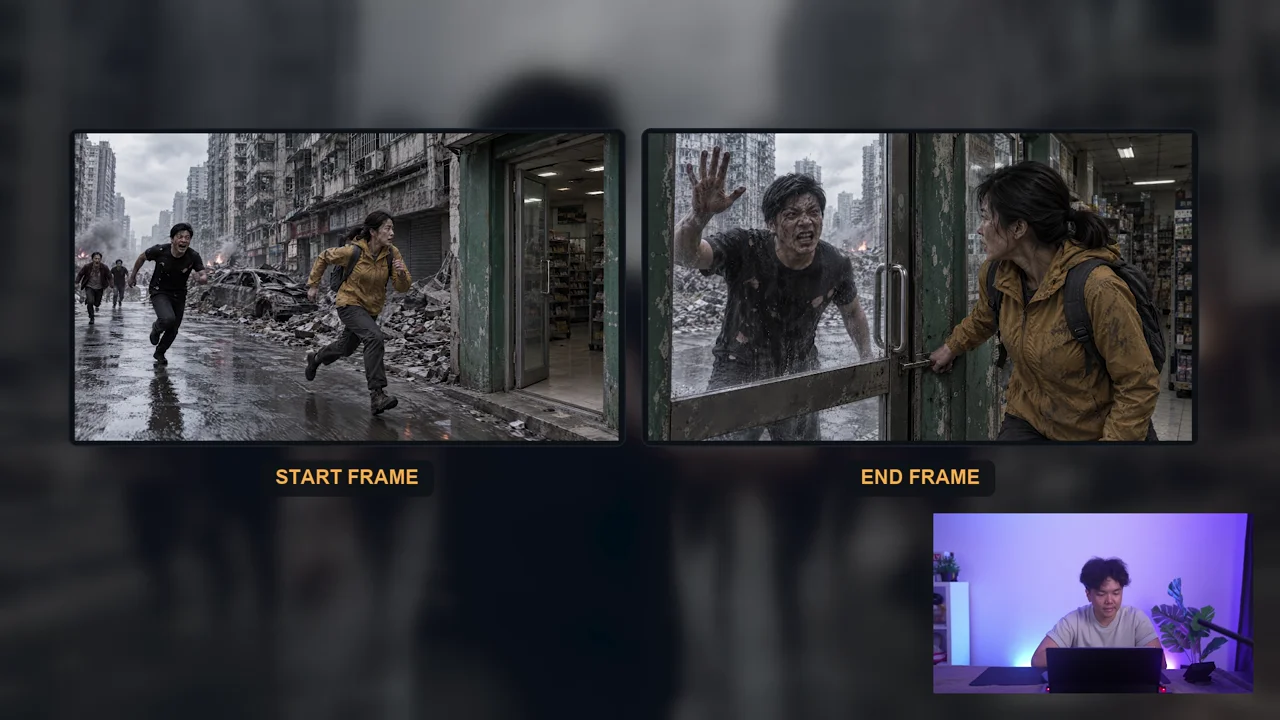
The storyboard gives the woman an urgent objective: reach the shop before the pursuers reach her. Each shot has to preserve that urgency. The production explicitly addresses a failure seen in earlier work, where a nearby zombie slows down conveniently and gives the protagonist time to escape.
Instead of asking vaguely for “good continuity,” specify the physical sequence. She crosses the threshold quickly. The door closes before the closest zombie arrives. The zombie hits the closed door without slowing, and other pursuers catch up outside. Then the film reveals the threat inside.
A planning sheet for this story can look like this:
| Story beat | What must be visible | What would break the scene |
|---|---|---|
| Pursuit | The survivor moving toward a reachable entrance, with the threat behind | The pursuer stops for no reason or the exit changes location |
| Entry | The survivor gets fully inside before the door closes | A body passes through the door or the zombie reaches her first without consequence |
| Door attack | The closed door separates the survivor from the growing crowd | Only one zombie remains despite the established pursuit, or the door changes shape |
| Interior reveal | A new threat inside after the apparent escape | The reveal arrives before the escape or appears in the wrong location |
The table is an editorial planning aid based on the demonstrated plot. It gives you something to compare against the result. Keep a reference set for the woman, the pursuers, the city and the shop, and reuse the approved versions across shots.
A storyboard image can hide a timing problem. If the zombie starts too close, the woman needs an action that plausibly gets her through the door. Adjust the staging before generation rather than hoping the model will solve an impossible gap.
Use keyframes for moments and prompts for transitions
The door-entry test uses a starting image with the woman at the entrance and the zombie close behind. The ending image puts her inside, the door shut and the zombie outside. The prompt supplies the action between those states.
Those images answer “where does this begin and end?” The prompt still needs to explain how it happens. Keep the action short enough to inspect: entry, immediate door closure, impact. More frames can define more moments, but they do not automatically establish a logical path between them.
The source reports good previews for the separate scenes. Many were only a few seconds long. That helped the editor keep the usable action and control the order. It is a result from this production, not a universal rule that every short Kling clip succeeds or every long clip fails.
After each shot, compare the result with its success conditions. Check the middle, not just the endpoints. A shot can begin and end with the right composition while passing through impossible motion in between. If the transition fails, simplify or divide the action before committing to more expensive retries.
Keep the successful edit separate from the failed long generation
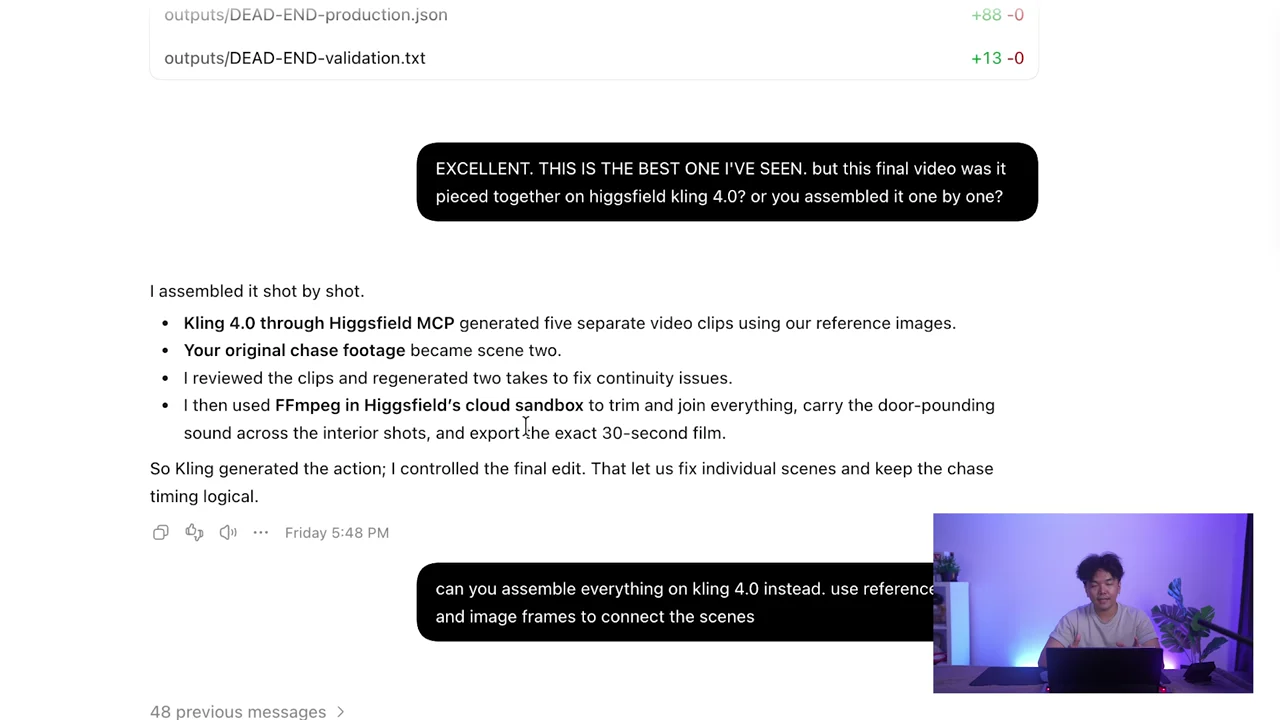
The first complete film shown in the video was assembled with FFmpeg from the storyboard scenes. Ron checked the production method after viewing it. That distinction matters: an editor placing approved shots in order is a different workflow from a model generating the entire sequence.
The next experiment supplies three video references and four scene images, asking Kling for the complete sequence with cuts and sound. The required order is pursuit, entry, door attack and interior reveal. The output does not preserve it. A second pass through Edit video leaves the continuity problem unresolved. Compare the assembly disclosure and long-sequence attempt.
When a long generation loses story order, adding more descriptive adjectives is unlikely to be the most useful correction. First identify whether the problem belongs to a shot or to the edit. If the individual actions work but the order is wrong, assemble the approved clips in the intended sequence. If the entry itself is impossible, fix that shot before editing.
Keep filenames or an edit list tied to the storyboard order. Place the pursuit before the escape even if the escape was generated first. Listen across cuts for abrupt changes in ambience, and trim each clip to the action the story needs. A maximum generation length is available capacity, not a target that every shot must fill.
Budget for usable footage and failed corrections
The recording praises Kling’s initial quote relative to Seedance, but it also reports two full-length attempts quoted at 120 credits each with the story problem still unresolved. Those are the quoted jobs in this production. They are not a current flat rate, and they do not establish the cost of every possible alternative.
The official page’s pricing table and FAQ currently give conflicting figures. Use the live quote for your selected inputs rather than turning either number into a purchasing promise. Save the quote alongside the settings and result so you can see what each usable shot actually cost.
A useful production budget includes experiments, rejected takes and corrections. Decide in advance which failure would justify one more attempt and which would send the scene back to planning. For this case, controlling the final edit was more productive than continuing to ask the long generation to recover the entire story.
Avoid turning the result into “Kling beats Seedance” or the reverse. The performance transformation, individual story shots and long-sequence assembly are different tasks. This example supports a specific workflow choice: use the successful short shots and retain control over their order.
Troubleshooting the chase
If the zombie slows down before reaching the door, inspect the starting distance and the requested timing. Give the survivor a plausible path, then request continuous pursuit through the impact. If the crowd disappears, specify which additional pursuers arrive and compare the shot against the preceding one.
If the woman, shop or door changes between scenes, check whether the generation used the approved reference assets. A fresh scene description can accidentally invite a fresh design. If an edit fixes the door but changes the character, compare the whole revision rather than accepting the corrected detail in isolation.
If the film looks polished but the reveal feels arbitrary, review the scene order with sound off. The audience should understand the escape before discovering the interior threat. Then listen with the image hidden to check whether the sound reveals too much too early.
If a correction becomes a new production method, record that change. The FFmpeg assembly in this case was useful, but it must not be reported as a single Kling generation. Keep the actual method beside the output so you know how to revise it later.
Finish one coherent scene before extending the film
Watch the final export from beginning to end, including the last frame and sound tail. Compare it against the storyboard, inspect identity during motion and check that the escape and reveal remain intelligible. Keep the approved sources and edit order with the export.
For a broader task-by-task choice, read the AI video comparison and the Higgsfield workflow hub. The full zombie-film video is most useful when watched as a comparison of production methods: a successful performance transformation, controlled short shots, and a long generation whose story order did not hold.