Best AI Video Model — EPIC SHOWDOWN?

A video model can make a scene look expensive while quietly changing the thing the scene is about. A fork multiplies. A cup reaches a dog’s mouth without a believable catch. A farmer passes through a tree. These errors are easy to miss when the first frame looks good.
The Superbash comparison tests those details through concrete production tasks. Watch the full model showdown, then use the comparison workbench with prompts and clips to inspect the moments that matter to your own project. The source is sponsored by Higgsfield, which supplied credits for the tests. Its creator link is preserved here; this guide does not promise a discount or repeat the tests as new results.
Kling 4.0 and Seedance 2.5 emerged as the source’s two picks. Neither was flawless. The useful question for a production is which one handles the action, identity and edit you actually need at an acceptable total cost.
Before you start: understand what was compared
The recording covers dance, spaghetti, a dog talk show, a lightning storm, a stair race and a kitchen commercial. The published workbench also includes a café baseline. It retains the prompts, per-clip observations and exceptions, so you can distinguish the edited discussion from the fuller test record.
These are specific attempts, judged editorially. The workbench discloses different input modes for some models, a modified FLUX.3 talk-show prompt after filter rejections, and an unchanged retry for a failed Seedance kitchen opening. An assertion that every model received an identical treatment throughout would be too strong.
Model names here identify the entries in the source record. Do not silently replace them with a similarly named current release and call it the same test. Current product capabilities and prices can help plan a new run, but they do not alter what the October comparison demonstrated.
For your own comparison, prepare one reference set, a short prompt and a list of visible success conditions. Save the exact model, mode, duration, resolution, quote and output. If the model cannot accept a required input or duration, record that mismatch rather than hiding it inside the result.
Dance: attractive motion is not exact choreography
The dance round looks surprisingly competent across the entries. The generated versions sometimes add footwork beyond the original performance. That can make a clip more entertaining, but it also raises a question: did the model follow the requested action or invent a different dance?
The dance workbench clarifies that the models received a still image and written choreography. They did not receive the original dance as a motion reference. The real footage shown alongside the outputs is a comparison, not the input video for a motion-transfer test. Watch the opening discussion.
If you need an expressive social clip, added movement may be acceptable. If you need a particular routine, compare each required beat with the output. The absence of an elimination in this round does not mean every model reproduced the choreography exactly. Decide which kind of success your brief requires before choosing a model from these examples.
Spaghetti: count props and track who does what
The spaghetti scene asks one person to bring out a bowl and eat while the other reacts. It combines timed action, a physical prop and a short line of dialogue. The source identifies a utensil inconsistency in Gemini Omni Flash 1.1; the workbench describes a duplicated fork as the elimination reason.
A prop error can be small in screen area and large in meaning. In a product demonstration, a tool changing shape or multiplying can invalidate the shot. Watch the transition where the object enters the frame, the hand-to-object contact, and what happens after the action. Checking a single frame before and after the movement may miss the error.
Use the spaghetti clips and prompt alongside the video discussion. The useful test is whether the same object persists through the interaction, not whether a still of the meal looks realistic.
For a new shoot, a simple cup pickup or product unboxing can serve the same purpose. Specify how many objects should exist and where each starts. That is a proposed evaluation exercise, not an additional result from this comparison.
Talking dogs: identity, dialogue and the missing gag
The dog talk show uses Muffin and Missy as recurring characters. The panel likes the general appearance, then notices failures around a rubber chicken and the intended interaction. Grok makes a prop appear implausibly; the recorded bracket eliminates MiniMax H3 when the requested paw-press gag does not happen.
The spoken conversation is looser than the workbench’s action record, including a reference to a rubber duck. For precise reproduction, use the retained prompt and clip. Read the talk-show evidence and watch the source discussion.
Review a dialogue scene on separate passes. First, identify which character should speak each line. Next, follow the prop through the whole shot. Finally, check whether the joke’s action actually occurs. A scene with charming animals and plausible mouth movement can still omit the event that makes the scene funny.
The café baseline in the workbench is useful before this harder test. It asks for gentler action and dialogue. If a model cannot keep the dogs and a simple pour coherent there, increasing the complexity will make diagnosis harder.
Lightning storm: keep the world continuous
The storm round starts from a real photograph of a tea farmer in Yunnan and asks for a longer sequence with weather, camera movement and escape. The source notices disappearing foliage in Grok and the farmer passing through the tree in the FLUX entry. The environment can look cinematic while its physical layout stops making sense.
Michael’s impression that some generated surroundings resemble the place he visited is a personal observation. It does not verify a geographically accurate reconstruction outside the frame. For production review, the stronger check is whether the location remains consistent within the clip.
Track fixed landmarks as the camera moves. Does the trunk stay where it was? Does the escape route remain open for a plausible reason? Does the character pass around an obstacle or through it? Review the storm workbench and the video’s storm round at normal speed, then slow the suspicious transition.
The workbench also notes that no model clearly delivers the requested half-speed beat. That matters even for the visually stronger entries. A model can win a comparison while still missing part of the brief.
Stair race: a good spill can hide a bad catch
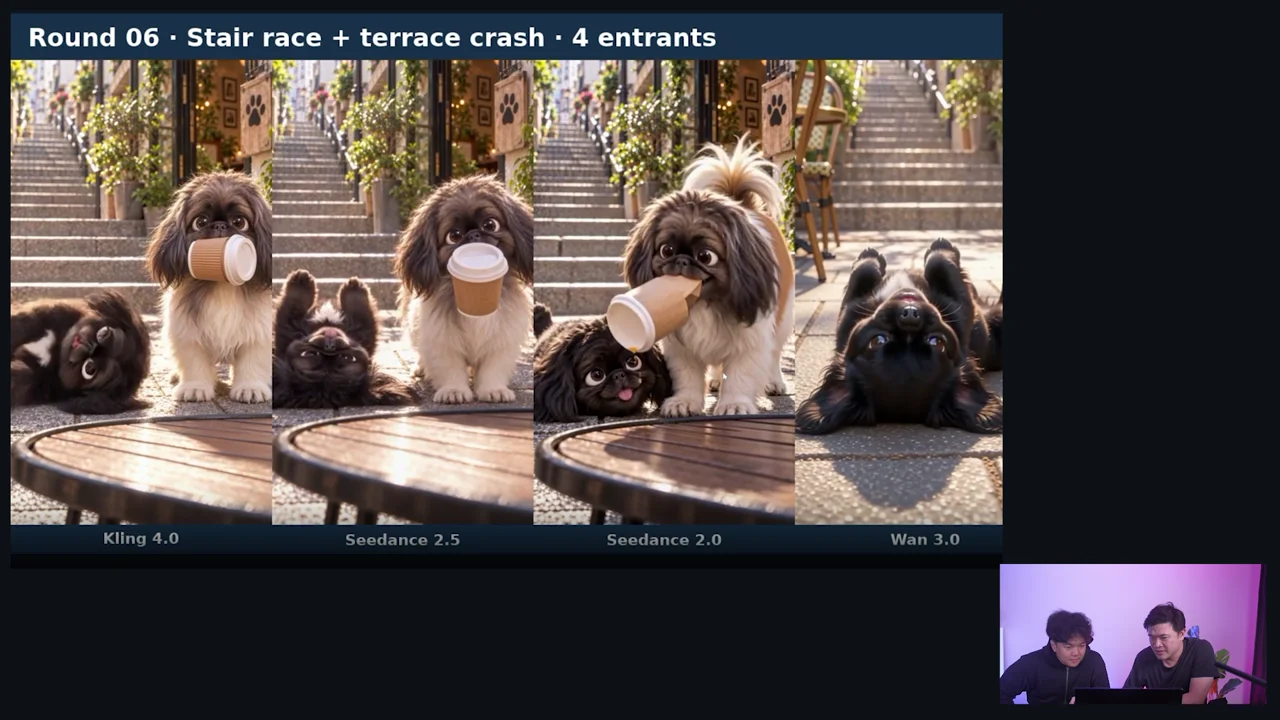
The stair-and-terrace sequence stresses fast movement, recurring characters and a cup interaction. The discussion calls out changing dog breeds, a floating cup and a duplicated cup. Seedance 2.5 earns praise for the spill, then receives criticism when another cup appears. That mixed result is more useful than a clean winner label.
The workbench’s Kling note also records a tabletop pickup rather than the requested airborne catch. So “Kling did well” should not become “Kling performed every scripted beat.” Inspect the stair-race clips, then watch the discussion.
For an ad with a recurring character, identity drift may be more costly than a minor background defect. Compare the animal’s face, markings and proportions through the action. A believable spill does not compensate for turning the customer’s dog into a different breed.
If a catch is indispensable, treat it as its own shot with a clear start and end. If the story works without the catch, rewrite the action instead of spending indefinitely on an exact beat the model is struggling to perform. That is an editing choice, not evidence that the failed generation passed.
Kitchen commercial: inspect every scene in the sequence
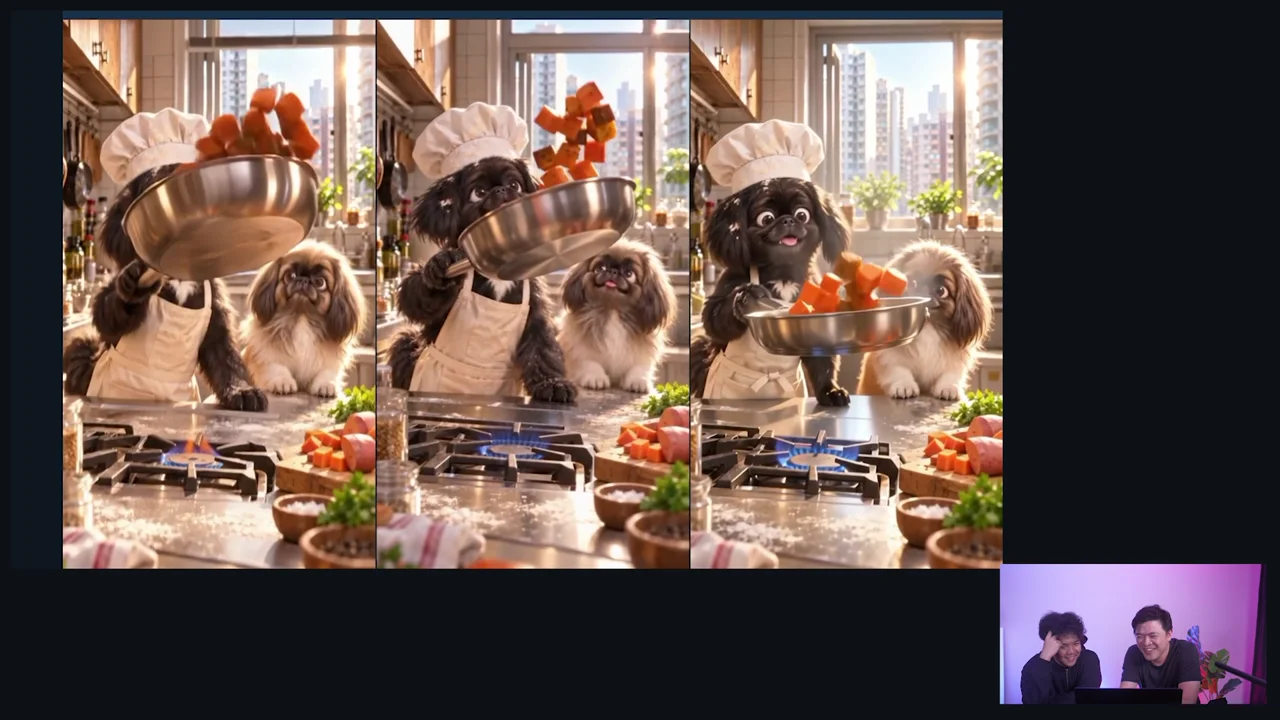
The final task is a five-scene product commercial. The source compares Seedance, Kling and a bonus Wan entry, looking at dog identity, food, packaging and camera movement. Extra dogs and a changing pan handle are obvious failures; omitted actions can be harder to spot.
The workbench calls Kling and Seedance equal co-picks while retaining their defects. Its notes distinguish a clean product presentation from a fully executed script. Use the kitchen prompt and clips and watch the final round before treating either model as ready for a specific commercial.
A product review needs the approved package beside the export. Check label spelling, shape, colors and the number of products. Then watch the camera move: a good opening close-up does not establish that the package stays correct during an orbit or pullback. Count the characters too. A newly generated dog is not harmless background decoration when the ad depends on two established mascots.
The complete commercial is an assembled sequence of scenes. Evaluate the joins and story order as well as the individual clips. The zombie-film case study shows why this distinction matters: short shots worked better there than a single long attempt to connect all the events.
Compare total cost without turning old quotes into current prices
The spoken conclusion cites 420 credits per minute for Seedance 2.5 and an approximate fourfold gap. The workbench labels its cost snapshot October 29, 2026 and records 135 credits per minute for Kling at its stated rate. Those figures do not support treating “four times” as an exact universal ratio.
Current Kling documentation and Seedance documentation describe available controls and per-job quotes. Checked November 12, they list up to 30-second generations for Kling 4.0 and Seedance 2.5, while Seedance 2.0 has a shorter documented maximum. Duration support does not establish equivalent input modes, quality or success rates.
Use the current quote for your exact setup. Add rejected takes and revisions to the cost of the usable output. A cheaper model that needs several repairs may cost more for a particular shot; an expensive model that fails the same action is not a bargain either. This comparison does not measure an expected retry rate for every workload.
Troubleshooting your own comparison
If one output has the wrong shape or duration, verify settings before scoring the model. If a reference mode differs, disclose it. If a prompt is rejected and you change it, preserve both versions. If you retry, keep the failed result in the record so the final selection does not hide the work needed to obtain it.
If every model struggles with the same action, inspect the brief. Are the start image, timing and requested movement physically compatible? Divide a complex interaction into smaller shots if that suits the production. If only one model fails, try one targeted correction and compare it against the original instead of changing every variable.
For a first choice, test Kling 4.0 and Seedance 2.5 on the specific scene you need, using this source’s co-pick conclusion as a starting point. The Higgsfield workflow guide helps choose the surrounding production method. Keep the exact showdown video open beside the workbench: the errors happen over time, and a ranking alone cannot show them.