Higgsfield Blender + GPT 6 Astra = NEW Meta for Video Workflows (FREE)
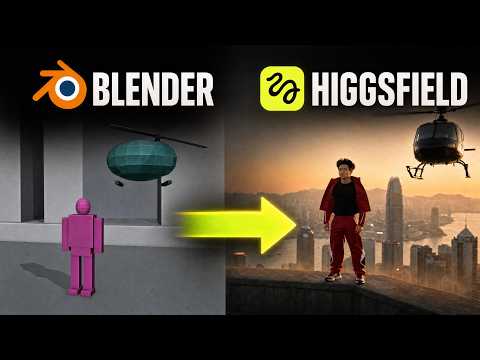
The setup is free, but the credits are not
Higgsfield now has a Blender plugin that costs nothing to install or use for previews. You only pay Higgsfield credits when you feed that preview into Seedance 2.5 or Minimax H3 for the polished video. The channel's test used ChatGPT's desktop app with Astra connected through the Higgsfield bridge, and after a full day of testing, the app usage was surprisingly low.
Here's the loop: describe a shot to Astra, let it build an editable scene in Blender with camera movement and rough animation, check the preview, make changes, then spend credits only when the motion looks right. No Blender experience needed. Astra handles the technical work.
What actually happens: Blender scene vs. generated video
The first test was an 18-second sequence of a tiny car racing across a crowded desk, Pixar style. Blender's render already looked good, and the Higgsfield version came out very close to it, with slightly warmer lighting and a stretch to 25 seconds. That surprised the host. The Blender output was strong enough that for simple shots, the free render might be the final product you show.
A second test took the opposite approach: keep the environment and objects simple, and focus only on camera movement and transitions. Five different shots, one recurring character. The Blender preview looked plain on purpose, because the point was to lock camera direction before video generation. The final output captured the Hong Kong environment well, but the first two shots had the character standing still, which stood out. The fix is to go back into Blender, describe the movement to Astra, and preview again before spending more credits.
Five takeaways if you try this
The host ended with five concrete points that match our testing:
1. Connected tools. Ask Astra to work on the open Blender scene through the Higgsfield bridge, then export the preview into Higgsfield for generation. 2. Camera planning. Describe a tracking shot, orbit, or pullback, and inspect the movement in Blender before generating. 3. Blocking. Set where characters and props sit before the video model runs. 4. Revisions. The scene stays editable, so adjust and preview without spending anything. 5. Reusable files. Save the Blender file, and the same camera sequence can become the starting point for a different visual treatment.
The useful part is inspecting decisions along the way instead of typing a prompt and hoping. You can even doodle in Paint and describe that to Astra as a reference for camera direction. For solo creators, this moves you from text-to-video guesswork to a director's preview that costs nothing until you're ready.