Higgsfield Katana + Claude = INSANE AI Edits (Quick Guide)

To recreate a short edit with your own character or product, you need more than an image with the right style. The cuts, movement, framing and sound have to work together. Higgsfield Katana lets you give that job to Claude: supply a reference, explain what should change, generate a version, then revise the parts that miss the brief.
This guide takes you through that workflow, including the checks that keep an attractive first attempt from becoming an inaccurate final export. The worked examples use the actual Superbash tests: aura presets, an Abraham Lincoln anime intro, a fashion lookbook and a fictional Night Shift drink. They show useful results and visible failures. The source demonstration is sponsored by Higgsfield; none of these examples measures advertising performance.
Before you start: prepare the reference and decide what must survive
Have a Higgsfield account with access to Katana, sufficient credits for the quoted job, and Claude with the Higgsfield connector enabled. You also need your character or product images and either a Katana preset or a reference clip you can use. Current connector and upload details below were checked against Higgsfield’s Katana guide on October 28, 2026.
Before generating, write down what the new edit should preserve. For a character, that might mean a particular silhouette, face and recognizable accessories. For a product, it includes the exact label, shape and colors. Separately identify the parts of the reference you want to borrow: shot order, cut timing, camera movement, framing or sound.
Those are different requirements. A remake can follow the cuts but render the wrong label. It can keep a character recognizable while replacing the original action with a pan across a still image. A short brief makes these differences easier to spot.
For a first attempt, choose a preset whose surrounding footage fits the project. The Dark Aura example retains watch and car shots while changing the central character. If those objects suggest the wrong setting or product, changing the character alone will not solve the problem. Preview the entire preset before committing to it.
Connect Higgsfield to Claude
The demonstrated route starts in Katana with Install Higgsfield in Claude. It opens a connector dialog with the Higgsfield address filled in. Check the name and address before continuing, connect your Higgsfield account, and complete its authorization flow. The expected result is an active Higgsfield connection that Claude can use for generation.
For manual setup, the current official route is Claude Settings → Connectors → Add custom connector. Use the name Higgsfield and the URL https://mcp.higgsfield.ai/mcp, then connect and sign in. Higgsfield’s instructions use account authorization rather than asking you to paste an API key into the chat. Official connector instructions.
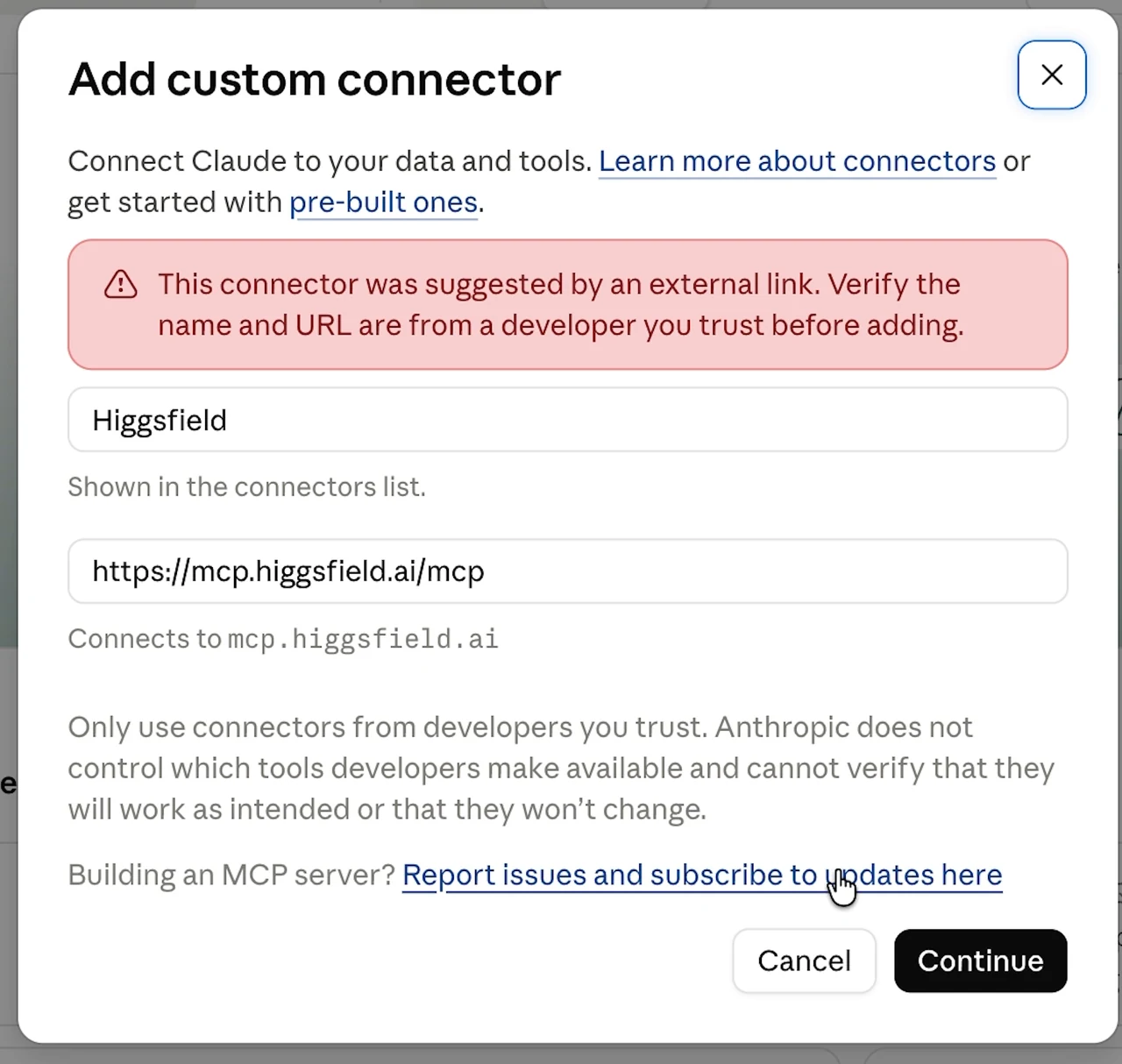
If Claude cannot use Higgsfield after setup, first check that the connector is active in the conversation. Repeating the creative prompt cannot fix a missing account connection. Complete the normal sign-in or authorization screen when requested; do not paste credentials into a generation prompt.
Submit a preset with your own images
Open a Katana preset and preview it. In the demonstrated interface, choose Recreate, supply your image, add any extra instructions, and choose Recreate in Claude. Claude then analyzes the reference, plans the edit and runs the generation tools. Follow the progress in the conversation and check the job’s credit information before approving paid generation.
The current Katana page uses Send & Generate in Claude for the handoff. Button labels can change, but the useful check is the same: the conversation should receive the intended preset or reference, your replacement images and your instructions. Do not begin a second job merely because the first is still processing.
If you start from the conversation, Higgsfield also documents /katana, /katana/<preset-name> and a plain-language request. Use the Higgsfield upload window offered in the chat for media. An ordinary Claude attachment is not automatically a file available to the connector; a direct media URL is another supported route, whereas a social profile link is not the clip itself. The current guide permits up to five photos. Katana inputs and commands.
A useful brief names the intended edit and its constraints. For example, this is an adapted brief for the character exercise, not a promise of identical output:
Recreate this preset using the supplied character images. Preserve the hat, beard and recognizable face. Keep the reference shot order and timing. Before generating, identify any shots that will retain unrelated reference footage and show the quoted cost. Deliver the finished sequence and a comparison with the reference.
Keep the first completed version and its links. Later corrections are easier to judge when you can compare them against both the reference and the earlier result.
Review motion as well as appearance
Watch the reference and remake from beginning to end. First check whether the same things happen at the same points. Then look at how they happen: does the character walk, or does the whole image slide across the screen? Does the camera move around the subject, or does the frame simply zoom? Are cuts landing at comparable moments in the music?
The Monolith test is useful precisely because the result is not an exact match. Its treatment resembles the reference, but movement and rhythm differ. A still frame can help compare composition; it cannot prove that the motion matches.
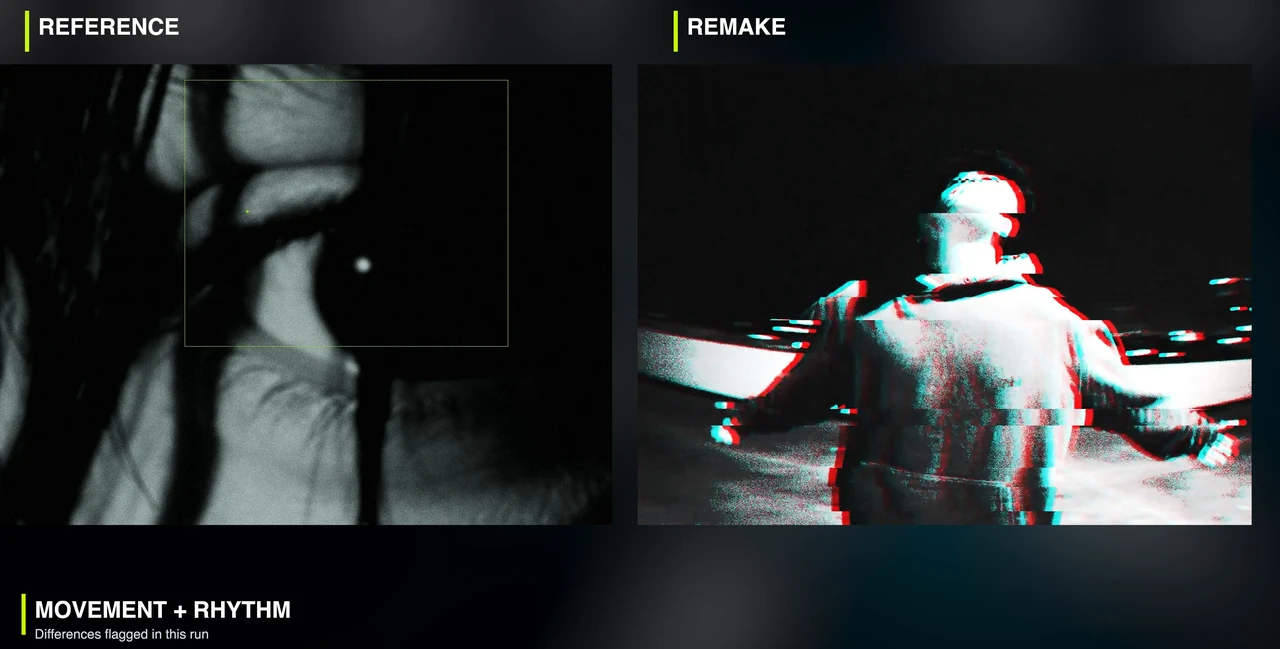
It helps to review one property at a time:
| Property | What to inspect | A reason to revise |
|---|---|---|
| Identity | Face, silhouette, distinctive clothing or product details | A recognizable feature disappears or changes between shots |
| Action | The subject’s actual movement | A requested walk is represented by a moving still image |
| Edit | Shot order, duration and cut placement | A cut arrives too early or a shot is missing |
| Framing | Subject size, position and visibility | A key product detail is outside the frame |
| Sound | Music, effects and synchronization | The new sound changes the intended treatment |
Aura Fast demonstrates reuse of earlier clips within the conversation. That can be a practical way to explore another version, but the source provides no measured credit saving. Review the new quote instead of assuming reuse is free.
Use the Lincoln example to separate identity from animation
The monochrome anime exercise starts with an Abraham Lincoln character sheet. The identity cues are concrete: a tall hat, beard and recognizable face. The generated close-ups retain those cues while changing the visual treatment.
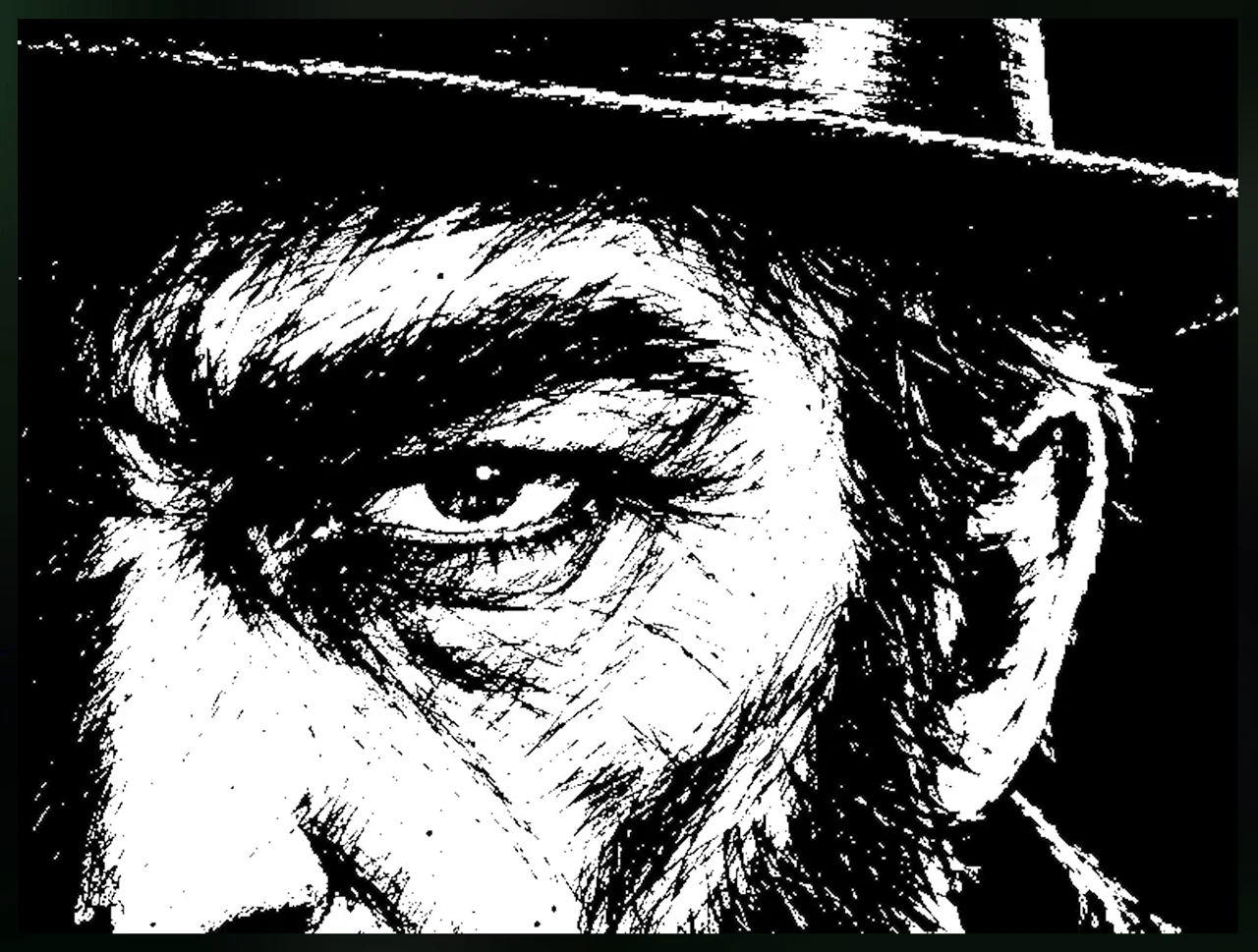
The finished intro uses still artwork with animated framing, shakes and flashes. It also has a new effects track instead of the reference song. That combination can work for a graphic character intro. It is a poor substitute if your brief requires the character to perform an action continuously through the shot.
Set that distinction before asking for revisions. If the intended output is a stylized title sequence, inspect the artwork, pacing and transitions. If it is character animation, ask which shots actually contain generated movement and watch those shots at normal speed. Calling both results an “anime intro” hides a decision that affects the whole job.
Claude reported 27.5 credits for ten images in this particular test. Treat that as the recorded job cost, not a current per-video rate. The number of assets, regeneration and follow-up work affect what you will spend. Current Higgsfield documentation says corrections consume additional credits; inspect the quote for each new request. Katana credit guidance.
Repair a fashion reel with a shot-specific request
The lookbook example uses three generated outfits: black tailoring, cream casual clothing and technical streetwear. Its first pop cutout fashion edit has weak movement in the walking and bench shots. Moving the still image around does not supply the requested action.
The repair is to identify the failing shots and describe the visible change you need. An adapted correction would be:
Preserve version one. In the walking shot, replace the moving still with generated leg movement that follows the reference action. In the bench shot, add the requested movement while keeping the approved character and outfit. Keep the reference timing. Return a comparison and identify any remaining framing differences.
This gives the agent a specific result to attempt and preserves a version you may want to keep. It also avoids turning “make it better” into permission to redesign every shot.
The revised example adds leg movement and feet lifting toward the camera. It still has different bench framing, and the tunnel shot continues to use a cutout. After repairing one action, check the rest of the sequence against the reference. Watch the full revision again, including shots you did not ask to change.
Generated outfits also have a narrower use than a real clothing demonstration. They can communicate a lookbook concept, but this exercise does not establish the cut, sizing, fit or behavior of a purchasable garment. If the intended audience needs those facts, the generated fashion sequence cannot supply them.
Check product labels before accepting a custom remake
For the product exercise, the reference is a 12-second film for Superbash Night Shift, a fictional drink. The replacement design is black and cyan. The request is to preserve cuts, camera moves and sound while changing the product treatment.
The result follows cuts and music, but the label needs correction. One shot and the ending use a still image. These failures matter because the product, rather than the surrounding style, is the subject of the ad.
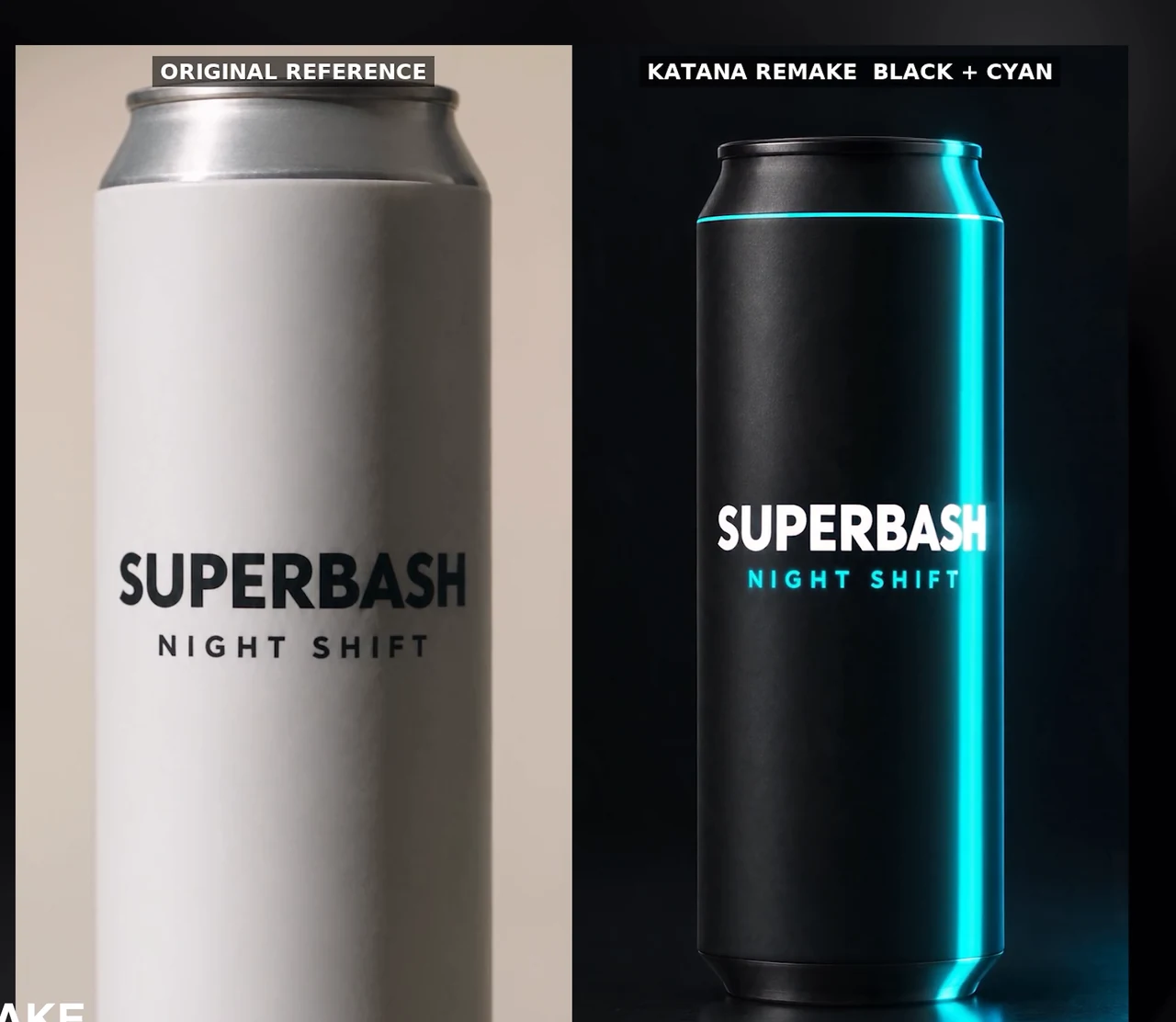
Use the approved product image as the reference for spelling, logo placement, proportions and package shape. Check every shot where the product is readable, including the ending. Then watch the movement separately. A correct still at the end cannot prove that the requested camera move was generated in the preceding shot.
The repair in this test leaves the ordinary Katana workflow: Claude assembles a result with custom code and skips some quality checks. Framing and camera movement still differ from the reference. Treat that output as an experiment requiring review, not evidence that the standard preset workflow handled the entire job unaided.
If your own correction takes a similar detour, ask what changed in the production method and which checks were omitted. Keep the working version, the revised version and the comparison. A workaround is useful only when you understand what it has fixed and what remains unresolved.
Troubleshoot the common failures before exporting
The tool cannot see an uploaded image. Confirm that the file reached the Higgsfield upload flow, rather than only appearing as a normal chat attachment. Resubmit through the documented upload route before spending credits on a new creative request.
The result has the right style but the wrong movement. Name the shot and requested action. Review whether the first version used a still image, generated motion or a cutout. Ask for the missing action and compare the revision at normal speed.
The character is recognizable but surrounding footage feels wrong. Revisit the preset. The retained watch and car shots in Dark Aura show why changing the main character may leave unrelated visual material in the sequence.
The product looks plausible but is not accurate. Stop at the incorrect label or shape. A closer match in lighting or color does not repair a misspelled brand or altered package. Require a fresh check of every product shot after correction.
The quote grows during revisions. Separate the indispensable corrections from optional variations before approving another generation. Neither the recorded 27.5-credit image job nor a reused clip establishes a universal price.
When the sequence passes those checks, download the final asset and watch that exported file. Verify that it is the chosen revision, that the ending is complete, and that the label or character details remain readable. Optional titles or a call to action can be added afterward. The brief Claude Motion example associated with this source was supplied by Higgsfield; it was not another independently demonstrated Katana repair.
For the wider project around this creative work, see a practical AI stack for a small online business.