Higgsfield Ads Studio Guide: How to Drive Traffic to your Website

A useful ad gives someone a reason to visit a particular page. Before generating images or changing a video, decide what that reason is and what the visitor should find after clicking. Otherwise, a large batch of polished creatives leaves you with the same unanswered question: which one deserves to run?
This guide uses DogDogHK, a Hong Kong dog directory, to build a practical Higgsfield workflow. You will prepare a brand kit, generate and assess static messages, then make a controlled variation of an existing video. The examples include a park-planning ad, a dog-feeding scene with changed bowls, and a clinic scene with a different carrier.
These are creative-production examples. The ads had not been launched when the source demonstration was recorded. Its roughly 1,200 Search Console clicks over 28 days came from existing search traffic, not from Higgsfield-generated ads. Keep production quality and campaign results separate throughout the exercise.
Choose the destination before the creative
Start with a page that can fulfill the ad’s promise. DogDogHK has several possible destinations: a park guide, a vet directory and food reviews. Each gives a different visitor a reason to act.
For a park guide, the person may want a weekend outing, need to check practical facilities, or simply want somewhere new to walk. Those are related interests, but they are different messages. Write one sentence connecting the audience’s immediate need to the destination before opening the generator.
For example, this is a planning exercise based on the demonstrated directory:
| Reader’s need | Message to explore | Destination to check |
|---|---|---|
| Find an outing for the weekend | A woodland walk with a dog | A relevant park or walk guide |
| Resolve uncertainty before leaving home | A park-planning checklist | The page containing the actual facilities and access information |
| Find somewhere unfamiliar | Discover another place to walk | A browseable list of appropriate locations |
| Learn about feeding options | A dinner story with a useful next step | Food reviews that answer the visitor’s question |
Do not use the generator’s copy as evidence that a park permits an activity or has a particular facility. The destination needs to support the claim. If the directory does not yet contain the necessary information, fix the page or change the message before producing more ads.
DogDogHK’s stated business model relies mainly on AdSense, so interested website visits matter. A shop has another question to answer: whether those visits become purchases. Neither objective is measured by the number of images a tool can generate.
Before you start: prepare the account and source materials
You need access to Higgsfield Ads Studio, credits for the generation quote, a brand website or information you can enter manually, and the pages or products you want to promote. For Ad Multiplier, also prepare an existing video you have permission to adapt. The static-ad workflow does not remove the need to create that source footage.
Current product details in this guide were checked on October 28, 2026. Higgsfield’s Ads Studio instructions describe URL-based or manual brand setup and product selection. Its Ad Multiplier guide specifies a 4–30-second input video, optional reference images, and 480p, 720p or 1080p output. Check the actual quote and available controls in your account before generating.
Keep a copy of the original footage and approved product images. When you change one object in a scene, they provide a clear reference for checking what should stay the same.
Import the brand, then correct the kit
Open Ads Studio and create the brand from the website URL. Let it collect the site’s context, then review the resulting kit before proceeding. If the site is not ready, enter the brand information manually.
The DogDogHK import produces colors, a description of the site, audience and tone. It also finds the site’s Instagram and Facebook links. Those fields help later requests use consistent context, but importing them does not establish that every inference is correct.
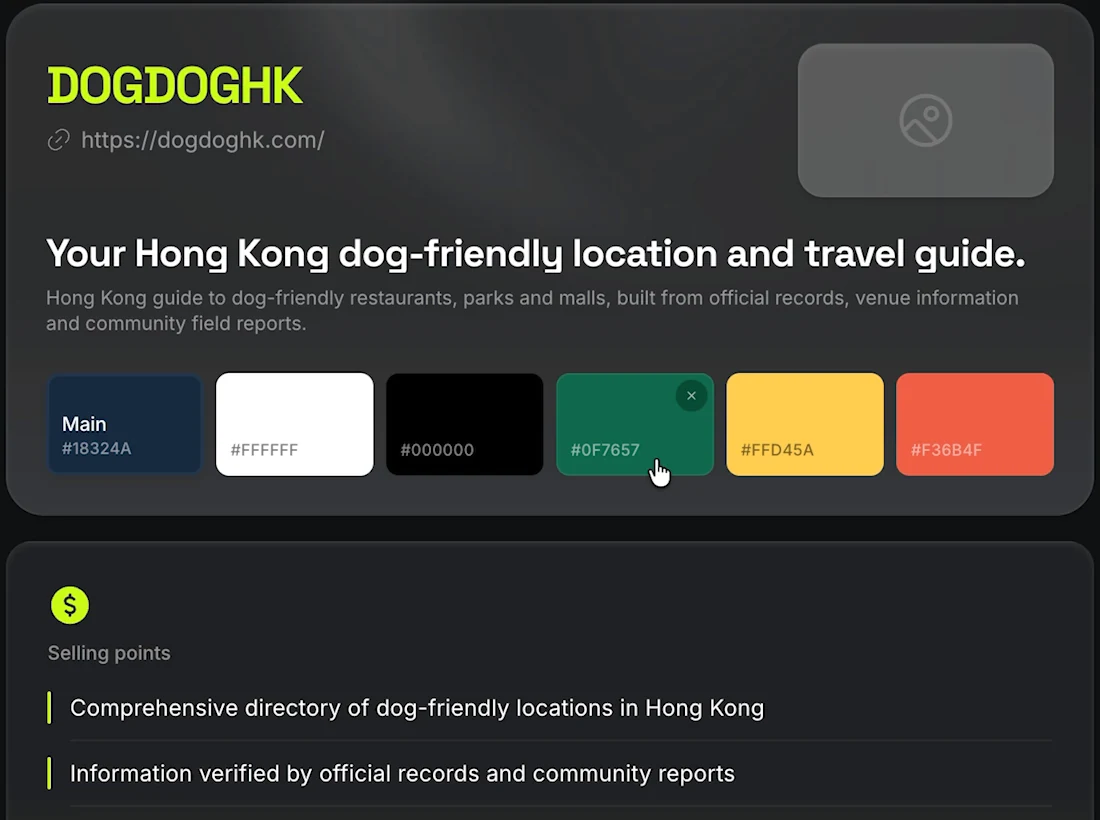
Review the kit in a practical order. First check the brand name and website destination. Then read the description and selling points: do they describe what the site actually provides? Check the audience and tone against the people you want to reach. Finally, inspect the visual fields and social links.
For DogDogHK, a statement about information being verified is more consequential than a slightly imperfect color. It can shape what the ad promises about the directory. Remove or narrow any statement that the site’s own content cannot support.
Save the corrected context before generating the batch. Otherwise you may spend credits producing several variations of the same mistaken assumption.
Select the pages and check the generation quote
Choose what you want to promote. The demonstration selects the park guide and vet directory. That gives the generator specific destinations instead of only a general brand description.
Set the batch size and read the generation button before committing. The recorded 20-ad job quotes 80 credits. It is a concrete cost for that selected batch, not a promise about every setting or future price.
The interface in the recording allows up to 100 ads in a run. Current documentation describes up to 20 ads per product, at four credits per static ad. These describe different scopes; do not treat the recorded batch limit as a current per-product allowance. Use the limits and quote shown for your selected products. Current static-ad limits and pricing.
For a first pass, choose enough alternatives to compare messages you can actually evaluate. Before requesting a larger batch, decide what would make an idea useful for this destination.
Compare the reason to click, then inspect the wording
The generated DogDogHK batch offers several directions. A woodland-path image suggests a weekend outing. A practical checklist addresses uncertainty about parks. Another concept invites people to discover somewhere new.
Sort those ideas by the problem they address before judging which is most attractive. This makes the next decision clearer. If your destination is a detailed park guide, a facilities question may fit better than a broad lifestyle promise. If you are introducing an unfamiliar directory, discovery may be worth testing.
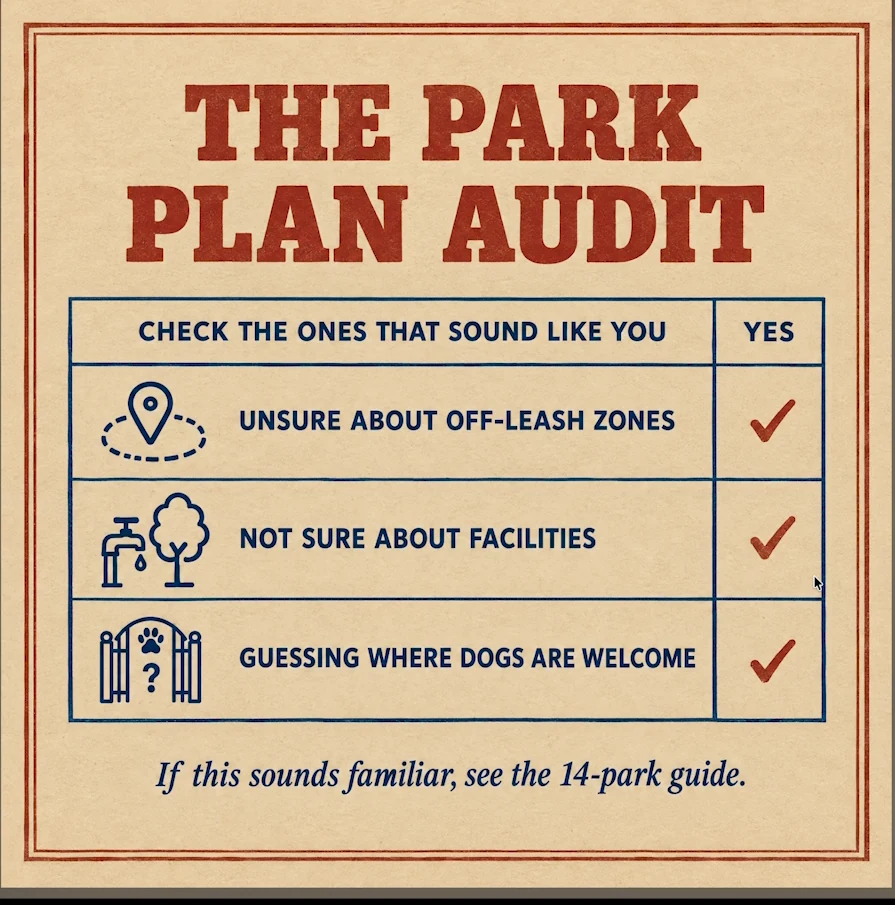
Review each candidate at the size people will see it. Is the main message readable? Can the viewer tell why to visit? Does the destination actually answer the question? Check small text, the brand name and any numbers as well as the headline.
A useful review note is specific: “The question about facilities matches the park guide, but this line implies every location allows dogs off leash.” That gives you a correction to make. “Make it more engaging” leaves the factual problem untouched.
The source test does not identify a winning ad or report a click-through rate. Select a few distinct, supportable messages for a measured trial; do not label a preferred design as the best-performing one before it has run.
Develop a video story before opening Ad Multiplier
The next exercise is a short dog-feeding story: dogs wait beside their bowls while the owner is occupied, then receive attention and dinner. The ending points toward food reviews. The scene supplies a reason to keep watching, while the destination supplies something useful afterward.
Ads Studio’s chat helps develop static concepts and a video plan. In this example, the source clips were generated separately in Higgsfield with planning work in Codex. The finished footage then became input to Ad Multiplier. A website URL did not directly produce every finished video in one operation.
Plan that work explicitly. Decide what the story needs to show, make or obtain the source clip, and check that the base version is usable before asking for variations. If the original has an unclear ending or an unreadable website address, changing the bowl color will not fix the message.
Crop and trim the source clip
Open Ad Multiplier and upload the existing video. Use its crop and trim controls to choose the framing and section you want to adapt, then confirm the selection.
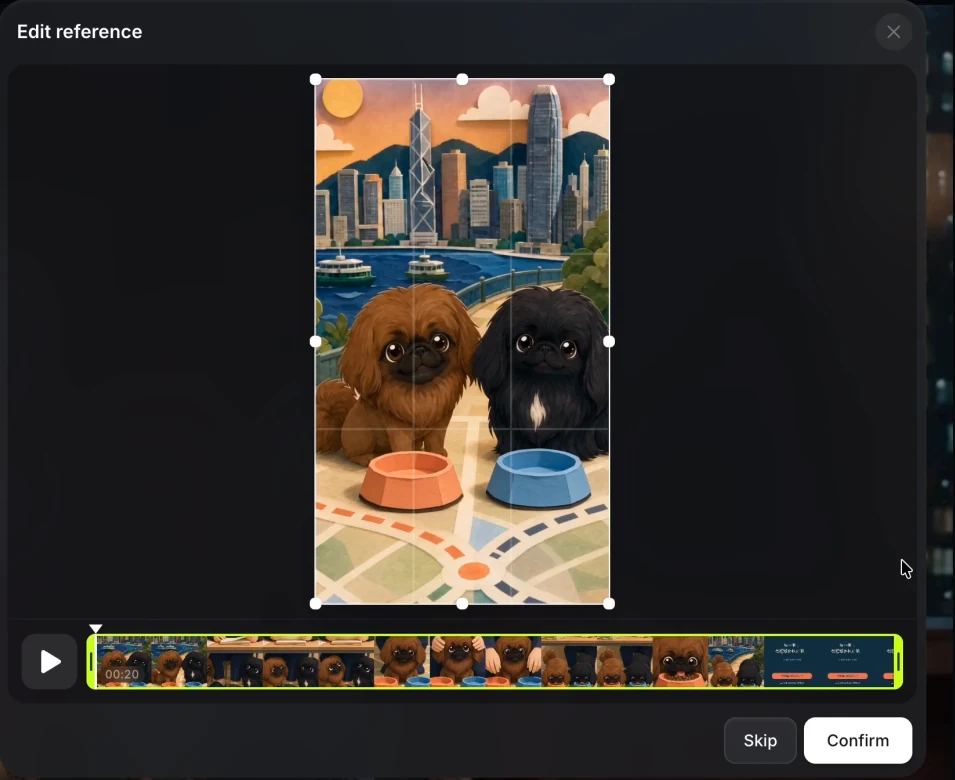
Choose the crop based on what must remain visible. In the feeding scene, the bowls are the objects being changed and the dogs establish the story. A crop that removes one bowl or cuts away the payoff makes the comparison less useful.
Optional reference images help describe a specific replacement. Current documentation allows up to 20 images, but the number alone does not improve a brief. Use images that clarify the object, character or product you want the tool to reproduce. Ad Multiplier input requirements.
Choose a general edit or a hook/CTA change
For an object change such as replacing bowls, use the general prompt. State what should change and what needs to stay recognizable. For this exercise, an adapted request could be:
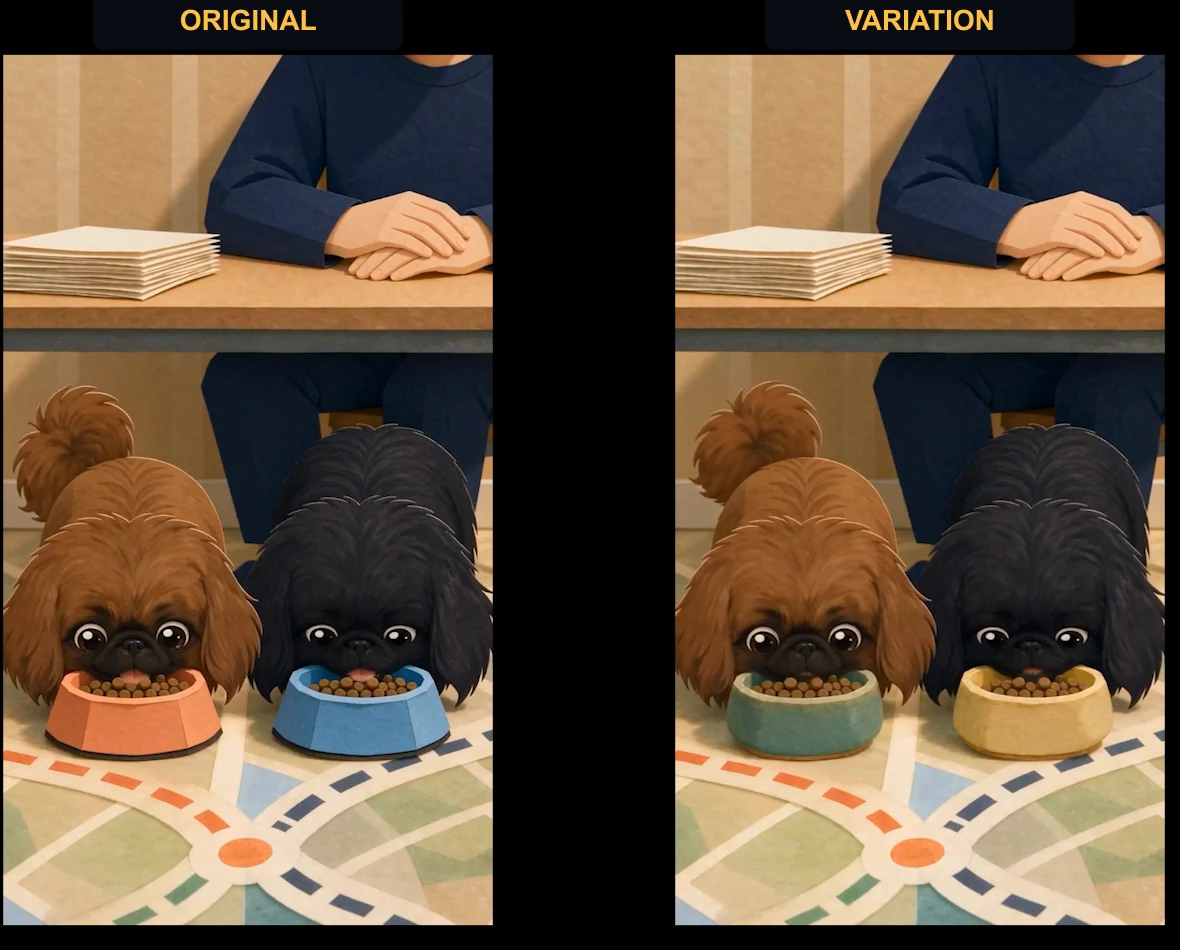
Change the coral and blue bowls to green and yellow ceramic bowls. Keep the two dogs, dinner scene and sequence recognizable. Preserve the purpose of the ending so viewers still understand why to visit the food reviews.
That is an example brief, not the exact original prompt or a guarantee that every other detail will be preserved. Compare the actual output against the original.
The dedicated Change hook control concerns the opening that gives someone a reason to continue watching. Change CTA concerns the call to action: what you want the viewer to do next. In the demonstrated interface, enabling either switches off general-prompt mode. Hook and CTA can be enabled together, and the text remains available when switching back between modes.
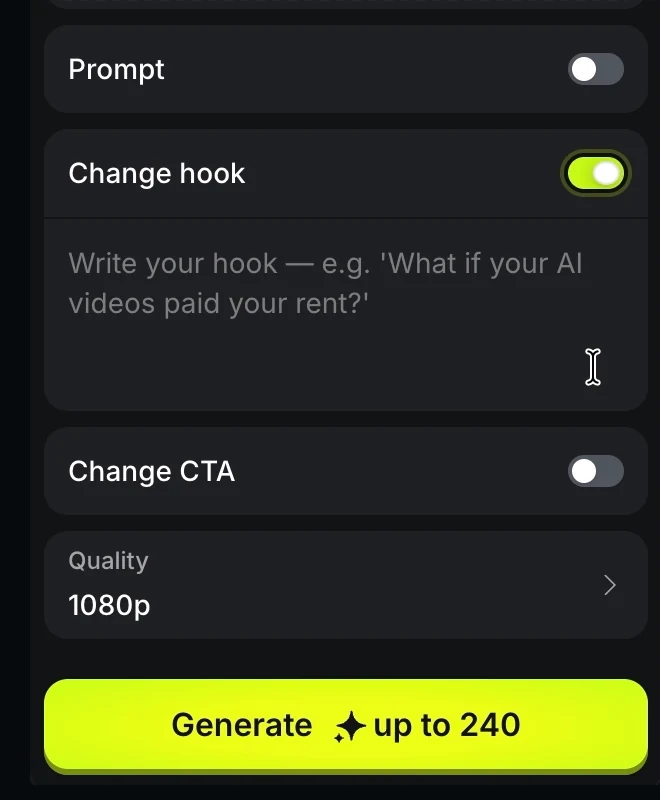
Choose the output resolution and inspect the credit quote. Video cost varies with the selected job; the displayed “up to 240” in this example is not a universal price for every variation. Confirm that the setting and intended change are correct before spending credits.
Compare the changed object and the unchanged story
The bowl variation changes coral and blue bowls to green and yellow ceramic bowls with different shapes. The dogs and dinner setup remain recognizable. The variation adapts an existing scene while retaining its premise.
The clinic example makes a similar change: a beige pet carrier becomes coral with a quilted appearance. The surrounding clinic scene remains recognizable. If you try this with a real product, compare the replacement against an approved reference rather than accepting a plausible-looking substitute.
Watch both versions all the way through. Check whether the change persists, whether the surrounding action remains coherent, and whether the final message is still readable. Look for unintended changes as well as the requested one.
Object variations can be useful production exercises, but a different bowl or carrier does not necessarily offer a different reason to click. If you want to test the message, a changed opening, clearer reason to visit or different graphic treatment may be a more relevant next experiment. Those were proposed follow-ups in the source, not completed performance tests.
Finish the asset and plan a fair trial
Download the selected version and review the exported file. Check the whole story, the website address and the ending. The demonstrated examples received finishing work; include that work in your plan instead of assuming every generated variation is ready to publish.
For the proposed Instagram workflow, the reel would direct interested viewers toward the website through the profile link. Make the destination match the creative. A dinner story should lead people to food information, and a park-planning ad should make the relevant guide easy to find.
Before launching a trial, record what you changed and what you intend to measure. For a directory, that may be visits to the advertised guide and what visitors do there. For a shop, you also need to distinguish visits from purchases. This is a proposed measurement plan, not a report of results from the DogDogHK test.
If you change the opening, object, ending and destination at once, an eventual difference in response is hard to interpret. Start with a change that answers a particular question, retain the original, and keep the campaign result alongside the creative version that produced it.
Troubleshoot the workflow
Every ad repeats a questionable claim. Return to the saved brand kit and selected page context. Correct the underlying description before requesting another batch.
The design looks good but has no clear reason to visit. Rewrite the audience need and destination sentence. Choose a message that the landing page can fulfill.
The video request changes the wrong part. Check which mode is active. In the recorded interface, general edits and the dedicated hook/CTA controls are separate modes, even though their text survives switching.
The replacement is recognizable but inaccurate. Supply a clearer approved reference and inspect shape, text and proportions in the output. Do not treat a rough substitute as evidence of a real product’s appearance.
The creative is finished but the campaign has no results. That is a measurement stage still to complete. Existing organic search clicks do not establish paid-ad performance, and a generated batch supplies no conversion evidence by itself.
For the site behind the campaign, build a niche directory with AI explains how to validate the information visitors need before expanding the directory.