Higgsfield AI Influencer Tutorial: From Character to Instagram in MINUTES

Start with one recognizable character and one short clip. You need to find out whether the face survives movement, whether the edit changes the intended subject, and how many credits an acceptable result consumes. An entire Instagram schedule can wait until those checks pass.
This guide uses Superbash’s AbraGoham Lincoln experiment: a Lincoln-inspired character made in Higgsfield, then placed into dance and basketball clips. The finished posts demonstrate a workable production method. They do not demonstrate a profitable account. Ron had begun seeing views after an initial period at zero, but had not reached his own target of 1,000 views on a Reel.
The steps combine that recorded workflow with Higgsfield’s documentation checked on October 28, 2026. Screenshots are cropped frames from the original recording. The suggested briefs and inspection checks below are additions for your own trial; no new generation was run for this guide.
Before you start: prepare the character and the first shot
You need access to Higgsfield’s AI Influencer and Genjutsu tools, a character idea, and a short reference video. Check access in your account before purchasing anything: Ron’s setup required at least the Plus plan, but that recording-era requirement is not a current subscription quote. The Generate button’s displayed cost is the useful number when you are about to spend credits.
For a first test, choose footage you made or have permission to adapt. A four-second recording with one clearly visible person is easier to inspect than a long clip with several overlapping people. Decide what the finished shot should preserve: the setting, the camera movement, the clothing, or only the performance. That decision determines which motion mode to use later.
Write a short character brief before generating. For example, a proposed comedy persona might have a tall black hat, a dark formal coat, a distinctive beard, and a serious expression that contrasts with an ordinary dance. Keep this brief beside your references. If one generation looks appealing but loses the defining features, it is a different character.
Ron chose Lincoln because the recognizable appearance could carry a running joke across otherwise unrelated clips. His earlier character attempts included some good images and many that did not fit the account. That is a useful distinction: an attractive output can still be unsuitable for the recurring identity you want. A viewer should recognize the persona again in the next post. Source: character choices and unsuccessful iterations, 0:56–2:11.
Build and approve the reference character
Open AI Influencer Studio. The current documentation calls its creation panel Influencer builder; the recording shows Create Influencer. You can upload a permitted face reference or build through the appearance controls. Current documented character strengths are Average, Bold, and Extreme. Work through the appearance settings, inspect the selected configuration, and generate after checking the quote. Results include a portrait and a full-body view in History. Official character-builder instructions.
Treat the two views as one reference. A face that looks right above the shoulders is not enough if the body, clothing, or proportions contradict the persona. Compare the face, silhouette, hair, facial hair, and outfit across the available alternatives. Save the approved image instead of rebuilding the identity from memory for every clip.
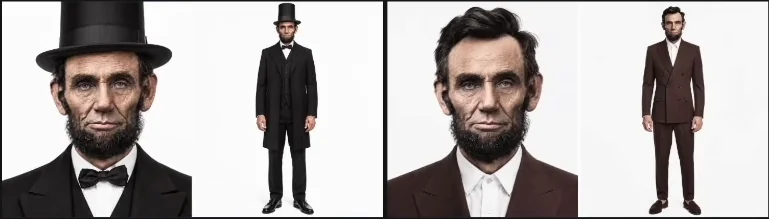
Ron recommends a batch of four because individual attempts can miss the intended look. The recorded interface charges 1.125 credits for one generation, or 4.5 for four, and shows 35 free generations left on that account. These are historical figures and an account balance, not a promise of free generations for a new account. Source: batch size and allowance, 2:11.
Use a batch when it helps answer a specific question: which version best preserves the face, or which proportions suit the planned full-body shot? Choose one and record why. If all four miss, change the relevant appearance setting or reference before spending on another batch. Without a selection rule, another batch can leave you with more candidates and no decision.
Do not mix incompatible variants into the next request. The black-hat Lincoln and the brown-suit variation are useful alternatives during selection; they are not automatically a consistent reference set. Pick the appearance you want to maintain.
Add the views that the movement will expose
A portrait and a front-facing body view leave the side and back unspecified. A dance turn can expose both. In the demonstrated workflow, the approved character image goes into Higgsfield’s Image tool with a request for a turnaround reference sheet. The resulting sheet shows the character from multiple directions. Source: turnaround reference, 2:43.
A suggested request is:
Create a turnaround reference sheet of this same character. Show the front, both side profiles, and the back, with matching close-up and full-body views. Preserve the face, beard, hat, coat, proportions, and colors. Use a plain background.
This is an example prompt, not the exact text recovered from Ron’s session. The expected result is a set of consistent reference images. It is not a rigged 3D model, and the word “360” does not guarantee that every angle has been reconstructed correctly.
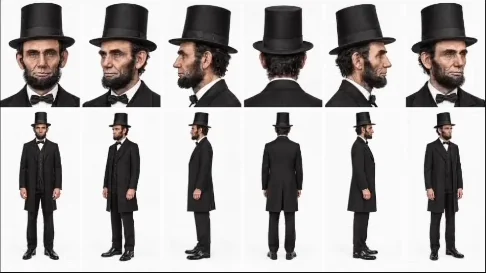
Inspect the sheet before using it. Does the hat keep the same shape? Does the coat change length on the back view? Does a side profile acquire a different nose or beard? A contradiction in the sheet gives the video model competing instructions. Correct it or omit that view rather than treating every generated angle as authoritative.
Only add views relevant to the shot. A stationary close-up may not need a full turnaround. A player turning toward a basketball hoop benefits from a usable back reference. This keeps preparation connected to the movement you actually need.
Choose Objects swap or Motion transfer
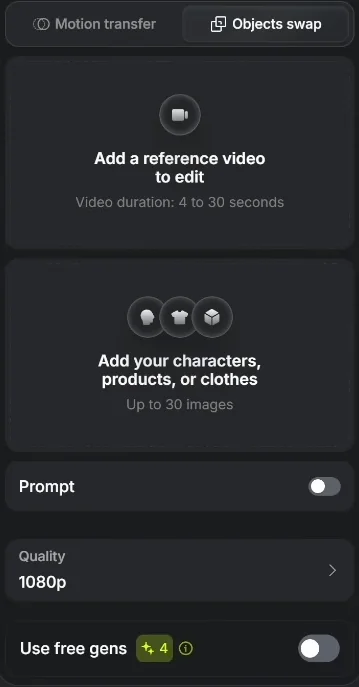
The image establishes identity; the reference clip supplies movement and framing. For replacing a performer while keeping the existing shot, choose Objects swap. That is the mode used for most of the Lincoln posts.
The recording describes Motion transfer as changing the world around a person and Objects swap as changing the person while preserving the world. Current documentation gives a more precise distinction: Motion transfer can rebuild the scene, including characters and location, around the reference movement; Objects swap targets a selected person, object, outfit, or text. Use the latter when the surrounding shot should stay intact. Official mode definitions.
Ron collected reference clips while browsing Instagram and YouTube, then gave their links to Astra for a yt-dlp download workflow before uploading the files to Higgsfield. That explains the demonstrated input path; it does not establish reuse permission for every bookmarked clip. For your first attempt, a local original recording avoids making the experiment depend on downloading someone else’s post. Source: reference-video workflow, 3:08.
Generate a short motion test
Open Motion in the character studio, or use the currently documented route Video → Create Video → Higgsfield Genjutsu. Select Objects swap, add the reference clip, and add the approved character image. Genjutsu accepts a 4–30-second reference and up to 30 images; one image can be sufficient for a simple swap. The image picker can use saved AI Influencer characters. Set Quality, inspect the quote, and generate. Enable the optional Prompt control when the intended change needs explanation. Official Genjutsu workflow.
For an original dance test, a proposed prompt is:
Replace the main dancer with the character in the reference image. Keep the dancer’s movement, camera framing, room, and other people. Preserve the character’s hat, beard, and dark coat throughout the shot.
The prompt states what should change and what you will later inspect. It does not guarantee preservation. Begin with a short segment containing a turn or an arm crossing the body so that the test exposes a difficult part of the movement.
Watch the entire result at normal speed, then pause where the body turns, hands overlap, or another person passes in front. Check that the face belongs to the chosen character, the limbs follow plausible movement, and the background has not changed unexpectedly. If the first and last frames are convincing but the middle loses the identity, the clip still needs work.
Save the source clip, approved reference, prompt, selected mode, duration, quality, and result together. That makes the next revision a change to one known input instead of an attempt to recreate the previous run.
Inspect the dance and basketball examples differently
The Lincoln dance demonstrates more than a face replacement. Ron says he also changed the vehicle into a carriage to fit the persona. That is a second requested transformation, so it should have its own check: the carriage should remain coherent while the dancer moves across it. Source: finished dance and vehicle change, 4:20.
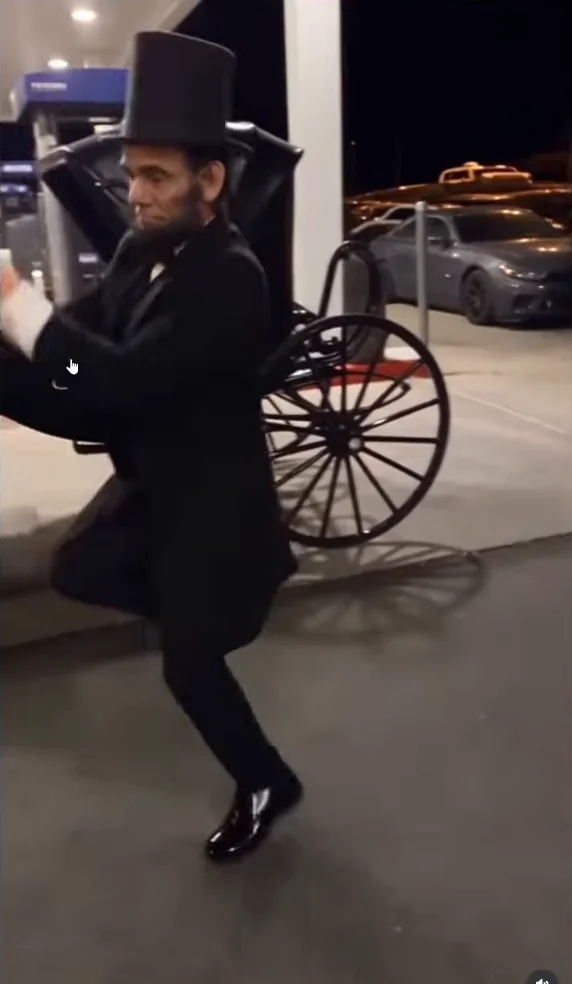
If your own first swap fails, return to a version that changes only the performer. Once that works, add the vehicle or prop change. This is a suggested way to isolate a problem; the source does not establish how many attempts Ron needed or the exact prompt that produced his carriage.
The basketball example is a different inspection problem. The character turns away, the body moves quickly, and another player overlaps the subject. A good frontal portrait cannot tell you whether the model will keep the identity through that sequence.
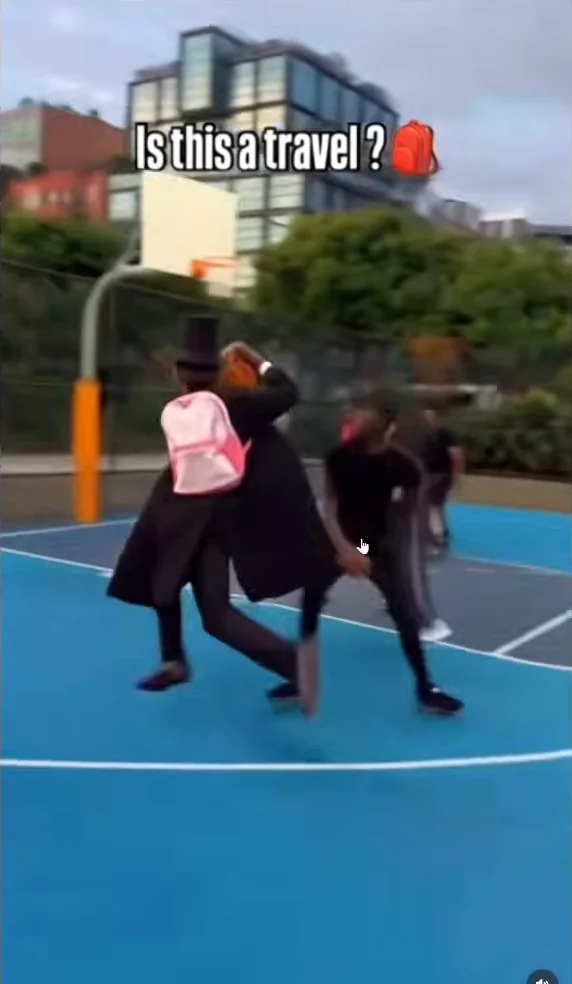
Ron was pleased that Lincoln remained recognizable through the action and arm movement. The selected outputs support that observation, but they do not give a success rate over all attempts. For your own result, check the moving sequence as well as the stills: momentary face changes, a sliding hat, or a hand merging with the ball may be easier to notice in playback. Source: basketball and motion examples, 4:38–5:08.
Budget for attempts, duration, and quality
The initial character can be inexpensive while a series of videos consumes the balance quickly. Ron reports identical Motion transfer and Objects swap rates during the recording: three credits per billed second at 480p, seven at 720p, and a discounted eleven at 1080p. Source: recorded rates, 5:41.
| Recorded quality | Credits per billed second | Four-second attempt | Thirty-second attempt |
|---|---|---|---|
| 480p | 3 | 12 | 90 |
| 720p | 7 | 28 | 210 |
| 1080p, promotional rate | 11 | 44 | 330 |
These are calculations from the recording’s rates, not current quotes. They exclude extra attempts and any separate image work. For example, four attempts at a four-second 480p clip would total 48 credits at those rates. Three attempts at thirty seconds and 1080p would total 990. Those are planning examples, not Ron’s measured spending.
Ron stayed with 480p despite the 1080p discount because he wanted enough credits for a continuing account experiment and liked the results at the lower setting. Use your own viewing check to make that decision: inspect the clip at its intended display size and decide whether the extra resolution fixes a visible problem. A discount alone does not establish that the more expensive version is useful.
Before each generation, use the current quote. Afterwards, review Manage Account → Usage for the charge and any return. Higgsfield’s credit documentation says free generations apply on its website; automated routes such as MCP and CLI consume credits. The free allowance visible in Ron’s browser should therefore not be assumed to carry over to an automated production workflow. Official credit accounting.
For a trial, record credits spent per accepted clip, including rejected creative attempts. That gives you a more useful production estimate than the cost of the single successful generation you choose to show.
Troubleshoot rejected or stuck generations
Ron encountered Protected content detected, particularly with short extracts from music videos and films. Some dance, meme, and basketball references worked for him. Those observations describe his sample; they do not mean every reference in those categories will be accepted. Source: rejection examples, 6:48.
When a reference is rejected, read the stated reason and choose a suitable original or permitted replacement. Giving the original creator credit is good attribution, but an attribution line alone does not establish permission to adapt the footage. Acceptance by the generator does not settle that question either.
A content rejection is different from a queued job. Higgsfield’s troubleshooting guide says a queued generation can be canceled from its tile; a processing or generating job may already be running and cannot necessarily be canceled. Failed generations usually return credits, and Usage is where to verify the return. If the job stays stuck or the return is missing, preserve the error, model, and generation details for support. Official generation troubleshooting.
For visual failures, change the input that relates to the defect. If a side view loses the character, inspect the side reference. If the background changes, check the selected mode and requested edit. If a busy shot makes the subject ambiguous, try a simpler short section. These are diagnostic suggestions, not guarantees that another paid attempt will succeed.
Ron proposes recording his own dance and swapping in the character, or making a new generated source clip. The self-recorded route was a proposed follow-up, not a completed comparison in this recording. You can use it as a first exercise, but should not treat it as a source-tested improvement. Source: original-footage alternatives, 7:33.
Run an audience experiment after the production check
Once you have a clip that passes inspection, choose what you want the next post to test. Keep the character consistent while changing one creative element, such as the activity or opening moment. Record the posting date, clip, production cost, and audience response at a consistent interval. This is a suggested experiment log, not a demonstrated growth formula.
Ron describes the account as a way to turn ideas he already bookmarked while scrolling into something he could make. He found the production process fast and enjoyable. His early standard was modest: 1,000 views or ten likes on a Reel would make him happy. Views had started moving from zero but remained below the view target when recorded. No monetization result was shown. Source: early account response, 3:57.
Use the first posts to learn whether the recurring character and format attract the response you want before committing to longer or more expensive generations. Keep the approved reference and production notes so that the next useful idea can reuse the work already done. For editing the Lincoln character into a longer sequence, continue with the Katana guide.