Hermes Agent · Tutorial 02
Install Hermes Agent on Mac or VPS
Install Hermes Agent on macOS, Linux, WSL2, Windows, or a VPS, connect one model provider, and verify it with `hermes doctor`.

0 of 8 complete
Essentials · Step 2 of 8 · View the route
Last tested and updated: August 2026
The quickest Hermes Agent installation uses the official desktop installer on macOS or Windows. For a command-line installation on macOS, Linux, WSL2, Android Termux, or a VPS, run the official shell installer and then configure one model provider.
Before you install
Before installing, decide where Hermes should run and how it will access a model. A local installation is easier to inspect. A VPS stays online when your computer is closed, but you are responsible for server updates, account security, logs, and recovery.
For the command-line installer, check that Git is available:
git --versionOn Debian or Ubuntu, install the additional prerequisites before running the installer:
sudo apt update
sudo apt install -y git curl xz-utils
The official installer handles Python, Node.js, ripgrep, ffmpeg, the virtual environment, and the global hermes command. You do not need to install those pieces manually.
You also need either a supported model-provider account or a compatible subscription route. Hermes is the harness, not the model. Store API keys in a password manager and never paste them into a repository, screenshot, or shared shell script.
If Kimi or MiniMax fits your workload, compare the options below. These disclosed partner links record the Superbash Learn source and may support the site at no extra cost. Confirm current plan access and pricing first.


Suggested for this guide
Kimi
A practical starting point when you want a lower-cost provider for the Hermes setup in this lesson.
Best for: Claude Code setups and cost-aware model work
Check Kimi plansPartner link. It supports Superbash Learn at no extra cost to you.
Suggested for this guide
MiniMax
A strong option when your work needs a cost-conscious execution model with plenty of context.
Best for: Long-context work and cost-efficient execution
Check MiniMax plansPartner link. It supports Superbash Learn at no extra cost to you.Two paths: Mac vs VPS
Pick a local installation for learning. Pick a VPS when scheduled jobs or messaging gateways must stay available after your laptop closes.
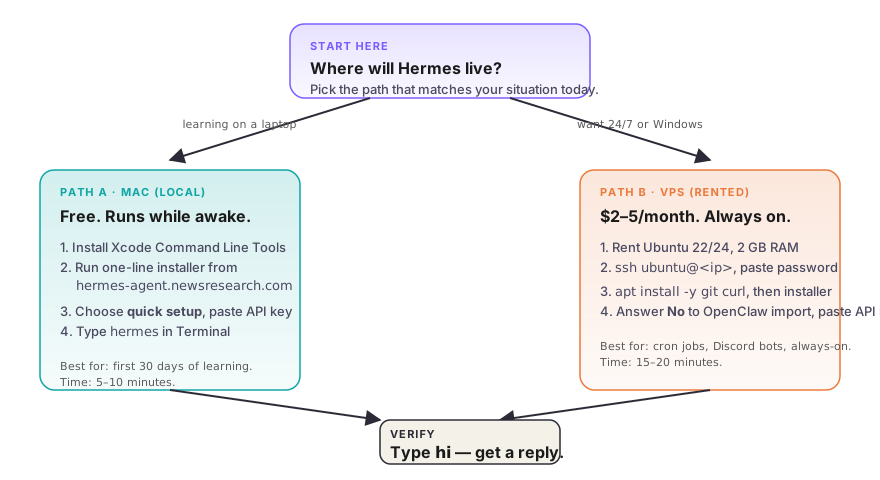
Mac (local). Hermes runs on your laptop. This is the easiest setup to inspect and remove. Scheduled work stops when the machine sleeps or disconnects.
VPS (rented Linux server). Hermes runs on an always-on Linux machine. The real monthly cost includes the server, model usage, backups, and any paid tools. See our Hostinger Hermes plan guide for the current plan choice, deployment path, and renewal-price checklist. You still need to manage SSH access and basic server security.
| Situation | Path |
|---|---|
| Learning or testing an interactive workflow | Mac |
| Want 7am cron while you sleep | VPS |
| Want the official desktop app on Windows | Native Windows installer |
| Plan to wire Telegram or Discord bots | VPS |
The Mac path
For the recommended desktop route, download the current macOS installer from the official Hermes Agent site. It installs both the desktop application and CLI.
For a CLI-only installation, open Terminal and run:
curl -fsSL https://hermes-agent.nousresearch.com/install.sh | bash
source ~/.zshrc
hermes
If hermes is still not found, start a new terminal or confirm that ~/.local/bin is on your PATH. Configure one model first. Leave Telegram, Discord, and other gateways for L05 after the basic chat works.
The VPS path
The VPS path uses SSH (Secure Shell, an encrypted terminal into a remote computer) and the same installer as the Mac path.
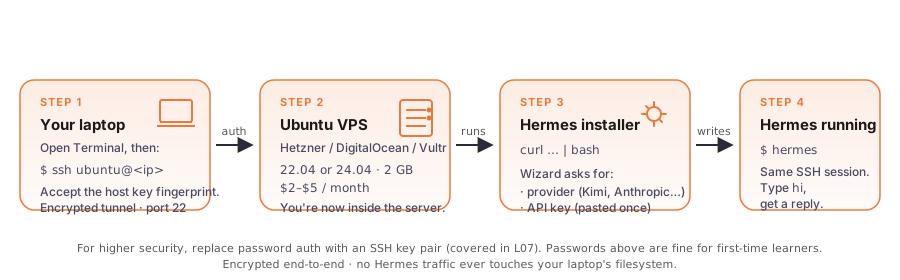
- Rent a server. Choose a current Ubuntu or Debian image with enough memory for Hermes and the tools you plan to run.
- SSH in.
ssh ubuntu@<your-server-ip>. Typeyesto trust the host fingerprint. Paste the password. The cursor does not move while you type; that is normal. - Install prerequisites. Run
sudo apt update && sudo apt install -y git curl xz-utils. - Run the official installer. Use the same
https://hermes-agent.nousresearch.com/install.shcommand shown above. - Configure one model and test locally. Do not expose a dashboard or messaging gateway to the public internet during the first setup.
Configure a model provider
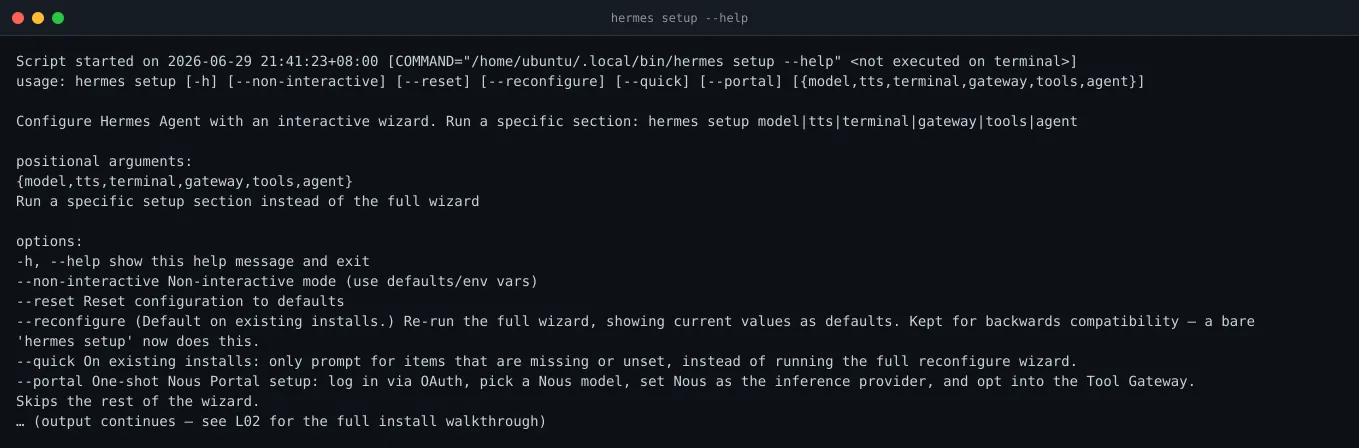
Run the full setup wizard if you want Hermes to walk through the choices:
hermes setupThe current official documentation also offers hermes setup --portal as the shortest route for users choosing Nous Portal. If you already have another supported provider, use hermes model to configure it directly.
Start with one provider and one model. Confirm the provider’s current price, context limit, regional availability, and spending controls before adding the key. Model catalogs change too quickly for a static list to be a safe purchasing guide.
Set a small account-level budget or alert during testing. A scheduled loop can repeat an expensive mistake while nobody is watching.
Verify it works
Run these four commands. Each should return without error.
hermes version         # records the installed version
hermes doctor          # checks the environment and dependencies
hermes status          # shows component and configuration status
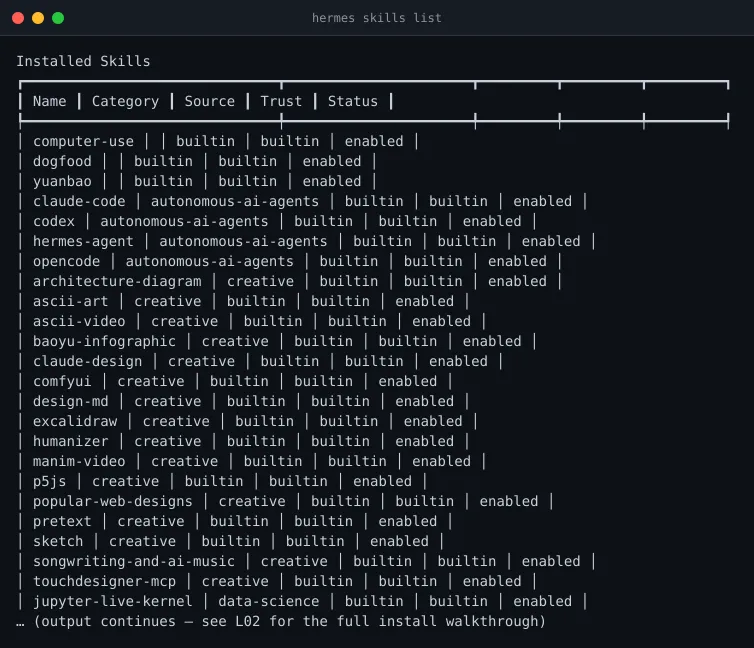
hermes skills list     # enumerates available skills
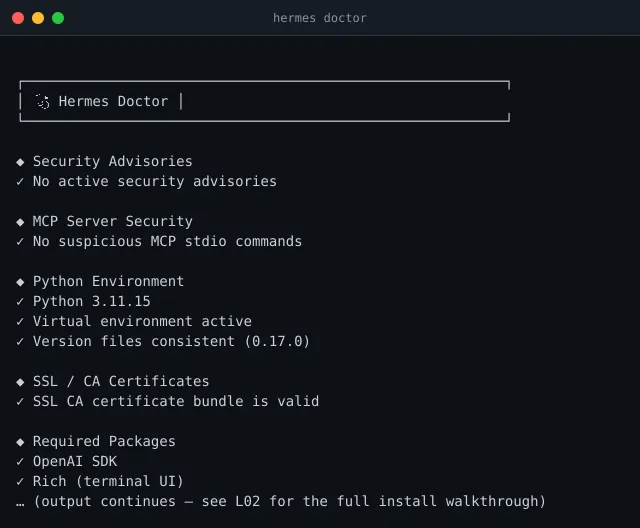
A healthy doctor looks like this.
hermes setup --help lists setup options you can run again. Current Hermes versions also expose focused commands such as hermes model, hermes tools, and hermes gateway setup.
hermes skills list shows what Hermes can invoke.
The final smoke test: launch chat, type hi. If Hermes responds, the install is complete.
hermes
> hi
< Hello! How can I help today?
A one-liner that proves the same thing without interactive chat:
hermes doctor >/dev/null 2>&1 && echo "hermes install verified" || echo "hermes install FAILED"If you see an error, read the specific hermes doctor result before reinstalling. A missing command usually points to shell PATH; an authentication error points to provider configuration; missing Linux packages should name the dependency to install.
Watch the full install
Hermes Agent installation questions
What operating systems can install Hermes Agent?
The official installer supports Linux, macOS, WSL2, native Windows, and Android through Termux. The desktop installer is the recommended route on macOS and Windows. Some features remain platform-specific, so check the official platform matrix before choosing a production host.
Do I need Python or Node.js before installing Hermes?
No. The standard installer manages Python, Node.js, ripgrep, ffmpeg, and the Hermes virtual environment. On Linux, make sure Git, curl, and xz-utils are available first.
Should I install Hermes Agent on a Mac or VPS?
Use a Mac for learning, local files, and workflows you supervise directly. Use a VPS for scheduled jobs or messaging gateways that must stay online. A VPS adds maintenance and security work, so prove the workflow locally before making it persistent.
How do I fix hermes: command not found?
Reload the shell with source ~/.zshrc or source ~/.bashrc, then check whether ~/.local/bin is on your PATH. The per-user installer normally places the launcher at ~/.local/bin/hermes.
How do I update an existing Hermes installation?
Run hermes update. Hermes detects supported installation layouts and reports the matching update path. Record the current version and back up important configuration before updating a production gateway.
What’s next
Choose a daily interface in L03: Hermes TUI vs Desktop App, then secure the installation with L07: How to Secure Your Hermes Agent. VPS users should not postpone that security work. When the setup is stable, L08: Automation: cron, kanban, sub-agents shows how to schedule the workflow introduced in L01.
Check your understanding
Q1.The first thing a Mac user should run before the Hermes installer is:
Q2.When the VPS installer asks 'Import from OpenClaw?', a first-time VPS user should answer:
Q3.Short answer: What is the single most important day-one habit in your model provider's dashboard?
Q4.Which model should a beginner pick if cost matters most?
Q5.You're on a Windows PC. Which install path should you pick?
Q6.Which three commands prove Hermes is installed and healthy?

Suggested for this guide
Hostinger VPS
When you are ready to keep an agent running after this tutorial, compare a VPS with enough memory for its workload, logs, updates, and recovery plan.
Best for: Always-on agents, cron jobs, and remote access
View Hostinger plansPartner link. It supports Superbash Learn at no extra cost to you.