Hermes Agent · Tutorial 05
Connect Hermes to Linear, GitHub, and Notion with MCP
Connect Hermes to outside apps through MCP, decide between catalog and custom servers, and install Linear without breaking your setup.
0 of 1 complete
Reference guide · Read when needed · View the route
Last tested and updated: June 2026
MCP stands for Model Context Protocol, a standard that lets Hermes call an outside app. A catalog installation takes four commands.
Start with L02: Install and First Run. For the harness concept first, see L01: What Is Hermes Agent.
How Hermes reaches another app
A 2023 chatbot could not read your Linear backlog. Today Hermes can. An MCP server is a small program that speaks one app’s API. MCP is the Model Context Protocol standard those servers follow.
The safer setup changed in May 2026. Before the catalog, you had to find a community MCP, copy JSON into the configuration, and manage its API key by hand. The Hermes team now ships a built-in catalog of pre-reviewed MCPs. As of June 2026, it includes Linear, n8n, and Unreal Engine.
Catalog or custom server
Two ways exist to give Hermes a new tool. Pick the right one for the situation.
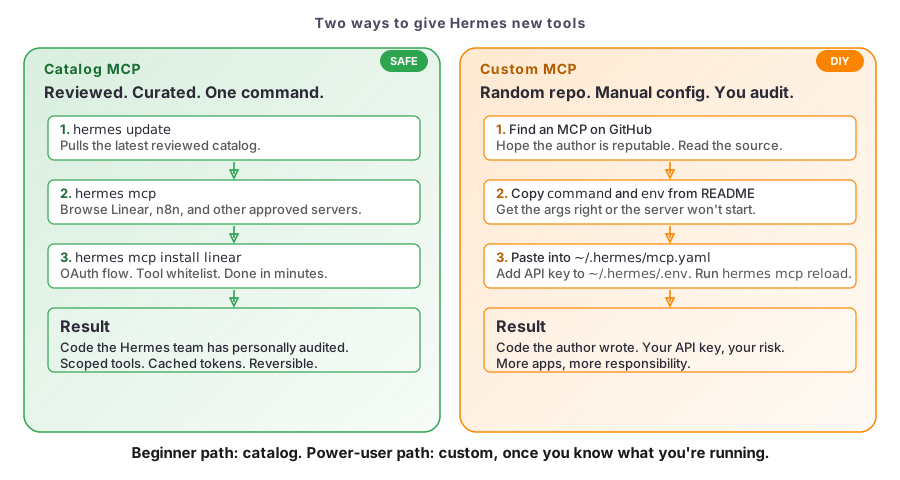
Catalog MCP is the safe path. The catalog lists MCPs the Hermes team has reviewed and shipped. As of June 2026 the catalog ships Linear, n8n, and Unreal Engine. Run hermes mcp catalog to see today’s list.
Custom MCP is the flexible path. The app you need isn’t in the catalog. You find a community MCP on GitHub, read the source, copy command and env into mcp.yaml, add your own API key. Higher ceiling, lower floor. The catalog exists because new users get burned in this gap.
The four commands
The whole catalog workflow is four commands. Every other piece of MCP knowledge hangs off these.
| Command | What it does |
|---|---|
hermes update | Pulls the latest Hermes release, including the latest catalog manifests. Run this first. |
hermes mcp | Opens the interactive catalog picker. Lists every approved MCP server with a short description. |
hermes mcp install <name> | Installs a specific MCP from the catalog. Prompts for credentials and shows the tool whitelist. |
hermes mcp configure <name> | Re-opens the tool whitelist for an installed MCP. Use this to tighten permissions later. |
You can see them on screen by running hermes mcp --help. The subcommand list tells you which verbs the catalog actually exposes:
usage: hermes mcp [-h] [--accept-hooks]
       {serve,add,remove,rm,list,ls,test,configure,config,login,reauth,
        picker,catalog,install} ...

Manage MCP server connections and run Hermes as an MCP server.
MCP servers provide additional tools via the Model Context Protocol.
Use 'hermes mcp add' to connect to a new server, or 'hermes mcp serve'
to expose Hermes conversations over MCP.
picker and install are the two you’ll touch. configure is the one you’ll come back to. The rest are there when you need them.
Choose the first integration
Pick the app that already holds work you’d do this week. Here are the realistic first picks in order of clean install and immediate payoff.
Linear: the cleanest first install. It uses OAuth (Open Authorization, a browser-based token grant with no copy-paste). The catalog install gets you find_issues, create_issue, and a few read/write tools in about three minutes.
n8n: pick this if you already run n8n workflows and want Hermes to inspect, trigger, or edit them. Uses an API key instead of OAuth.
GitHub, Notion, Discord, Telegram: not in the catalog as of June 2026. The community has MCPs for all of them. Quality varies. Do not install these as your first MCP.
| App | Path | Effort | When to pick it |
|---|---|---|---|
| Linear | Catalog | 3 min | First install, OAuth, immediate payoff |
| n8n | Catalog | 5 min | You already run n8n workflows |
| GitHub / Notion / Discord / Telegram | Custom | 15 to 30 min | Read source first; community MCPs vary |
The rule: catalog first, custom second, write-your-own last.
What an MCP actually is (the short version)
An MCP is a small server program that speaks one app’s API (Application Programming Interface: the contract an app exposes to outside code). Each MCP exposes a list of tools: discrete functions like find_issues or create_issue. One MCP per app. The agent routes calls by name.
Install one catalog MCP
Install Linear from the catalog
Linear is the cleanest first install because it uses OAuth. No API key, no .env editing.
1. Update. Run hermes update to pull the latest catalog manifest.
2. Browse. Run hermes mcp. You should see linear, n8n, and unreal-engine listed.
3. Install. Run hermes mcp install linear. Hermes will:
- Show you a link to authenticate with Linear.
- Wait while you click the link, log in, and grant access.
- Return you to a tool whitelist screen.
4. Whitelist. By default, read-only and safe-write tools are checked. Destructive tools are unchecked. Read the list. If you wouldn’t give a new intern the delete_workspace permission, don’t give it to an MCP. Hit enter to save.
5. Use it. From the Hermes chat:
“Find all issues assigned to me in Linear this week and summarise them in three bullets.”
The agent routes the call to the Linear MCP and returns real results from your workspace. If the call fails, run hermes mcp configure linear to re-authenticate.
6. Tighten later. When you come back to this MCP next week and want to revoke a permission, run hermes mcp configure linear. Re-review the whitelist on every MCP you have installed.
Where the credentials live
Your Linear OAuth token is cached at ~/.hermes/mcp-tokens/linear.json. API-key MCPs (like n8n) write to ~/.hermes/.env. Both are plaintext. Don’t commit them. Don’t paste them into chats. L07 covers the full threat model.
Watch Ron walk through it
What’s next
- The community MCP ecosystem has GitHub, Notion, Discord, Telegram: read L07: Security Essentials before installing any of them.
- Continue to L06: Performance, Model Routing, and Cost.
- L08: Automation: Cron, Kanban, Sub-Agents walks through a 7am Linear digest.