Hermes Agent · Tutorial 08
Automate Hermes with Cron, Kanban, and Subagents
Automate Hermes with daily cron jobs, multi-agent Kanban boards, and sub-agents, then troubleshoot the failures that derail each pattern.

0 of 1 complete
Reference guide · Read when needed · View the route
Last tested and updated: June 2026
Cron is how Hermes runs while you’re not at the keyboard. Once a routine runs without you, the agent stops being a tool you use and becomes a worker you hire.
Prereqs: L02 install, L04 Skill Bundles, L05 MCP catalog (Model Context Protocol), L07 security for 24/7 VPS runs.
Who this is for
You have used the Hermes TUI for at least a week and want the agent to run tasks without you at the keyboard. This lesson assumes muscle memory: you can run a slash command, you know what a Skill Bundle is, and you’ve built one in L04.
Not for: anyone who hasn’t installed Hermes (L02) or built a Skill Bundle (L04). Those come first.
What you’ll be able to do
By the end of this lesson you can configure one reliable daily cron job, pick the right Hermes automation pattern for a new task, and avoid the three silent-failure modes that catch first-time automation users.
Learning objectives
- Configure a daily cron job inside Hermes that runs reliably while your laptop is closed.
- Compare the cron, Kanban, and sub-agent patterns and pick the right one for a given task.
- Debug the silent-failure traps (no log file, fresh-session Skills, race conditions) that hide a broken job for days.
A workflow that runs at 7am
Pick a task you do every weekday. “Open five tabs, scan the AI news, write a summary, paste it into the team Discord at 7am.” The whole point of running Hermes is that it does this without you.
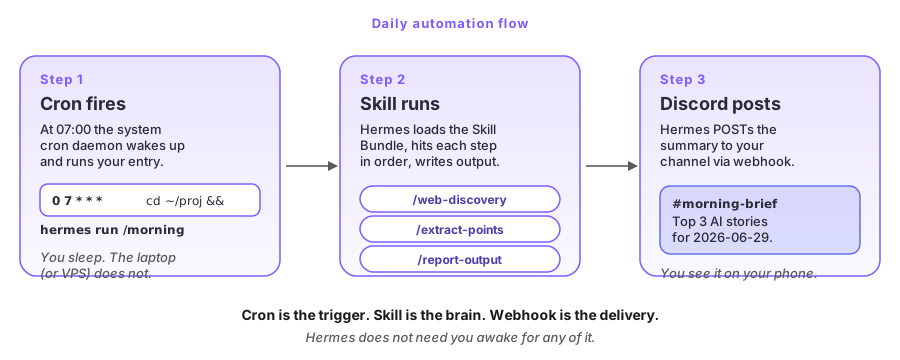
Figure 1: The three pieces: a cron trigger (left), a Skill Bundle brain (middle), and a Discord webhook delivery (right). No glue code.
The workflow combines a cron trigger, a Skill Bundle from L04, and a Discord webhook from L05. These three existing pieces connect without glue code. The rest of the lesson explains how to wire them and what can make that wiring fail.
Cron, Kanban, or sub-agent
Hermes has three automation patterns. They all let the agent work without you, but they answer different questions.
Pattern 1: Cron jobs. A scheduled trigger. “Run this command at 7am every day.” Best for: simple, repeatable, single-task automation. A daily research summary. An hourly price check. A weekly newsletter draft. The job is small and well-defined. Its value is that it runs even when your laptop is closed.
Pattern 2: Kanban boards. A multi-agent project board. Each task has an assignee profile: a separate Hermes instance with its own config, API keys, and specialisation. Multiple named workers collaborate. You watch progress on a live dashboard. Best for: multi-step workflows with defined roles. “Research → draft → review → publish.”
Pattern 3: Sub-agents. A worker spawned by your main agent within the same session. It has no persistent state, no specialisation, and no separate config: just quick parallel work. Best for: “search three sources at once and combine the result” inside one workflow.
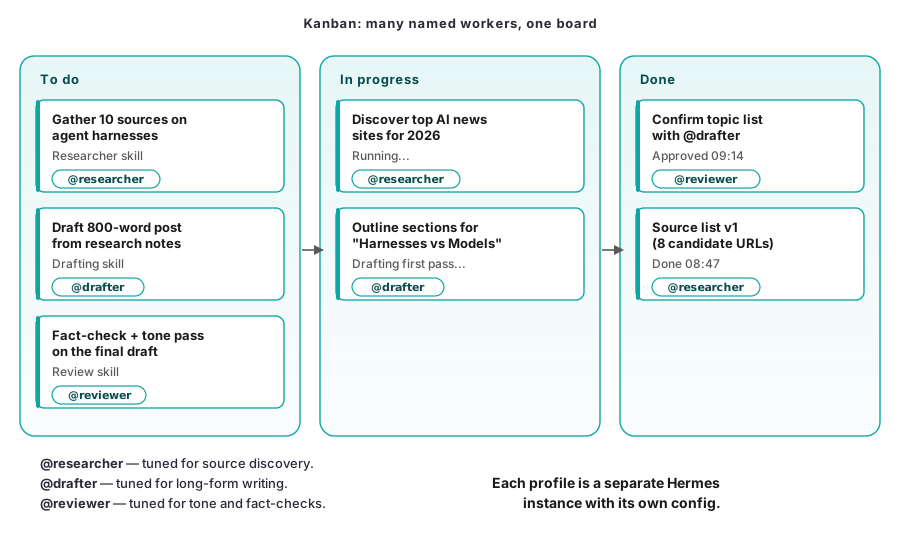
Figure 2: A Kanban board with three columns (To do, In progress, Done) showing task cards owned by named worker profiles @researcher, @drafter, @reviewer. The board itself is the role trigger.
The shapes map onto different problems: cron is a time trigger, Kanban is a role trigger, sub-agents are a parallelism trigger. Confusing them is the most common beginner mistake.
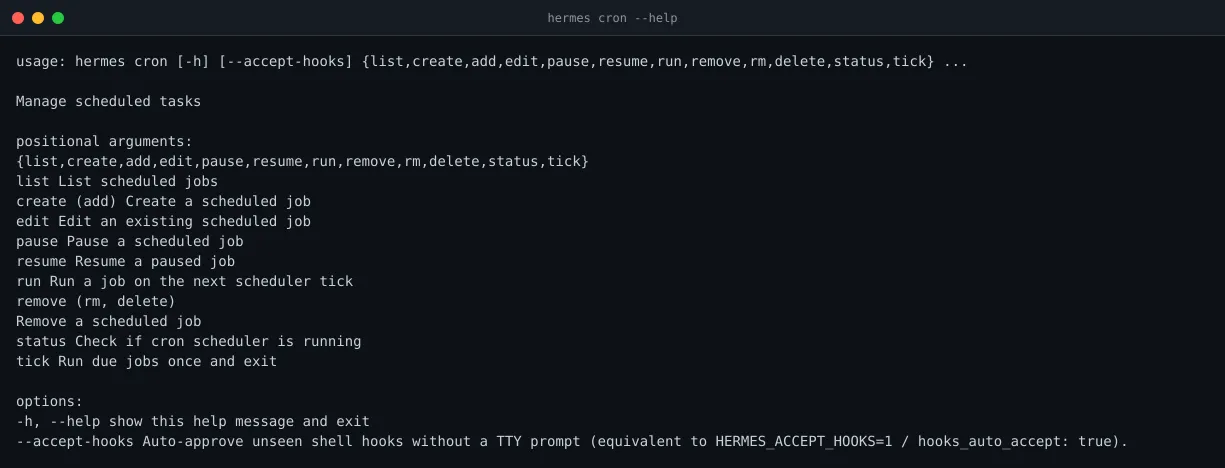
Figure 3: The hermes cron subcommand tree. hermes cron status is your smoke test: if it says the scheduler is not running, nothing else matters.
Match the trigger to the job
Decide by asking three questions in order.
- Is the work a single recurring task with no human review? → Cron.
- Is the work a multi-step project with defined roles and visible progress? → Kanban.
- Is the work a quick parallel fan-out inside one session? → Sub-agent.
| Task | Pattern | Why |
|---|---|---|
| Daily 7am summary or hourly price check | Cron | Single recurring task, runs on a schedule, no review needed |
| Research → draft → review → publish pipeline | Kanban | Multiple roles, visible state, possible retries |
| ”Search three sources in parallel and combine” | Sub-agent | One session, fan out, gather |
| Weekly newsletter draft or 24/7 VPS assistant | Cron now, Kanban later | Cron is fine while you’re solo |
For 90% of beginners, the right answer is cron. Don’t reach for Kanban until you have a multi-step project that benefits from visible progress.
The cron skill
Cron is the simplest pattern. Three steps: define the work as a Skill, schedule it, verify it runs. The Skill Bundle pattern from L04 lines up perfectly here: one slash command replaces five manual steps, and cron fires it for you.
The minimum viable cron job looks like this:
# Pick a Skill Bundle you already trust manually (L04).
# Test it interactively first. If it doesn't work in your terminal,
# it won't work in cron.

# Register the schedule with Hermes:
hermes cron create \
  --name morning-summary \
  --cron "0 7 * * *" \
  --command "/morning-brief"

# Verify it actually exists and will fire:
hermes cron list
hermes cron status
The first thing to notice: cron is a first-class subcommand on the Hermes CLI, not a wrapper around the system cron daemon. The scheduler runs inside Hermes, so jobs share its config, API keys, and logs. If Hermes restarts, jobs pause until it comes back up.
The five habits that prevent silent failures:
- Use the absolute command path.
hermes cron statusfrom your shell may resolve$PATH; the scheduler may not. - Pass the working directory explicitly. Cron starts in
$HOME. If your Skill reads~/projects/news/, tell it so. - Log to a file. Append stdout and stderr. Check it the next morning.
- Test the Skill manually first. If
/morning-brieffails interactively, it will fail in cron. - Schedule a canary. Have a weekly job post an “I’m alive” heartbeat to Discord so you know the scheduler itself is running.
The kanban gotcha
Kanban is powerful but it is not what you should ship first. Per the source video, do not pair Kanban with cron until Hermes ships reliable delete and dedup logic. Duplicate tasks pile up and workers race to write the same file.
The right order: ship one cron job first. Watch it run for a week. Then start a Kanban board for one project (Story 1 in the source video’s taxonomy). Graduate to multi-role pipelines only after that.
The sub-agent gotcha
Sub-agents are the fastest pattern but the most fragile. Per the L06 source video, parallel research with cheap models took 14 minutes, longer than doing it directly.
Sub-agents are a tool for inside a workflow, not for replacing it. If you want sub-agents for long-running automation, you probably want cron or Kanban instead.
Common pitfalls and troubleshooting
| What goes wrong | Why it happens | What to do |
|---|---|---|
| Kanban and cron create duplicate cards or race to overwrite the same file. | Hermes does not yet ship reliable delete and dedup support. The paired sources in iN2fD36Sgdg recommend keeping the two systems separate for now. | Give cron and Kanban separate profiles. Do not feed hermes cron run into a Kanban Story until dedup ships. |
| A sub-agent repeats the same question, burns tokens, and never writes an output. | The prompt is ambiguous and there is no iteration cap (cxF_F217r6I, 701XCzDQVhA). | Cap the agent at 3 to 5 attempts, force a choice in the prompt, and inspect the output rather than its chain of reasoning. |
| An automation keeps failing with small variations while the bill climbs. | There is no attempt budget. The creator in SdahAks9ffE needed 81 runs. | Set a budget of 10 to 15 attempts. At the limit, change the Skill or workflow pattern instead of rephrasing the same prompt. |
| A job breaks after a VPS reboot or starts reading the wrong files. | The cron entry survived, but its working directory, absolute paths, or environment did not. | Pass --workdir, use absolute paths in the Skill, and run hermes cron status after every reboot. |
| A manual TUI session collides with a cron run on the same profile. | Both processes need exclusive access to the profile. | Use separate profiles for cron and each Kanban story. Close the TUI before hermes cron run --debug. |
| The schedule fires but the expected output never appears. | The job has no --log path and failures disappear into /dev/null. | Pass --log ~/.hermes/logs/<name>.log, then check the last seven days of runs once a week. |
/morning-brief works in the TUI but fails when scheduled. | Cron starts with no chat history, warm context, or chance to ask a follow-up question. | Rewrite the Skill so it can finish from zero state before scheduling it. |
Choose the first pattern
Cron is the right starting point for 90% of beginners. Give one trusted Skill a schedule and a log, then watch it run for a week. Kanban earns its complexity when the work needs visible progress and named roles. Sub-agents are useful for parallel work inside a live session, but they disappear with that session.
Every cron job needs --log and a weekly check. Keep Kanban and cron separate until Hermes ships reliable delete and dedup support. Three dependable daily jobs are worth more than one fragile multi-role pipeline.
Schedule a real morning brief
Build a daily 7am summary cron
Pick one Skill Bundle you already trust manually: a research summary, a saved-links digest, a calendar preview. You built one in L04 if you followed that lesson. If not, write one now: the exercise below assumes a Bundle called /morning-brief.
Step 1: Verify the Skill works manually.
hermes
> /morning-brief
Watch the output. If it fails here, no amount of cron will save you. Fix it until it produces the output you want.
Step 2: Confirm the cron scheduler is running.
hermes cron statusYou should see “scheduler running.” If not, see L07 on daemon recovery and per-user service setup.
Step 3: Register the cron job.
hermes cron create \
  --name morning-summary \
  --cron "0 7 * * *" \
  --command "/morning-brief" \
  --log ~/.hermes/logs/morning-summary.log
Step 4: Confirm it’s listed.
hermes cron listYou should see morning-summary with the 0 7 * * * schedule.
Step 5: Force a tick.
hermes cron run --debug morning-summaryThis fires the job immediately so you don’t have to wait until 7am. Watch the log file:
tail -f ~/.hermes/logs/morning-summary.logStep 6: Verify the Discord post.
If your Skill is wired to Discord via L05, the post should appear in your channel within a minute of the tick. If it doesn’t, check three places in order: the webhook URL, the MCP server auth, the Skill’s output format.
Success criteria
You have shipped your first cron when all five of these are true:
- The Skill works manually.
hermes cron listshows your job.hermes cron statussays the scheduler is running.hermes cron run <name>produces the expected output in the log.- The next 7am fires on its own without you touching the keyboard.
If the first run is silent, the most common cause is the Skill failing in a fresh session. Run hermes cron run --debug morning-summary to see the full trace.
Do this today
- Pick one Skill Bundle you trust manually (the one you tested in L04).
- Run it interactively in the TUI; fix it until it produces what you want.
- Confirm
hermes cron statussays the scheduler is running. - Register the cron entry with a
--logpath under~/.hermes/logs/. - Force a tick with
hermes cron run --debug <name>; tail the log.
What’s next
- L07: security essentials if cron breaks after a VPS reboot
- L09: Hermes Agent vs Claude Code vs Mavis vs Gemini before you add a Kanban Story 3+ pipeline
If you want to go deeper
- The Hermes GitHub repo: docs on cron persistence, scheduler recovery, and the long-running Kanban Story config. Canonical source for
--logflag semantics and profile isolation. - The sub-agent iteration cap, in Ron’s words: video
701XCzDQVhA: the “asked the same question six times” short. Source for the loop gotcha in Pitfall 2. - Iteration cost in numbers: video
SdahAks9ffE: “It Took 81 Runs to Get the Automation Right.” A case for setting a hard iteration cap (Pitfall 3).
Watch the full walkthrough
Post your first cron screenshot or the canary Discord message in the community Discord: the best ones get featured next week.
FAQ
Q: Do cron jobs run when my Mac is asleep?
It depends on where Hermes runs. The cron scheduler lives inside the hermes process. If your laptop is closed or the process is paused, the job misses its tick. Run cron on a 24/7 host (a VPS, a mini PC, or a desktop you don’t sleep) if you want the 7am job to fire while you sleep.
Q: Can a Kanban story call another Kanban story?
Not directly, as of June 2026. Each Kanban story is owned by an assignee profile that runs to completion: stories do not chain into other stories on their own. If you need a “research → draft → review → publish” pipeline, wire the dependencies with cron: job A writes the handoff file, job B reads it. Or wait for the chaining operator: the skeleton flags this as a known gap.
Q: How do I see what my sub-agent is doing?
You see the task assignment on the Kanban dashboard, not the reasoning. Sub-agents have their own context window that is not exposed to you. Verify outputs (the final answer, the file produced), not processes (did it ask a clarifying question, did it loop, did it pick the cheap model). If you need the thinking, run the same prompt in your main agent.
Q: Cron vs Kanban for a beginner: what’s the difference?
Cron is a time trigger: one job, one Skill, fires on a schedule. Kanban is a role trigger: many workers, named assignee profiles, a visible board. If your work is one recurring task a single Skill can handle, cron is enough: start there. If your work needs visible progress, retries, and defined roles, Kanban earns its complexity. Most beginners never need Kanban.
Glossary
- Cron job: a scheduled task. “Run this command at 7am every day.” Named after the Unix
crondaemon. In Hermes, it lives inside thehermesprocess. - Kanban: a visual task board. Each story has a status (To do / In progress / Done) and an assignee profile.
- Sub-agent: a worker agent spawned by your main agent within the same session. Its own context window, no persistent state: dies with the session.
- Assignee profile: a separate Hermes instance per worker. Each has its own config, API keys, working directory.
- Loop: a workflow that retries until a success check passes. Sub-agents live inside a loop; Kanban stories run to completion.