Industry analysis · October 28, 2026
Opus 5.5 Motion Graphics: The Harness Behind One Prompt
Build Claude Code video with a deterministic renderer, real assets, frame reviews, and reusable skills. A practical look beyond one-prompt demos.
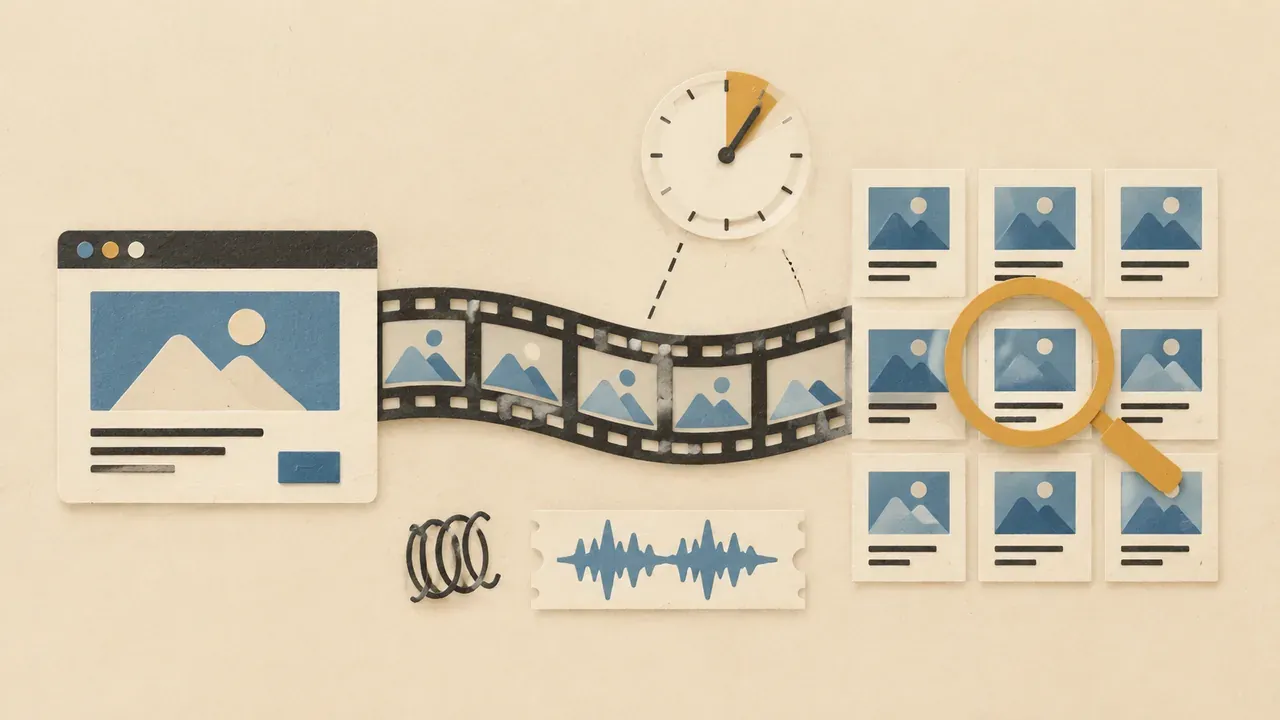
The reusable production harness is the product: prove that frames repeat, review what the renderer produces, and retain the brief and fixes for the next film.
A video generator and a coding agent can both contribute to a film, but their production pipelines differ. In this Opus 5.5 motion graphics workflow, the agent writes a program; other tools produce the frames and export. The useful question is how to make that process inspectable and repeatable.
Seeco’s October 3 investigation, shared again with a demo on October 27, motivates this analysis. Those dates use Hong Kong time. We separate the creator reports from our engineering recommendations, then outline an original eight-second study. Its purpose is to expose the machinery behind a result, without presenting a synthetic animation as product evidence or a measured Opus run.
Count the work behind the request
Seeco’s central observation is that a short initiating message can sit above extensive preparation: references, dependencies, assets and detailed instructions. Their summary captures the distinction:
The harness around it does the rest
— seeco
Count four different things: a user message, a model response, an agent run and an accepted export. One message can trigger dozens of tool calls and repair attempts. Acceptance may arrive well after the first output. That does not establish that every shared clip followed an identical process.
Thariq’s September 23 post described public one-shot claims supported by approximately 10,000 characters of direction, plus skills, examples and credentials. His observation explains why prompt length alone is an incomplete production metric.
Superbash publishes visual and 3D artifacts in its benchmarks. The four new Superbench 2.1 briefs require one user message and one HTML response, without tools or repair turns. Two returning challenges retain their original 1.x protocols. An iterated production reel measures a different workflow. Superbash has not measured this motion pipeline; a polished reel cannot be substituted for those constrained benchmark results.
Make every frame independently addressable
One timestamp, one complete picture
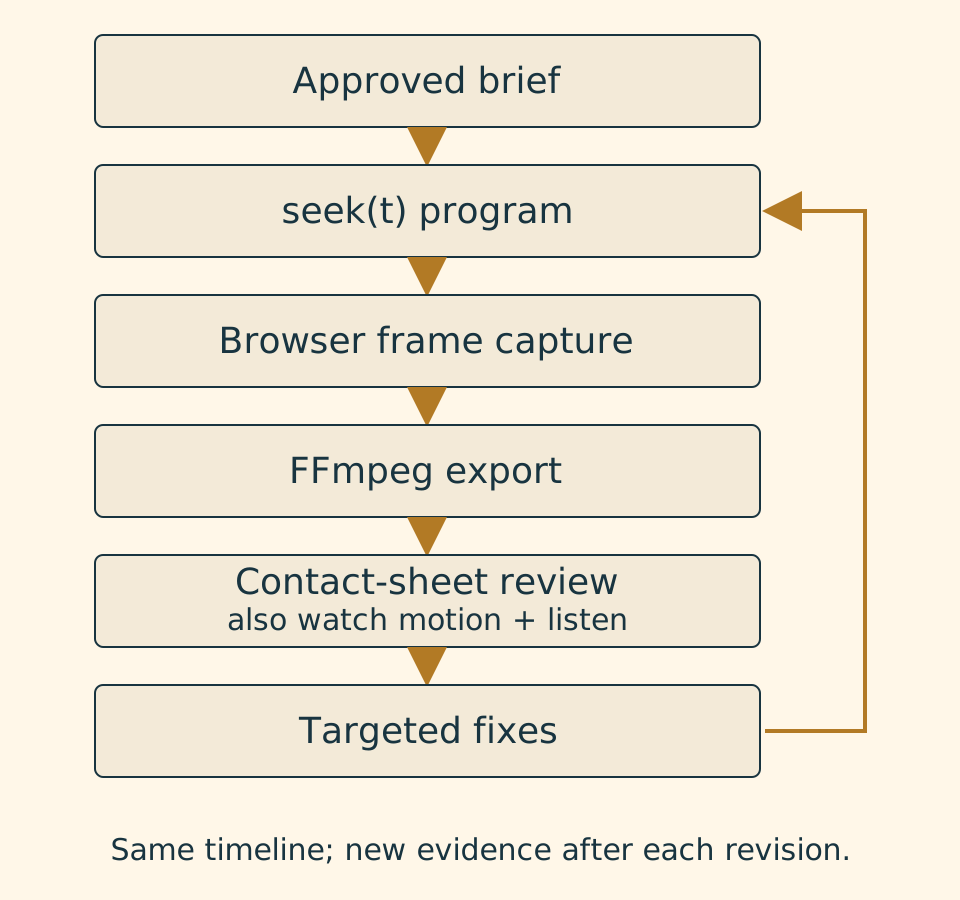
Here, Opus supplies program text, a browser rasterizes that program, and FFmpeg encodes the captures. This describes the proposed code-rendered video exercise, rather than every video posted on X or every Claude surface.
Define seek(t) in seconds. Frame i samples i / fps: eight seconds at 30 fps means 240 frames, ending at 239/30 seconds. Each seek must compute the whole scene without relying on previous calls. Wall time, animation timers and a random generator advancing inside the render call would undermine that contract.
Save this as scene.html. The rectangle and seeded decoration are synthetic fixtures for learning the mechanics, not a polished reel or benchmark result.
<!doctype html>
<meta charset="utf-8">
<style>html,body{margin:0;background:#162328}canvas{display:block}</style>
<canvas id="stage" width="960" height="540"></canvas>
<script>
const canvas = document.querySelector('#stage');
const ctx = canvas.getContext('2d');
let seed = 173;
function random01() {
  seed = (Math.imul(seed, 1664525) + 1013904223) >>> 0;
  return seed / 4294967296;
}
const specks = Array.from({length: 70}, () =>
  [random01() * 960, random01() * 540]);
window.seek = (seconds) => {
  const t = Math.max(0, Math.min(8, seconds));
  const p = Math.max(0, Math.min(1, (t - 0.5) / 1.5));
  const ease = p * p * (3 - 2 * p);
  ctx.clearRect(0, 0, 960, 540);
  ctx.fillStyle = '#162328';
  ctx.fillRect(0, 0, 960, 540);
  ctx.fillStyle = '#42545a';
  for (const [x, y] of specks) ctx.fillRect(x, y, 2, 2);
  ctx.fillStyle = '#edb56b';
  ctx.fillRect(70 + 180 * ease, 160, 240, 180);
  ctx.fillStyle = '#fff7e8';
  ctx.font = 'bold 42px sans-serif';
  ctx.fillText('A frame you can repeat', 70, 420);
};
window.seek(0);
</script>
Decoration is generated once; seeking never advances its seed. Pin the browser, viewport, assets and fonts for production. The system font reduces setup here, but a licensed local font gives stronger control across machines. Await font readiness and image decoding before capturing scenes with those dependencies.
Save the capture script as capture.mjs. Keep its dependency lockfile and browser version for subsequent exports.
import { chromium } from 'playwright';
import { mkdir } from 'node:fs/promises';
import { pathToFileURL } from 'node:url';
import path from 'node:path';

const fps = 30;
const browser = await chromium.launch({ headless: true });
try {
  const page = await browser.newPage({
    viewport: { width: 960, height: 540 }, deviceScaleFactor: 1
  });
  await page.goto(pathToFileURL(path.resolve('scene.html')).href);
  await page.evaluate(() => document.fonts.ready.then(() => true));
  await mkdir('frames', { recursive: true });
  for (let frame = 0; frame < 8 * fps; frame++) {
    await page.evaluate(t => window.seek(t), frame / fps);
    await page.screenshot({
      path: `frames/${String(frame).padStart(4, '0')}.png`
    });
  }
} finally {
  await browser.close();
}
Encode the numbered captures with the following command, then save the JavaScript as repeat-check.mjs. The explicit frame limit prevents leftover captures from extending the export.
node capture.mjs
ffmpeg -y -framerate 30 -start_number 0 -i frames/%04d.png \
  -frames:v 240 -c:v libx264 -pix_fmt yuv420p -movflags +faststart study.mp4
import { chromium } from 'playwright';
import { createHash } from 'node:crypto';
import { pathToFileURL } from 'node:url';
import path from 'node:path';
const browser = await chromium.launch({ headless: true });
const url = pathToFileURL(path.resolve('scene.html')).href;
async function openScene() {
const page = await browser.newPage({
viewport: { width: 960, height: 540 }, deviceScaleFactor: 1
});
await page.goto(url);
await page.evaluate(() => document.fonts.ready.then(() => true));
return page;
}
async function hashAt(page, t) {
await page.evaluate(seconds => window.seek(seconds), t);
return createHash('sha256').update(await page.screenshot()).digest('hex');
}
try {
const page = await openScene();
const a = await hashAt(page, 1.25);
await hashAt(page, 6);
const b = await hashAt(page, 1.25);
const fresh = await openScene();
const c = await hashAt(fresh, 1.25);
if (a !== b || a !== c) throw new Error('Frame changed across seeks');
console.log('Repeated and fresh-page frame hashes agree:', a);
} finally {
await browser.close();
}Keep the frame index in review notes alongside seconds. A reviewer can then request a precise interval instead of describing a vaguely late transition. When a change affects layout, recapture the surrounding held states too: a correct arrival frame can still lead into an unreadable composition.
Matching PNG hashes support repeatability in the same pinned environment. They do not promise identical MP4 bytes or identical GPU and font output elsewhere. If hashes disagree, compare decoded pixels as well as metadata. Add nonmonotonic samples around transition boundaries before trusting a more complex scene.
Give Claude Code a rendering workspace
Use an isolated local project with current, authenticated Claude Code, Node.js, Python 3 and FFmpeg with libx264 already available. These are reader setup commands, not dependencies to add to the Superbash repository. Consult Playwright’s installation guidance if browser libraries are missing.
mkdir motion-proof
cd motion-proof
npm init -y
npm install --save-dev playwright
npx playwright install chromium
ffmpeg -version
claude --model claude-opus-5-5 --effort xhigh
A shell-capable agent can capture frames, encode them and inspect stills. Shell access does not establish native listening ability: a human reviews the final soundtrack, while an agent can examine timing and waveform-derived evidence.
As of October 28, Anthropic’s documentation lists the model ID claude-opus-5-5 with medium as its default effort, subject to account overrides. The launch command explicitly requests xhigh; /effort xhigh and /effort max are interactive alternatives. Record actual settings and usage. Model configuration governs availability. More effort spends time and tokens without guaranteeing good art.
Put this agreement in CLAUDE.md:
# Video workspace agreement

The exported image is determined by seconds passed to window.seek(seconds).
Recompute the scene from its inputs on each call, including backward seeks.
Keep the random seed, fonts, viewport, asset versions and browser version fixed.
Do not use elapsed wall time, CSS animation or an autonomous render loop.

Use assets listed in production/assets.csv. Flag missing screens or unsupported
claims before composing the affected shot. Synthetic fixtures stay labeled.

Write review evidence under checks/. Include frame times and concrete defects.
Keep the first export so the revised version can be compared with it.
Stop after two correction rounds or the brief's budget, whichever comes first.
Do not upload, publish, or purchase assets as part of rendering.
Remotion skills and HyperFrames are optional alternatives; this sample uses neither. Name a required framework explicitly. Use the worktree review lab for isolated editing, and the existing Opus migration guidance to separate model evaluation from production acceptance.
Approve the inputs before polishing the motion
Turn a reference into constraints
A useful brief fixes audience, one supported claim, desired action, duration, frame rate and aspect ratio. Inventory asset rights, available fonts and soundtrack licensing before specifying effects. Record timeline states, a review owner, deliverables, effort and elapsed-time limits.
Viewer and desired action:
One claim we can substantiate, with its source:
Output: duration / frame rate / dimensions / destination
Approved files: path / origin / usage rights / intended shot
Missing inputs and who can supply them:
Reference traits: palette / type scale / spacing / movement / reading holds
Timeline: start-end / viewer learns / opening state / closing state
Audio: licensed track / timing origin / moments to emphasize
Limits: model effort / usage budget / elapsed-time cap / two review rounds
Acceptance: truthful screens, readable text, repeatable frames, reviewed sound
Delivery: source, dependency lockfile, exports, stills, defect log, reviewer
Provide screenshots and logos or collect them from an authorized product source. A missing dashboard is a missing input: request it. Never invent a convincing screen or metric to fill the hole. Synthetic placeholders must remain visibly labeled and cannot ship as proof.
From a permitted reference frame, extract palette values, type scale, density, camera behavior, transition duration and reading holds. Borrow principles rather than protected artwork, wording or logos. For each scene, record what the viewer learns and its entry and exit states. A persistent shape can connect scenes, but it is only one possible approach.
Tony Dinh reported completing a TypingMind reel in less than 30 minutes and contrasted it with roughly $1,000+ previously spent. Seeco gives about $1,200; we prefer Tony’s primary statement. Neither amount establishes a general market price, and the elapsed time is his report rather than a Superbash timing test.
Drive movement and audio from the same timeline
This optional spring replaces the sample’s ease. It returns zero before its start and calculates position directly, without integrating velocity across frames:
function settle(elapsed, decay = 7, frequency = 11) {
  if (elapsed <= 0) return 0;
  return 1 - Math.exp(-decay * elapsed) *
    (Math.cos(frequency * elapsed) +
     (decay / frequency) * Math.sin(frequency * elapsed));
}
const panelX = t => 60 + 280 * settle(t - 0.8);
// Inside seek(t), paint the panel at panelX(t).
For repeated target changes, sum time-stamped delta responses. Give objects different settling behavior when useful, but let reading time govern headline holds. Every element does not need an overshoot.
For a supplied, licensed track, create a local Python environment and save the analysis code as beats.py:
python3 -m venv .venv
. .venv/bin/activate
python -m pip install librosa
import json
import librosa
samples, sample_rate = librosa.load('assets/score.wav', sr=None, mono=True)
_, positions = librosa.beat.beat_track(y=samples, sr=sample_rate, units='time')
with open('beats.json', 'w', encoding='utf-8') as output:
json.dump({'seconds': positions.tolist(), 'fps': 30}, output, indent=2)Beat estimates are candidate timestamps, not confirmed downbeats, bar structure or perfect onset locations. Human-check them. Map a chosen beat with round(seconds * fps) and share the scene’s zero point. Major transitions can follow selected beats without cutting on every beat.
Only run this mux step after supplying assets/score.wav spanning at least eight seconds:
python beats.py
ffmpeg -y -i study.mp4 -i assets/score.wav -map 0:v:0 -map 1:a:0 \
  -t 8 -c:v copy -c:a aac -b:a 192k -movflags +faststart study-audio.mp4
The script does not synchronize the composition automatically. Use its reviewed timestamps explicitly. The synthetic study has no music by default; loudness measurement, mastering and listening remain separate work.
Review evidence before spending on another export
Inspect the failure, then change its cause
A contact sheet exposes composition and continuity problems quickly. Sparse stills cannot establish smooth movement or sound synchronization. These commands create 16 overview cells, a strip of 12 consecutive frames and a 360px preview for this eight-second example:
mkdir -p checks
ffmpeg -y -i study.mp4 -vf "fps=2,scale=240:-1,tile=4x4" \
  -frames:v 1 checks/overview.png
ffmpeg -y -i study.mp4 \
  -vf "select='between(n,24,35)',scale=240:-1,tile=4x3" \
  -frames:v 1 checks/arrival.png
ffmpeg -y -i study.mp4 -vf "scale=360:-2" \
  -c:v libx264 -crf 20 -an checks/phone.mp4
node repeat-check.mjs
Longer films need more sheets. The small preview tests widescreen readability at phone width; it does not validate a vertical layout. Author square and vertical compositions deliberately from the shared timeline. Watch full-speed playback, listen separately, and inspect both sides of any intended loop. This sample is not a seamless loop.
The repeat check samples the same time after an intervening seek and in a fresh page. Agreement demonstrates a narrow technical property, not factual correctness or artistic quality. Failure blocks delivery until its cause is understood.
Use this anchored rubric on actual output:
Inspect the captures and playback, then complete a six-row review:
claim clarity | small-screen text | composition | transition continuity |
audio alignment | product fidelity

For each row: score 0-3, frame/time evidence, and the smallest useful change.
0 = blocking error; 1 = major repair; 2 = usable with a named issue;
3 = passes the brief's acceptance condition.
If sound is absent by design, mark audio N/A rather than inventing a score.
Rank the three most consequential defects; fix those before adding effects.
Recheck changed intervals and their boundaries, then review a full export.
Any invented product claim, unreadable required text, or unstable frame blocks
acceptance. Do not hide blockers in an average. Respect the two-round budget.
Review the claim against its cited product source before grading visual polish. A smooth chart with unsupported values is still a failed deliverable. Keep the asset inventory next to the review record so a later revision can establish which screenshot, font and soundtrack version the reviewer actually approved.
Evidence should name a time or frame and a change with a visible consequence. For example, extend a claim’s held state when it disappears before reading finishes. Rank the three largest defects, then use at most two correction rounds by default. Report unresolved defects when the budget ends. Hard factual and determinism failures block acceptance regardless of the average score. The acceptance-check lesson helps turn those decisions into explicit conditions.
Store the workflow as a callable skill
The reusable unit includes scripts, inputs and decisions. Our skills hub, Hermes starter stack and Hermes toolkit explain repeatable workflows and their dependencies. Claude Code skills have their own paths and syntax; do not transplant Hermes installation instructions.
Use this project layout:
motion-proof/
  .claude/skills/motion-reel/SKILL.md
  CLAUDE.md
  production/brief.md
  production/assets.csv
  production/visual-notes.md
  production/timeline.json
  assets/
  scene.html
  capture.mjs
  repeat-check.mjs
  beats.py
  package-lock.json
  checks/
  frames/
Keep secrets outside instructions and source control. This example needs no third-party keys. Place the following skeleton in .claude/skills/motion-reel/SKILL.md:
---
name: motion-reel
description: Build and review a short, seekable product animation from approved inputs.
disable-model-invocation: true
---

Use $ARGUMENTS as the requested production scope. Read CLAUDE.md first.

1. Record the audience, supported claim, formats, assets, rights and limits in
   production/brief.md and production/assets.csv. Ask about missing essentials.
2. Propose visual notes and a timed scene list. Render representative stills.
   Wait for the brief owner to approve these inputs before a complete export.
3. Implement the timeline through window.seek(seconds). Run capture.mjs and
   repeat-check.mjs; create contact sheets and a small-screen preview in checks/.
4. Score the actual output using the project rubric. Repair up to three ranked
   defects per round, with no more than two rounds within the approved budget.
5. Deliver the export paths, settings, first-versus-final comparison and open
   defects. Require a human playback and soundtrack check before publication.

A missing required asset or a failed reproducibility check blocks delivery.
Do not substitute imagined product evidence. Do not publish the result.
Under Claude Code’s skill conventions, it exposes /motion-reel:
/motion-reel Use production/brief.md for an 8-second landscape feature study.The skeleton still needs the referenced scripts and rubric. Its gates cover authorized inputs, style and still approval, bounded critique, then technical and human review. An unmet gate stops progress; it does not justify an unlimited unattended loop.
For inspection, PDoomVideo offers a music-video codebase, while ClaudeAnimationBase is a p5.js/p5.brush starter. Neither is required or proves one-shot production. Dated star counts describe attention, not quality.
Choose code for the parts it can control
Code is a useful fit for interface animation, typography, charts, reproducible transitions and product explanations. Photorealism, expressive characters, lifelike bodies and fluid organic action are harder fits. Footage or a video model may provide better source material; this exercise makes no promise of reconstructing it through tracing.
Count model usage, tool calls, rendering, licensed assets, audio, storage and human review. Record setup separately from repeated production, and distinguish first-pass expense from accepted-export cost. Tony’s anecdote and seeco’s reported long runs do not establish typical savings or an agency replacement case.
The related Descript and Cutmap story explores narrowing an editing workflow, including HyperFrames overlays. It is useful adjacent reading, not evidence of Opus 5.5 video performance. Reusing a renderer can reduce repeated setup while still leaving substantial editorial judgment with the reviewer.
Which claims have supporting evidence?
We checked these claims on October 28, 2026; creator reports are not independent performance tests.
| Claim | Status | Source |
|---|---|---|
Opus 5.5 launched September 22; its model ID is claude-opus-5-5. | Verified. | Anthropic, model overview |
| Opus 5.5 defaults to medium effort; xhigh and max can be selected. | Verified; account settings and organization caps can override availability/defaults. | Claude Code model configuration |
| Thariq described one-shot posts backed by long instructions and supporting tools on September 23. | Verified post; not a census of all demos. | Thariq |
| Tony Dinh reported a TypingMind reel in less than 30 minutes and a previous cost of roughly $1,000+. | Verified creator statement, not independently timed. Seeco says about $1,200; use Tony’s figure. | Tony Dinh |
| PDoomVideo and ClaudeAnimationBase are public repositories. | Verified. October 28 snapshot: approximately 2.6K and 2.2K stars. Seeco recorded 1.1K for PDoomVideo at writing. | PDoomVideo, ClaudeAnimationBase |
| Remotion agent skills and HyperFrames exist. | Verified repositories; no claim that our example requires them. | Remotion skills, HyperFrames |
| An athemeroy dataset establishes a pattern called brief contagion. | Unverified, per seeco. | Seeco |
| Individual reels reached the reported view/bookmark totals, including twoclipping, Drew and Donald. | Unverified, per seeco; counters and observation dates differ. | Seeco |
| A watercolor production used 163 model calls and about seven hours. | Unverified, per seeco. | Seeco |
| Donald and Pip productions used approximately 9,500- and 19,000-character briefs. | Unverified, per seeco. | Seeco |
| Seedance 2.5 footage was generated and then traced into code. | Unverified, per seeco. | Seeco |
| Tommy Rossi observed the agent skipping installed animation frameworks. | Unverified, per seeco; do not generalize model behavior. | Seeco |
| Every viral one-shot used xhigh or max. | Unverified, per seeco; an absolute claim without a complete sample. | Seeco |
Start with an eight-second proof
The Superbash verdict is to invest in a reusable production harness. A prompt starts the work; it does not document the result’s quality. First run the synthetic study, compare repeated hashes, examine the contact sheet and view the phone preview. Then replace one synthetic scene with approved product assets. Preserve both the first and revised output so improvements remain inspectable.
These examples are documentation, not a renderer run or an authenticated Opus 5.5 test performed for this article. Stop when frames repeat, the claim is legible, assets are truthful and no critical defect remains unexplained. If those conditions fail, keep the failure evidence with the project before attempting another export.
Sources and implementation references
The principal reporting comes from seeco’s October 3 article and October 27 reshare. Primary corroboration and repository references appear in the table above; their statuses reflect our October 28 check.
For implementation, consult Claude Code model settings, skill documentation, Playwright screenshots and browser setup. FFmpeg’s tile filter covers sheet assembly; its encoding and mapping reference explains exports. The librosa beat tracker documents timing estimates. Keep dependency versions with your production record so future revisions can reproduce the environment.
Put this to work
Connect a time-based renderer to browser capture, encoding, and a frame critique loop.
Try
Render an eight-second synthetic title study before attempting a real product reel.
Prove it worked
Compare repeated frame hashes, inspect a phone-size preview, and record fixes for the three largest defects.
Keep in view
- A single request can start many tool calls and revisions; it does not establish first-try quality.
- A seekable program makes individual frames reproducible and specific edits easier to inspect.
- Real assets and recorded review decisions make the workflow reusable across films.