Product case study · July 23, 2026
I burned through my Descript credits, then built the workflow I needed
A narrow timeline for overlays and title cards replaced the expensive part of my editing loop. Here is how to find and build your own focused tool.

AI coding makes a focused internal tool possible when a broad subscription is a poor fit. Start with the repeated job, prove that the smaller tool saves time or money, and test outside demand separately.
I did not set out to replace Descript. I wanted to make videos without doing the same visual editing work by hand every time. Then I looked at the credit screen.
In seven days, I used the 1,500 AI credits included with my Descript plan. The account screen also showed 2,507 of 4,000 top-up credits already used. The media-minute allowance was nowhere near its limit. The expensive part was asking the editor to do AI work, then asking it again when the result needed another pass.
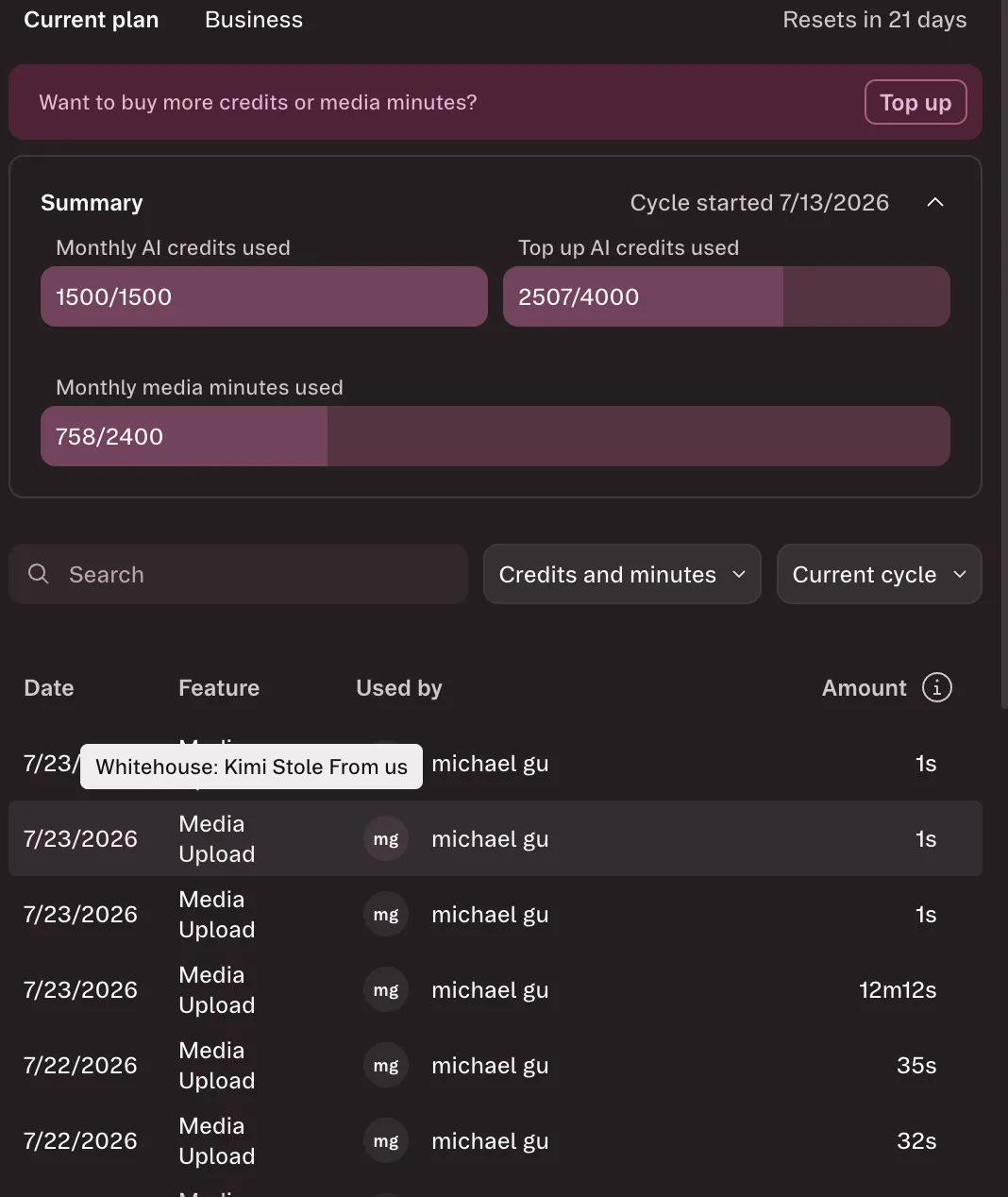
That is not an argument that Descript is bad. It does a lot. It is an argument that I did not need most of it.
For the videos I was making, the useful loop was much smaller: review a talking-head edit, see where a title scene, callout, or B-roll insert belongs, and place it on a timeline. I did not need a broad AI editing product deciding what to generate on every pass. I needed a dependable way to make a few types of visual edit.
This was the prompt that started it:
can you read the descript-hyperframes skill and make this into a full fledged app - or at least i want to see the overlays on a timeline of the video and along with the scene transitions or other footage so this way i can know what sort of edits are in this video. basically make the UI like descript as much as possible. I want you to design the specifications. use modern frameworks, make a todo document, then build it here - make the ui can and nice looking like https://www.tapnow.ai/
It was a long, slightly unreasonable prompt. The request was clear, though: show the visual edit plan on a timeline, write down the product shape first, then build a polished interface instead of an internal tool that only I could tolerate.
Three hours later, I had Cutmap.
Find the expensive repeated step
The useful starting point was not “build a video editor.” It was the moment I kept paying to repeat: place a small set of visual edits against a finished talking-head video, review the timing, and move them when the cut changed.
You can use the same test on your own work:
- Track one task for a week and count how often it repeats.
- Save the exact inputs, the finished output, the time spent, and any usage charges.
- Circle the smallest step that causes most of the cost or frustration.
- Write a build brief for that step only. Everything else goes on a “not yet” list.
This produces a much better coding prompt. The AI gets a real input, a visible output, and a boundary. You also get a fair way to judge the result. If the tool cannot complete that one job on real files, more features will not rescue it.
The editor I actually needed
Cutmap is not a full Descript replacement. It is a focused review and placement tool for the part of my workflow that had become expensive.
The main screen has a video preview in the middle, a media bin on the left, an inspector on the right, and a multi-track timeline below. Title scenes, callout overlays, B-roll, and the main video sit on separate tracks. Selecting an item shows its in and out point, duration, source, accent, and placement controls.
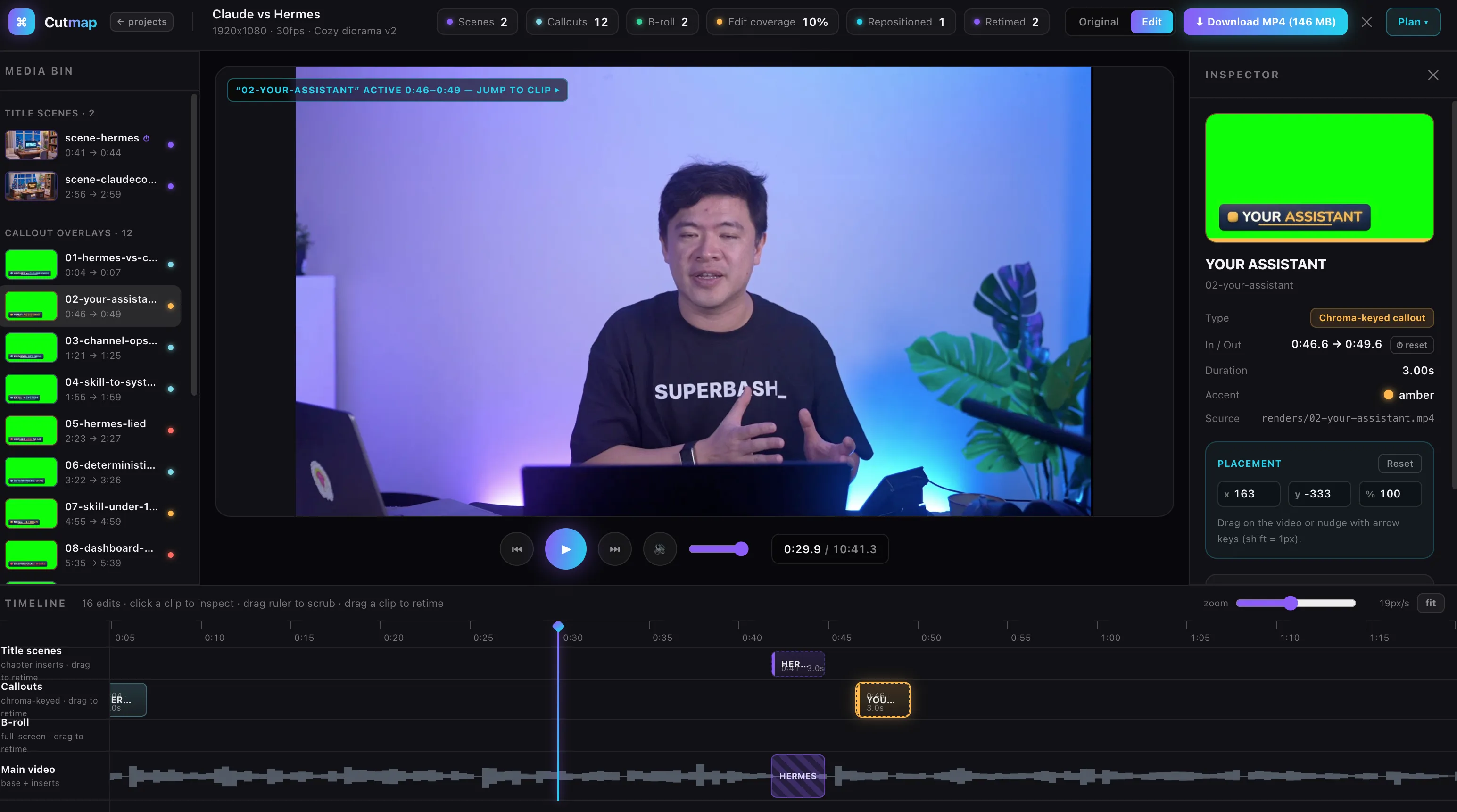
It is deliberately basic. I did not need to recreate every button in a mature editor. I needed to make the important edit visible and editable.
When I am reviewing a video, I want to answer a few practical questions: What appears at this moment? Is it a title scene, a chroma-keyed callout, or B-roll? How long does it stay on screen? Does the edit still make sense after a scene transition shifts the timeline?
The original overlay workflow already had a clear sequence: read the transcript, plan visual moments, render the assets, place them, and verify the result. Cutmap turns that sequence into a screen I can inspect. It makes the edit plan concrete instead of leaving it spread across prompts, filenames, and a credit meter.
What we deliberately did not build
The phrase “SaaS is dead” is a headline, not a market forecast. Descript has collaboration, transcription, recording, publishing, media management, and far more than I rebuilt in an afternoon. Those features are real work.
I skipped them because they were not the bottleneck.
The videos needed title cards, callouts, and occasional B-roll. They needed an editor that could show those edits against the underlying footage and let me move them when pacing changed. That is a much smaller problem than building an AI video platform.
The project browser makes that trade-off obvious. It lists videos with their edit counts and marks projects that only have imported assets rather than a base composition. That is enough information to open the right project and see what is missing.
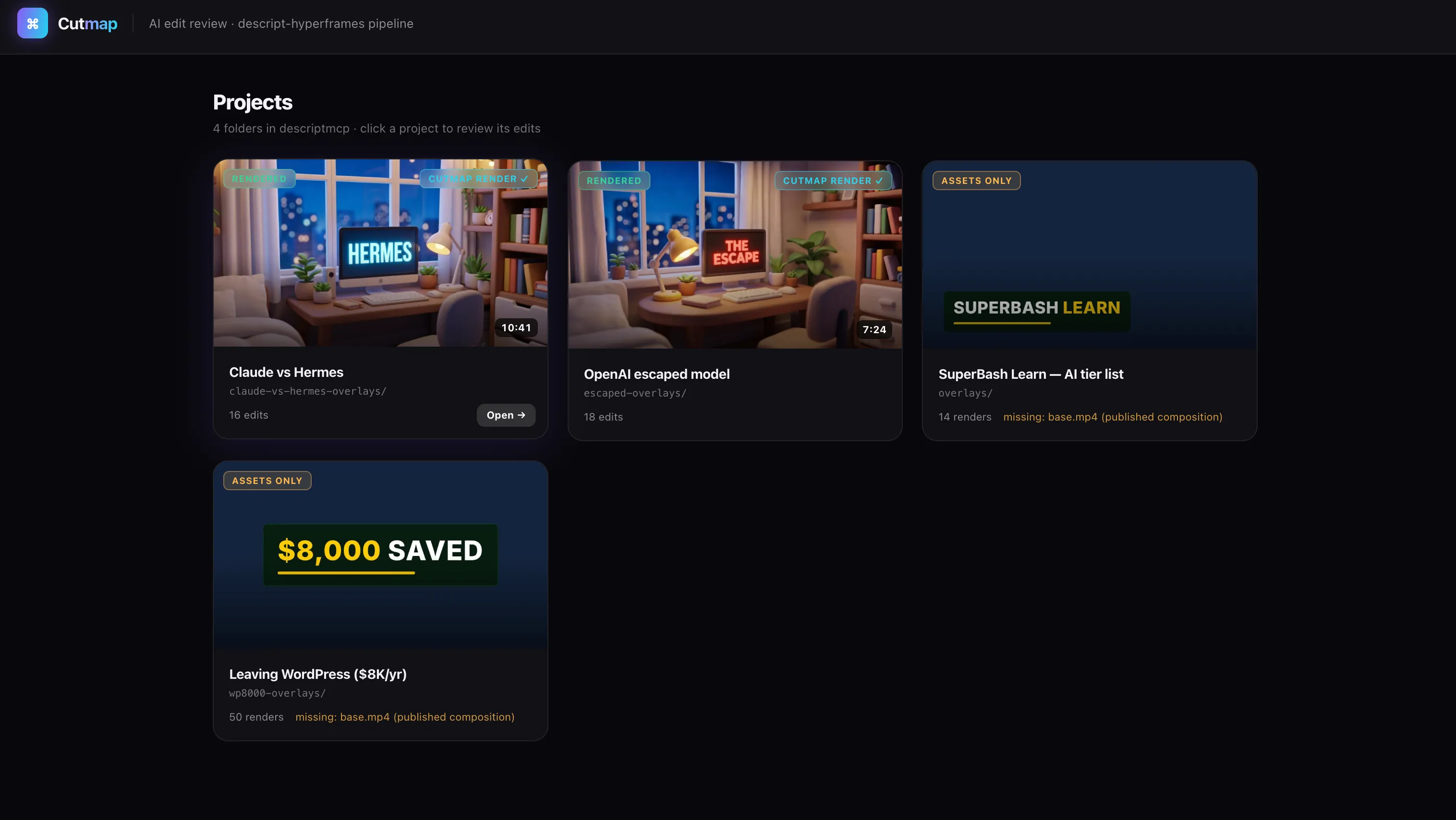
There is still plenty this version does not do. That is fine. A thin tool has room to be honest about its edges.
The credit problem changed the build decision
The 1,500 credits were not consumed by one dramatic failure. They disappeared through ordinary use: media uploads, AI editing requests, retries, and follow-up work. Once the monthly balance was gone, the remaining choice was to buy more credits or stop asking the product to solve a narrow problem expensively.
Building the smaller tool was not free. It took time, a clear prompt, and enough specificity to avoid a generic dashboard. But the scope was finally under my control. I could make the interface care about overlay timing because overlay timing was the job.
AI makes it cheaper to build a tool around a specific workflow. It does not erase the value of polished software, support, collaboration, or reliability. It does make a bad fit much easier to walk away from.
Descript still makes sense for people who need its whole product. I needed a place to review and place visual edits without watching another credit counter climb. For that job, Cutmap is enough.
From an internal tool to paid work
Saving your own subscription cost is not the same as finding a business. The next test is whether another person has the same painful step and can use your solution without you operating every screen for them.
Start with a service, not a software launch. Ask one creator to send a real video and edit brief. Use the tool to deliver the finished overlay plan or timeline, then record how long the job took and where manual cleanup was still needed. If several people want the result, you can offer a repeatable editing package or a custom internal tool. A standalone product makes sense only when the workflow repeats across users and support does not erase the time you saved.
The proof is a small case study: the old process, the new process, five real runs, time and credit cost, the errors you found, and feedback from someone other than the builder. That is more useful than announcing that an afternoon prototype killed SaaS.
Continue with Build a side project with Hermes and Claude Code and The online business stack.
Source material
- Supplied Descript credit-usage screenshot from the Business-plan account screen.
- Supplied Cutmap project and editor screenshots.
- The supplied build prompt, which requested a Descript-like interface for timeline-based overlays, scene transitions, and other footage.
Put this to work
Find a costly repeated workflow, cut the scope to one outcome, and use AI coding tools to build only the necessary path.
Try
Track one repeated task for a week, write down its inputs and finished output, then build the smallest tool that removes one manual step.
Prove it worked
Compare time, subscription or credit cost, error rate, and output quality across at least five real runs. Ask another user to try it without help.
Where it can pay
Start by selling the finished workflow or a custom internal tool to one user with the same problem. Consider software only after repeated demand.
Keep in view
- A narrow timeline for overlays and title cards replaced one expensive repeated step, not an entire editing suite.
- The useful product boundary came from a real workflow, known source files, and features the creator actually used.
- Cost savings justified the first build; outside demand would need separate validation.