MiniMax Code · Tutorial 04
Goals and Task Briefs That Actually Finish
Turn a vague request into a bounded, testable brief and use Goal only when the outcome needs iterative work.

0 of 6 complete
Essentials · Step 4 of 6 · View the route
Last checked and updated: August 25, 2026
“Improve the README” sounds simple, but it does not say what improvement means, which file may change, what information is true, or when the work should stop. An agent can satisfy that request forever.
A good brief turns the request into a contract you can inspect. Goal adds persistence: MiniMax Code can keep choosing the next step, checking the result, and iterating until the outcome is achieved, blocked, or paused. Goal is useful when the destination is verifiable but the route takes several attempts. It is unnecessary for a one-line change or one answer.
By the end of this lesson, you will write a six-part brief, make the agent restate it, and run one tightly bounded Goal in the practice workspace.
Regular prompt or Goal?
| Use a regular prompt | Use Goal |
|---|---|
| One clear edit or answer | A verifiable outcome needs several attempts |
| One known file | Investigation may change the next step |
| Short code review | Tests, logs, benchmarks, or research evidence guide iteration |
| Subjective work that needs frequent human judgment | The finish line and stop conditions can be stated in advance |
Goal does not mean “keep trying forever.” Official documentation says it stops when the outcome is achieved, progress is blocked, or you pause it. MiniMax warns that it can use substantially more resources than a one-time prompt, so set a time, attempt, or usage limit.
Avoid Goal for vague requests such as “make it better,” for high-impact external actions, or when success depends mainly on taste. Production changes, deletion, paid operations, external publishing, and sending messages still need explicit human confirmation.
The six-part task brief
Use this structure throughout the course:
Outcome
What should exist or work when this is finished?

Scope
Which folder, files, app, or account may be inspected or changed?

Evidence
Which requirements, examples, screenshots, logs, or source files are authoritative?

Constraints and approvals
What must remain unchanged? What requires confirmation before acting?

Checks
Which command, preview, comparison, or artifact will prove the result?

Finish line
When should the agent stop, and what should it report?
Notice what is absent: flattery, role-play, and long claims about how intelligent the agent should be. The useful information is operational.
Step-by-step scenario: turn “improve the README” into a Goal
Continue in the disposable minimax-code-practice workspace. Your README.md should currently have the heading and the status line from Lesson 3.
Step 1: define a checkable outcome
The vague request is:
Improve the README.Replace it with an outcome someone else can verify:
Add a two-item “Practice rules” section explaining that work stays in the practice folder and that results are checked before acceptance.
Now you know what must exist and what the content must accomplish.
Step 2: ask the agent to restate the contract
Copy this prompt as a regular, plan-only message:
Draft a task contract for this request, but do not edit anything yet.

Outcome
README.md contains a “Practice rules” heading and exactly two bullets: one about keeping
work inside this practice folder, and one about checking results before accepting them.

Scope
Only README.md in the active minimax-code-practice workspace may be read or changed.

Evidence
The existing @README.md and the wording requirements above are authoritative.

Constraints and approvals
Preserve the title and status line. Do not run commands, access another folder, use the
network, or add claims about MiniMax features. Ask before any change outside this exact plan.

Checks
Verify the exact heading, exactly two bullets, preserved title and status, and one changed path.

Finish line
Stop after restating the contract, proposed edit, checks, and blockers. Wait for approval.
Compare the restatement with your brief. Correct omissions now. The agent should not quietly replace “exactly two bullets” with “a short list” or forget the one-file boundary.
Step 3: decide whether Goal is justified
This tiny edit would normally use a regular prompt. We will use Goal once for training, with a strict one-attempt limit, so you can find and control it.
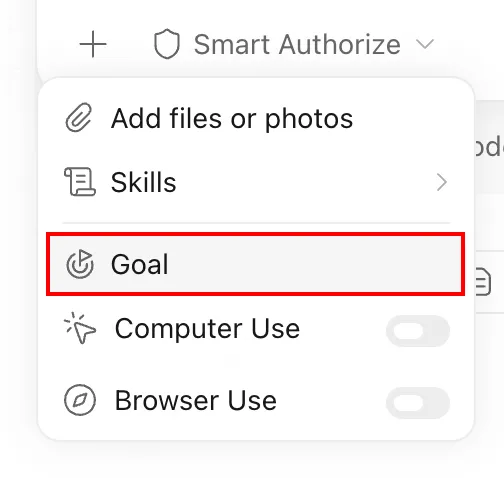
Enter Goal from the interface:
- Type
/and select Goal from the command menu, or choose+beside the input and select Goal. - Do not merely type
/goalas text; the official guide says that does not enter Goal mode. - Confirm that a Goal status appears above the input after you send it.
Step 4: run the bounded Goal
Copy this Goal:
Achieve this outcome: README.md contains a “Practice rules” heading and exactly two concise
bullets—one says work stays inside this practice folder, and one says results are checked before
acceptance.

Preserve the existing title and status line. Only read or modify README.md in the active
minimax-code-practice workspace. Do not run commands, use external tools, or touch another path.

Verify completion by reopening README.md, counting the two bullets, confirming the preserved
lines, and reporting every changed path.

Use at most one editing attempt. If the requirements conflict, the file is unavailable, a broader
permission is needed, or the first check fails, pause and report the evidence and input required.
Do not keep retrying.
Read any permission request. Approve only the named file edit. Monitor the Goal status; you can edit, pause, resume, or clear it.
Step 5: judge completion yourself
When Goal reports completion:
- Open
README.mdfrom Files. - Confirm the title and
Status: ready for review.remain. - Confirm a
Practice rulesheading exists. - Count exactly two bullets.
- Open Changes and confirm only
README.mdchanged. - Record pass or fail. Do not change a failing score merely because Goal marked itself complete.
Write better blockers
“Tell me if you get stuck” is too vague. A useful stop condition names observable events:
If the required file is missing, validation cannot run, a permission outside the named path is
needed, an external service is unavailable, or two consecutive attempts show no new evidence,
pause. Report what was tried, the latest evidence, the blocker, and the exact input needed.
For this lesson, the limit is even tighter: one editing attempt. Larger Goals can use a time budget, attempt count, or usage boundary that matches the risk.
Safety boundary
Goal’s persistence does not expand your authorization. Keep manual confirmation for deletion, overwriting unrelated work, production changes, uploads, publication, messages, purchases, account settings, and any action outside the named workspace.
Pause a Goal when:
- the same failure appears twice without new evidence;
- usage reaches your stated limit;
- the task starts modifying an unexpected path;
- a required fact is unavailable or contradictory;
- validation cannot independently prove completion;
- the next step would create an external or irreversible effect.
Troubleshooting
| Symptom | Likely cause | Recovery |
|---|---|---|
Typing /goal only sends text | Goal must be selected from the / command menu or + menu | Open the menu and select Goal; confirm the status appears above the input |
| Goal is missing from both menus | The app version or environment may not support it | Check for updates and confirm current feature availability; use a regular prompt meanwhile |
| Goal keeps revising a result that already passes | Completion criteria are subjective or missing | Pause it, inspect the evidence, and rewrite the finish line as observable checks |
| Goal retries the same failure | Stop conditions or attempt limits were too loose | Pause; require a blocker report with attempts, evidence, and needed input before resuming |
| Usage rises faster than expected | Goal can span several turns and repeated checks | Pause and review the attempt/usage limit in current settings before continuing |
| The agent “improves” unrelated content | Scope and preservation constraints were not enforced | Stop, inspect Changes, restore unwanted edits, and restate exact allowed and preserved surfaces |
FAQ
Is Goal more powerful than a regular prompt?
It changes the operating loop: the outcome stays active across attempts. It is not a reason to remove scope, approvals, or verification.
Should every coding task be a Goal?
No. One-line changes, explanations, and short reviews are usually clearer as regular prompts.
Can I ask MiniMax Code to draft a Goal for me?
Yes. Official guidance suggests describing the job and asking for a draft, then personally confirming completion criteria, validation, constraints, boundaries, and blocking conditions before starting it.
What if Goal says complete but a check fails?
The check wins. Pause or reopen the work, provide the failing evidence, and decide whether another bounded attempt is justified.
How much time or usage should I allow?
There is no universal number. Match the limit to the task’s value and risk, inspect your current Usage screen, and start smaller than you think you need.
Official sources
What’s next
Add a recoverable Git checkpoint, inspect permission prompts and panels, run a first-pass review, and undo a scoped change in L05: Permissions, Panels, Git, and Code Review.