Product case study · October 28, 2026
Lauren Tan’s AI Coding Agents Workflow: Trust Comes First
Lauren Tan’s viral workshop teaches agent verification, skill evals and enforced architecture. Build a workflow beyond the GrokBot agents caption.

Trust grows when agents can verify the app, skills survive evals, and architecture rejects bad changes. Prove one local workflow before scaling it.
The viral GrokBot agents caption promises a ready-made autonomous company. Lauren Tan’s workshop explains something more useful to an engineer: how to earn trust in work an agent produces. Her AI coding agents workflow connects a running application, tested skills and architecture that rejects unsupported changes.
The recording identifies Tan on screen as “Software engineer | SpaceXAI.” That is the recording’s identification, not an independently verified current employment history. Akari posted the video on October 26 HKT, October 25 UTC; Evan Luthra reposted it on October 27.
This analysis is based on a full watch of the 57-minute recording, two transcript passes and the on-screen slides. The recording appears to date from roughly mid-2026, weeks before the October posts. That is an inference from on-screen cues: a chart runs through July 2026, and Tan describes the current month as the 12th. The recording date is unconfirmed. The practical adaptations below cover verification, skill evals and CI enforcement.
What the viral GrokBot agents caption gets wrong
The supplied full-watch record and both transcript passes do not support the captions’ organizational, adoption or compensation claims. That matters because copying a supposed reporting structure would miss the actual engineering work: giving agents evidence, evaluating their procedures and constraining their changes.
Fact check: caption versus workshop
This comparison covers the supplied full recording, with two transcript passes and slide review. The left column paraphrases akari’s caption and Evan’s repost, rather than quoting Tan.
| Viral claim | What the talk actually says |
|---|---|
| 50+ GrokBot agents do the work of 20 engineers | No such headcount or replacement claim appears. Tan describes a conceptual trust curve and reports about 20 PRs landing overnight. PRs are not engineers. |
| 1 Chief of Staff, 3 AI PMs and 40+ workers execute overnight | The workshop does not present this hierarchy. It covers verification skills, eval subagents, cloud bug reproduction and architectural constraints. |
| She manages the whole system over morning coffee | She says she woke up to landed PRs and reviewed them on main. The coffee-management scene is caption framing. |
| 97% of SpaceXAI engineers work this way | No organization-wide adoption percentage appears in the workshop. |
| Engineers using this setup receive $750K+ offers | No such compensation figure or hiring-offer claim appears. |
| 99% of people open one GrokBot, ask a question and close it | This usage statistic is absent. Her criticism concerns unverified agent work and weak engineering constraints. |
| A $5,000 course is replaced by a complete system built from scratch | No course price appears, and this is a workshop discussion with examples, not a start-to-finish implementation of the caption’s system. |
What she did NOT say
Tan does not teach that managerial hierarchy, establish company-wide adoption, make a salary-offer claim or sell the described course. The workshop is not a start-to-finish build of the caption’s system. This finding concerns this recording, not everything she has ever said. Absence from this talk does not independently prove that every caption claim is impossible elsewhere. The captions document the viral framing; they do not corroborate the workshop’s results.
The trust curve behind her AI coding agents workflow
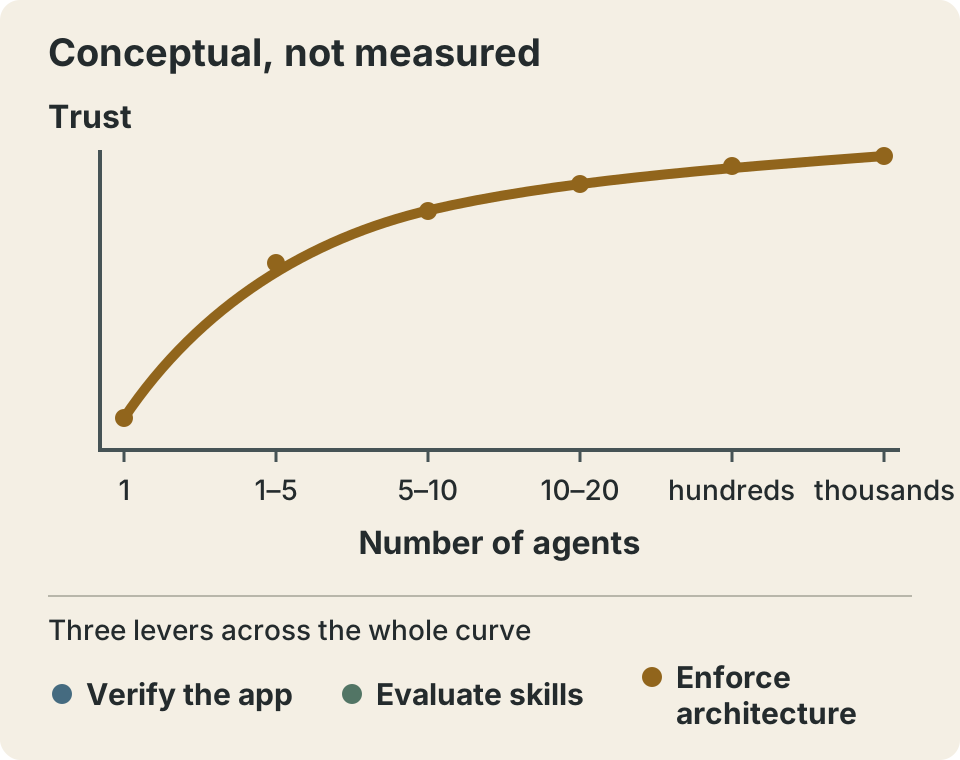
At low trust, Tan describes micromanaging an agent: watching each output, checking its work and supplying corrections. More agents multiply that supervision burden. Reliability has to improve before useful autonomy can grow; a higher agent count does not itself cause reliability.
Her curve is a conceptual account of that progression, not a measured scaling law or evidence that she runs thousands of simultaneous agents. Three levers change the evidence available to a reviewer: verification against a running app, high-quality skills improved through evals, and architecture designed for agent contributions.
The output figures need the same care. Tan’s slide reports 3000+ PRs in five months. She says she shipped approximately 1,000 last month, describes about 20 PRs landing overnight, and reports investing over 600 PRs in the GrokBot architecture refactor. These are her claims, not independently audited throughput measurements. They overlap and must not be added together.
Nor do PRs measure engineer replacement or code quality. Tan describes varying PR sizes and encourages atomic changes so history remains useful and regressions can be reverted. A small deletion and a substantial feature can each count as one PR. The contribution chart’s commit total is a separate metric. The transferable question is what evidence makes each change reviewable, rather than how impressive the aggregate looks.
Agent verification needs a running app and a feature map
Tan’s launch-week performance story shows why agent confidence is insufficient. Facing a laggy application, she collected traces, interpreted them and passed evidence back to an agent that confidently guessed at causes. The human still supplied the feedback loop. As she puts it: “You’re the verifier.” Adding workers would leave that bottleneck intact.
Her control-glass skill, shown as Control Glass via Playwright, drives a development build over Chrome DevTools Protocol. The displayed capabilities include DOM and accessibility inspection, clicks, typing, screenshots, CPU traces, heap snapshots, console and network observations, and worktree-isolated instances. These are shown capabilities, not a public installation recipe supplied by the recording.
A running app lets the agent compare an expected behavior with what actually happens. It can distinguish a plausible patch from a working user flow. That evidence does not by itself establish maintainability or architectural quality: a feature can work while introducing an expensive dependency or a second state owner.
Write a verification skill for one user flow
This Superbash example to adapt checks a fictional project board’s filter. Its routes, selectors and fixtures must be mapped to an actual app. Put it in the skill directory supported by your tool; it is not Tan’s recovered skill.
---
name: verify-project-filter
description: Verify the project board's Open filter in a local dev build.
---

# Verify the project filter

## Required inputs
- Repository path and exact commit/build under test.
- Approved local dev URL and dedicated browser/CDP session.
- Feature map: docs/features/project-filter.md.
- Seeded test account with one open task and one closed task.
- Available browser tools for DOM inspection, clicks and screenshots.

## Procedure
1. Read the feature map and relevant implementation before guessing a cause.
2. Confirm the running build, URL and browser belong to this test workspace.
3. Open the board with the All filter. Record both fixture task titles.
4. Select Open. Confirm the open task remains and the closed task disappears.
5. Reload. Confirm Open is still selected and the same result is visible.
6. Switch back to All. Confirm both tasks return.
7. Save screenshots and console output with the commit and exact steps.
8. For a proposed fix, reproduce on the baseline and repeat on the changed build.

## Verdict
Return PASS, FAIL or BLOCKED with expected/observed behavior and artifact paths.
A missing account, selector, tool or fixture is BLOCKED, never PASS.
Do not infer success from a build or from the agent's completion message.
Do not change the fixture or acceptance criteria to make a run pass.

## Boundaries
Use test data and the dedicated dev browser only. Do not use personal sessions.
Do not merge, publish, delete unrelated data or change credentials.
Stop after two failed reproduction attempts and report what is missing.
A Markdown file alone grants no CDP tools. Supply app-specific startup, health-check and browser-tool bindings from your project, including the dedicated test environment and account setup. Do not invent a universal control-glass command. The explicit expected result, before/after artifacts and honest BLOCKED verdict make the procedure auditable. Missing access is evidence of an incomplete run, not permission to assume success. CPU and heap evidence belong in a performance investigation; this filter check needs observable rows and persistence.
Give the agent a feature map it can navigate
Tool access still leaves a vocabulary problem. A report about a sidebar or a screenshot may not name any source file. A feature map connects UI names, preconditions, routes, stable selectors, shortcuts and source ownership, so the agent can reach the right flow before changing code.
# Project board: Open filter

Purpose: show unfinished tasks without losing the selected filter on reload.
Route: /projects/demo/board
Preconditions: local test account; seeded tasks Open sample and Closed sample.
Baseline: All is selected; both sample tasks are visible; no modal is open.

Navigation: Projects -> Demo -> Board -> Status filter.
Shortcut: none defined for this example.
Controls: [data-testid="status-filter"] with options All and Open.
Rows: [data-testid="task-row"]; identify each fixture by visible title.
Expected: Open hides Closed sample; reload preserves Open; All restores both.

Code entry: src/features/project-board/ProjectBoard.jsx
State owner: src/features/project-board/filter-store.js
Read the current implementation before editing; these paths are navigation aids.
Evidence: before/after screenshots, console output, build SHA and observed rows.
Maintenance: update this entry when routes, selectors or filter behavior change.
Keep the map beside the evolving UI and update it when navigation or behavior changes. It guides discovery rather than replacing current source code. A stale selector should trigger investigation, not a guessed verdict. Tan describes pstack’s create-verification and maintain-verification skills for building and maintaining this context; the talk does not supply an installation command here.
Browse the skills hub and the Hermes agent skills toolkit by the engineering job each skill performs. Choose a procedure that closes a specific evidence gap, then verify its behavior in your own environment.
Evaluate the skill before trusting its verdict
“Evals are a way to unit test your skills, basically,” Tan explains. She describes pstack growing incrementally from observed failures: guessing at causes, failing to read relevant code and declaring success without supporting evidence. Turning those failures into instructions is only the first step. The next is checking whether the instruction changes behavior.
In her approach, a coordinator defines a rubric, subagents run isolated cases, and a different-model judge cross-checks results. Neutral directory names are her tactic for reducing evaluation cues, not proof that evaluation awareness disappears. Testing across models checks whether a skill’s behavior transfers beyond its original worker.
Tan describes using /loop to “keep looping on this eval” toward a 10/10 target. That target needs scrutiny. A judge can share the worker’s mistakes, and a perfect score can reflect an easy rubric. Preserve evidence that lets someone challenge the score.
Run a bounded eval loop
This Superbash coordinator protocol adds a loop cap and budget; those limits are not claims about Tan’s configuration. It is a prompt to adapt, not executable code or a promise that your harness has a particular command.
Evaluate verify-project-filter against a fixed rubric.
Budget: at most 3 improvement rounds, 2 concurrent workers and 30 minutes total.
Stop when any cap is reached. Report actual usage; do not retry indefinitely.

Before running:
- Freeze a broken fixture where Open still shows the closed task.
- Freeze a working fixture where Open filters correctly and survives reload.
- Reserve a third fixture with missing test data; expected verdict is BLOCKED.
- Put answer keys and the held-out case outside worker access.
- Assign neutral workspace names. Give workers identical task instructions.

Each round:
1. Run independent subagents in separate checkouts and browser sessions.
2. Preserve their tool logs, screenshots, verdicts, build IDs and runtime.
3. Check expected verdicts and visible task rows deterministically.
4. Have a different-model judge score artifacts against the frozen rubric.
5. If a case fails, revise only the skill from observed failure evidence.
6. Rerun development cases; record the revision and score changes.

Candidate acceptance: every development case scores 10/10 with no hard failure.
Then run the untouched holdout once with the candidate skill frozen.
If the holdout fails, report failure and design a new evaluation before retrying.
A 10/10 score is a result on these cases, not production certification.
Score five criteria from 0 to 2: correct workspace/build and preconditions; real navigation and reproduction; expected-versus-observed comparison including reload/recovery; traceable artifacts and a truthful verdict; scope compliance and appropriate stopping. Zero means absent or wrong, one partial, two complete and evidenced. For a deliberately blocked case, full credit means identifying the missing precondition and stopping.
Fabricated evidence, a wrong-build check or an outside-scope mutation is a hard failure regardless of total. The judge cannot waive deterministic failures. Keep answer keys and held-out cases outside worker reach through actual process/file isolation; a sibling directory alone is not security isolation.
Separate checks of verdicts, build IDs and visible rows from model judgments about explanation quality. Keep one untouched holdout, compare runs with and without the skill if cost allows, inspect failures and revise the skill rather than the answer key. The skills starter stack helps keep adoption small; the worktree review lab provides related guidance on separate checkouts and review artifacts. Worktrees isolate changes, not permissions or secrets.
Dune makes the supported change the easy change
Dune is Tan’s architecture codename for GrokBot: conventions and principles rather than a promised public package. There is no installation recipe to copy here. Her concern is that prototype shortcuts accumulate into shared complexity, making every later change harder to assess. Existing brownfield code with strong conventions may need targeted improvements rather than a rewrite; greenfield work needs constraints early.
The five principles on her slide describe a concrete direction. The supported route should require fewer decisions than a shortcut. Forbidden dependencies should fail automatically. Every durable value should have one clear owner that writes it. New features should add isolated files rather than branches in shared roots. Exceptions should be small, explicit architectural decisions subject to review.
A co-located feature directory gives agents a place to work, with recognizable entry points and transcript cards. Electron main/renderer separation keeps expensive work off the renderer and protects its roughly 16 ms frame budget. The architecture makes correct ownership easier to discover and unsupported imports easier to reject. In Tan’s phrasing, “the shortest path is the best path.”
The five enforcement layers, from soft to hard
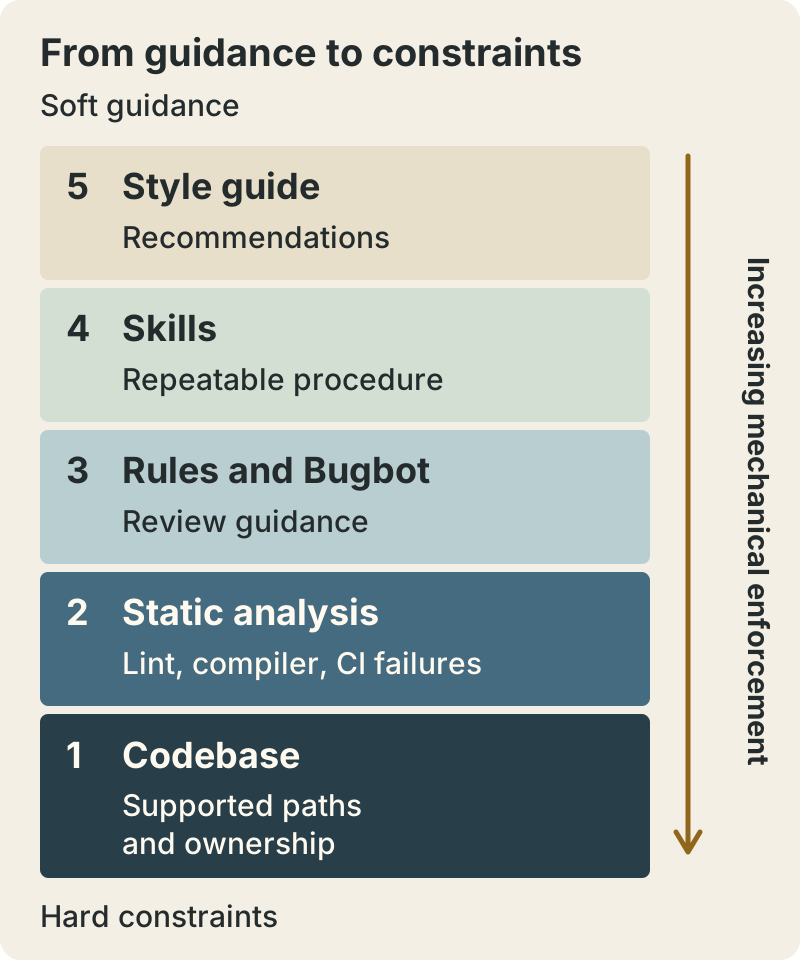
The stack reverses the numbered slide’s display order: style guide (5), skills (4), rules/Bugbot (3), static analysis including lint/compiler/CI (2), and codebase architecture (1). These layers complement each other. Soft instructions can be forgotten; a mechanical failure requires a code or configuration change rather than a reassuring answer. Neither architecture nor a compiler makes bugs impossible.
This is harness engineering in the editorial sense: designing the environment, evidence and constraints surrounding a model. The harness engineering article quoted by akari is related context by a different author, @0xwhrrari. It is not Tan’s written guide or evidence for her reported PR totals.
Turn one repeated review comment into a CI failure
“How do I turn this into a lint rule? How do I turn this into a CI failure?” Tan asks. Her bans on useEffect and code comments are project-specific choices, not universal React or documentation advice. She describes agents adding irrelevant historical narration in comments. The useful adaptation is to identify a recurring failure and encode a check with a clear supported alternative.
Make a forbidden React pattern fail lint
An illustrative review request is that this renderer feature must use the approved state owner rather than adding effects. The following Superbash example assumes a JavaScript/JSX React project with locally installed, locked ESLint and flat configuration. Adapt the existing config; retain the configured TypeScript parser for TypeScript. This minimal example covers JS/JSX only.
// eslint.config.mjs: append this policy to the example app's config.
export default [
  {
    files: ["src/renderer/**/*.{js,jsx}"],
    languageOptions: {
      ecmaVersion: "latest",
      sourceType: "module",
      parserOptions: { ecmaFeatures: { jsx: true } }
    },
    linterOptions: { noInlineConfig: true },
    rules: {
      "no-restricted-syntax": [
        "error",
        {
          selector: "ImportDeclaration[source.value='react'] > ImportSpecifier[imported.name='useEffect']",
          message: "Use the approved feature state owner; renderer features may not import useEffect."
        },
        {
          selector: "CallExpression[callee.name='useEffect']",
          message: "Use the approved feature state owner instead of a renderer effect."
        },
        {
          selector: "CallExpression[callee.type='MemberExpression'][callee.property.name='useEffect']",
          message: "Use the approved feature state owner instead of a renderer effect."
        }
      ]
    }
  }
];
Failing fixture, src/renderer/policy-fail.jsx:
import { useEffect as runEffect } from "react";
export function Status() {
  runEffect(() => {}, []);
  return null;
}
Passing fixture, src/renderer/policy-pass.jsx:
export function Status({ label }) {
  return <output>{label}</output>;
}
Run each command separately in a disposable reader project:
./node_modules/.bin/eslint src/renderer/policy-fail.jsx --max-warnings 0
./node_modules/.bin/eslint src/renderer/policy-pass.jsx --max-warnings 0
Expected exits are 1 with the import-policy message for failure and 0 for success. Exit 2 means configuration/runtime trouble. ESLint’s selector rule documentation explains selectors and custom diagnostics; its CLI documentation covers the flags and exit codes.
The import selector catches aliases such as runEffect. Call selectors cover direct and member calls, but wrappers, re-exports, computed string access and unusual imports need additional enforcement. The generic member selector can flag a non-React method. This is a syntax rule, not comprehensive symbol analysis.
Validate both fixtures, then remove the deliberately failing file from production source. Have an existing required CI/build job run ./node_modules/.bin/eslint src/renderer --max-warnings 0 before building. Propagate failure with && or a fail-fast runner; protect config changes through review. Name the real supported API in diagnostics. This example implements neither that API nor a comment ban. Here it is article content only: Superbash adds no ESLint dependency, script or workflow; GitHub Actions is disabled.
Start locally, then move proven work to the cloud
“I think that the best place to start is local, because you can observe.” Tan’s advice gives you a place to inspect tool calls and application behavior while correcting the skill. If an agent opens the wrong build, misses a precondition or mistakes a loading state for success, you can see the failure before automating it elsewhere.
After proving that loop, reuse the verified environment and skill in the cloud. Tan’s Benny example takes bug reports, launches its own cloud desktop, drives Cursor with the same control skills and reproduces behavior. Its useful result was that a report reproduced on an older build while, in her words, “it’s already fixed on main.” The remaining action was releasing another build. Benny did not need to generate a duplicate fix, and the example does not establish that it wrote the original one.
Build and environment identifiers are essential evidence. Record the reported version, tested commit, fixture state and exact steps alongside screenshots or recordings. Distinguish reproduced, not reproduced, already fixed and blocked outcomes. A report without a reproducible environment should remain blocked until the missing information arrives.
Tan also describes PMs, designers and GTM colleagues contributing within the constrained system. These are human colleagues. In the PM example, she still describes reviewing the proposed fix. The practical gain is that contributors can follow supported paths and return evidence for review; an agent’s completion message does not remove that responsibility.
Copy the feedback loop within your token budget
“I work at an AI lab where we have unlimited tokens,” Tan says, before cautioning against copying her exact approach. She describes substantial upfront token spending and ROI tradeoffs. Her access does not establish that the same refactor or evaluation schedule fits another team’s budget.
For a first week, use one agent and one flow. Write one map entry, collect an evidence bundle and confirm that you can tell a working run from a broken one. Add broken and working eval fixtures, with a missing-data holdout that should return BLOCKED. Then turn one recurring review failure into a required check. Move only the stable reproduction task to a cloud environment after it reliably returns evidence.
Budget retries and concurrent workers explicitly. Stop when the time or spending cap is reached and record unfinished work honestly. Measure cost per verified task, review time and regressions alongside output counts. A cheaper completion that requires a long manual investigation may be a worse result; a blocked verdict that prevents a false fix may be valuable.
The Astra early review is related reading on bounded verification, not supporting evidence for this workshop. Before expanding the workflow, use the acceptance-check lesson to define the evidence that would let a reviewer accept the next change.
Workshop sources and practical references
Sources: akari’s original video post, Evan’s repost, the separate @0xwhrrari harness article, and official ESLint selector and CLI documentation. Templates and diagrams are Superbash adaptations. The board verification templates are illustrative and have not been run against a real app; the two lint fixtures were checked in a disposable project and returned the expected failure and success exits.
Put this to work
Separate the viral caption from Lauren Tan’s workflow for earning trust in coding agents.
Try
Write one verification skill, map one feature, and evaluate it on a broken and a working fixture.
Prove it worked
Keep reproduction evidence, score against a fixed rubric, and demonstrate a CI check rejecting a known violation.
Keep in view
- The viral organization chart and compensation claims do not appear in the workshop.
- A verification skill and feature map let agents test the application they change.
- Skill evals and enforced architecture make repeated work easier to review.