Tencent WorkBuddy · Tutorial 14
WorkBuddy Security, Memory, Cost, and Troubleshooting
Audit permission modes, data paths, memory, skills, connectors, credits, backups, and logs before trusting WorkBuddy with important work.

0 of 1 complete
Reference guide · Read when needed · View the route
Last checked and updated: September 3, 2026
WorkBuddy’s default permission mode requests confirmation for sensitive operations such as file changes or work outside the workspace. Full Access removes many confirmations and can allow high-risk operations directly. Keep default permission for daily work and treat Full Access as an exceptional, time-bounded choice for a trusted task.
When a confirmation appears, review three things:
- Operation: read, write, delete, execute, send, or change settings.
- Scope: exact paths, records, accounts, recipients, or services.
- Necessity: why the deliverable requires that authority.
If uncertain, cancel and request a preview, file list, backup, or script explanation.
Understand the data path
“Local AI workbench” does not mean no data ever leaves the machine. Official documentation describes:
- Local file operations in authorised workspaces.
- Model processing that may involve data fragments.
- Library content created in WorkBuddy cloud storage.
- Uploaded office and local files stored through Tencent cloud-drive services.
- External sharing when Skills, MCP, Connectors, OAuth services, models, or notification channels are used.
- Logs and metadata for status, audit, reliability, and product operation.
Map your task:
Input data classification:
Local paths read:
Files written:
Model/provider:
Skills and scripts:
External services and domains:
Cloud storage destination:
People or identities with access:
Logs/history retained:
Deletion or revoke path:
If you cannot fill this in for sensitive work, the task is not ready.
Review memory
Personal memory is enabled by default in the documented product. WorkBuddy extracts useful facts and preferences from conversations, processes them nightly, and allows review, editing, deletion, or disabling in Settings → Memory. Official guidance warns that memory summaries may be inaccurate or stale.
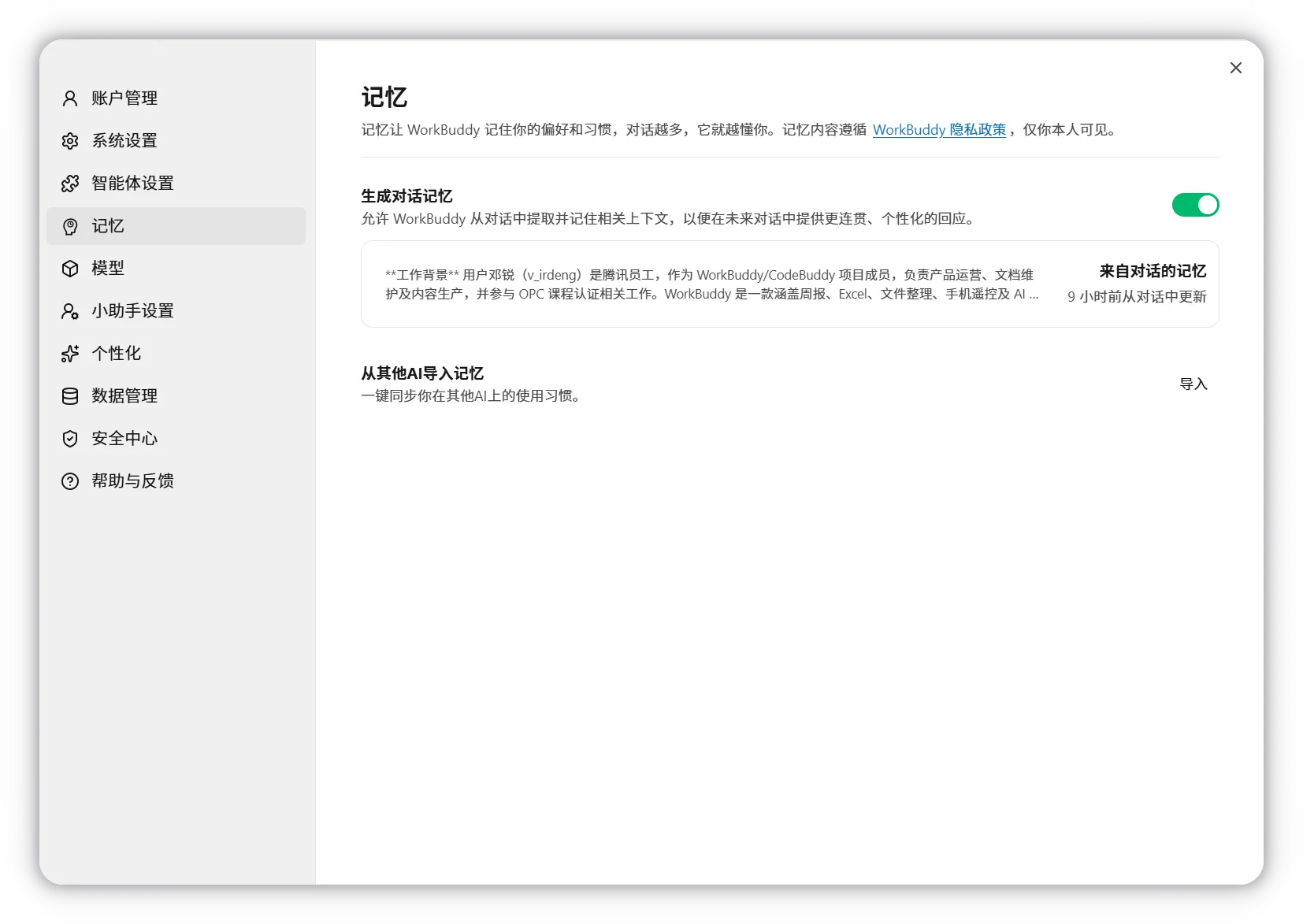
Monthly memory audit:
- Delete secrets, temporary facts, and sensitive details that should not persist.
- Correct wrong preferences or relationships.
- Add dates to facts that expire.
- Do not store legal instructions, live balances, credentials, or medical conclusions as trusted memory.
- Disable memory for workflows where retention is inappropriate.
Control credits
The official credit guide says all conversation-related requests consume credits, with cost affected by model token pricing and task complexity. Control cost by:
- Profiling a sample before a full batch.
- Selecting only relevant files and sheets.
- Using Ask for inspection before expensive creation.
- Separating research, analysis, and final rendering so only the failed stage reruns.
- Disabling unused skills and connectors.
- Setting a run-frequency budget for automations.
- Checking shared use by CodeBuddy on the same account.
Budget card:
Task: weekly competitor brief
Test-run credits: [value]
Expected runs/month: 4
Expected monthly credits: test x 4 + 25% retry buffer
Stop threshold: [value]
Owner checks usage: [day/person]
Credential hygiene
- Never paste tokens, API keys, AppSecrets, QR codes, recovery codes, cookies, or private keys into chat.
- Use supported secure settings and OAuth flows.
- Prefer test accounts and narrow scopes.
- Rotate a credential if it appears in a prompt, screenshot, file, or log.
- Revoke access in both WorkBuddy and the external service.
- Do not put credentials in custom skill instructions or repositories.
Recovery before debugging
Maintain:
- Copies of irreplaceable originals.
- Git checkpoints for code and text projects.
- Rename/rollback manifests for batches.
- Source ledgers for research.
- Automation run history.
- Connector owner and revoke path.
When something fails:
- Stop further actions.
- Capture the exact error, time, task, model, and step.
- Inventory changed files and external side effects.
- Preserve logs and generated manifests.
- Roll back only after reviewing the target.
- Reproduce with a smaller, non-sensitive input.
- Change one variable at a time.
Common problems
| Problem | First checks |
|---|---|
| Mac permission or auth errors | App version, current-user ownership of WorkBuddy support folders, official FAQ; do not run broad recursive permission commands blindly |
| Connector stopped working | Correct account, OAuth/token expiry, scope, service status, and revoked access |
| Mobile task cannot see a file | Desktop path and workspace; mobile clients cannot directly upload arbitrary desktop files |
| Task uses wrong context | Selected workspace, task boundary, stale memory, Project assets, and attached files |
| Automation spends too much | Model, file volume, prompt length, retry loop, frequency, and shared credits |
| Result looks complete but is wrong | Return to source ledger, reconciliation, formulas, changed paths, and independent checks |
Success check
Complete a control audit for one real workflow. It passes when you can name its data path, permissions, credentials, retained memory, monthly cost, rollback, and owner—and demonstrate how to disable or revoke every external capability.
FAQ
Is Full Access ever appropriate?
It may reduce friction for a trusted, contained task, but official guidance warns it can execute high-risk actions without confirmation. Prefer default permission and narrow workspaces; turn Full Access off immediately after any exceptional use.
Does deleting a connector remove all data?
Not necessarily. Task history, local files, external-service records, caches, or cloud artefacts may remain. Check each location and the service’s retention terms.
Is memory charged?
Official documentation says memory extraction does not consume the user’s credits. Tasks that use model reasoning still consume credits normally.
Quick self-check
Q1. A skill asks you to paste a service API key into the task chat. What should you do?
Answer: Stop. Use a supported secure credential field or do not use the integration; rotate the key if it was already exposed.
Official sources
What’s next
Combine the course into one evidence-backed workflow in L15: Capstone—Build a Weekly Briefing System.