Tencent WorkBuddy · Tutorial 15
Capstone: Build a Weekly Briefing System in WorkBuddy
Research, analyse, write, visualise, archive, and propose automation for one weekly briefing while preserving evidence and approval boundaries.

0 of 1 complete
Reference guide · Read when needed · View the route
Last checked and updated: September 3, 2026
The capstone is a weekly AI-tools briefing for a small operations team. You will produce:
- A research contract.
- A source ledger.
- A structured data table.
- A reviewed Markdown brief.
- One chart and a five-slide presentation.
- A Library archive with status metadata.
- A draft custom Skill.
- An Automation proposal—enabled only after the manual run passes twice.
Use public, non-sensitive information and a disposable workspace. Do not create vendor accounts, start trials, contact companies, upload private data, or publish a public page.
Phase 1: define the weekly question
Choose a narrow question, such as:
What changed this week in the official pricing, availability, or major workflow features of three AI office tools our team already evaluates?
Create research-contract.md:
Audience: five-person operations team.
Decision: whether any current workflow needs re-testing.
Products: [three named tools].
Period: previous seven calendar days in Asia/Hong_Kong.
Allowed sources: official product, documentation, pricing, status, release, and policy pages.
Discovery sources: search and directories, never final proof.
Required result: changes, unchanged items checked, conflicts, unavailable facts, and next tests.
Forbidden: accounts, trials, outreach, downloads, publication, or private data.
Phase 2: plan before browsing
In Plan mode, ask WorkBuddy to show:
- Source domains it expects to use.
- Claim-ledger fields.
- Pages that require live verification.
- Files it will create.
- Model and skills.
- Estimated stages and stop points.
Do not approve if the plan relies on snippets, community claims, or an undefined “deep research” step.
Phase 3: build evidence and data
Create source-ledger.csv with one claim per row. Then create changes.csv:
product,change_type,previous_state,current_state,effective_date,source_url,checked_at,statusPossible status values: confirmed, partial, conflicting, unavailable, no_change_found.
Require WorkBuddy to preserve “no change found” as a search result bounded by checked pages—not proof that no change exists anywhere.
Reconcile:
- Every
changes.csvrow has a ledger claim. - Every confirmed value has a direct official URL.
- Effective date is distinct from page publication date.
- Calculations can be reproduced from stored values.
Phase 4: write the brief
Using only reviewed source-ledger.csv and changes.csv, create weekly-brief.md.
Structure:
1. Executive decision — what requires action this week.
2. Confirmed changes.
3. Checked but unchanged.
4. Conflicts and unavailable facts.
5. Recommended tests, owners left blank for human assignment.
6. Method and checked-at time.
Put a direct source beside every change. Separate facts, calculations, and recommendations.
Read every source-linked sentence. Reject unsupported confidence, invented impact, or a recommendation that does not follow from the evidence.
Phase 5: chart and presentation
Create one chart only if the data supports comparison. A count of changes may be misleading when documentation coverage differs. A better chart might show the verified current monthly price for the same comparable tier—with currency, tax, billing period, checked date, and “not comparable” where needed.
Then request five slides:
- Decision this week
- Confirmed changes
- Comparable data
- Risks and unknowns
- Tests and human owners
Open the PPT, inspect every slide, and recalculate the plotted values.
Phase 6: archive the reviewed package
Save to a date-stamped Library folder:
2026-09-03-weekly-brief/
  Sources/source-ledger.csv
  Data/changes.csv
  Reviewed/weekly-brief.md
  Reviewed/weekly-brief.pptx
  Method/research-contract.md
  Method/run-review.md
Add owner, reviewed status, checked date, next recheck date, and sensitivity. Keep drafts outside Reviewed.
Phase 7: design the reusable Skill
Ask WorkBuddy to create a draft Skill named weekly-evidence-brief that:
- Requires a product list and date window.
- Creates the contract, ledger, data, brief, and review checklist.
- Accepts only official pages as confirmation.
- Stops on login walls, conflicts, or publication.
- Never sends, buys, creates accounts, or changes permissions.
- Leaves owners blank.
- Does not enable a schedule.
Inspect the generated skill contents and run it on one product with a one-day window. Test a conflicting source and an unavailable page.
Phase 8: propose Automation
Only after two manual runs pass, create—but initially pause—an Automation proposal:
Name: Weekly evidence briefing — draft only
Schedule: Monday 07:30 Asia/Hong_Kong
Workspace: dedicated weekly-briefing folder
Skill: reviewed weekly-evidence-brief version
Output: date-stamped draft folder
Notification: “Draft ready for review”; no attachment with sensitive content
Forbidden: send, publish, overwrite Reviewed, change connectors, retry more than once
No-input/failure: create a failure report, not a fabricated brief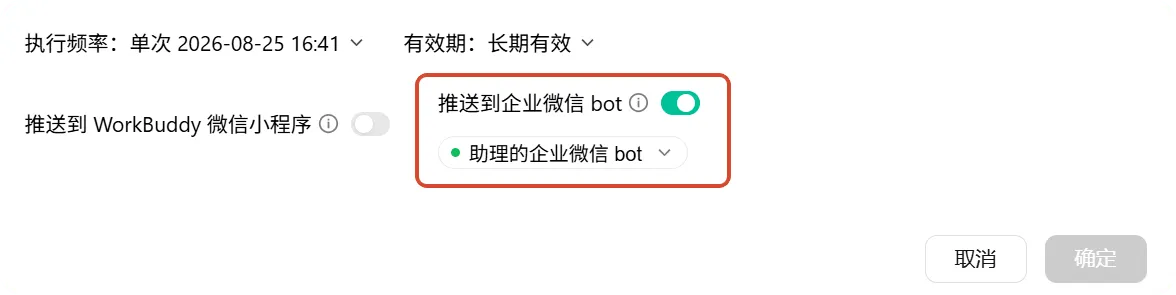
Final acceptance checklist
- The question and time window are explicit.
- Every factual change has a direct official source and checked time.
- Discovery evidence is not promoted to confirmation.
- Data and calculations reconcile.
- The brief separates facts, calculations, unknowns, and recommendations.
- Chart and slides match reviewed data.
- No external message, account, purchase, or publication occurred.
- Library status distinguishes Draft from Reviewed.
- Skill triggers narrowly and handles conflicts.
- Automation remains paused until two manual runs pass.
- Permission, connector, memory, and credit audits are recorded.
- A human owns approval, schedule monitoring, and shutdown.
Graduation test
Give the reviewed package to someone who did not watch the task. They should be able to:
- Reproduce three claims from direct sources.
- Recalculate one chart value.
- Identify what remains unknown.
- See which files and services were used.
- Stop or revoke the future workflow.
If they cannot, the system is not finished even if the presentation looks excellent.
FAQ
Why not automate from the start?
Automation repeats both good methods and hidden mistakes. Two supervised runs expose ambiguous inputs, unstable pages, missing failure behaviour, and real credit use.
Should an expert team write the final brief?
It can review research, operations, and risk in parallel, but one accountable human still approves the evidence set and conclusion.
Can the brief publish automatically to workbuddy.link?
Not in this capstone. Public publishing changes the audience and requires a separate release decision, data clearance, testing, owner, and rollback.
Quick self-check
Q1. What is the capstone’s real deliverable: the slide deck or the system?
Answer: The reviewable system—contract, sources, data, checks, artefacts, archive, reusable method, and controlled future run.
Official sources
Course complete
You can now use WorkBuddy as a supervised production system: define the outcome, narrow the authority, preserve evidence, inspect changes, and automate only what has already earned trust.