Tencent WorkBuddy · Tutorial 11
WorkBuddy Connectors, MCP, and Tencent Tools
Connect one external service with least privilege, test read-only access, distinguish credentials from content, and revoke the integration cleanly.

0 of 1 complete
Reference guide · Read when needed · View the route
Last checked and updated: September 3, 2026
WorkBuddy Connectors bridge tasks to external services. Current official documentation lists QQ Mail, Tencent Docs, Tencent Lexiang, Tencent Meeting, TAPD, and Tencent cloud storage, and it supports custom connectors through MCP.
MCP is the technical connection standard. A Connector is the product experience that configures and manages an external service. A Skill may then teach WorkBuddy how to use that capability for a particular workflow.
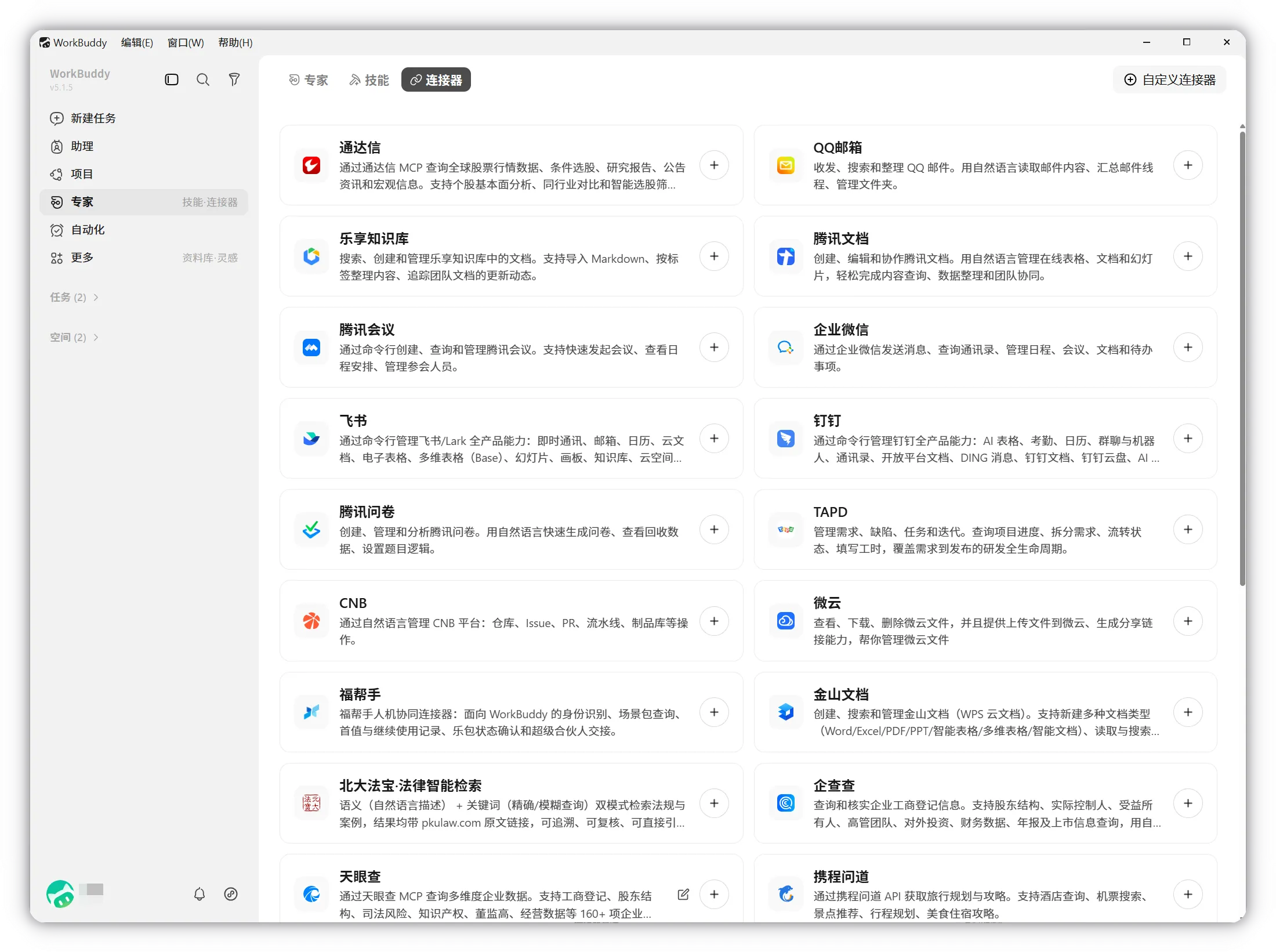
Choose a low-risk first connection
A good first exercise is a personal Tencent Docs folder containing one harmless practice document. Avoid your full mail history, company-wide knowledge base, production TAPD project, or shared drive.
Create a connector card:
Service: Tencent Docs practice folder
Identity: personal test account
Requested scopes: read selected documents; create one practice document
Forbidden actions: change sharing, invite collaborators, delete, publish
Data allowed: synthetic meeting notes only
Test: list one document title and last-updated time
Revoke path: WorkBuddy Connector settings + service account settings
Owner: [person]
Review the authorisation screen
OAuth or QR authorisation should show the service identity and requested permissions. Read them. If the integration requests broader authority than the exercise needs, cancel.
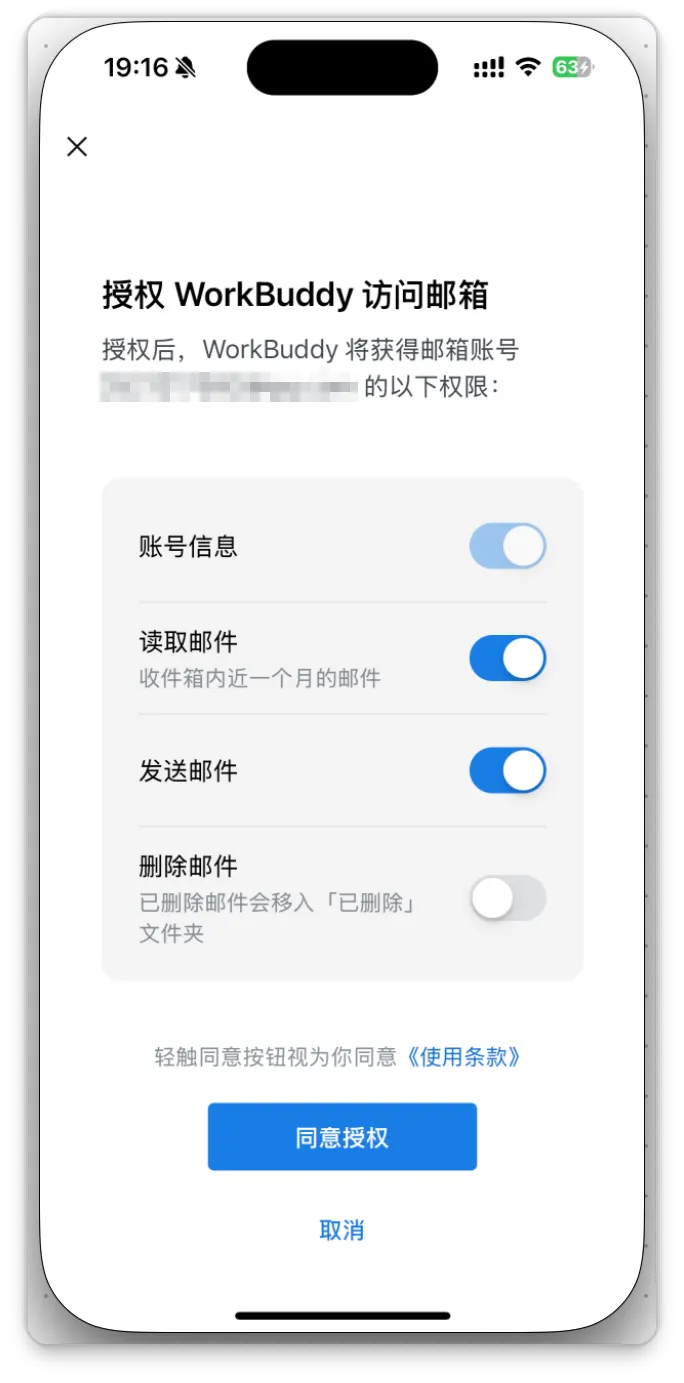
Credentials are capabilities. Do not paste an OAuth token, Tencent Docs token, QQ bot AppSecret, API key, or recovery code into the chat. Use the supported secure settings or authorisation flow. The official Tencent Docs practice explicitly tells users to keep its personal Token secure.
Run a read-only connection test
Use only the connected Tencent Docs practice location.
Read the selected document and report:
- title,
- last updated time,
- section headings,
- current collaborator count if the connector exposes it.
Do not edit content, comments, title, permissions, or collaborators.
Do not copy the document to another service.
Compare the result with Tencent Docs directly. If access fails, diagnose the account, scope, expiration, and selected location before broadening permissions.
Add one controlled write
After read-only access passes:
Create a new Tencent Docs document in the practice folder named “Connector test — 2026-09-03”.
Body: one sentence stating this is synthetic test content.
Do not copy any source document, add collaborators, change folder permissions, or send a notification.
Return the direct link and the exact actions performed.
Open the result in Tencent Docs and inspect its location and sharing state. Then delete it yourself if deletion is part of cleanup; do not hide a write test by letting the agent clean up before you can inspect it.
Public, personal, and project authorisation
WorkBuddy Projects distinguish:
- Public authorisation: an administrator configures a shared service account for members.
- Personal authorisation: each member connects their own account and credentials are not shared.
Use personal authorisation when actions must reflect the individual. Use public authorisation only for a deliberately shared account with documented ownership and audit rules.
Custom MCP checklist
For a custom MCP server, inspect:
- Publisher and source repository.
- Server command or URL.
- Tools it exposes and whether they read or write.
- Environment variables and credential handling.
- Data sent to the server and onward services.
- Local process permissions and network destinations.
- Logs, updates, disable, and uninstall procedure.
An MCP server is software with authority, not a harmless prompt preset.
Revoke and prove revocation
- Disconnect the service in WorkBuddy.
- Revoke the app or token in the external service when available.
- Start a new task and rerun the read-only test.
- Confirm access now fails.
- Check whether local cached content or task history remains and handle it according to policy.
Success check
The connection passes when the intended account and narrow scope work, one read-only and one synthetic write test are independently verified, forbidden actions did not occur, and revocation prevents new access.
FAQ
Does connector activity consume credits?
Official documentation says the connector’s direct data access may not consume credits, while WorkBuddy’s model work to understand, summarise, or generate from that data does.
Can an email connector send automatically?
The documented Agent Mail flow keeps replies, forwards, and other outbound actions behind user confirmation. Continue to inspect recipient, attachment, identity, and content before sending.
Is a Tencent service automatically trusted with all company data?
No. Service ownership does not replace your organisation’s data classification, contractual requirements, least-privilege design, or approval process.
Quick self-check
Q1. Where should a connector token be entered?
Answer: Only in the supported secure authorisation/settings flow—not in chat, a document, screenshot, skill body, or repository.
Official sources
What’s next
Combine shared instructions, assets, expertise, and collaboration deliberately in L12: Projects, Experts, and Agent Teams.