Hermes Agent · Tutorial 13
Clean Up Hermes Skills Safely with Curator
Audit a crowded Hermes skill library, preview Curator's decisions, protect important workflows, and recover or roll back anything it archives.
0 of 1 complete
Reference guide · Read when needed · View the route
Source-checked and updated: August 20, 2026. Commands, defaults, scope, backup behavior, and consolidation cost were checked against the current official Hermes Agent documentation and source.
Hermes can learn a useful workflow and save it as a Skill. That is powerful until the library starts filling with old experiments, near-duplicates, and instructions that describe a setup you no longer use.
Curator is Hermes’ maintenance system for that problem. It records skill activity, marks long-unused managed skills as stale, moves older ones into a recoverable archive, and can optionally ask an auxiliary model to merge overlapping skills into broader, easier-to-find instructions.
This lesson turns the /curator idea highlighted by Luke The Dev into a safe, repeatable maintenance workflow. You will inspect the library before changing it, protect anything operationally important, preview a run, and prove that recovery works.
Prereqs: complete L04: Skills and Skill Bundles first. If any of your Skills run on a schedule, also read L08: Cron, Kanban, and sub-agents.
What you will be able to do
By the end of this lesson, you can:
- explain which skills Curator can and cannot touch;
- preview a cleanup without mutating the library;
- pin a critical Skill and protect scheduled workflows;
- choose between free deterministic pruning and paid LLM consolidation;
- restore one archived Skill or roll back an entire run;
- read Curator’s reports and audit ledger instead of guessing what changed.
The idea that made Curator click
Luke The Dev described Hermes as a potential “skill hoarder”: the agent keeps learning, but the resulting library accumulates old workflows, several versions of the same method, and forgotten experiments. The proposed fix is a quiet maintenance pass that waits for an idle period, archives instead of deleting, and leaves a record of what happened.
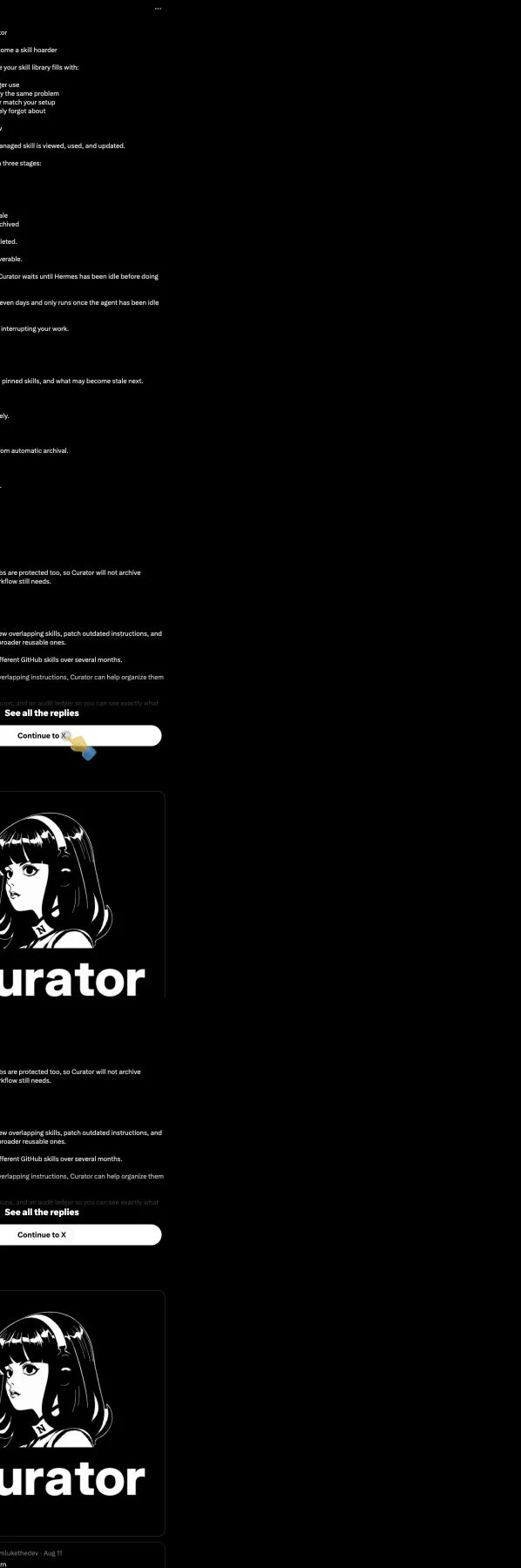
Source: Luke The Dev’s Curator post on X, captured August 20, 2026. The post is a useful overview; the operational details below follow current Hermes documentation.
There is one naming detail worth getting right: Curator is not a normal task Skill that you install from a marketplace. It is a built-in Hermes feature exposed through the hermes curator CLI and the matching /curator slash command inside a running session.
The lifecycle: active, stale, archived
Curator’s default lifecycle is deliberately boring:
- A managed Skill starts as active.
- After 30 days without activity, it becomes stale.
- After 90 days without activity, Hermes moves it to
~/.hermes/skills/.archive/. hermes curator restore <skill>moves it back to the active tree.
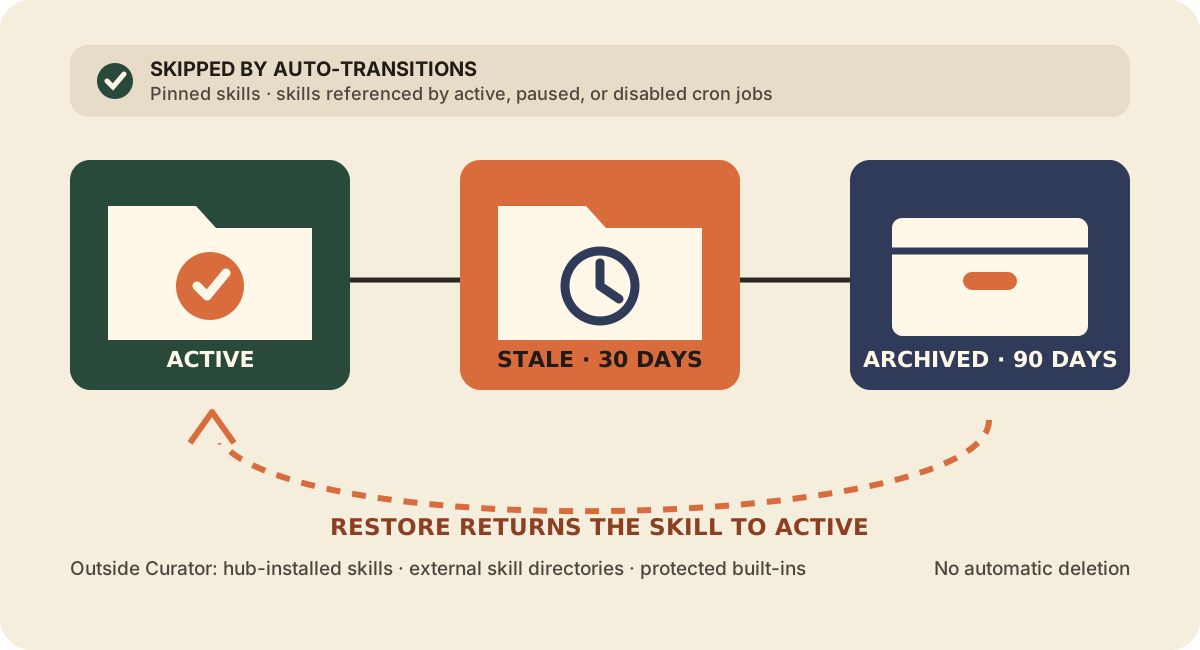
Figure 1: Archive is a reversible state, not deletion. Pinning and cron references act as safety rails around automatic transitions.
The background check runs only when two conditions are true: one full interval has passed since the last run—168 hours, or seven days, by default—and Hermes has been idle for at least two hours. It is an inactivity check on CLI startup and the gateway’s recurring ticker, not a separate system cron daemon.
On a fresh install, Curator does not immediately sweep the library. The first observation records the current time, then waits one full interval. That grace period is your chance to inspect the catalog, pin anything important, or disable Curator.
What Curator actually manages
This is the part most summaries skip.
Curator primarily manages Skills that Hermes’ background self-improvement review explicitly marked for autonomous curation. The policy flag lives in ~/.hermes/skills/.usage.json. Despite its historical name—created_by: "agent"—the field means “autonomous Curator may manage this”, not reliable proof of who typed the original file.
Your hand-written Skills and Skills created by a foreground agent at your request are normally unmanaged. Curator reports them but does not automatically stale, archive, or consolidate them until you explicitly adopt them:
hermes curator list-unmanaged
hermes curator adopt <skill-name>
hermes curator adopt --all-unmanaged --dry-run
Adoption is a policy decision. It does not reset the activity clock. If you adopt a Skill last used six months ago, it may qualify for archival on the next real pass.
Current Hermes also defaults to:
curator:
  prune_builtins: true
That allows unused bundled built-in Skills to be archived after the 90-day threshold. Bundled Skills are not patched or merged by the LLM review. If you want the older, narrower behavior—only explicitly managed local Skills—set prune_builtins: false.
Use this boundary map before deciding what to adopt or protect:
| Skill category | Curator behavior |
|---|---|
| Curator-managed local Skills | Tracks activity; can stale, archive, patch, or consolidate according to settings |
| Unmanaged hand-written or foreground-created Skills | Reports them; leaves them alone until you adopt them |
| Bundled built-ins | Can be archived for long inactivity when prune_builtins: true; never LLM-patched or consolidated |
| Hub-installed Skills | Always off-limits; the hub owns their update lifecycle |
| External skill directories | Always off-limits; the external source owns them |
Protected built-ins such as plan | Hardcoded as off-limits because Hermes depends on them for core UX |
Your first safe Curator run
Use this order. It separates observation, protection, preview, and mutation.
1. Inspect the inventory
hermes curator status
hermes curator list-unmanaged
hermes curator list-archived
status shows the last run, counts by lifecycle state, pinned Skills, and the least-recently-used candidates. Pay attention to the split between curator-managed and unmanaged. A large local library can legitimately show zero managed Skills.
If the report says Model: (not resolved) and Duration: 0s, do not immediately debug your model configuration. With no managed consolidation candidates, Hermes skips model resolution entirely.
2. Protect critical Skills
hermes curator pin deployment-checklist
hermes curator pin customer-report
A pin blocks automatic stale/archive transitions, excludes the Skill from LLM consolidation, and prevents an agent from deleting it through skill_manage. Normal patches and edits are still allowed.
Skills named in any cron job’s skills: list receive similar protection from automatic transitions—even if the job is paused or disabled. Use an explicit pin as well when you also want tool-driven deletion blocked.
3. Take a named backup
hermes curator backup --reason "before-first-curator-run"
hermes curator rollback --list
Hermes automatically snapshots the skills tree before every real Curator pass, but a named manual backup gives you an obvious checkpoint. Snapshots live under ~/.hermes/skills/.curator_backups/; the default retention is five.
4. Preview the decisions
hermes curator run --dry-runRead the generated REPORT.md under ~/.hermes/logs/curator/<timestamp>/. Confirm that stale and archive candidates make sense. If a critical Skill appears, pin it before going further.
5. Run deterministic pruning
hermes curator runWith the default configuration, this performs only the deterministic activity-based transitions. No auxiliary model is called, so there is no LLM review bill.
6. Verify and rehearse recovery
hermes curator status
hermes curator list-archived
hermes curator ledger --limit 20
Choose a non-critical archived test Skill and restore it:
hermes curator restore <test-skill>Your cleanup is not proven until you can find the report, identify the mutation in the ledger, and restore something successfully.
Pruning and consolidation are different jobs
Curator has two phases, and only one is enabled by default.
Deterministic pruning uses activity timestamps and fixed thresholds. It marks stale Skills and moves old ones into the archive. It does not need an LLM.
LLM consolidation reads managed skill packages, looks for overlap or drift, and may patch instructions, combine several narrow Skills into a broader umbrella, or archive absorbed copies. It is off by default because it spends auxiliary-model tokens and makes larger structural changes.
Run it once without changing your default:
hermes curator run --consolidateOr enable it for future runs:
curator:
  consolidate: true
The official docs warn that a full sweep can take 50–100 API calls. Put Curator on a cheaper auxiliary model if you enable consolidation regularly:
auxiliary:
  curator:
    provider: openrouter
    model: google/gemini-3-flash-preview
    timeout: 600
You can also choose the Curator slot interactively through hermes model or the dashboard’s Models tab.
A realistic skill-hoarder cleanup
Imagine your library contains seven GitHub-related Skills accumulated over six months:
github-pr-review;github-pr-security-review;github-issue-triage;fix-github-403;github-release-checklist;github-actions-debug-august;github-repo-audit.
Do not start by adopting everything and turning on consolidation.
First, list unmanaged Skills and inspect when each was last active. Pin any Skill used by a release or deployment workflow. Run a dry pass. Then adopt only the GitHub cluster you genuinely want Curator to manage. A one-off consolidation can propose a class-level github-operations umbrella with focused sections and support files, while leaving the deployment-critical release Skill pinned and standalone.
The test is discoverability: when Hermes searches by description, can it find one broad, well-described Skill faster than seven narrow, overlapping ones? Fewer files is not the goal by itself. A smaller library that hides distinct workflows is worse than the clutter you started with.
Configuration you should understand
The current defaults live under curator: in ~/.hermes/config.yaml:
curator:
  enabled: true
  interval_hours: 168
  min_idle_hours: 2
  stale_after_days: 30
  archive_after_days: 90
  consolidate: false
  prune_builtins: true
  archive_ttl_days: 0
  backup:
    enabled: true
    keep: 5
archive_ttl_days: 0 means archives are kept indefinitely. If you set a time-to-live, deletion still requires an explicit purge:
hermes curator purge --dry-run
hermes curator purge --days 180
For a conservative personal setup, this is a sensible starting point:
curator:
  enabled: true
  interval_hours: 168
  min_idle_hours: 2
  stale_after_days: 45
  archive_after_days: 120
  consolidate: false
  prune_builtins: false
  archive_ttl_days: 0
  backup:
    enabled: true
    keep: 8
That is a recommendation, not the product default. It leaves bundled Skills alone, gives local Skills a longer observation window, keeps archives indefinitely, and retains more rollback points.
Commands worth remembering
| Goal | CLI command | Slash equivalent |
|---|---|---|
| See inventory and likely stale candidates | hermes curator status | /curator status |
| Preview a run | hermes curator run --dry-run | /curator run --dry-run |
| Run the default prune-only pass | hermes curator run | /curator run |
| Force one consolidation pass | hermes curator run --consolidate | /curator run --consolidate |
| Protect a Skill | hermes curator pin <name> | /curator pin <name> |
| Remove protection | hermes curator unpin <name> | /curator unpin <name> |
| Stop or resume background runs | hermes curator pause / resume | /curator pause / resume |
| Restore one archived Skill | hermes curator restore <name> | /curator restore <name> |
| Inspect archived Skills | hermes curator list-archived | /curator list-archived |
| Inspect unmanaged Skills | hermes curator list-unmanaged | /curator list-unmanaged |
| Hand a Skill to Curator | hermes curator adopt <name> | /curator adopt <name> |
| Snapshot the whole library | hermes curator backup | /curator backup |
| Undo the latest whole-library run | hermes curator rollback | /curator rollback |
| Inspect individual mutations | hermes curator ledger | /curator ledger |
Backups, reports, and the audit ledger
Curator gives you three levels of evidence and recovery:
- Per-run report:
~/.hermes/logs/curator/<timestamp>/REPORT.mdexplains what the pass did.run.jsonkeeps the machine-readable record. - Whole-tree snapshot: every real run creates a compressed backup.
hermes curator rollbackrestores the newest one;rollback --listandrollback --id <timestamp>let you choose another. - Mutation ledger:
~/.hermes/skills/.curator_ledger.jsonlrecords who changed what, the action, evidence, and before/after file hashes.hermes curator rollback <entry-id>undoes one mutation without replacing the rest of the library.
Rollback itself takes a safety snapshot before changing the tree. Single-entry rollback fails closed if Hermes cannot capture the current state first.

Source: Official Hermes Agent Curator documentation, captured August 20, 2026.
Troubleshooting the mistakes that matter
| Symptom | Likely cause | Fix |
|---|---|---|
status shows zero managed Skills | Your Skills are hand-written, foreground-created, hub-installed, or external | Run list-unmanaged; adopt only the Skills you intentionally hand over |
| Report shows no resolved model and a 0-second run | There were no consolidation candidates | Treat this as a no-op, not a provider failure |
| A Skill used by automation looks old | The cron job does not reference it in its skills: list | Add the explicit reference and pin the Skill if deletion must also be blocked |
| A restored Skill will not return | An active bundled or hub Skill now uses the same name | Rename the archived Skill or resolve the active-name collision first |
| Consolidation becomes expensive | You enabled an LLM sweep that can make dozens of calls | Use one-off --consolidate, a cheaper auxiliary model, and a generous but bounded timeout |
| You dislike a whole cleanup run | Several related mutations landed together | Use whole-tree rollback; use ledger rollback for one isolated change |
| A critical Skill appeared in the dry-run archive list | It is managed, old, and unpinned | Pin it before any real run; check for an explicit cron reference |
The exercise: prove safe maintenance
Use a disposable test Skill or a non-critical old Skill. Do not use your only deployment or publishing workflow.
- Run
hermes curator statusand record managed, unmanaged, stale, and archived counts. - Run
hermes curator list-unmanagedand choose one non-critical candidate. - Pin one important managed Skill.
- Create a named backup.
- Run
hermes curator run --dry-runand readREPORT.md. - Run the default prune-only pass.
- Inspect
list-archivedand the ledger. - Restore one test Skill.
- Confirm the restored Skill loads in a new Hermes session.
Success criteria
You have finished when all five statements are true:
- You can name exactly which parts of the library Curator manages.
- A critical Skill is pinned or explicitly protected by your chosen policy.
- The dry-run report matched the real run’s intended scope.
- You can point to the backup, report, and ledger entry for the run.
- A restored Skill loads and works again.