Product case study · August 31, 2026
WebMCP Without the Write Risk: A Read-only Browser Tool Lab
Build one read-only WebMCP browser tool, validate its schema, log every call, preserve a UI fallback, and interpret a reproducible 20-versus-20 test.
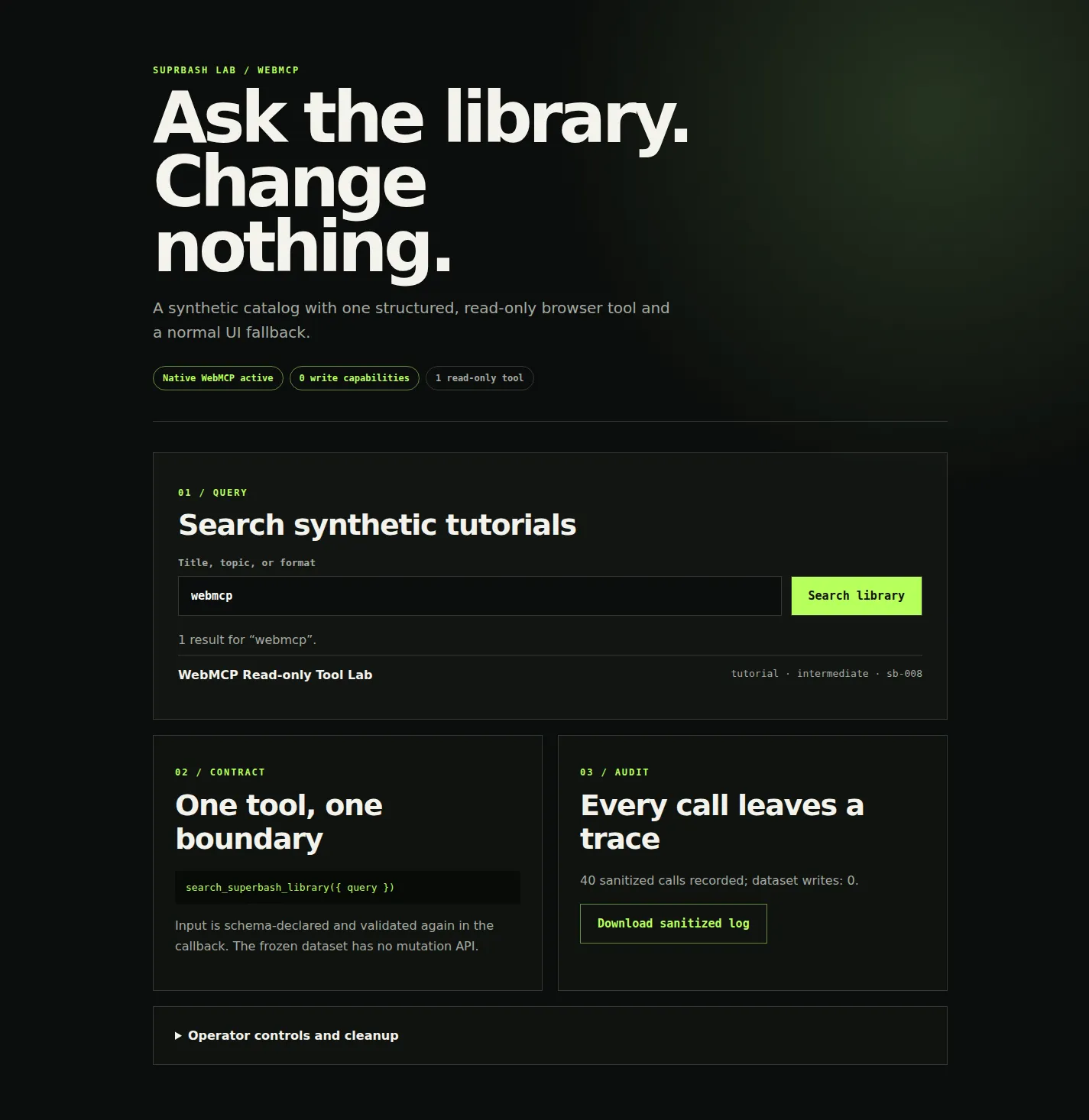
WebMCP is a promising experimental browser API, not a reason to hand an agent more authority. Our native Chromium plumbing run returned the right synthetic record 20/20 times with zero dataset writes, complete logs, and a 75.5% median-latency reduction. Because no approved browser-agent client or model was available, end-to-end agent reliability remains unmeasured.
WebMCP gives a web page a way to describe JavaScript functions as structured tools for an agent. The current draft puts the API at document.modelContext: the page registers a name, description, JSON Schema-shaped input contract, annotations, and an execution callback.[2][5] OpenAI calls it an experimental open standard and is running a challenge with a September 3, 2026, 1 p.m. PT deadline.[1]
The attractive pitch is speed and reliability: stop making an agent infer every action from pixels and labels, and give it a typed path instead. That pitch still needs measurement. A tool can be well structured and dangerously overpowered; a fast benchmark can also be meaningless if the “UI” comparison is artificial.
This tutorial takes the narrow route: one read-only query over frozen synthetic data, one visible UI fallback, one audit trail, and no claim that a browser-plumbing test proves agent performance.
First, put WebMCP in the right layer
WebMCP is a browser-facing API implemented by a page and mediated by a supporting browser. The draft describes client-side tools that live with the visible application and can share its current page context.[2][5]
It is not:
- an Agent Skill or
SKILL.mdinstruction package; - a remote or local MCP server speaking a backend transport;
- a CLI that an agent launches as a subprocess;
- a browser extension or general plugin system;
- a complete application, authentication system, authorization policy, or sandbox.
That distinction matters. The WebMCP repository says backend MCP integrations communicate directly with a service, while WebMCP tools run in the browser page and complement rather than replace backend integrations.[2] The human interface remains primary; the structured tool is another path through reviewed application logic.
The specification is a Draft Community Group Report, explicitly not a W3C Standard or Standards Track document.[5] Chrome lists the feature as an origin trial from versions 149 through 156 and exposes it locally through Experimental Web Platform features.[3][4] OpenAI’s challenge page also names ChatGPT’s in-app browser and Chrome with the experimental flag or origin trial as test paths.[1]
The one-tool demo
The repository includes examples/webmcp-read-only-demo/. It serves eight synthetic tutorial records and registers exactly one tool:
await document.modelContext.registerTool({
  name: "search_superbash_library",
  description: "Searches a frozen synthetic tutorial catalog. Read-only.",
  inputSchema: {
    type: "object",
    additionalProperties: false,
    properties: {
      query: { type: "string", minLength: 2, maxLength: 64 },
    },
    required: ["query"],
  },
  annotations: { readOnlyHint: true, untrustedContentHint: false },
  async execute(input) {
    return executeReadOnly(input, "webmcp");
  },
}, { signal: registrationController.signal });
The annotation is useful metadata, not enforcement. The implementation creates the boundary:
- The callback rejects arrays, unknown fields, non-string queries, and strings outside 2–64 characters.
- The dataset is recursively frozen and serialized before calls.
- Results are new object copies; no dataset reference is returned.
- There is no create, update, delete, login, network, admin, or storage function.
- Every call checks that the serialized dataset is unchanged.
The draft is still moving. Its current executeTool() signature takes an object, but the installed Chromium 151 build returned Failed to parse input arguments for that form and accepted a JSON string. The demo tries the pinned draft form first, then uses the string form only for that specific compatibility error. Keep callback-side validation even when the schema looks complete: the specification still tracks native input/output schema validation as an open area.[2]
Run and enable it
From the repository root:
python3 -m http.server 4173 \
  --directory examples/webmcp-read-only-demo
Open http://127.0.0.1:4173. For a local Chrome test, enable Experimental Web Platform features at chrome://flags/#enable-experimental-web-platform-features and relaunch. For a deployed test during the experiment, register the exact origin for the Chrome origin trial rather than shipping a global browser flag to users.[3][4]
The badge should say Native WebMCP active and the tool count should be one. If the API is absent, the page says so and the normal search form remains active. Search for webmcp; the deterministic answer is record sb-008.
Do not test this demo in a browser profile containing production sessions if you do not need them. It has no use for a login. The data is synthetic, the server is loopback-only, and the benchmark makes no external request.
Permissions are not authorization
WebMCP’s draft includes browser concepts such as secure contexts, same-origin discovery, explicit cross-origin exposure, and a tools Permissions Policy for frames.[2][5] Those controls answer which document or agent can discover and invoke a registered page tool. They do not decide whether a user is allowed to read a production invoice, change a role, or approve a payment.
A production tool must still call the application’s normal authorization layer. It should receive only the session context the visible page already has, enforce object-level access on the server, and reject an operation even when an agent generated syntactically valid arguments.
This demo avoids that ambiguity entirely: it has no account, token, backend API, private record, or write operation. If your first WebMCP proof needs an admin credential, you chose the wrong proof.
Log the call, not the secret
Each demo invocation records:
- timestamp and sequence;
webmcporuichannel;- tool name for structured calls;
- normalized synthetic query;
- result IDs;
- success or validation error;
- callback duration;
- dataset-integrity result.
It does not record a model prompt, cookies, authorization headers, browser profile, or private source data. The log is an in-memory page-session artifact available through the “Download sanitized log” button. Logging is operational state, not a mutation of the catalog being queried.
For a real application, route reviewed audit events to your existing security log with retention and access controls. Do not dump full agent context just because a tool call happened. Prompt text can contain secrets and unrelated personal data.
The UI path is part of the design
The form calls the same queryLibrary() function as the tool callback. It is not a dead fallback page maintained separately. That gives users three exits:
- browsers without WebMCP use the form;
- agents can fall back to browser actuation when no suitable tool exists, a behavior the WebMCP explainer explicitly preserves;[2]
- operators can abort the registration signal, removing the tool while leaving the form operational.
Press Disable WebMCP tool to run the local off switch. The benchmark separately verifies that getTools() returns zero afterward, the query still returns sb-008, and the frozen dataset remains identical.
Cleanup is equally small: close the tab and stop the static server. The harness removes its temporary Chromium profile. There is no package installed into the browser, no extension to uninstall, no credential to revoke, and no persistent application database.
What the 20-versus-20 run measured
The reproducible harness at benchmarks/webmcp-read-only-demo/run-browser.mjs launched Chromium 151.0.7922.108 with Experimental Web Platform features. It pinned WebMCP revision 41d12f057167ccf5954dbcf49d99502cb6c84491, confirmed one registered tool, ran webmcp → sb-008 20 times through native document.modelContext.executeTool(), then ran the same query 20 times through the visible form.
| Measure | Native WebMCP | UI form |
|---|---|---|
| Correct | 20/20 | 20/20 |
| Median browser duration | 4.1 ms | 16.75 ms |
| Unauthorized dataset writes | 0 | 0 |
| Complete structured tool logs | 20/20 | Not applicable |
The native path was 75.5% faster by this narrow timing boundary, so it cleared the fixed 30% numerical timing gate. More importantly, this run used a headless CDP harness, not ChatGPT’s in-app browser, an approved Chrome agent client, or any fixed model. The form path was scripted; no model had to perceive, plan, and click.
The honest verdict is therefore not evaluated for agent performance. The run proves that the native API registration, execution, validation, audit, dataset-integrity check, disable path, and UI fallback work in the recorded experimental Chromium build. It does not prove that WebMCP makes an agent 30% faster.
To complete that claim, freeze one approved client and model, the task text, the starting page, the expected IDs, the network, and the end-to-end timing boundary. Run 20 fresh structured trials and 20 fresh UI-only trials. Publish “pass” only if WebMCP reaches at least 18/20 correct, creates zero unauthorized writes, lowers median completion time by at least 30%, and produces a complete tool-call log for every structured trial.
The safe first deployment
Start with a query that a signed-out user can already perform on public or synthetic data. Give it one narrow schema and one result type. Keep the visible UI. Validate again inside the callback. Log identifiers rather than secrets. Provide a kill switch and test it.
Only then consider authenticated read tools. Write tools deserve a separate threat model, explicit confirmation design, server-side authorization review, idempotency and replay controls, and rollback testing. A readOnlyHint does not turn write-capable JavaScript into read-only code.
WebMCP’s value is a clearer path through a web application. The safest experiment is also clear: expose less, measure honestly, and keep the human path working.
Sources
[1] https://openai.com/webmcp-challenge — WebMCP Challenge | OpenAI [2] https://github.com/webmachinelearning/webmcp — WebMCP specification repository [3] https://developer.chrome.com/blog/ai-webmcp-origin-trial — Join the WebMCP origin trial | Chrome for Developers [4] https://chromestatus.com/feature/5117755740913664 — WebMCP | Chrome Platform Status [5] https://webmachinelearning.github.io/webmcp — WebMCP Draft Community Group Report
Put this to work
Separate a structured browser tool from the agent client, application authentication, browser permissions, and backend authorization that surround it.
Try
Serve the isolated demo on loopback, enable Chrome's experimental Web Platform features, and inspect the one-tool contract before running the harness.
Prove it worked
Keep the pinned spec revision, browser version, 40 matched run rows, sanitized audit log, dataset-integrity checks, and post-disable fallback proof.
Where it can pay
A reviewable read-only integration can be a safer first step for teams evaluating agent-native web interfaces, but do not sell an unmeasured speed claim.
Keep in view
- WebMCP exposes structured, page-owned tools through document.modelContext; it is not an MCP server or a replacement for the site's UI.
- The demo has one read-only tool over frozen synthetic data, callback-side validation, a sanitized audit log, and no production credentials.
- The native browser path scored 20/20 and beat the 30% timing gate at 75.5%, but no agent model was tested.