Product case study · September 1, 2026
Pi Coding Agent: start with the core, then review every package
Install Pi 0.84.4 without lifecycle scripts, understand its small core and extension boundary, and choose a real sandbox for risky work.
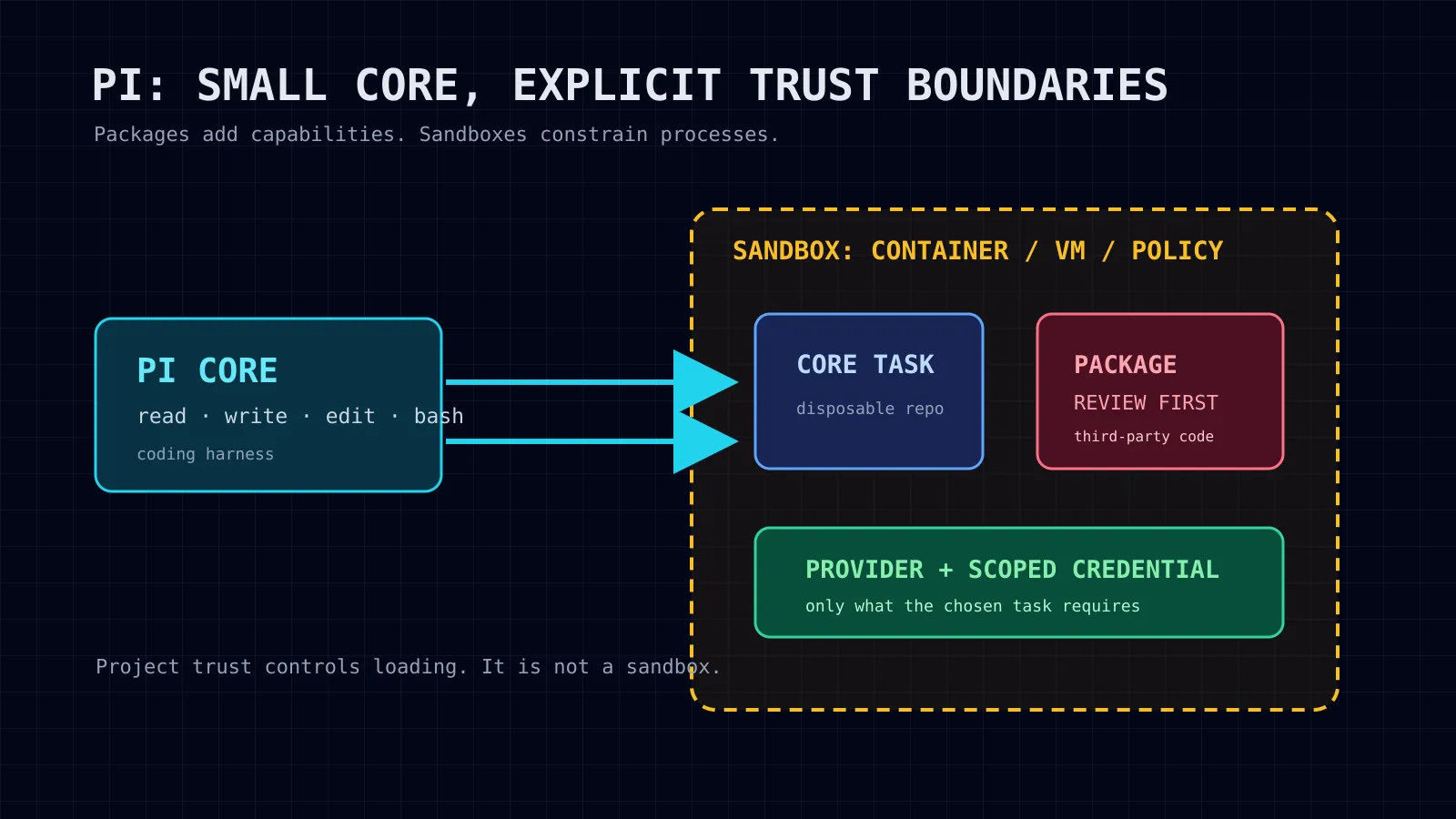
Pi is a minimal, extensible terminal coding harness rather than an all-in-one autonomous platform. Its core gives the model file and shell tools; extensions and packages add behavior as separately trusted software. Project trust is useful for controlling project-local loading, but it is not isolation: use a container, VM, or policy-controlled sandbox for untrusted or unattended work.
Checked September 1, 2026. Pi 0.84.4 is a terminal coding harness designed to keep its core small and move customization into TypeScript extensions, skills, prompt templates, themes, and Pi packages. The distinction matters: an extension or package is not a feature shipped inside the core binary. It is additional code and instructions you choose to trust.Pi documentationnpm package
Pi is not a substitute for every adjacent system. It is strongest when you want a compact coding-agent loop that you can extend deliberately. It is not, by itself, a broad cross-channel automation platform, a durable worker runtime, or a sandbox.
Install the supported package, then remove it cleanly
The current package and namespace are exact:
npm install -g --ignore-scripts @earendil-works/pi-coding-agent
pi --version
--ignore-scripts disables dependency lifecycle scripts during this install; Pi documents that it does not require install scripts for a normal npm installation. Do not copy older @mariozechner commands: the maintained package is @earendil-works/pi-coding-agent.Pi quick start
Use the matching package-manager command to remove a global npm installation:
npm uninstall -g @earendil-works/pi-coding-agent
command -v pi || true
If you installed through pnpm, Yarn, or Bun, use that manager’s corresponding global removal command instead. Removing the CLI does not automatically audit or delete Pi configuration, sessions, or separately installed packages; inspect ~/.pi/agent before deleting anything you need to retain.Pi quick start
For a reversible evaluation, avoid the global install altogether:
mkdir -p /tmp/pi-eval/tool
npm install --prefix /tmp/pi-eval/tool --ignore-scripts \
  @earendil-works/pi-coding-agent@0.84.4
/tmp/pi-eval/tool/node_modules/.bin/pi --version
That is an installer inspection, not a security proof. Inspect the unpacked package, its dependency tree, and any package you later add before letting it access a real repository or credential.
What belongs to which layer
| Layer | What it is | What it does not prove |
|---|---|---|
| Pi core | The coding-agent CLI, default tool loop, interactive UI, print/JSON mode, RPC mode, and SDK. | That a model response is safe, correct, or contained. |
| Core tools | The default read, write, edit, and bash tools exposed to the selected model. | A least-privilege filesystem or process boundary. |
| Skills and prompt templates | Reusable instructions and prompts loaded on demand. | That model-followed instructions cannot request risky actions. |
| Extensions | TypeScript modules that can add tools, commands, events, and UI. | That added code has less access than Pi. |
| Pi packages | npm, Git, or local bundles of extensions, skills, prompts, and themes. | That a popular package has been reviewed or is safe. |
| Provider | The subscription login, API key, or local router that supplies a model. | That host files selected as context remain local. |
| Sandbox | A container, VM, micro-VM, or policy-controlled boundary around the process or tools. | That application-level project trust alone contains the workload. |
Pi’s own security guide is explicit: its built-in tools and extensions run with the permissions of the process that starts Pi. Project trust decides whether project-local resources load; it is not a sandbox and does not constrain what a running model can ask the tools to do.Pi security
The core: intentionally small
A default Pi session lets the model read files, write files, edit files, and run shell commands. Authenticate interactively with /login, or configure a supported API key before starting the session. The package documents subscription providers including Anthropic, OpenAI/Codex, and GitHub Copilot, as well as a long list of API-key providers and a llama.cpp route.Pi providers
The core has several ways to operate:
| Mode | Use it for |
|---|---|
| Interactive TUI | A supervised repository task, model selection, session navigation, and explicit human review. |
| Print or JSON | A one-shot or automation-friendly run that emits text or structured events. |
| RPC | A process integration over stdin/stdout JSONL. |
| SDK | Embedding Pi’s agent capabilities inside a Node.js application. |
Those modes change integration shape, not the trust boundary. A non-interactive invocation can be convenient in CI or a script, but it must receive a provider credential and should run only within the same explicit containment you would use for an interactive agent.Pi documentation
What changed in 0.84.4
The August 28, 2026 v0.84.4 release adds terminal capability overrides for hyperlinks, images, and truecolor; ui_prompt_start and ui_prompt_end extension events; an RPC clear_queue operation; and experimental deepseek-v4-flash-vision-exp support. It also fixes important session, tool-result ordering, and compaction behavior, including a resumed JSONL trailing-newline issue and compaction timing around large tool output.Pi v0.84.4 release
Treat that release information as version-specific. Check pi --version before relying on a flag, tool behavior, or fix from this page.
Packages are separate software
Pi packages can bundle extensions, skills, prompt templates, and themes. Pi supports npm, Git, and local-path sources; installing or removing a package normally changes either global ~/.pi/agent/settings.json or project .pi/settings.json. A project package can be installed automatically after the project is trusted.Pi package documentation
That convenience creates a serious boundary: Pi’s package documentation says packages run with full system access, extensions execute arbitrary code, and skills can instruct the model to run executables. Review source before installing a third-party package.Pi package documentation
Use a short review checklist before adding one:
- Record the package name, version, publisher, source repository, licence, and date checked.
- Read
package.json, the Pi manifest, the entry extension, dependencies, and install/update behavior. - Identify filesystem access, child-process launches, network calls, credential stores, MCP servers, and any host-config discovery.
- Pin the npm version or Git revision for an evaluation.
- Try it only in an isolated disposable workspace, then test its removal and the settings diff.
- Do not describe package behavior as Pi core behavior.
Reviewed-package sidebar: pi-mcp-adapter is third-party
pi-mcp-adapter is a third-party Pi package, not Pi core. At the checked date, the Pi catalog listed version 2.31.0, published August 28, 2026, as an extension/skill package with 12 dependencies and four peer dependencies. Its declared manifest loads ./index.ts and ./skills; its stated purpose is a token-efficient MCP adapter.Pi catalog entry
Its repository says it can read standard MCP configuration files and can start MCP servers lazily when a tool is used. That can be useful, but it also expands the trust surface to configuration discovery, server commands, MCP endpoints, OAuth flows, and their credentials. The package’s own documentation says host-specific configuration discovery is off by default and that it does not silently launch commands from discovered host configs; verify that behavior against the pinned source you install, not only this article.pi-mcp-adapter repository
A bounded trial uses a temporary extension load rather than a persistent install:
pi -e npm:pi-mcp-adapter@2.31.0Run it only after source review and only in a sandbox that has no real MCP credentials or broad host mounts. For a persistent install, use the documented package command, then verify settings and removal:
pi install npm:pi-mcp-adapter@2.31.0
pi list
pi remove npm:pi-mcp-adapter
pi list
The package catalog’s downloads or ranking are popularity signals, not a safety audit. On September 1, 2026, the catalog showed pi-mcp-adapter, pi-web-access, and pi-subagents among high-download entries; that does not transfer any package’s behavior or security properties to Pi core.Pi package catalog
Project trust is an input guard, not containment
Pi looks for project-local settings and resources such as .pi/extensions, .pi/skills, and project .agents/skills. A first interactive session normally asks whether to trust those resources; non-interactive modes use the configured default unless a one-run approval flag overrides it. Context files such as AGENTS.md and CLAUDE.md are still loaded unless context loading is disabled.Pi security
That protects against a repository silently changing Pi’s settings or extensions before you approve it. It does not turn untrusted repository text, prompt injection, generated output, shell commands, or model output into safe input. Start unknown repositories with no project trust, inspect their context files manually, and use operating-system isolation for any task that will execute tools.
Pick a real isolation pattern
Pi documents three broad patterns:
| Pattern | Boundary | Important caveat |
|---|---|---|
| Gondolin extension | Routes built-in tools and ! commands into a local micro-VM while Pi itself stays on the host. | Other custom extension tools still run where Pi runs unless they delegate too. |
| Plain Docker | Runs the entire Pi process in a container. | A writable bind mount still changes host files; API keys enter the container. |
| OpenShell | Runs the entire Pi process in a policy-controlled sandbox. | It requires an active gateway and policy setup. |
For a first task, copy a disposable repository into a container or remote sandbox rather than bind-mounting a valuable host checkout. Mount only what the task needs, keep host ~/.pi/agent out of the sandbox, pass no production credentials, and constrain egress to the model endpoint and explicitly required registries. Pi’s security documentation also warns that a read/write bind mount gives the sandbox direct ability to modify host files.Pi containerizationPi security
Pi, Hermes, and Herdr: adjacent layers, not replacements
| Product layer | Best description | Do not infer |
|---|---|---|
| Pi | A minimal, extensible coding harness for a selected model and repository task. | That it supplies a durable multi-agent operating platform or a sandbox. |
| Hermes | A broader autonomous-agent platform with profiles, skills, messaging, background jobs, and multiple interaction surfaces. | That a Hermes profile or permission setting itself provides OS-level containment. |
| Herdr | A persistent terminal runtime and orchestration layer for longer-lived agent work. | That it is the same sort of minimal coding harness as Pi. |
A team can use Pi as the narrowly scoped coding harness inside a separately chosen runtime or automation system. The right comparison is therefore layer-by-layer: task loop, extension surface, persistence/orchestration, provider access, and explicit isolation.
A finish line worth recording
Before calling a Pi evaluation complete, retain:
- Pi and package versions, source URLs, and the date checked;
- the sandbox engine and its policy or Docker arguments;
- provider/model, authentication route, token or cash cost, and setup time;
- the exact prompt and human corrections;
- the requested test result,
git diff --check, changed-path list, and final diff; - proof that an out-of-scope filesystem probe was denied by the sandbox;
- package install/removal settings before and after; and
- a clean shutdown or restart result if the workflow claims detach/restart behavior.
The companion lesson gives a disposable-repository procedure and insists on recording a failed preflight honestly. Do not replace missing sandbox, provider, or package-inspection evidence with a reassuring completion message.
Sources
- Pi documentation
- Pi security documentation
- Pi containerization documentation
- Pi package documentation
- Pi v0.84.4 release
- Pi repository
- Pi package catalog
- pi-mcp-adapter catalog entry
- pi-mcp-adapter repository
- Pi npm package
Put this to work
Draw the trust boundary around every installed package and every mounted directory, not just around the Pi executable.
Try
Follow the companion sandboxed first-task lesson in a disposable copy after checking that its Docker or OpenShell prerequisite is available.
Prove it worked
Keep the version, package source and version, model/provider, test output, diff, sandbox-denial result, and uninstall result together.
Where it can pay
A reproducible, bounded agent workflow can become a safer code-review or implementation service.
Keep in view
- Install the current `@earendil-works/pi-coding-agent` package with npm lifecycle scripts disabled; remove the same package with npm when finished.
- Core Pi has four default model tools: read, write, edit, and bash. Skills, extensions, prompts, themes, and packages are separate layers.
- Pi project trust controls loading of project resources; it does not reduce the permissions of Pi, its shell commands, or installed extensions.
- The 0.84.4 release adds RPC queue clearing, terminal capability overrides, extension UI-prompt events, and experimental DeepSeek V4 Flash Vision support.