Tools · Tutorial 04
Pi: complete one sandboxed first coding task
Install Pi 0.84.4 without lifecycle scripts, run one small task in an explicit sandbox, verify its diff and tests, prove a denied filesystem probe, and remove the evaluation cleanly.
0 of 1 complete
Reference guide · Read when needed · View the route
Last tested and updated: September 1, 2026
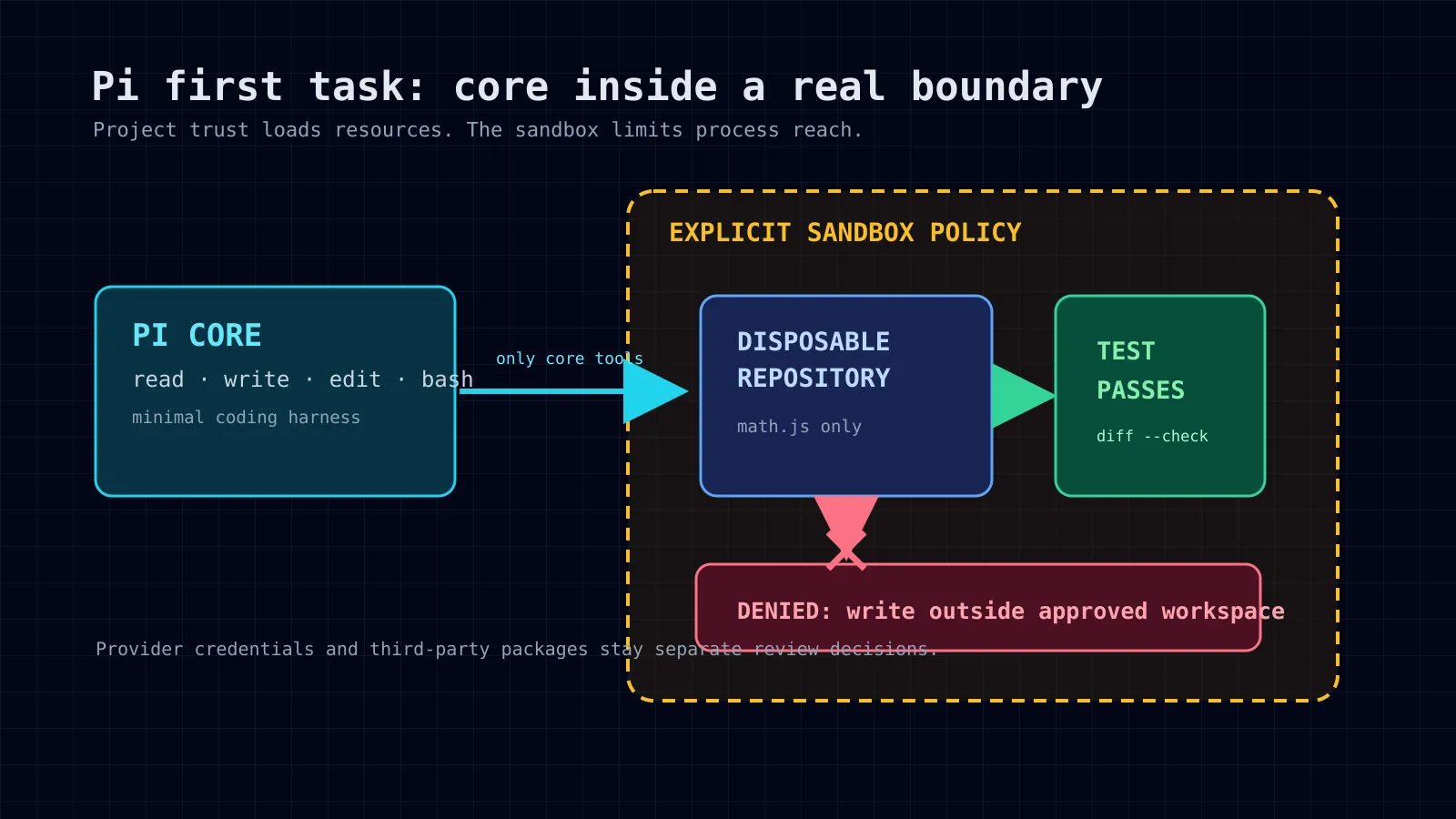
Pi is a minimal terminal coding harness. Its default model tools can read, write, edit, and run shell commands. That makes it useful for a small repository task; it also means that Pi runs with the permissions of the user who starts it. Pi project trust controls whether project-local resources load. It does not isolate tools, extensions, or shell commands.Pi security
This lesson’s finish line is deliberately narrow:
- a disposable Git repository has one small, requested fix;
- the requested test passes;
git diff --checkpasses;- only the intended file changes;
- an out-of-scope filesystem probe is denied by the sandbox;
- you retain the Pi version, provider/model, cost, tool failures, human correction, and cleanup evidence; and
- Pi and any trial package are removed without leftover evaluation settings.
Do not start if you cannot meet the sandbox and provider preflight. A dry run without a model credential is useful for inspecting installation and isolation, but it is not an agent-task result.
Step 1: name the boundaries before installing
This exercise has five separate layers. Keep them separate in your notes.
| Layer | This lesson’s choice |
|---|---|
| Coding harness | Pi 0.84.4 core only for the first run. |
| Repository | A disposable local copy containing no credentials or private data. |
| Provider | One account you explicitly select inside the sandbox; use a short-lived or test credential when possible. |
| Sandbox | Docker, OpenShell, or another policy-controlled whole-process boundary that you can demonstrate. |
| Package trial | Optional and only after core results are recorded; every package is third-party software. |
Pi documents Docker as a whole-process container pattern and OpenShell as a policy-controlled sandbox pattern. Its Gondolin extension routes built-in Pi tools into a micro-VM, but Pi itself remains on the host and other extension tools can still run there. For this first task, prefer a whole-process sandbox.Pi containerization
Step 2: preflight the sandbox engine
For Docker, verify both client and daemon access before preparing a repository:
docker --version
docker info --format '{{.ServerVersion}}'
If the second command reports permission denied or cannot connect, stop. Do not use sudo as a casual workaround and do not claim Docker isolation that you did not obtain. Have an administrator configure the daemon access intentionally, use an approved rootless Docker setup, or choose an available OpenShell/VM environment.
For OpenShell, the gateway must already be available and selected. Pi documents the required pattern as:
openshell gateway add <gateway-url> --name <name>
openshell gateway select <name>
openshell sandbox create --name pi-sandbox --from pi -- pi
A remote OpenShell gateway does not bind-mount your host project. Upload a disposable repository to the sandbox and download its result afterward. That is stronger than a writable host bind mount, which lets sandbox writes change host files.Pi containerization
Step 3: build a disposable project
Create a tiny JavaScript repository with one intentional defect. It contains no .env, tokens, SSH keys, customer data, or production configuration.
mkdir -p /tmp/pi-first-task/repo
cd /tmp/pi-first-task/repo
git init
cat > package.json <<'EOF'
{
  "name": "pi-first-task",
  "private": true,
  "scripts": { "test": "node --test" }
}
EOF
mkdir -p test
cat > math.js <<'EOF'
export function add(left, right) {
  return left - right;
}
EOF
cat > test/math.test.js <<'EOF'
import test from 'node:test';
import assert from 'node:assert/strict';
import { add } from '../math.js';

test('add combines two numbers', () => {
  assert.equal(add(2, 3), 5);
});
EOF
node --test
The test should fail because add subtracts. Checkpoint the intentionally broken state:
git add package.json math.js test/math.test.js
git commit -m "test: add failing addition exercise"
git status --short
Step 4: build Pi into an explicit Docker image
Save this Dockerfile.pi beside the disposable repository, not in a project you care about:
FROM node:24-bookworm-slim

RUN apt-get update \
  && apt-get install -y --no-install-recommends bash ca-certificates git ripgrep \
  && rm -rf /var/lib/apt/lists/*
RUN npm install -g --ignore-scripts @earendil-works/pi-coding-agent@0.84.4

WORKDIR /workspace
ENTRYPOINT ["pi"]
Build it after daemon preflight succeeds:
docker build -t pi-first-task:0.84.4 -f Dockerfile.pi .This pins the Pi version and disables npm lifecycle scripts. It does not prove that every dependency is harmless. Inspect the package source and image build logs before trusting them with anything valuable.Pi quick start
Step 5: prove the filesystem boundary before the model runs
A writable repository mount is convenient but deliberately does not protect that repository from the agent. For the denial probe, mount it read-only and ask the container shell to create an out-of-scope file. This must fail:
docker run --rm \
  --read-only \
  --tmpfs /tmp:rw,noexec,nosuid,size=64m \
  --mount type=bind,source="$PWD",target=/workspace,readonly \
  --entrypoint /bin/sh \
  pi-first-task:0.84.4 \
  -lc 'touch /workspace/out-of-scope.txt'
Record the non-zero exit status and the read-only filesystem error. Then prove the host did not receive the file:
test ! -e out-of-scope.txt
printf 'sandbox denial retained\n'
This proves only the policy you tested: the container could not write to that particular read-only mount. It does not prove that Docker blocks all network access, all kernel escapes, or all access enabled by other mounted paths. For a stronger setup, copy the repository into a sandbox or use a remote OpenShell sandbox, add an explicit egress policy, and provide only a narrow provider route.
Step 6: run the core-only task in the writable disposable copy
For the actual fix, make a separate copy that the sandbox is allowed to modify:
cd /tmp/pi-first-task
cp -a repo writable-repo
cd writable-repo
Run Pi with its core tools only. Do not mount host ~/.pi/agent; it can contain sessions, settings, and credentials. The following command gives Pi a container-local agent directory. It prompts for provider authentication inside the sandbox, or you can pass a short-lived test key using the provider’s documented environment variable:
docker run --rm -it \
  --mount type=bind,source="$PWD",target=/workspace \
  --mount type=volume,source=pi-first-task-agent,target=/root/.pi/agent \
  --workdir /workspace \
  -e PI_OFFLINE=1 \
  pi-first-task:0.84.4 \
  "Fix math.js so the existing test passes. Work only in math.js. Do not install packages, use the network, edit tests, commit, or push. Run npm test and git diff --check. Report every command and changed file, then stop."
In the interactive session, authenticate with /login only if you are willing to place that test-provider credential inside this sandbox. Prefer a scoped account or the sandbox’s inference route. Pi supports interactive subscription login and multiple API-key providers; do not paste a production secret into terminal history or this lesson.Pi quick startPi providers
Record before accepting the result:
| Evidence | Value to retain |
|---|---|
| Setup time | Minutes from image build to model-ready session. |
| Pi and image version | pi --version and image tag. |
| Provider and model | Name only; never record a secret. |
| Token/cash cost | Pi session display or provider report. |
| Tool failures | Exact failed commands and recovery. |
| Human correction | Any prompt, edit, or approval you supplied. |
| Core/package delta | core only for this first pass. |
Step 7: verify outside the agent
Exit Pi. From the host, independently run:
cd /tmp/pi-first-task/writable-repo
npm test
git diff --check
git status --short
git diff -- math.js
git diff --name-only
Accept only this result:
npm testpasses.git diff --checkproduces no error.math.jsis the only changed file.- The diff changes subtraction to addition and nothing else.
- Your earlier read-only-mount probe failed and left no
out-of-scope.txtbehind.
If any condition fails, keep the evidence and mark the run unsuccessful. Do not polish an incomplete run into a success story.
Step 8: test detach or restart only when you need it
Pi sessions and sandbox lifetime are separate. A docker run --rm container disappears when its Pi process exits; it is not a detached worker system. If your workflow needs restart evidence, preserve the container-local Pi agent volume, start a new container, and check whether the expected session is visible without mounting host Pi state.
Record the exact stop command, restart command, session behavior, and any leftover processes. Do not claim detach/restart support from a screenshot or a model response alone.
Step 9: optional package trial — a second, separately labelled run
Only after the core result passes may you test a reviewed package. pi-mcp-adapter is one example: it is a third-party extension/skill package, not a core Pi feature. The Pi catalog identifies its version, dependencies, manifest, and install command; its repository describes MCP-config handling and lazy server start. Read the pinned source before installation and use a separate disposable copy.pi-mcp-adapter catalog entrypi-mcp-adapter repository
A package test must add a measurable benefit. For example, configure one harmless local MCP server in the sandbox and compare a documented discovery call with the core-only baseline. Do not import ambient host MCP configuration, OAuth tokens, or an unreviewed remote server just to demonstrate that a package starts.
Keep the package run separate:
# Inside the disposable sandbox after inspecting the pinned package source.
pi install npm:pi-mcp-adapter@2.31.0
pi list
# Run one bounded, testable task.
pi remove npm:pi-mcp-adapter
pi list
Record package version, source review notes, dependencies, configuration paths, added permissions, first-run behavior, task delta, and removal result. Pi documents that package installs can modify user or project settings; verify those settings are clean after removal.Pi package documentation
Step 10: remove the evaluation
Remove the temporary image and volume only after you have saved the evidence you need:
docker volume rm pi-first-task-agent
docker image rm pi-first-task:0.84.4
rm -rf /tmp/pi-first-task
If you performed a global installation instead, remove the exact current package:
npm uninstall -g @earendil-works/pi-coding-agent
command -v pi || true
Review ~/.pi/agent manually before deleting configuration or sessions. The command removes the npm package, not every file Pi or a third-party package may have created.
Stop conditions
Stop and label the result blocked, rather than improvising around one of these conditions:
- Docker/OpenShell/VM isolation cannot be established or its denial probe does not fail as expected;
- installer or package source cannot be inspected;
- no provider credential or subscription is available for the selected reversible task;
- the repository contains secrets, private data, or unrelated changes; or
- the requested test, diff check, changed-path limit, or cleanup check fails.
A good first Pi run is not the fastest one. It is the run for which you can show the task result, the boundary, and the cleanup separately.