Release guide · August 4, 2026

Hermes Agent v0.20.0 Herald: voice, desktop artifacts, webhooks, and upgrade guide

What changed in Hermes Agent v0.20.0: streaming voice, grounded citations, desktop artifacts, signed webhooks, A2A, security, and upgrade checks.

Reading time
14 min
Checked
Aug 6, 2026
Editorial abstraction of a reliable agent platform opening into voice, desktop, and coordinated-work channels
Hermes can now hear you, show its work and coordinate with other agents
Bottom line

v0.20.0 is a compelling upgrade for active Hermes users, especially people using the desktop app, long-running sessions, or external automations. Treat its performance numbers as maintainer measurements, and upgrade a non-production profile first: this release also changes the supported runtime and installer story.

Hermes Agent v0.20.0, known as the Herald release, is a major update to Nous Research’s open-source agent harness. It adds streaming voice with interruption, grounded citations, versioned desktop artifacts, signed webhooks, A2A agent communication, and reliability work for long sessions. It is not a new foundation model.

Nous Research calls it the Herald release. The name is a little theatrical, but the features fit together: Hermes can now speak conversationally, exchange work with other agents, notify external systems, and produce research with a more auditable citation trail. Its desktop app is also becoming a workbench rather than a simple chat window.

The official release was published August 3, 2026 as v2026.8.3. Nous reports roughly 3,650 commits, 1,400 merged pull requests, and more than 650 contributors since v0.19.0. Those are maintainer measurements, not an independent audit. The feature claims below link back to the release notes and implementation pull requests.

The short version

  • Voice is the headline feature. Hermes can begin speaking while a response is still being generated, stop when you interrupt it, and optionally wait for an on-device wake phrase.
  • Research gets more checkable. The new grounded-citations skill records a source ledger, renders citations from it, and can verify whether a draft’s references and source list still match.
  • The desktop app now handles artifacts. Large generated HTML, SVG, and code can become versioned cards with a sandboxed preview instead of a 300-line message dump.
  • Hermes can join real systems. Signed outbound webhooks push lifecycle events to any HTTP endpoint, while the A2A v1.0 plugin lets Hermes communicate with compatible agents.
  • Daily work should feel less fragile. New CLI commands, mid-turn redirection, self-recovering tools, more careful context compression, and better approval controls target the small failures that waste agent turns.
  • Upgrade deliberately. The release notes say Node 26 is now required and retire Brew/PyPI distribution channels, while the tagged installation page still mentions Node 22. Let the official installer and hermes doctor determine the installed runtime rather than pinning one manually from either page.
If you use Hermes for…Start by testing…
Voice or messagingStreaming playback, barge-in, microphone permissions, and reply routing
Research briefsCitation-ledger coverage and whether each source supports the sentence that cites it
Desktop workHTML, SVG, and code artifact preview, versioning, download, and sandbox behavior
External automationWebhook signature verification, delivery-ID deduplication, and retry handling
Multi-agent systemsA2A authentication, task limits, credential redaction, and network exposure

Voice finally behaves like a conversation

Earlier voice mode had the usual assistant-shaped pause: speak, wait for the entire model response, then wait again for one long audio file. v0.20.0 pipelines the response into sentence-sized chunks. Hermes can synthesize and play a clause while the model is still producing the next one.

The other important part is barge-in. If you start speaking while Hermes is talking, it stops playback, preserves the opening of your interruption with a pre-roll recording buffer, transcribes it, and uses it as the next turn. That is a meaningful UX change rather than a cosmetic audio toggle: correcting an agent no longer requires waiting for it to finish a wrong answer.

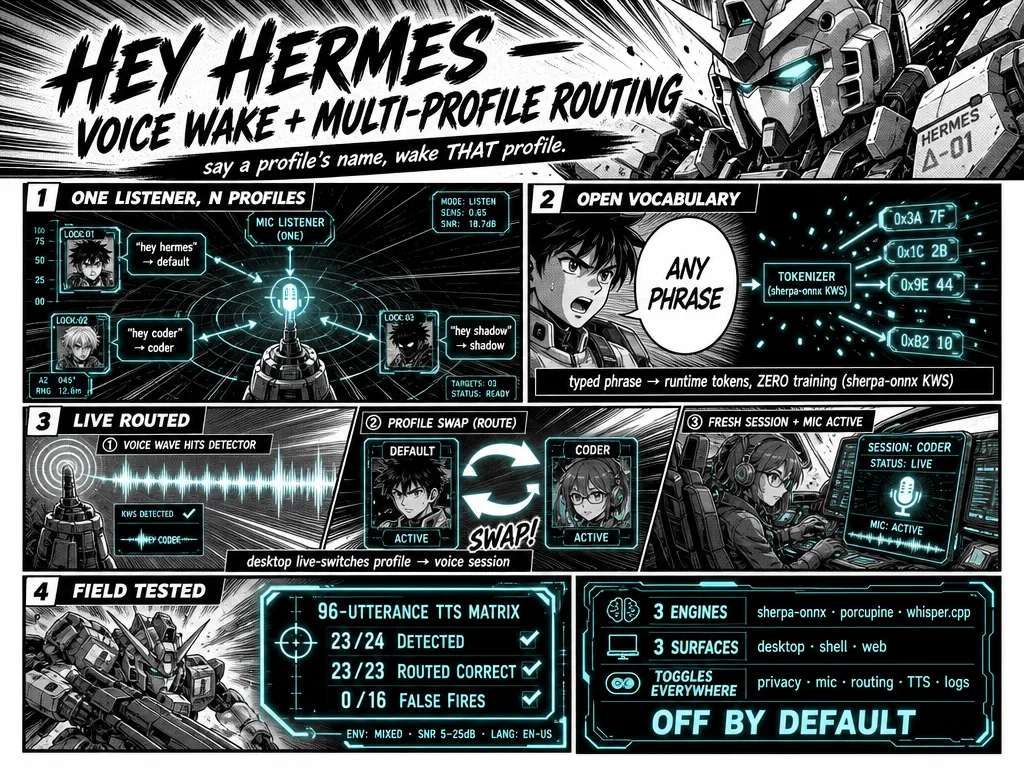
Wake words build on that interaction. Hermes supports a default “Hey Hermes” listener and an opt-in open-vocabulary path for a phrase you choose. The listener runs on-device while it waits. Multiple enabled profiles can have separate phrases, so a phrase such as “hey coder” can route to a coding profile rather than a personal one. This is off by default, and it should stay that way until you have tested microphone permissions, noise behavior, and profile boundaries.

Maintainer infographic illustrating Hermes wake words, open-vocabulary phrase detection, and multi-profile routing

Official implementation graphic from the wake-word pull request. The image describes a feature design; its detection figures are maintainer test results, not an independent benchmark.

Voice also expands beyond a local machine. Release notes list inbound voice-note transcription and platform-aware audio replies for WhatsApp, Feishu, DingTalk, LINE, QQ, Photon, and Weixin. Speech-to-text becomes configurable in the tools UI, supports language selection, and adds OpenAI gpt-transcribe support. That makes voice more broadly available, but it does not turn every connected messenger into a private or hands-free-safe device. Review each platform’s permissions, recipient rules, and retention policy before enabling it.

The most practical research feature: citations with a ledger

The release’s grounded-citations skill is a sensible answer to a common AI-writing problem: a response can contain citations that look correct but were never tied to the actual retrieval step.

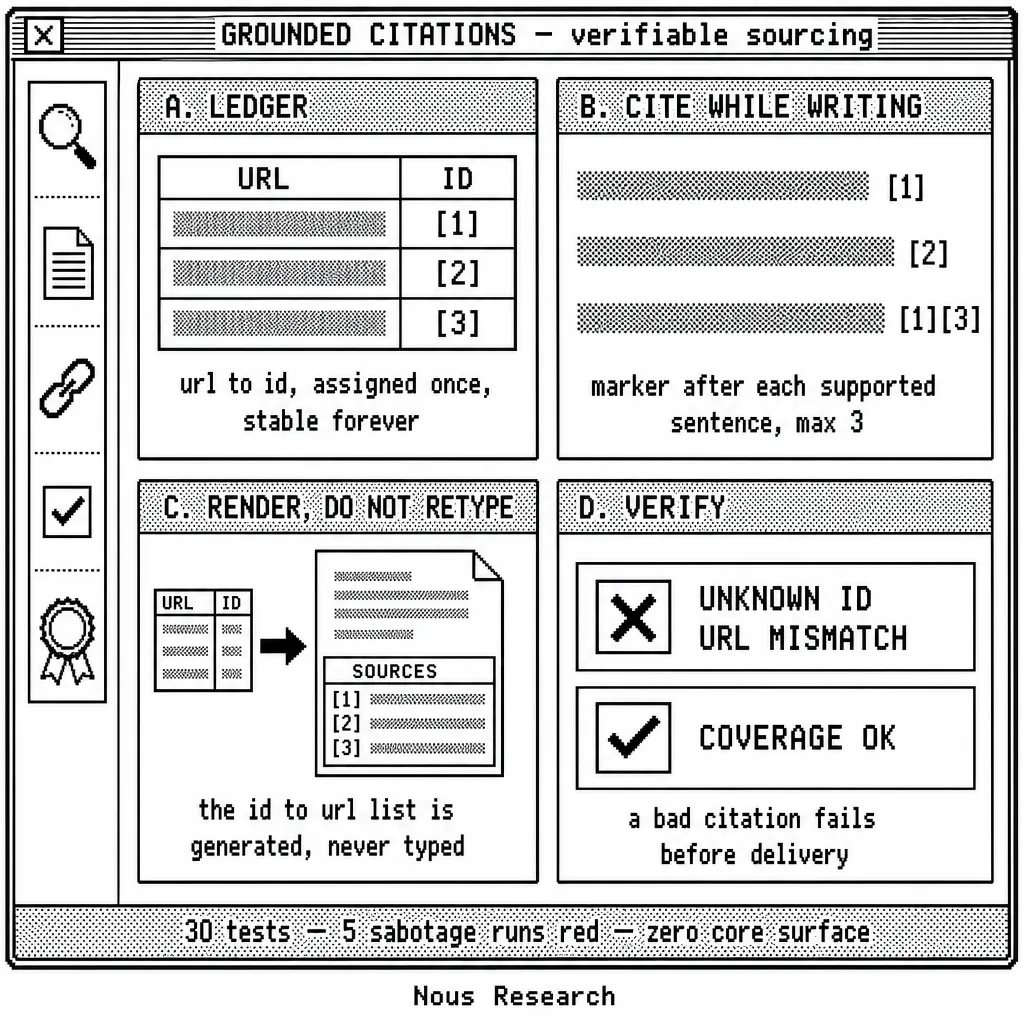
Instead of asking the model to remember URLs while drafting, Hermes assigns source IDs in a persistent, profile-aware ledger. The draft cites those IDs; the skill renders the source list from the ledger and can verify the citation coverage and source-to-URL mapping before delivery. The companion fact-checking mode applies the same machinery to a document or claim and reports what it could verify, what it could not, and what conflicts with the evidence.

That is not a magic truth machine. A citation can be real yet irrelevant, a source can be wrong, and a web page can change after retrieval. It is still a substantial improvement over citations assembled from model memory, because a broken ID, missing source list, or URL mismatch becomes detectable.

Maintainer infographic showing the Hermes grounded-citations source ledger, citation markers, rendered source list, and verification checks

For consequential work, keep a human review step: open the cited source, check that it supports the specific sentence, and distinguish primary evidence from commentary. The feature makes that review faster and more reliable; it does not replace it.

Desktop moves from chat client to workbench

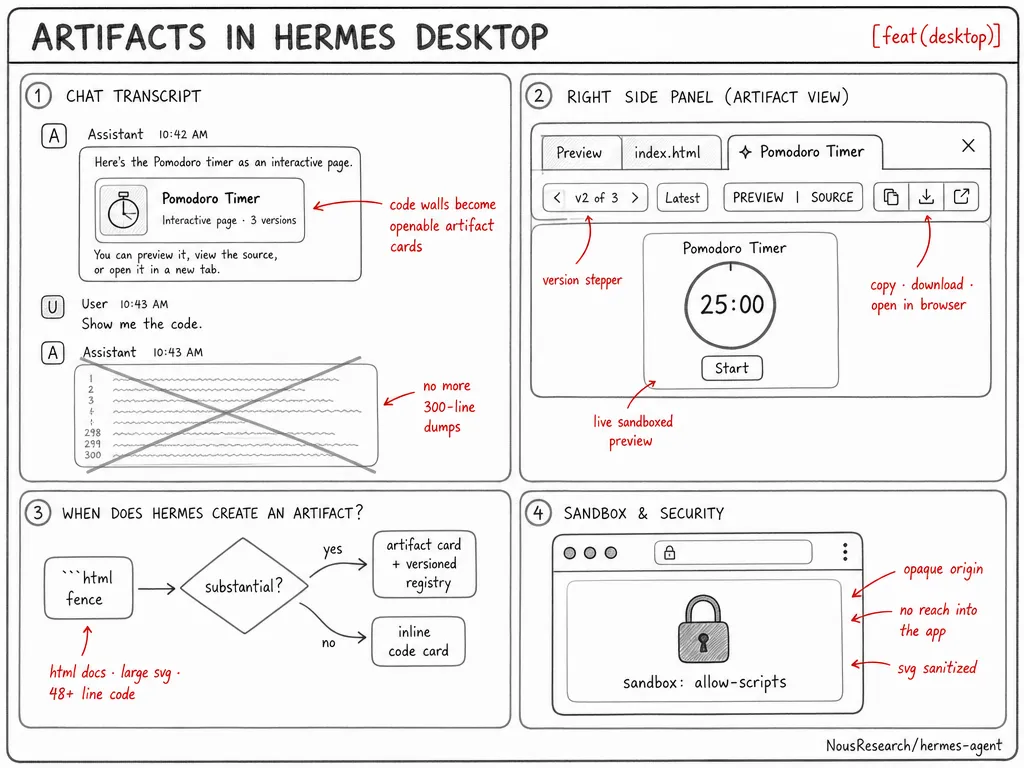
The best desktop change is artifacts. When Hermes produces substantial HTML, a large SVG, or a long code block, the desktop can promote that output into a compact artifact card. The card opens in a right rail with versions, preview/source switching, copy/download actions, and an option to open HTML in a browser.

The security detail matters. HTML runs in a sandboxed iframe without same-origin access, and SVG content is sanitized. That is a safer default than letting generated markup execute in the application page itself, though it is still wise to inspect output before opening or distributing it.

Maintainer diagram of Hermes Desktop artifact cards, a versioned live preview pane, and the sandbox model

The desktop also gains a plugin SDK, with Kanban as the first bundled example; file download support for plugins; floating panes; multiple app windows; and a global quick-entry window for adding a thought to a session from anywhere in the OS. Together, these changes matter most for users treating Hermes as a daily workspace rather than a one-off terminal command.

Hermes can now talk to your systems and other agents

Two additions make Hermes less isolated.

Signed outbound webhooks

Hermes can push lifecycle events such as session activity, turn completion, and tool events to configured HTTP endpoints. Payloads use an HMAC-SHA256 signature and include a delivery ID, letting a receiver authenticate the event and deduplicate retries. Delivery uses a bounded queue so a slow endpoint does not block a tool call; the implementation documentation says it retries connection errors and 5xx responses once, while treating 4xx responses and redirects as failures rather than silently changing behavior.

This is the straightforward route to a dashboard, CI system, home automation service, or a small operational database. Do not expose a receiver that accepts a webhook merely because it has the right JSON shape: verify the signature over the raw request body, reject stale timestamps, and deduplicate delivery IDs.

A2A v1.0

The bundled Agent-to-Agent plugin lets Hermes discover, call, and receive work from A2A-compatible agents. On the inbound side it publishes an Agent Card at /.well-known/agent-card.json, supports streaming, and routes tasks into live gateway sessions. The release links its protocol validation to the official A2A SDK.

The plugin ships with sensible default boundaries: localhost-only access without a token, bearer tokens for peers, prompt-injection filtering, outbound credential redaction, SSRF-safe signed push callbacks, audit logs, and turn caps designed to prevent loops. Those controls are useful, not a reason to expose a gateway to the public internet without authentication and network controls.

Small changes that save whole turns

The release includes a dense cluster of changes that reduce friction during normal work:

ChangeWhat it means in practice
!commandRun a shell command from the CLI without spending a model turn or adding the output to conversation history. It still uses the normal approval gate.
/init, /diff, /context, /focusGenerate or update AGENTS.md; inspect changed files; see what fills the context window; and reduce noisy output without losing a way to recover it.
Mid-turn redirectsGive a correction while Hermes is working instead of stopping it and re-explaining the whole task.
Tool recoveryTruncated terminal output can spill to a file, patch can diagnose already-applied or whitespace-mismatched changes, and writes are checked on disk.
Smarter compressionPreserve recent user messages, prune bulky tool results earlier, compact incrementally, and let thresholds vary by model.
Smarter approvalsTurn approval history into allowlist suggestions, stop repeated denials from looping, and add an approval boundary for Docker/Podman daemon redirects.

These are not glamorous launch-demo features, but they are exactly the changes that decide whether an agent can survive a long, messy task without wasting a fresh model turn on a recoverable failure.

The release also raises the default tool-calling iteration limit from 90 to 500. That helps genuine long-running tasks, but it increases the importance of a budget, scoped permissions, and a clear stop condition. More autonomous steps are not automatically better work.

Faster, but be careful with the numbers

Nous reports several substantial performance changes: native Anthropic prompt caching can include tool schemas without losing history; hermes -w cold start falls from about 14 seconds to 1.8 seconds; no-op updates are 2-6 seconds faster; and a telemetry-gate configuration path is 54 times faster after removing unnecessary deep copies. The desktop team also reports less render churn and 60fps improvements while streaming or dragging panes.

Those figures come from the maintainers and are useful directional evidence, not a universal benchmark. Your real result depends on model provider, local hardware, gateway configuration, skill count, network latency, and how old your Hermes state is. The practical test is to start a long session, run your usual tools, switch views, trigger a controlled gateway restart, and compare time to first response with successful completion. A cold-start number alone is not enough.

Security, reliability, and upgrade risk

v0.20.0 adds real hardening: stricter credential-injection egress rules, DNS-pinned SSRF-safe fetching, stronger redaction at compression boundaries, refreshed dependency pins, Windows subprocess and encoding fixes, session-state repairs, and more defensive memory-provider behavior.

But this is also a large upgrade with operational implications. The release notes state that Node 26 is required across installer, repair, and upgrade flows, and that Homebrew and PyPI wheel installation channels are retired in favor of the shell installer, Docker, or Nix. The tagged installation document still says its installer manages Node 22, so the two official materials are not fully aligned.

Do not perform a manual runtime migration based on a sentence in a release post. Use the supported installer/update route for your current setup, then run hermes doctor, confirm the runtime it actually selected, and keep a restorable copy of your configuration and session data before moving a production gateway.

Pick one feature and ship one useful result

The release contains too much to learn at once. Choose one path and finish the deliverable before adding another surface.

FeatureSmall projectWhat to verifyPossible paid outcome
Grounded citationsA weekly research brief on one narrow marketEvery material claim opens to a supporting sourceA reviewed monitoring brief for a team
Desktop artifactsA versioned report or lightweight internal appSource, preview, download, and revision history all matchA client-ready deliverable with an audit trail
Signed webhooksA completed-task alert sent to a test receiverInvalid signatures fail and duplicate deliveries do not repeat workA bounded operations automation with maintenance
Streaming voiceA hands-free intake flow for one routine requestInterruptions work and private data follows the chosen provider policyAn internal accessibility or field-work workflow

Finish the project in an isolated profile. Keep a screenshot or artifact, a test log, the approval and credential boundaries, and the time it took to produce a reviewed result. That turns feature exploration into portfolio evidence.

If a business wants the result, define the deliverable and maintenance boundary before connecting production systems. Research and operations work can become a service. Unattended access to a client’s accounts should never be the sales pitch.

Who should upgrade first

Upgrade a test profile now if you:

  • use Hermes Desktop for generated apps, documents, or large code outputs;
  • rely on voice notes, TTS, or hands-free interaction;
  • produce research briefs where source traceability matters;
  • operate a gateway, dashboard, CI workflow, or another system that benefits from signed event delivery;
  • run long sessions that suffer from context pressure or tool-recovery loops.

Wait for a sandbox pass before upgrading a critical shared gateway if you depend on a manually installed runtime, older Node setup, custom plugins, gateway webhooks, or untested approval rules. Test the exact model/provider, profile routes, message delivery, tool permissions, and restart behavior you rely on.

A practical first-day checklist

  1. Back up the Hermes configuration and note the installed version and runtime.
  2. Update through your detected supported install channel; then run hermes doctor before reconnecting production messaging.
  3. In an isolated profile, run one ordinary coding task and one long research task. Check citations manually before trusting the new research flow.
  4. If using Desktop, create a harmless HTML artifact and verify that preview, source view, copy, and download behave as expected.
  5. If using integrations, point a webhook at a test receiver that verifies the HMAC signature and deduplicates delivery IDs.
  6. Only then test voice, wake words, A2A, or plugin enablement. Add one surface at a time, with explicit permissions and a known rollback.

Why the upgrade matters

Hermes 0.20.0 matters because it improves both ends of agent work. At the visible end, it adds conversational voice, a much stronger desktop work surface, and useful shortcuts. Underneath, it makes research provenance, context survival, tool recovery, approvals, and external integration more deliberate.

The release does not make unattended agents safe by default, nor do its speed claims guarantee your setup will be faster. It does give careful users better primitives for building assistants that are easier to interrupt, easier to verify, and less likely to lose work.

Hermes Agent v0.20.0 questions

What is the Hermes Agent Herald release?

Herald is the name for Hermes Agent v0.20.0, published as release tag v2026.8.3. The update focuses on voice, research provenance, desktop artifacts, external integrations, agent-to-agent communication, and reliability during long-running work.

Does Hermes Agent v0.20.0 include a new AI model?

No. Hermes is the harness that connects a chosen model to tools, memory, interfaces, and integrations. You still select the model provider separately.

What should I test after upgrading Hermes Agent?

Run hermes doctor, then repeat one real workflow in a non-production profile. Check the selected runtime, model route, tool approvals, message delivery, and any plugin or webhook your setup depends on. Keep a restorable copy of the prior configuration and session data.

Are the v0.20.0 speed numbers independently verified?

No. The performance figures in the release notes come from the Hermes maintainers. Treat them as useful test targets, then measure cold start, time to first response, streaming behavior, and task completion on your own provider and hardware.

Is voice mode private by default?

Privacy depends on the speech-to-text provider, text-to-speech provider, connected messaging platform, local microphone permissions, and retention settings. Wake-word listening can run on-device, but the rest of the voice workflow still needs a provider-by-provider review.

Sources

Put this to work

Choose one agent capability and design the complete path from input to reviewed result and safe handoff.

Try

Build a cited weekly research brief that produces a versioned artifact and sends a signed completion webhook.

Prove it worked

Check every citation, inspect the saved artifact history, reject an invalid webhook signature, and document the recovery path.

Where it can pay

Reviewed research or operations automation can become a client service when the deliverable, approval points, and ongoing maintenance are explicit.

Keep in view

  • Streaming voice supports interruption instead of forcing users to wait for a full spoken answer.
  • Grounded citations and versioned desktop artifacts make research and deliverables easier to inspect.
  • Signed webhooks and A2A communication connect Hermes to external workflows with clearer boundaries.
Learn the workflow: connecting Hermes to real tools