OpenAI enters Jev's territory (Decisions API)

A support message that says “my card was billed twice” needs to reach the billing team. The first automation task is to choose that queue. Investigating the payment and issuing a refund are separate jobs.
OpenAI’s Decisions API can supply that small judgment in a form your application can read. Give it evidence, define the permitted answers, and let your code decide what happens next. This guide builds a support-routing example, extends the idea to visible product damage, and explains how to evaluate the result against Jev.
The original Superbash walkthrough covers the public beta. OpenAI’s documentation, checked on October 28, 2026, now describes Decisions as generally available, still using gpt-6-luna. The request below follows the current reference. It is a documentation-checked example; no API request or benchmark was run while preparing this guide. Official Decisions guide.
Define the decision before choosing a model
Write down the action that will consume the answer. For a support inbox, that might be “create a ticket in one of these queues.” Then define what each queue handles and what happens when the message does not fit.
A proposed first routing rule is:
| Queue | What belongs there | Example to test |
|---|---|---|
billing | An existing charge, invoice, or refund problem | “I was charged twice for one order.” |
technical | Broken product behavior that prevents use | “Checkout shows an error before payment.” |
other | Requests outside the defined queues | “Can someone discuss a partnership?” |
needs_review | Insufficient detail or conflicting requests | “The thing you fixed is broken again.” |
The last category is an addition for this exercise. It gives the application an explicit place to put a message that needs more information. A refusal or a request failure also needs a fallback, but neither is the same thing as the model selecting needs_review.
Do not ask the classifier to solve the whole complaint. It does not need to write an apology, inspect a payment processor, or authorize a refund to choose the next queue. Ron’s duplicate-charge example makes that boundary clear: a valid category is useful only if it gets the customer to somebody who can fix the problem. A neatly formatted wrong answer still routes the ticket incorrectly. Source: the routing example, 0:42.
Pick the answer type that fits the job
Decisions has three question types. Their shapes are defined in advance, which saves your application from interpreting an essay as a routing instruction.
| Type | Use | How to read it |
|---|---|---|
predicate | Check one condition, such as whether the text requests a refund | A probability that the condition is true |
choice | Pick a department from named alternatives | A selected value and probabilities over the options |
score | Apply ordered levels, such as issue severity | A score derived from the level probabilities |
A department is a choice because “billing” is not more or less severe than “technical.” Bug severity has an order: a cosmetic defect, a problem with a workaround, and a complete blocker belong at different levels. The source contrasts a slightly misplaced button with a checkout that cannot accept payments. The rubric should explain that difference instead of leaving the meaning of “serious” to each call. Source: conditions, choices, and scores, 1:25.
Current documentation defines a score as a probability-weighted average of level indices, so it can fall between levels. It is not necessarily one of the labels. Decisions supplies these narrow answers; use a different API pattern when the desired output is a written explanation or a custom extracted object. Official question-type guidance.
For a predicate, the probability is input to your application policy. There is no threshold in the source that is appropriate for every job. A mistake that sends a ticket to a colleague is different from a mistake that triggers an external transaction. Start by recording answers for review and decide on automation only after checking representative examples.
Before you start: prepare the account and try the playground
You need an OpenAI API project with billing available and an API key for that project. The source explicitly notes that credits the team received for another OpenAI use could not be transferred to this experiment. Check the relevant API balance instead of assuming an existing subscription or promotional allowance covers the calls. Source: project and billing setup, 3:34.
Open the Decisions playground to try the input and question before wiring up a ticket system. Use the department definitions above and a few messages with known answers. Keep those same examples for the API test so that you are not changing the task and the integration at once.
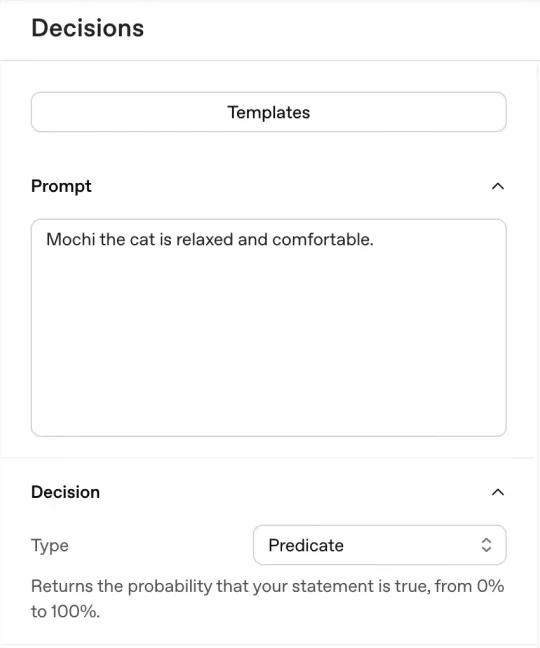
For a script, create a key through the platform’s API-key controls and make it available as OPENAI_API_KEY in the environment running the request. Keep the secret out of the article example, source repository, and browser client. OpenAI’s quickstart documents this environment-variable convention and SDK setup. Official API setup.
The walkthrough names Python package version 3.26. Treat that as its beta-era setup detail, not a current minimum-version requirement. The example below uses the HTTP endpoint directly and needs a terminal with curl, so it does not depend on that recorded SDK version. If you use Python instead, follow the current Python Decisions reference for client.decisions.create and check the installed SDK before debugging the request body.
Send one support-routing request
With OPENAI_API_KEY set in your terminal environment, run this request. It prints the response and does not create a ticket, move an email, or issue a refund.
curl https://api.openai.com/v1/decisions \
  -H "Authorization: Bearer $OPENAI_API_KEY" \
  -H "Content-Type: application/json" \
  -d '{
    "model": "gpt-6-luna",
    "input": "My card was billed twice for the same order.",
    "questions": [{
      "type": "choice",
      "name": "support_queue",
      "instructions": "Choose the team responsible for resolving the problem. Use needs_review when the message lacks enough detail or has conflicting requests.",
      "choices": [
        {"value": "billing", "description": "Existing charges, invoices, or refund requests."},
        {"value": "technical", "description": "Broken product behavior, including a checkout error before payment."},
        {"value": "other", "description": "A clear request outside billing and technical support."},
        {"value": "needs_review", "description": "Insufficient detail or conflicting requests."}
      ]
    }]
  }'
The field structure and endpoint are verified against the create-decision reference. The wording and queue definitions are a proposed support exercise.
The response contains answers. Match the answer to support_queue, check its type, and then inspect choice, confidence, and probabilities for a choice answer. The intended label for this test is billing; no numeric confidence or returned label is claimed here because this example was not executed.
Keep the first integration observational. Save the input identifier, expected label, returned answer, and whether a reviewer agrees. Once that record is useful, the application can map accepted labels to actual queue IDs. Do not treat a returned string as permission to run arbitrary operations; the mapping should contain only the actions you intended to support.
Separate a judgment from a refusal or failed request
The response can contain an answer with type: "refusal" instead of a classification. Other questions in the same request can still have answers. Check the type before reading choice-specific fields. Official response schema.
A useful application policy for this exercise is:
| Result | Proposed handling |
|---|---|
| Expected choice with evidence you have validated | Record the decision and assign the matching queue |
needs_review | Leave the ticket for triage or ask for missing details |
| Low confidence under your tested policy | Send to review rather than guessing a queue |
refusal | Record that no classification was supplied and use the fallback |
| Authentication, transport, or request error | Keep the ticket unprocessed and surface the failure |
This table is an application design suggestion, not behavior supplied automatically by Decisions. The API does not know your queue IDs, whether another worker already handled the ticket, or whether retrying your downstream operation would duplicate it.
For a first implementation, avoid silent fallback to billing whenever the response cannot be parsed. That would make failed requests look like successful classifications. Keep “no answer” visible so you can distinguish an integration problem from a poor category definition.
Test the awkward messages before automating the inbox
Begin with known cases, then test messages that cross your category boundaries. Ron’s suggested ambiguity is “I can’t pay because your checkout is broken.” It contains payment language, but the underlying issue may belong to technical support. Source: integration and ambiguous testing, 4:06.
Add a case where the payment succeeded twice, one where it never succeeded, and one that asks about a refund while also reporting a technical problem. Decide the expected handling with the person who owns the queue. If that person cannot choose a category from the written rules, improve the rules before blaming the model.
Use a separate set of examples after revising instructions. Checking only the messages that caused you to rewrite the prompt can hide new mistakes elsewhere. Record disagreements, unnecessary escalations, and cases that should have been escalated but were routed automatically. A single overall accuracy number may conceal the particular error that causes the most support work.
Keep the fallback until the chosen policy works on the material you receive. Use the probability to prioritize review; check the selected queue against the actual complaint.
Include images when the evidence is visual
If the complaint includes a photo of broken headphones, a text-only judgment may lack the evidence it needs. Decisions can receive the photo directly. Jev’s current documented models accept text, so an image-dependent Jev workflow needs another component to describe or extract information from the photograph first. Current Jev model inputs.
For an image trial, change the input in the request to an array like this, replacing the example URL with a publicly accessible photo you are permitted to send:
[
  {
    "role": "user",
    "content": [
      {"type": "input_text", "text": "Assess only the visible condition of the headphones."},
      {"type": "input_image", "image_url": "https://example.com/headphones.jpg"}
    ]
  }
]
This is a replacement field, not a complete second request. Keep the model and request wrapper. Replace the department question with a choice question named visible_condition, using visible_damage, no_visible_damage, and cannot_assess as values. Describe the last option as “the item is hidden, the view is unclear, or the image does not show enough of the item.” Hosted HTTP(S) image URLs are supported in the current API; inline base64 image data is another documented input method. Official image-input guidance.
That question is deliberately narrower than “does the product work?” A photograph can show a broken shell or a crack. It cannot establish that apparently intact headphones play sound correctly. Keep the outcome tied to what the image can support.
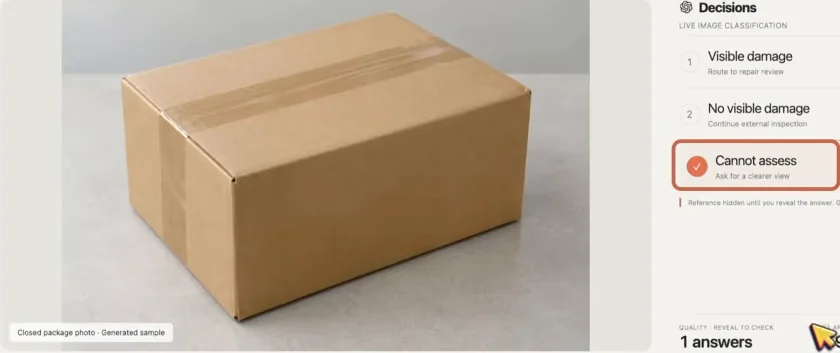
The community damage demonstration featured in the source, by Mark Kashef, includes a damaged device, an apparently undamaged device, and a closed package. The source frame labels its photos as generated samples. For the closed box, the reported answer is cannot assess. That is useful because the contents are not visible; forcing the answer into “damaged” or “working” would invent missing evidence. These are demonstration examples, not a verified physical product-inspection trial. Source: community image inspection, 4:53.
For your own evaluation, use known examples with different lighting, occlusion, and damage visibility. Review whether the model distinguishes the product from its packaging. Include an empty or irrelevant image to check that the question permits an uninformative answer. No new inspection accuracy is claimed by this guide.
Use frame scoring to make an editor’s shortlist
A video workflow needs a preparation step: extract still frames and retain their timestamps before sending images for judgment. Decisions does not accept the whole video as the image input shown in this workflow. The source’s thumbnail example, from Claire Vo, reports finding candidate frames from roughly 40 minutes of footage for $0.13. That cost belongs to the creator’s reported run. It is not a quote for every forty-minute recording. Source: community frame selection, 5:22.

A proposed evaluation question might ask whether all visible speakers have usable expressions, unobstructed faces, and open eyes. Keep those criteria explicit. A still where one person looks good and the other is mid-blink is a poor result for a two-person thumbnail even if the average face quality seems high.
Retain the original timestamp with every candidate. Review the shortlist at full size, choose the final frame yourself, and assess whether it represents the content accurately. This can reduce manual searching; it does not demonstrate that a selected expression increases clicks. If a coarse sample misses a useful moment, sample more closely around that part of the recording rather than treating the first shortlist as exhaustive.
Compare complete costs and the right latency baseline
The source quotes Jev at $0.042 per million input tokens and Decisions at $0.10, with no output-token charge for either decision service. The current TypeSafe model page confirms the Jev rate, and OpenAI’s Decisions guide confirms its uncached input rate while noting cache pricing, regional premiums, and long-context adjustments. These Decisions rates should not be confused with all other requests using Luna. TypeSafe pricing, OpenAI Decisions pricing.
For equal input-token totals at the quoted uncached rates, Jev’s input charge is 58% lower. As a planning example, 10,000 requests of 1,000 billed input tokens each would be ten million tokens: $0.42 at the Jev rate or $1.00 at the Decisions rate. This arithmetic excludes preparation, retries, other services, caching, regional adjustments, and differences in token counts. It is not a measured bill.
Text routing gives you a reason to evaluate Jev’s lower rate. Image inspection changes the comparison: add the cost and delay of any separate image-description service to the Jev design. The source does not measure the total reliability or cost of those two image pipelines. Source: unit-price comparison, 2:58.
Keep the two speed claims separate:
| Report | What it compares | What it establishes |
|---|---|---|
| OpenAI’s “up to 10 times faster” headline discussed in the source | Decisions against Luna through the Responses API | A claim about those OpenAI routes, not a Jev benchmark |
| Community business-report test cited by Ron | Jev averaging 155 ms and Decisions averaging 146 ms | A nine-millisecond difference in that reported test |
The community test used simple claim checks against a business report. It does not establish a general speed or accuracy winner. Time your complete job, including preparation, calls, retries, review, and downstream handling. If a customer must explain the duplicate charge to several departments, a small API latency saving has not solved the routing problem. Source: reported timings and limitations, 6:07.
Troubleshoot the integration before changing services
If the request never produces an answer, check the project, billing, key environment, endpoint, and request shape. If an SDK has no decisions method, compare its installed version with the current reference; the recorded beta package number is not evidence that every older environment supports the method. If image input fails, check whether the URL is actually accessible without your browser login and whether the request contains an image content part rather than a video file.
If the request succeeds but the label is wrong, inspect the evidence and category definitions. If the model keeps choosing a department for messages you consider ambiguous, make the review option explicit and add those cases to the evaluation set. If the image answer overstates what is visible, narrow the question and include cases where the correct result is cannot_assess.
An existing Jev workflow that performs the text task well does not need to move simply because a related API exists. Conversely, an application already using OpenAI may benefit from its familiar account and integration path. Ron cites that convenience for people already using Codex, Astra, or Sol, and contrasts the beta’s required Luna model with his usual approach of using Sol at low reasoning effort for routine jobs. That is a workflow preference, not a comparison of every model on the task.
He also mentions experimenting with decision-style conditions for trading execution, but gives no performance result or reproducible specification. That aside supplies no evidence of a profitable strategy. Begin with the support or image task you can check, and keep the fallback until the results justify automating the next action. Source: ecosystem preference and closing examples, 7:04.