4 Ways to Get MORE From ChatGPT and Codex

If useful work is scattered across conversations, making the model faster will only solve part of the problem. You still have to find the current task, understand what finished, decide what needs your attention and check whether a deployment actually works.
Organize the workflow around four parts: one place to see the work, a persistent machine for long builds, an agent with a clear product brief, and a deliberate way to explore alternatives when the first design is weak. This guide shows how to organize those parts and how to judge whether they are helping.
The examples come from the working Mikos dashboard and DogDogHK project. They are custom systems, not an off-the-shelf package this article can install for you. The source presents a workflow tour rather than a complete server configuration. The briefs and review exercises below are adaptable examples; current Codex instructions are linked where they add a specific supported procedure.
Before you start: choose one project and a definition of done
Choose a project that already has a place to store its work: a repository, a site or another system where you can inspect the result. Have access to its build environment and the accounts needed for the task. If an agent will use analytics, make sure it can read the relevant property rather than assuming a connector has supplied the right data.
Write down a concrete outcome before building a dashboard or adding another bot. “Improve the website” is difficult to verify. “Update this directory page with checked information, run the site’s checks, and report the live URL with the exact changes” gives you something to inspect.
Keep the first assignment small enough to finish through the whole process. A single verified update will tell you more about the workflow than a large queue of vaguely defined tasks. Once the process works, you can expand the amount of work it handles.
1. Build a dashboard around decisions and evidence
The dashboard’s most useful question is what needs you now? A list of every conversation is rarely the answer. A completed build needs a link to the result; a blocked build needs a reason and a specific decision; an active task needs a current state.
The Mikos example combines projects, bots, builds, recording, calendar items and other work in one place. You do not need to reproduce every category. Start with the project you chose and show the information required to manage it.
A practical task record can contain:
| Field | Why it belongs on the dashboard |
|---|---|
| Intended outcome | Lets you judge the work against the original request |
| Current state and last update | Distinguishes active work from a stale status |
| Action needed from you | Gives a blocked task a concrete next step |
| Result links | Opens the commit, build, report or published page |
| Verification result | Separates a claimed completion from a checked outcome |
| Usage and reset information | Helps you plan remaining work within the account’s limits |
This is a suggested record structure, not a published Mikos API schema. Adapt it to what your tools can actually read and update.
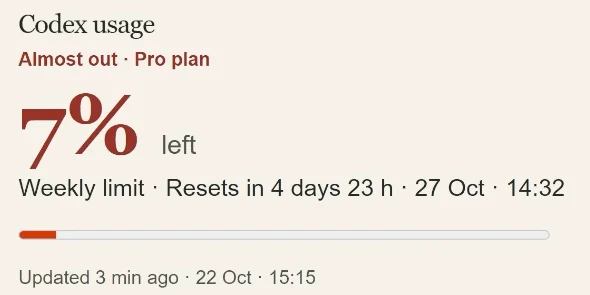
The demonstrated dashboard also makes Codex usage and the reset time prominent. That is useful for planning: if a long job is optional, you can decide whether to start it now, wait or reduce its scope. A reset indicator does not make every remaining task worth running just to consume the allowance.
Ask for a view that works on your phone as well as your desktop. Then test the actual decisions you expect to make there: can you open a result, identify the blocked task and read the reason without searching through several screens? A visually impressive dashboard can still fail this simple test.
Connect tools only when the connection supplies useful information
An MCP connection can give the agent access to a service’s data or actions. A skill supplies instructions for how to do a recurring job. They solve different parts of the workflow. OpenAI’s skills documentation describes skills as reusable instructions and resources in a folder with a SKILL.md; MCP servers can provide the live capabilities those instructions use.
For the dashboard, identify the source of each displayed fact. A commit link should come from the repository, a build result from the build system, and usage information from the available account readback. If a source is unavailable, show that limitation rather than turning an old value into a current-looking status.
The source workflow uses MCP as a way to connect its custom hub. It does not provide a universal server URL or installation command for cloning that hub. Give your agent the actual service and supported connection method for your environment.
2. Give long builds a persistent host
A laptop that sleeps cannot reliably finish an overnight job. A persistent remote machine gives the build a place to continue while your local computer is offline. The source setup runs builds remotely and brings their results back to the dashboard for review.
Persistence does not mean that a task has succeeded. The machine still needs the right repository, dependencies, permissions and working directory, and the process still needs to report failures. Check those basics with a small task before scheduling a large overnight run.
Current Codex Remote provides one supported way to manage work on a connected host. OpenAI’s remote-workflow guide says execution stays on the selected host and workspace. Choose the host, repository and base branch, create a worktree for isolated changes, and let environment setup finish before the build or tests. Queue waits for the current turn; Steer changes the active work. Those controls are not interchangeable.
That official workflow is added implementation context. It is not a claim that every custom server in the source uses the same setup. Use the procedure supported by your installed Codex environment and verify which machine and checkout the task will actually modify.
Hand off the job with an observable stopping point
Here is an example overnight brief you can adapt to a real project:
Update the specified directory page using the supplied sources. Work in an isolated checkout and preserve unrelated changes. Run the repository’s documented checks. Report the changed files, commit, check results and any unresolved source questions. If publication is within the agreed scope, verify the deployed page and include its URL; otherwise leave a reviewable change. Record progress so the task can resume after an interruption.
The example defines the expected evidence without inventing a build command for your repository. Your agent should read the project’s instructions and use its actual scripts. A generic command copied from another site is not a substitute for that inspection.
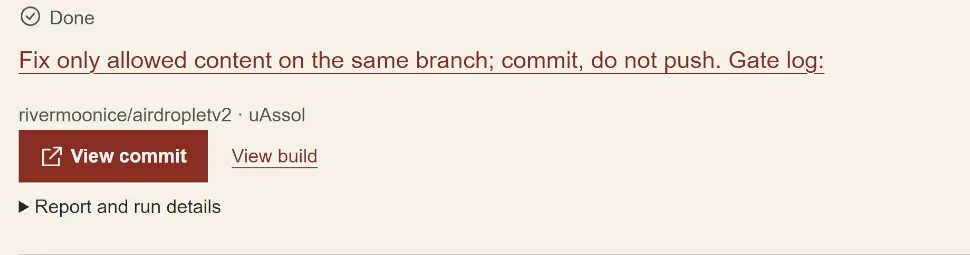
When you return, open the evidence. Does the commit contain the intended change? Did the required checks run on that revision? If the task was deployed, does the live page contain the new content? A green task label is only the beginning of that review.
Use speed when the delay is worth paying to reduce
The source compares an approximately 1.5× faster option with roughly 2× usage or cost in the account configuration being discussed. Those are recorded figures, not a current universal price schedule. Check the mode and usage terms shown in your own account.
The practical choice is between latency and useful output. An interactive fix that blocks your next step may justify a faster response. A long overnight build may not benefit enough to justify the extra usage. Remote execution makes ordinary-speed work less disruptive because you can inspect the result later.
The source includes a paid Hostinger segment showing an installed connector and account connection as an option for managing hosting. It is not a prerequisite for this workflow, and the recording’s Black Friday promotion is not a current offer established by this guide. Choose a host you can keep available and administer; verify the provider’s current setup before purchasing or changing infrastructure.
3. Give the agent a product brief, not just a stream of chores
A product-manager role means the agent can inspect the state of a project, propose useful work and request implementation. It needs an objective and evidence for choosing the next task. Otherwise, it is simply generating more activity.
DogDogHK provides a concrete example. The project helps dog owners in Hong Kong find places and information. Its Hermes agent reads Google Analytics and Search Console data, requests builds on a remote Codex machine and reports progress. That is a custom integration with delegated responsibilities; the source does not supply a complete configuration you can reproduce by turning on a single setting.
Use the pattern in stages. First let the agent read the relevant data and produce a proposal. Check whether it has the correct property, date range and page. Then let it prepare a bounded change and return the evidence. Extend its publishing responsibility only within the scope you actually intend it to have.
Separate the weekly goal from the daily task
A weekly goal explains the outcome you want. A daily task is one action toward it. For a directory, the goal might be to make a particular guide more useful and easier to find. A daily task could correct outdated location details, improve a confusing section or prepare a new page supported by actual sources.
The source gives “publish two articles per day” and running Instagram as examples of delegated targets. Treat those as operating choices, not a recommended quota for every site. Two weak articles do not become useful because the dashboard records two completed tasks.
An adapted product brief could read:
Review the agreed analytics and search data for this directory. Identify the page and reader problem behind each proposed change. Prioritize a small set of supported improvements, request implementation on the build host, and return the exact changes with verification. Keep unresolved data or source questions visible. In the weekly report, distinguish work completed from measured changes in reader behavior.
That last distinction matters. A deployed page is an output you can verify immediately. Its effect on visits or reader behavior takes measurement. Do not ask the agent to fill that gap with a confident explanation after a few minutes.
The source suggests using Hermes with the same Astra model arrangement for management and Codex for building. Account compatibility, quotas and charges depend on the configured integration; this guide does not establish that every provider or setup has identical cost. Check the actual supported connection and account readback before assuming the two roles share a budget.
Make the handoff easy to inspect
The manager’s request should identify the project, intended change, evidence, limits and acceptance checks. The builder’s response should identify the revision, checks and remaining work. Both should report to the same project record.
When a task stops, retain its state. Record what completed and what still needs attention so the next session can continue without repeating a publication or rebuilding an already accepted change. This is a workflow recommendation, not a claim that naming an agent “product manager” automatically supplies durable state.
4. Explore alternatives when the first design is too generic
Some problems benefit from several competing approaches. A new site design is one of them: the first reasonable layout may be usable but fail to express what makes the project worth visiting.
The source uses a skill called ADHD to push the agent beyond its first proposal. The name is a workflow label, not a medical claim. Its purpose here is divergent exploration: consider different approaches, compare them and develop the useful ones. The trade-off is additional tokens and review work.
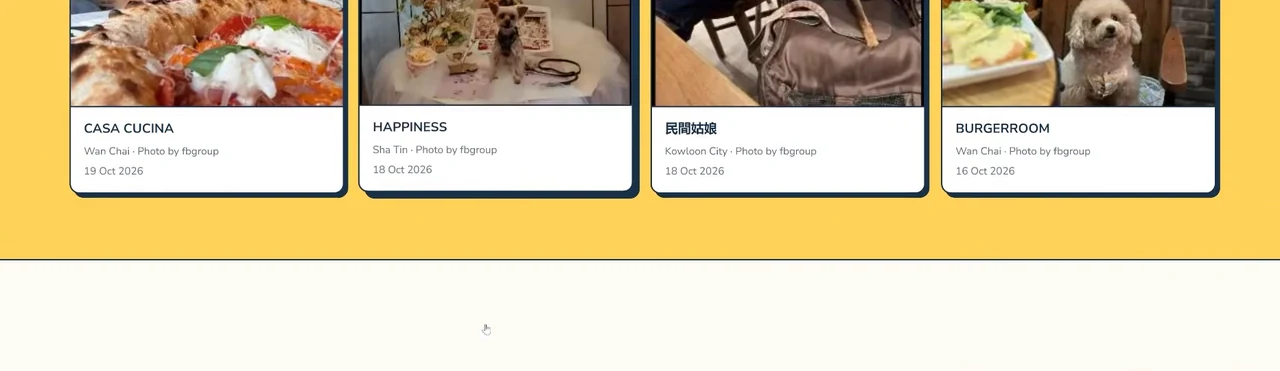
DogDogHK’s illustrated result uses a more colorful direction, with a prominent yellow field and distinct place cards. The dashboard exercise moves in another direction: it removes clutter and brings “what needs me” and results forward. Exploration does not always mean adding more visual elements.
You can try the principle with a bounded design brief even before adopting a particular skill:
Develop several meaningfully different ways to help a dog owner choose a place to visit. Explain the trade-offs in navigation, information density and visual treatment. Compare them against mobile readability and the actual directory content, then develop the strongest option. Preserve the details a reader needs to make the choice.
This is an example exercise, not the skill’s installation command. If you use the named skill, read the installed version’s instructions rather than assuming every tool interprets the name the same way.
Review the alternatives against a reader task. Can someone find a place, understand what it offers and identify the information they still need? For the dashboard, can you identify the next decision and open its evidence? Use those checks to choose between the mockups.
Reserve the extra exploration for uncertain decisions. A typo fix or a known build error usually needs a direct correction. More branches and more tokens can make a simple task harder to manage without improving the result.
Troubleshoot the workflow when it stalls
The dashboard looks current but the work has stopped. Check the last update and source of each status. Require the agent to report where execution stopped and preserve the task state. Do not infer progress from the continued availability of the dashboard itself.
An overnight task finishes without a useful result. Tighten the definition of done and the evidence it must return. Check the actual host, checkout and environment setup before blaming the model’s reasoning.
The product manager produces endless tasks. Ask it to connect each proposal to a reader problem and the project’s goal. Limit the next batch to changes you can inspect through completion.
A design exercise produces attractive but impractical options. Reintroduce the real content, mobile constraints and reader task. A distinctive color scheme cannot compensate for missing location information or unreadable controls.
Usage rises without more accepted work. Look at repeated attempts, unnecessary speed settings and open-ended exploration. Compare completed, verified outcomes with the resources spent, rather than treating message volume as productivity.
The first useful milestone is a complete trip through the workflow: one clear request, one isolated implementation, inspectable checks and a result you can use. Build the surrounding automation from that working path.
For another practical starting point, see a small online business stack.