We Built a Castle Siege Game with GPT-6 Astra!
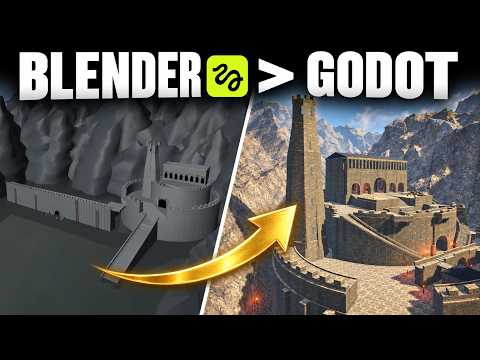
A castle siege prototype needs a route the player can follow, actions that feel connected to the character, and a clear reason to move when the battle changes. This guide shows how to plan and test those pieces with an AI coding assistant, Blender, Godot and generated art. Aim for one playable chapter: defend a wall, respond to a new threat, retreat and reach the keep.
The worked example is Ashfall: The Last Gate, built with GPT-6 Astra, Higgsfield, Blender and Godot. The footage shows a running first chapter and the revisions behind it. It does not supply a complete project or a reproducible one-prompt build. The procedures below combine that demonstrated workflow with current Godot import guidance; the test briefs are examples you can adapt to your own project.
Before you start: establish a small playable baseline
Have a Godot project that opens and runs, Blender for changing the 3D assets, and an assistant able to work on that project. Keep a copy or versioned checkpoint before changing the castle or character. Record the Godot version used by the project so the assistant checks matching documentation rather than mixing engine versions.
If you have no working 3D project yet, complete Godot’s Your first 3D game tutorial first. It provides a smaller foundation for movement, collisions, spawning and interface work. It does not create Ashfall, but those basics make a siege prototype easier to inspect and repair.
For the art workflow, prepare a character brief and a few environment references. Higgsfield access is needed only for the generation steps you choose to use. The playable game runs in Godot; an image generator does not supply combat rules, collision, animation fitting or objectives automatically.
Define a first playable slice before asking for a large battlefield:
| Part | First acceptance check |
|---|---|
| Outer wall | The player can move, aim and fire from a usable position |
| Incoming threat | The player can identify what needs attention |
| Phase change | The objective changes once, for an understandable reason |
| Retreat | A traversable route connects the wall area to the keep |
| Chapter ending | Reaching the destination produces an explicit result |
Keep decoration subordinate to that route. Ashfall’s first mountain-fortress attempt had a wall and too much empty ground. Testing from the player’s position exposed the missing keep more clearly than the initial description did.
Turn the fortress brief into observable changes
Start by walking the route in the running game. From the wall, locate the destination. From the courtyard, locate the staircase. At the keep, look back toward the battlefield. Capture those views before requesting changes, so the assistant has a shared spatial reference.
Ashfall’s revisions asked for a bigger keep, taller defenses on the right, mountains around the back and a properly curved road toward the gate. Much of the feedback used screenshots with yellow circles: move this object, raise that wall, put the staircase here. After each change, Ron reopened the environment in Godot and inspected it again.
Give an instruction that contains a location, a change and a test. For example:
In the attached courtyard view, move the staircase entrance to ground level beside the castle. Build its upper section into the castle side, with the mountain immediately beside it. Preserve a continuous walkable route to the keep. After the change, identify the edited scene and test the route from the courtyard.
This is a proposed revision brief, not a recovered build prompt. It makes the intended geometry clearer than “make the fortress more impressive.” Preserve the screenshot and a matching after-view so you can tell whether the staircase moved or the camera merely changed.
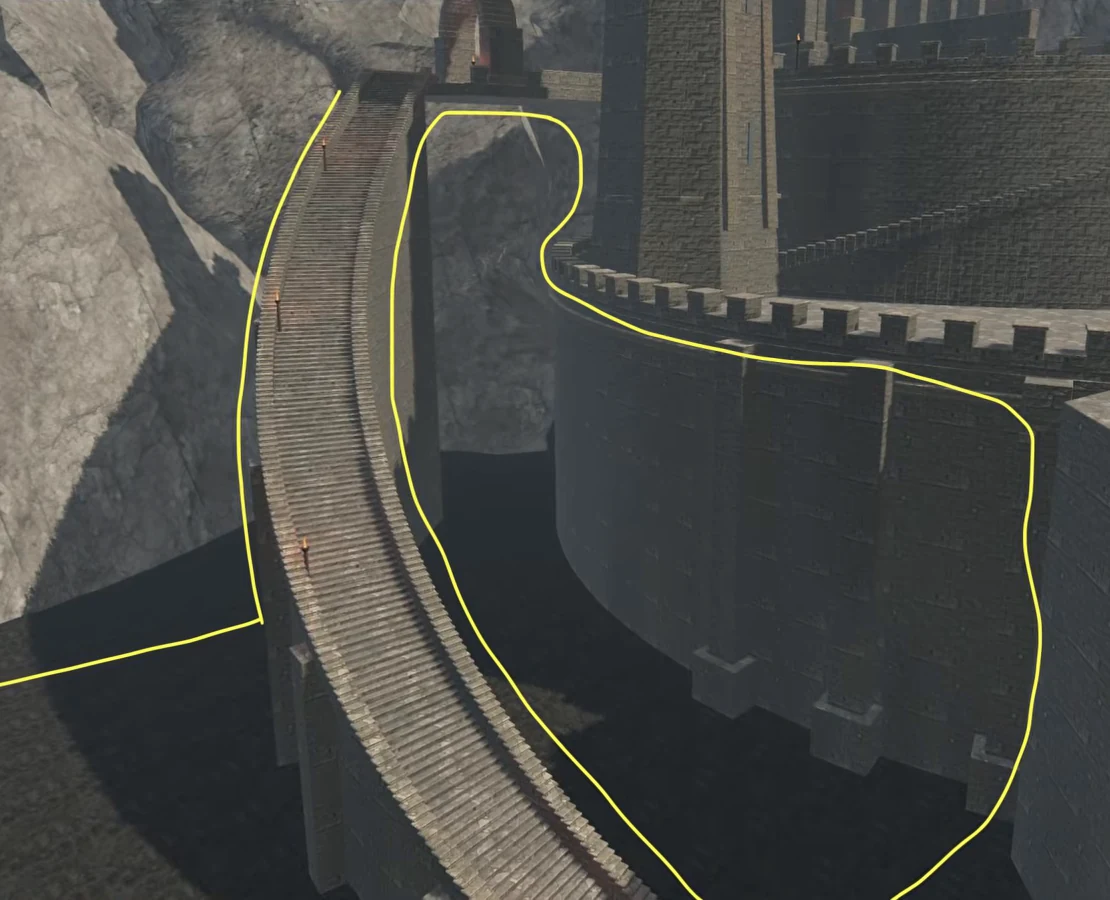
The staircase took multiple corrections in Ashfall. It initially began at the wall when the intended route began on the ground; another version stood apart from the castle. The later version was closer to the desired integration with the castle and mountain. A successful visual correction still needs a traversal test: walk up it, turn at the landing, and verify the entrance connects to the next space.
Test the interior too. Smaller stairs and courtyards should lead toward the great hall without forcing the player to guess which door is usable. Ashfall’s previously empty interior became part of the retreat. That gives the castle a purpose after the opening defense rather than leaving it as distant scenery.
Approve the character before turning it into a game asset
Ashfall’s archer, Kade, began with a character image. The brief called for a tall, dark-skinned man with short hair, stubble and medieval armor. One attempt produced a modern padded jacket and was rejected. The approved direction used a red tunic and leather armor before continuing into a 3D model, Blender fitting and Godot integration.
Review the concept at the scale and angle that matter in the game. In a third-person siege, the player sees the back, bow and quiver constantly. A good front-facing portrait does not establish that the equipment will sit correctly during aiming or running.
Use three checks before continuing:
- Design: the clothing, materials and silhouette match the character brief.
- Model: the 3D asset has the shape and parts needed for the intended use.
- In-game fit: the bow, arrow and quiver stay aligned through the actions the player performs.
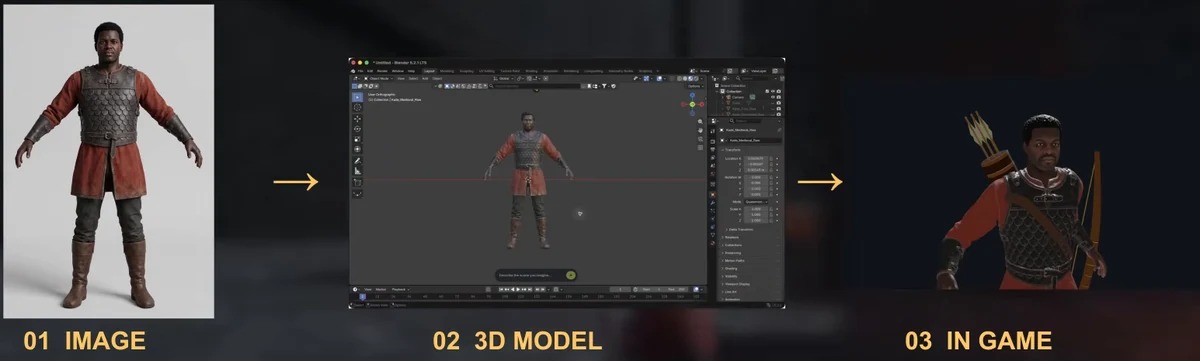
Keep the approved reference beside the model during inspection. Correct a modern-looking jacket while still at the concept stage; correcting it after animation and equipment fitting adds avoidable work. Conversely, a quiver floating at the hips is a placement problem to investigate in the 3D setup, not necessarily a reason to regenerate the entire character.
For a dependable exchange format, Godot recommends glTF 2.0 and supports .gltf and .glb. Direct .blend import calls Blender to convert the file, so Blender must be installed on the machine doing the import. For a project shared across machines, an exported .glb can avoid that dependency. Check the supported 3D formats against your asset and engine version.
Place the exported asset in the Godot project, then inspect it through the FileSystem dock. Select it for the Import dock, or double-click it for Advanced Import Settings, where you can preview models and animations. Prefer fixing the source asset for geometry changes. Use an inherited Godot scene for local additions that need to survive reimport, rather than treating the imported file as an ordinary editable scene. The import configuration guide explains those workflows.
The successful checkpoint is the model visible at the intended scale and orientation in the game, with required materials and animation data present. Import success alone does not verify those details.
Fit equipment and inspect movement one action at a time
Ashfall’s early Kade did not hold the bow properly. The arrow missed its intended alignment while aiming, and the quiver floated around his hips. Blender work improved the equipment fit, and movement used animation adapted from Godot’s demo assets. The quiver reached his back, but the running animation still needed another pass.
Use a small repeatable action sequence for each revision: idle, turn, begin running, stop, draw the bow, hold aim and release. Inspect both the game camera and a side view. Save a short before-and-after recording so you can compare the same turn or draw instead of relying on memory.
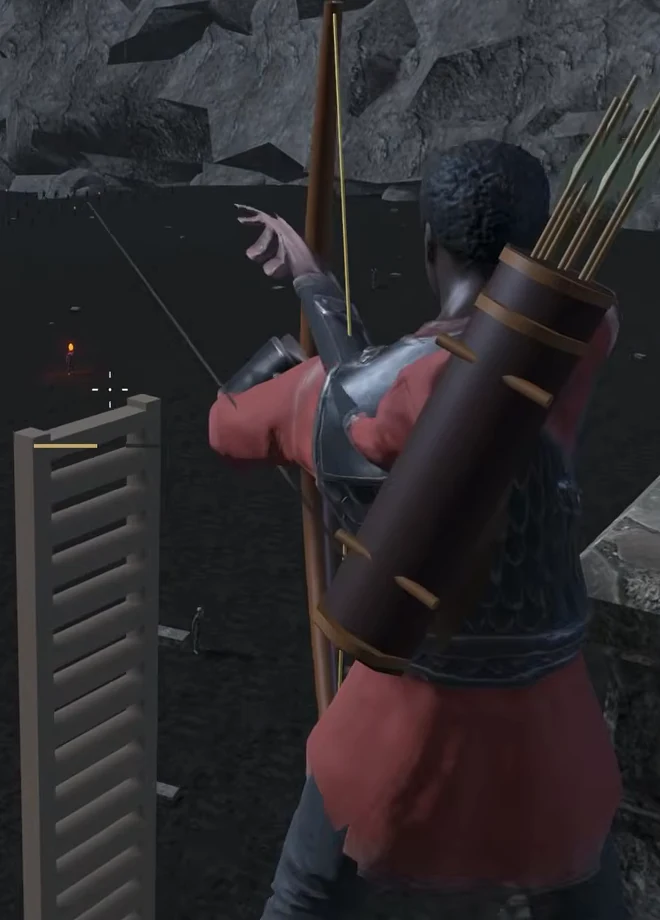
Separate three kinds of defect. An object that stays in the wrong place even while idle suggests placement or attachment. A hand that drifts away during the draw suggests animation or fitting. A character that looks acceptable while aiming but awkward while running needs movement-specific work. Ask the assistant to identify the relevant asset or scene before changing all three at once.
When sharing animations across skeletons, matching bone names is insufficient: rest transforms matter too. Godot’s documented starting point is the Skeleton3D node in Advanced Import Settings, then Retarget, a BoneMap, and an appropriate skeleton profile. For humanoids, SkeletonProfileHumanoid can map bones automatically; inspect and correct the mapping rather than assuming it succeeded. Warnings about missing, duplicate or incorrect relationships can coexist with a completed import. Follow Retargeting 3D Skeletons for the remaining rig-specific decisions.
Do not apply every rest-fixing option as a generic cure. A character with accessories or a deliberately different rest pose may need different choices. Re-test the bow and quiver after animation changes, because improving the run is not enough if it breaks the draw.
The source credits locomotion adapted from the Godot Third Person Shooter demo, © 2018 Juan Linietsky and Fernando Miguel Calabró, CC BY 3.0, retargeted for the character and adapted for in-place movement and archery. Preserve that credit when describing this build, and check the actual asset licenses when choosing resources for your own.
Give each siege phase a different player decision
The demonstrated chapter progresses through outer-wall defense, a ladder assault, torchbearers approaching the culvert, and retreat to the keep. Each phase changes what the player should pay attention to.
On the outer wall, holding the right mouse button draws the bow; keeping it drawn gives time to line up a stronger long-range shot. Firing without aiming is quicker. Friendly defenders can block arrows, so move to a clear line of sight. These are observed Ashfall controls and behaviors, not default Godot input bindings.
When ladders arrive, the threat shares the narrow walkway. The player has less time to aim and needs to check along the wall. Stronger arrow-hit reactions would make combat easier to read; Ron identifies that as unfinished work.
The torchbearer phase provides a more specific priority. Runners heading toward the culvert can accelerate the breach, so shooting them buys time. The player now has a reason to choose targets instead of firing into the largest crowd.
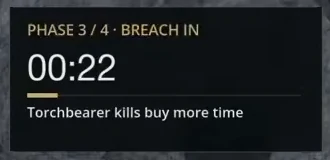
Ashfall added a timer to each phase because an earlier version left the player unsure whether to wait or kill everyone. The objective and countdown now appear while playing. In your prototype, define what each timer means: remaining defense time, time until a breach, or time available to escape. Those meanings should not be interchangeable labels on the same unexplained number.
For a simple Godot timing implementation, a Timer node exposes wait_time, time_left, one_shot and a timeout signal. Configure a phase timer, start it when that phase begins, and connect its timeout to the appropriate transition in your game logic. Display the remaining time from that same source. The Timer reference documents the node; the chapter’s rules and interface still need your own implementation.
Ask the assistant for an explicit transition plan before code changes. For example: “Enter torchbearer defense after the ladder phase, show the new objective, and transition to retreat once the breach condition fires. Ensure the transition cannot execute twice.” This is a suggested testable design, not a claim about Ashfall’s internal code.
Play through once while taking no useful action, then again while prioritizing the runners. Observe whether the expected timing differs and whether the chapter still advances. Test failure and restart paths as well as the successful run. A timer visible in a screenshot does not prove that every transition works.
Test the retreat as part of the level
When the wall falls, Ashfall asks the player to cover retreating defenders and reach the keep. The useful rhythm is to stop for a shot where there is room, then move again. A retreat corridor must support that rhythm: enough space to turn and shoot, a visible next destination, and no accidental dead end.
Walk the route without combat first. Then repeat it with enemies and friendly defenders present. Check that bodies, collisions or crowd placement do not make the staircase unusable. Inspect whether the route is readable while the camera is turned back toward the battle, not only while walking forward in an empty environment.
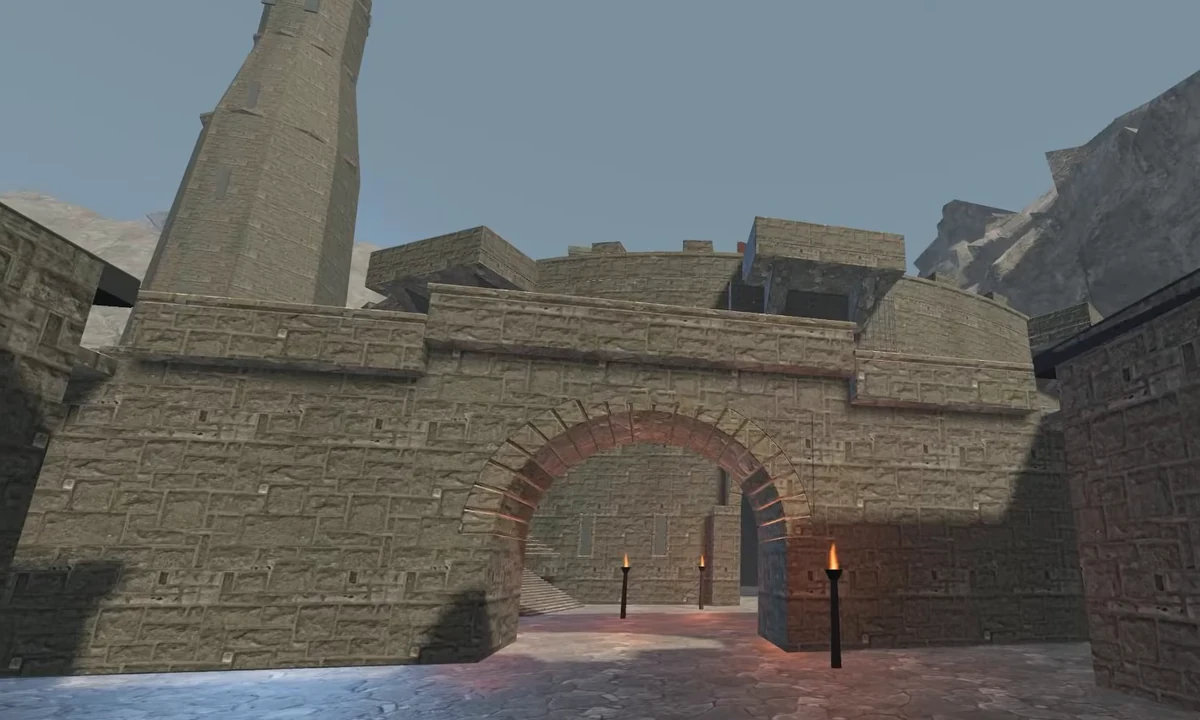
Ashfall reaches the keep and ends the chapter. A busier retreat with more defenders and louder pursuit remains a proposed improvement. So do better coordinated defenders that hold a section, get pushed back and regroup. Keep those aspirations separate from the behavior already demonstrated.
Give the next revision one measurable purpose. “Make the retreat more exciting” can lead to more enemies without improving play. “Keep the staircase entrance clear, show two defenders moving toward it, and make the next destination visible from the courtyard” is an example brief whose result you can inspect. The number is a proposed starting constraint, not a documented Ashfall setting.
Use sound and generated props to solve specific problems
Ashfall previously had a constant hiss under the action. The team removed that unwanted bed of sound and focused the next audio pass on footsteps, arrows and nearby fighting. More volume everywhere would not solve the original problem.
Test sound while doing the action it represents. Walk, stop, fire, and move away from combat. Check whether you hear a relevant event and whether a continuous loop masks it. A warning when a torchbearer gets close could help a player focused through the bow; that is a desired addition in the source, not an implemented alert demonstrated here.
The closing shield example shows a separate art request: dark iron, leather straps and a copper chevron. Astra prepares the generation, the estimate is checked, and the result is opened on Higgsfield. Treat that as a concept approval step. A shield image still needs the model, fitting and in-game checks appropriate to its intended use.
For the current ChatGPT connection, follow Higgsfield’s official connection guide: add the Higgsfield plugin from the Plugins Directory, sign in and authorize. The documented route requires an active paid Higgsfield subscription and does not require an API key. Verify it with a balance or recent-generations request and check that the assistant actually calls the tools before asking it to generate. This is the current plugin procedure; the recorded demonstration calls its connection MCP.
Keep the art decision small: approve the shield’s shape and materials before pursuing a 3D asset. If your next task is organizing trailer shots instead of game objects, the Higgsfield API shot-library guide covers that separate workflow.
Troubleshoot the part that failed, then replay the chapter
The fortress looks grand but the level feels empty. Check the route from the player’s position. Add a meaningful destination and connections between usable spaces before requesting more decoration. Ashfall needed a keep worth defending and an interior used during retreat.
The staircase moved but still does not work. Compare its entrance, landing and connection to the castle against the annotated screenshot. Then traverse it in Godot. A corrected silhouette can still leave broken collision or a disconnected doorway.
The character imports but aiming looks wrong. Revisit equipment alignment and the specific aim animation. Preview the rig, inspect bone mappings where retargeting is involved, and replay the same draw-and-release test. Do not accept an idle pose as evidence that the bow works.
The player cannot tell what to do. Ask a tester to name the current objective and next destination without explanation. Clarify the phase label, timing meaning or target priority where they hesitate. Ashfall’s countdown helped, but additional runner warnings and stronger hit reactions remain useful next checks.
The prototype technically runs but feels unfinished. Choose between movement, impact feedback and defender behavior based on the observed problem. Ron’s next priorities were the wall fights and Kade’s movement. A finished first chapter means you can play from the opening defense to the keep; it does not establish that the combat or animation is ready for release.
Keep the next task short enough to verify in one replay. Save the changed asset or scene, the exact test and the before-and-after evidence. That is how the repeated corrections in this project become a workflow you can use on a different game.