Honest Review: Kimi 3.1 Pro


Suggested for this guide
Kimi
Start with the current Kimi plan and confirm that it includes the model and coding access this guide needs.
Best for: Claude Code setups and cost-aware model work
Check Kimi plansPartner link. It supports Superbash Learn at no extra cost to you.Before moving your coding work to Kimi 3.1 Pro, give it a task you already understand and measure what happens between the prompt and a result you can use. A game that launches, a game whose controls work, and a game the agent has checked are different levels of completion. Count a result as finished only after it passes the checks your project needs.
Superbash’s paid weekend trial produced a functional glider and a more convincing tower-defense scene. The concern was the amount of useful work available before the five-hour allowance became restrictive. Kimi improved enough to be a credible option, but the host did not find a compelling reason to move substantial work away from an existing mix of Astra for general builds and Claude for video work or especially important tasks.
This guide turns those results into a practical evaluation you can run: establish the access route, use a repeatable project, check behavior yourself, and compare the cost of reaching the same finished state. The suggested test briefs and calculations below are added examples. They are not the original prompts or newly executed benchmarks. The team paid for a month of Pro access themselves; the test was not sponsored by Kimi. Source test and plan context.
Separate model quality, agent behavior, and access
Kimi 3.1 Pro is the model. A coding agent gives it tools to inspect files, change code, and run checks. The subscription or API account determines which requests you can make and how they are charged. Changing all three at once makes a comparison difficult to interpret.
For a model comparison, keep the project, brief, test procedure, and available tools as similar as possible. Record the agent and model selection in your notes. If you compare whole products instead, include the agent’s convenience and tool behavior in the verdict, but avoid attributing every difference to the underlying model.
You need a small project with a known starting point, model access, a browser for interactive results, and a written definition of finished. Keep a separate copy for each attempt so one model cannot benefit from another’s completed repairs. Pick work that resembles your actual queue; a browser game is useful if you care about interaction and visuals, but it cannot settle which model is best for an unrelated codebase.
Before you start: open a clean Kimi session
These are current documentation steps checked on October 28, 2026, added to make the evaluation usable. They were not executed as a new test for this article.
If you choose Kimi Code CLI and already have Node.js 22.19.0 or later, the official npm installation path is:
node --version
npm install -g @moonshot-ai/kimi-code
Open the terminal in your test project’s folder and start the client:
kimiUse /login and choose the appropriate access route: Kimi Code account login or a Kimi Platform API key. Type /model to select the model, and /help for the client’s controls. Kimi’s CLI getting-started guide documents those commands and alternatives for systems without a suitable Node installation.
Start a new session for K3.1 Pro rather than carrying an earlier model’s conversation into the trial. Kimi’s current coding-plan IDs are k3.1-pro and k3.1-pro-highspeed. The provider warns that mistyped IDs in third-party calls can fall back to a different model. Check the actual selection; a familiar-looking answer does not confirm that the intended model ran. Keep thinking enabled. Kimi Code model configuration.
The standalone Kimi API uses different IDs: kimi-k3.1-pro and kimi-k3.1-pro-highspeed. Its quickstart uses https://api.moonshot.ai/v1 with an API key. Use the instructions for your chosen access route rather than mixing a coding-plan model identifier with an API example. Kimi API quickstart.
Ask the agent to inspect the project and explain its launch and test instructions before changing anything. This gives you an early check that it can read the right files and understands the environment. Then begin the bounded task.
Evaluate a glider with explicit control checks
The glider example is useful because a convincing scene can hide a basic input error. If left and right are inverted, the game can render beautifully while failing the first thing a player tries to do.
Superbash’s glider had working buttons and could be flown. The host also reported that Kimi checked its work more carefully than in earlier Kimi K3 attempts, including checking for flipped controls. That is evidence of an improved build experience in this example. It does not establish that every control or failure state was tested. Glider result at 1:58.

For your own trial, write the intended control scheme into the brief. If you want inverted flight controls, say so; otherwise the model and tester can disagree about the expected behavior without either being internally inconsistent. A suggested evaluation prompt is:
Build a small browser glider with a clearly stated control scheme and a visible objective. Run it and verify the controls against that scheme. Tell me which checks you performed, what failed, and what you changed. Include launch instructions and keep the project easy to restart for another test.
Check one input at a time from a known starting state. Press a direction briefly, release it, and inspect whether the aircraft reacts as described. Repeat for every stated input, then try completing a short part of the objective. Record a failure as observed behavior: “pressing left turns right under the documented scheme” is more useful than “controls feel bad.”
Ask for the evidence behind an agent’s statement that it tested the game. A browser action, a recorded result, or a specific check is more informative than a sentence saying everything works. If it could not run the browser, that limitation belongs in the result. Do not score a proposed test as an executed one.
For repairs, keep the scene and objective fixed. Ask the agent to correct the input behavior and repeat the same check. Count that repair cycle in the evaluation, even if the final result is good. It tells you how much supervision the model needed to get there.
Evaluate tower defense for readable objects and working interaction
The tower-defense build showed a different improvement: the towers looked like more useful game objects instead of the indistinct shapes the host remembered from earlier attempts. He found the scene pleasant and easy to play. That is a useful result for this browser game; broader 3D work needs its own evaluation. Tower-defense example at 2:35.
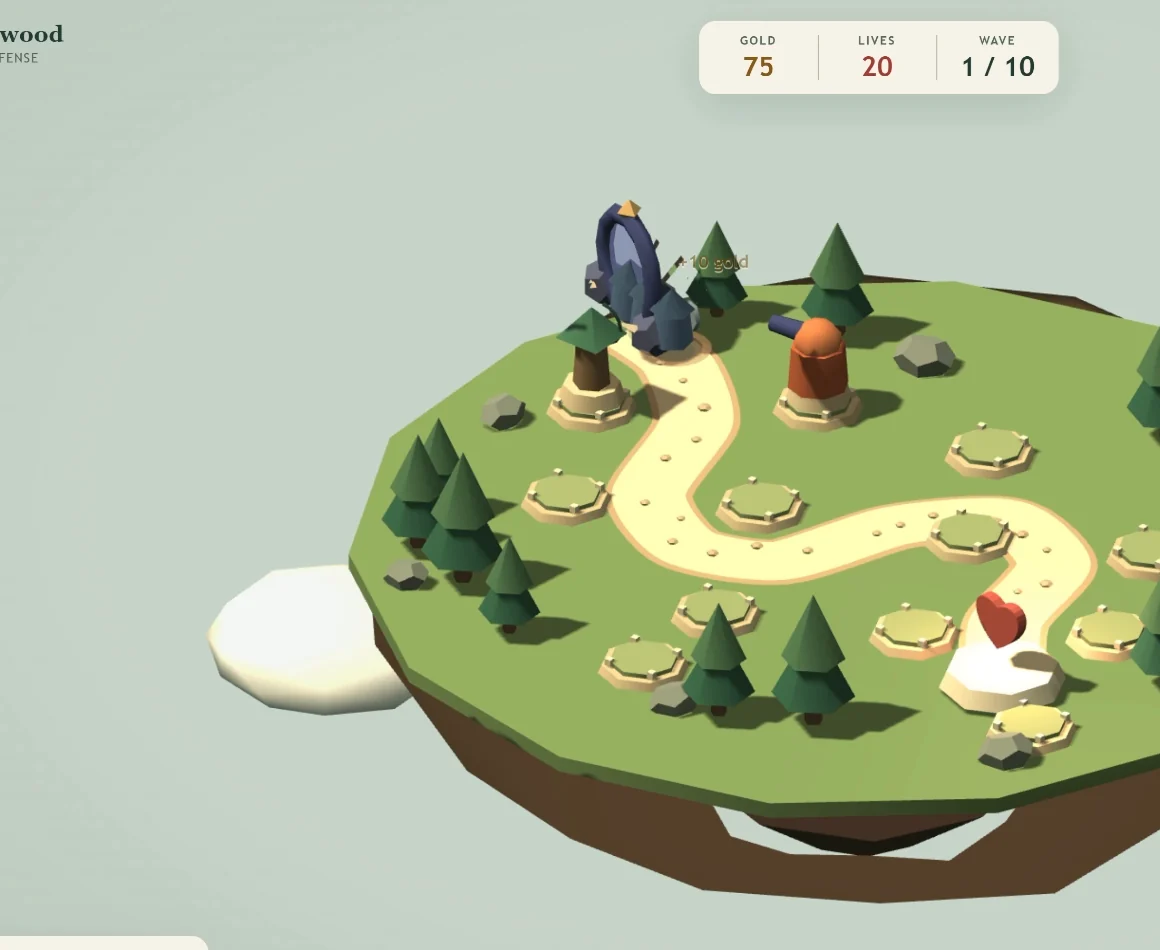
Use the scene to separate visual quality from game rules. First, inspect whether the path, build locations, towers, and important status information are distinguishable. Then interact with the game. Placing a tower should do what its control promises, and starting a wave should produce a playable state rather than only a new label.
For a fresh evaluation, define those expectations before generating the project. A suggested brief is:
Build a small tower-defense game with a readable enemy route, clear build locations, and distinct tower shapes. Explain how to place a tower and start a wave. Test the controls and report any behavior that remains unverified.
The recording establishes that the host placed towers and found the game usable. It does not supply an exhaustive check of targeting, damage, currency deductions, every wave, or the final win/loss state. Add those checks if they matter to your project, and keep them separate from what the source actually demonstrated.
A screenshot can help you compare shapes and layout, but it cannot prove the rules work. If the towers look better while the wave logic fails, record both outcomes. That gives the model credit for the improvement without accepting a broken deliverable.
Keep a completed-task record
Use one row for each attempt, including unsuccessful ones:
| Record | Why it matters |
|---|---|
| Starting project, brief, selected model, agent, and mode | Identifies what you actually compared |
| Tests required and tests passed | Defines usable completion |
| Time to first runnable result and time to accepted result | Separates quick output from finished work |
| Human repair requests and unverified behavior | Records supervision and remaining work |
| Quota before/after, limits encountered, and API cost if applicable | Connects capability to usable access |
The two game examples explain why Kimi deserves a trial. They do not provide a repeated success rate, a full token ledger, or a timed build table. Supply those measurements for your own workload before declaring a winner.
The host’s disappointment came from expectations formed by Kimi K3’s earlier combination of capability and low cost. K3.1 Pro produced good outputs, but he judged it broadly comparable to tools he already had. A successful build can therefore earn a place as an alternative without earning all of your work.
Compare subscription allowance with API spending
The source reports a $2/$10 token-price pair and an intelligence ranking just below Opus 5.5, alongside favorable cost-per-task positioning. Those were release-context figures cited by the host, not an invoice for the two games. Do not use that pair as a complete current price quote: account route, caching, and other billing details must come from the applicable provider pricing page. Opening price and benchmark claims.
The paid trial hit five-hour limits quickly. The host found the allowance less generous than earlier Kimi access and compared it unfavorably with the usage and resets he was getting from OpenAI subscriptions. His conclusion concerned his effective cost of doing work, not just the nominal rate for tokens. He also reported suggestions to use the API instead, but supplied no complete usage data proving that the API was cheaper. Allowance and alternatives at 3:09.
Check the rules attached to your actual account. Kimi’s documentation now distinguishes new plans, which retain a rolling five-hour window without a weekly limit, from legacy plans that retain weekly limits. Both remain subject to a monthly total. Multiple devices and keys share the account’s allowance; moving to another client does not create a fresh quota. The console shows quota and rate-limit status. Kimi membership and limits.
For a fair comparison, estimate what you would pay additionally to finish the work. If an existing subscription already covers the task, buying another subscription introduces an extra expense even if the new model has attractive API rates. If your existing allowance is exhausted, an API run may be useful, but measure its actual bill and completion rate.
Use the same finish condition for both routes. Dividing spending by accepted tasks is more informative than dividing it by prompts sent. Keep failed builds in the spending total. Include the time lost to interruptions in your notes, especially if you work interactively and cannot simply wait for another allowance window.
Use fast mode when a shorter wait has value
Ordinary mode felt slower to the host, who associated that with a larger model; the trial did not isolate the cause of latency. He described Kimi fast mode as roughly two to three times faster at twice the cost. His GPT comparison was about 1.5 times faster at twice the cost. Those were reported ratios, without a controlled timing table. Kimi’s current coding-plan documentation independently describes Highspeed as roughly two to three times the speed with about twice the quota use. It describes the model capabilities as the same. Source speed comparison and current Kimi mode documentation.
For a simple illustration, suppose the model-processing portion of a task takes 12 minutes in ordinary mode. A two-to-threefold speedup would reduce that portion to about 4–6 minutes. At a doubled usage charge, you would be spending extra to save roughly 6–8 minutes. These are hypothetical numbers derived from the stated ratios, not timings from Superbash’s games. Browser actions, builds, downloads, and other tools can add time that faster model output will not remove.
During an interactive session, that saving may matter because you are waiting before making the next decision. For unattended work that will finish overnight either way, ordinary mode may be sufficient. The team spaced benchmark builds overnight to spread usage out. That was a scheduling workaround, not proof that limits disappeared or that faster mode improved output quality.
Run your comparison in fresh sessions with the same brief and checks. Measure total time to accepted output, not only how quickly text starts streaming. If fast mode reaches the same limit sooner, count the resulting interruption too.
Troubleshoot the evaluation before blaming the model
If the intended model is unavailable, check account eligibility and the model selector. For a missing CLI model, the official remedy is to sign out and log in again. Recheck the selected ID and thinking setting before comparing quality. Official model troubleshooting.
If a build stops during active work, inspect usage status before changing the prompt. A five-hour restriction and a monthly quota exhaustion are different conditions. Repeated requests cannot establish that a coding task is beyond the model when access is what stopped it.
If the app launches but controls fail, preserve the initial result and give a precise reproduction. If the visual result is weak, identify the object or layout problem rather than requesting a generic polish pass. If the agent claims success without evidence, require the missing test or mark that behavior unverified.
Assign work by the result you prefer
Aggregate intelligence rankings help identify models worth testing. They do not measure every task equally. The host cited a reported 2.8-trillion-parameter size for Kimi and a roughly five-point Opus-versus-Astra intelligence-score gap, yet reported much larger practical gains with Opus on video editing and motion graphics. Those are source claims and team preferences, not measurements of model size or a new benchmark run. Current Kimi documentation describes K3.1 Pro as a 3T-class model. Source benchmark discussion and official K3.1 Pro description.
The same reasoning explains the comparison with MiniMax M3.1 Flash: the host saw a clear cheap-execution role for MiniMax, while Kimi competed near the top at a less distinctive effective price. He also acknowledged improved access congestion and direct availability for eligible existing subscribers. His request for more usage resets was a preference, not a promised entitlement. Speculation that Kimi rushed the release ahead of competitors was not evidence of the company’s motive. Source access and positioning.
Open weights could create a separate reason to adopt Kimi, but that was a future possibility in the review. Before planning a local deployment, verify that the intended weights have actually been released and that your hardware can run them. No local hardware test was demonstrated. Source open-weight assessment.
Give Kimi a larger role when it completes a recurring job better, needs fewer repairs, saves enough waiting time, or delivers more accepted work within your budget. If it matches your existing tool and adds a restrictive allowance, keep it as an alternative. The frontier versus open-weight decision lesson develops that choice beyond these two game examples.