Can GPT‑6.1 Sol keep up with Astra?

Choose a coding model by the result you need to inspect. A mechanical explainer needs readable controls and clear relationships between parts. An arcade racer needs a convincing view of the action as well as working progression. A model can deliver one well and leave the other needing another pass.
This guide uses five completed Superbash projects to build an evaluation you can repeat: a mechanical watch, a drift racer, a timber temple, a Blender cinematic and a solar system. Both GPT-6.1 Sol and GPT-6 Astra ran in Codex at High reasoning. The results shown are finished builds after testing and repairs, not untouched first responses.
Ron preferred Astra in three rounds and Sol in two. That is his judgment of these particular outputs. Use the concrete strengths and failures below to design your own acceptance checks rather than treating a 3–2 score as a general benchmark.
Before you start: hold the brief and environment steady
Use the same project brief, required assets and acceptance criteria for both models. Give each a separate working copy so one run does not inherit the other’s repairs. Record the model, reasoning level and final revision you are evaluating, along with any additional instructions you supplied.
In current Work and Codex interfaces, select GPT-6.1 Sol from the model picker if it is available to your account, then choose a supported reasoning level. Model availability depends on the account and workspace. OpenAI’s usage guidance also separates reasoning effort from model choice and warns that higher effort can use more allowance without guaranteeing a better result. These are current setup details checked on October 28, 2026.
For a comparison with the recorded test, keep High reasoning on both runs. That does not make the trial perfectly controlled: tool access, repair attempts and the tasks themselves still affect the outcome. Save those details rather than reporting only a winner.
Separate functional checks from visual judgment. A game that completes its progression and a game whose camera makes driving enjoyable answer different questions. Write both into the brief if both matter.
Test a mechanical explainer through its controls
The watch brief asks for four different movements, working controls and an exploded view. Pulling the movement apart should leave it ticking. Slowing the mechanism and zooming into the escapement should make its cycle easier to follow.
Begin by exercising those behaviors. Select each movement, operate the chronograph controls, change the speed and inspect the exploded view. A still image of attractive gears cannot establish that the controls work or that the movement remains visible when separated.
Then judge the explanation. Sol’s version gives the watch plenty of space, with brass gears against a pale background. Astra adds a power-path explanation beside the model, a component selector and grouped controls. Both deliver four movements and working chronograph controls; Ron prefers Astra because those supporting elements make the mechanism easier to understand.
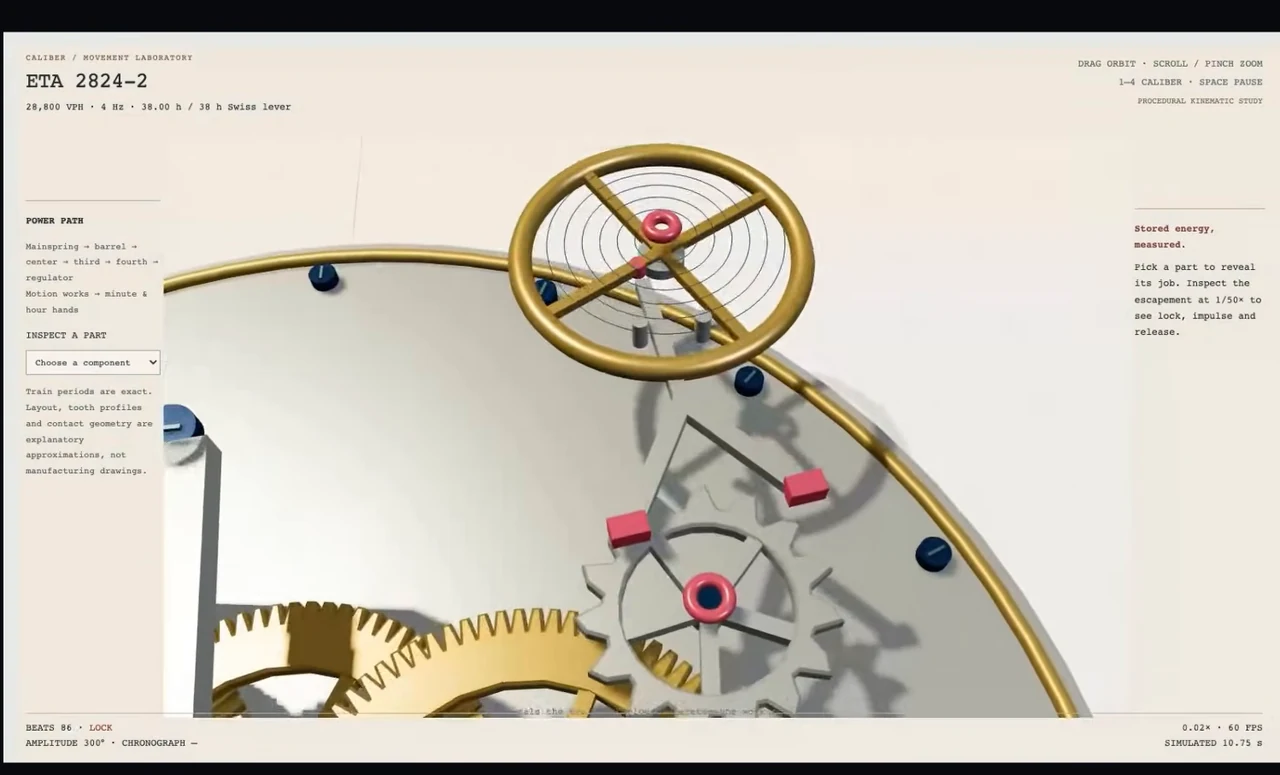
Mechanical contact is simplified in both examples. Treat them as interactive explainers, not engineering simulations. If your reader needs exact physical behavior, put that requirement into a separate validation task instead of inferring it from convincing animation.
Name the problem in a correction brief: “Keep the exploded view, but make the selected component and its role readable without covering the moving parts.” That is an adapted review instruction, not the original build prompt.
Test the racer for progression and camera placement
The neon drift game has three tracks, unlocks, saved times and a ghost replaying recorded driving. The source reports that automated runs completed the full progression in both versions. That supplies functional evidence beyond a screenshot of the starting track.
For your own project, verify the progression separately from appearance. Finish a track, check the resulting unlock, confirm the saved time and replay the ghost. Record which steps were exercised and what happened. If your agent only launches the game, the rest of the test remains open.
The visual difference is easier to see. Sol brings the camera close to the car, with a large sunset, cyan edges and drift trails. Astra pulls the camera back to show more of the circuit. That wider view helps the reader understand the course, but the small car loses prominence.
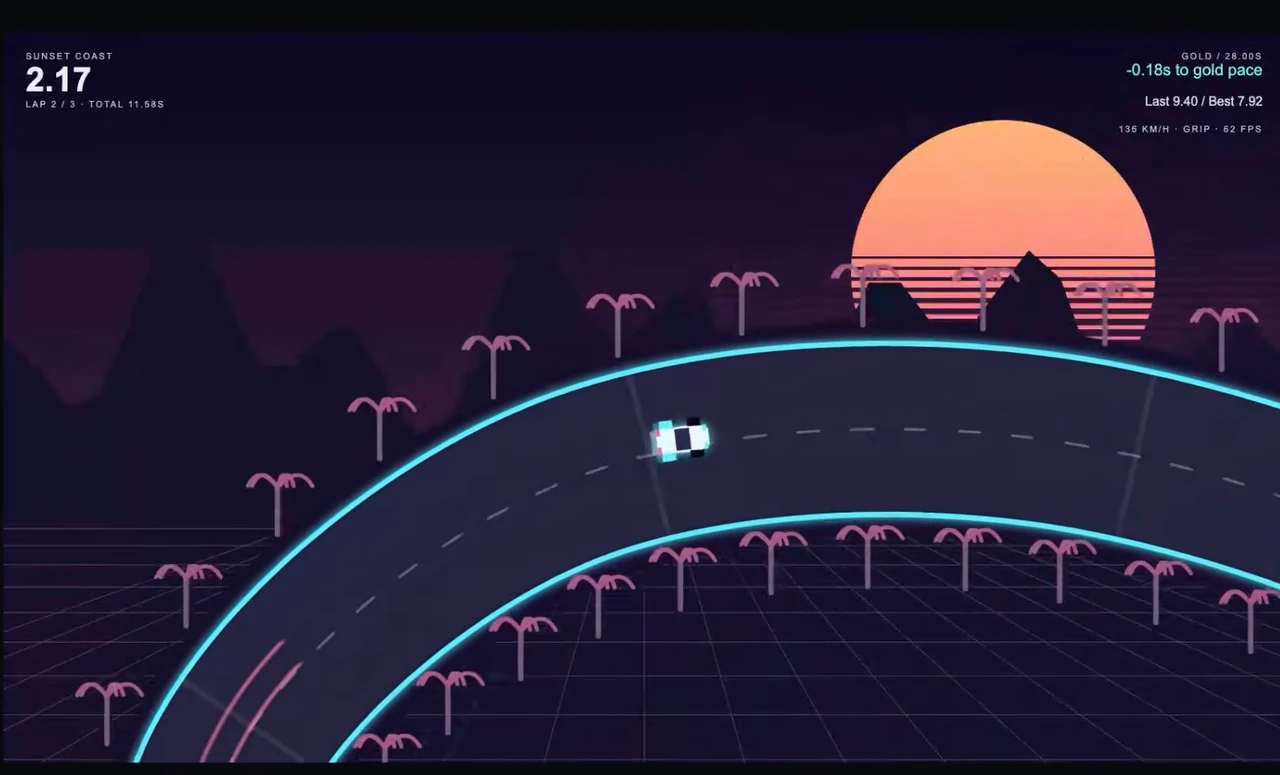
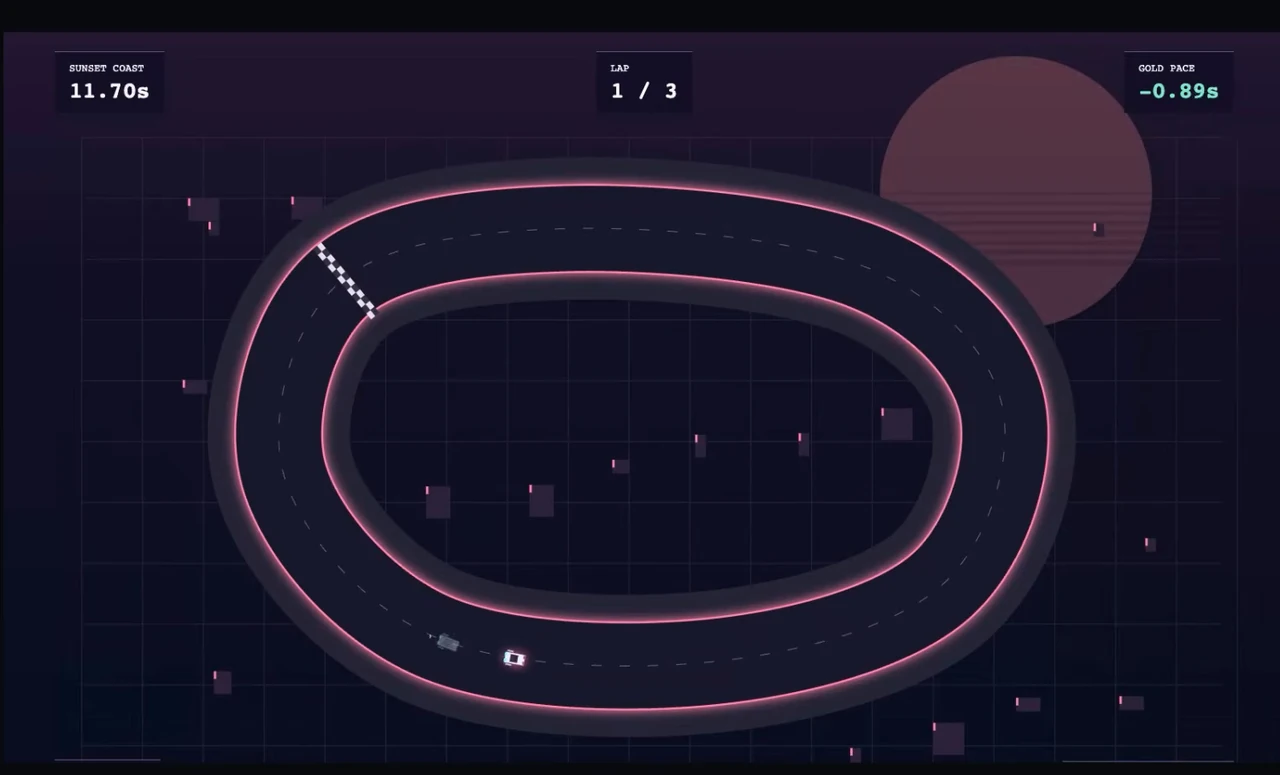
Sol wins this round on Ron’s visual judgment. Make the camera part of the acceptance criteria. “Show the whole track” and “make the car feel fast and prominent” can lead to different decisions even when both games work.
Test an architectural assembly for explanation and sequence
The timber temple exercise combines construction steps, component labels, an X-ray view, reverse playback and a slider that weathers the wood. Sol assembles the hall, labels the parts and lets the reader see through the roof. Astra’s framing fills more of the screen and gives selected components more room for explanation.
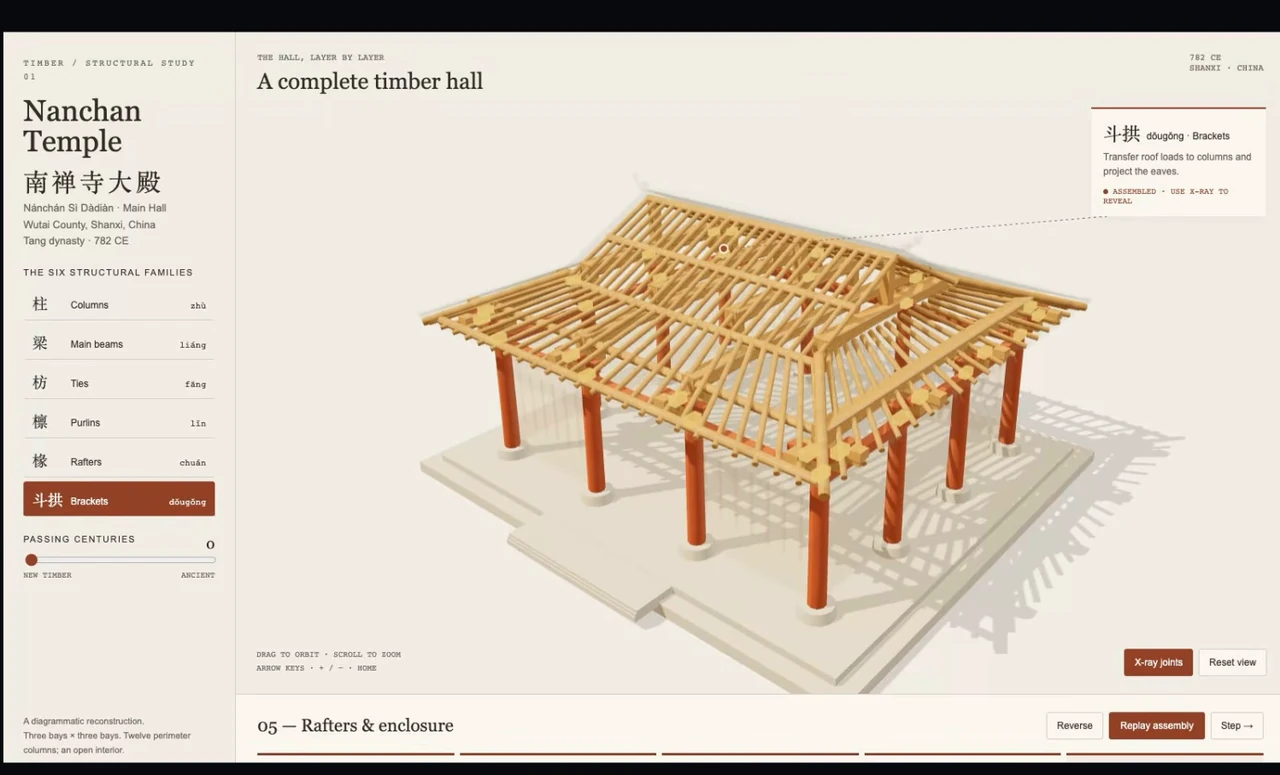
Work through the sequence in both directions. Select individual components and check whether the explanation remains associated with the visible part. Use the X-ray control to inspect the roof structure, then change the age slider and confirm that it affects the intended material.
There was a support problem in the requested assembly order. Both models proposed temporary staging, which the operator approved before they built the animation. Preserve that intervention when reporting the result. The final sequence was not produced by silently ignoring the issue, and it was not an independently validated construction plan.
If a model identifies a dependency problem in your brief, resolve it before judging the finished animation. Record the approved change so another evaluator knows what the system was asked to show. In this comparison, Ron awards Astra the point for the clarity of the presentation.
Test a cinematic from the same starting scene
For the Blender round, the pyramids and environment already exist. The task is to improve the look and produce an 18-second cinematic. Giving both models the same scene keeps the comparison focused on lighting, framing and editing rather than who happened to generate a different starting asset.
Sol produces three shots. Astra produces two, with a low opening through reeds and a brighter overall image. Ron prefers Sol’s warm stone, shadows and water reflections because they give the scene more depth. Astra’s brightness makes the flat riverbank and simple scenery more apparent.
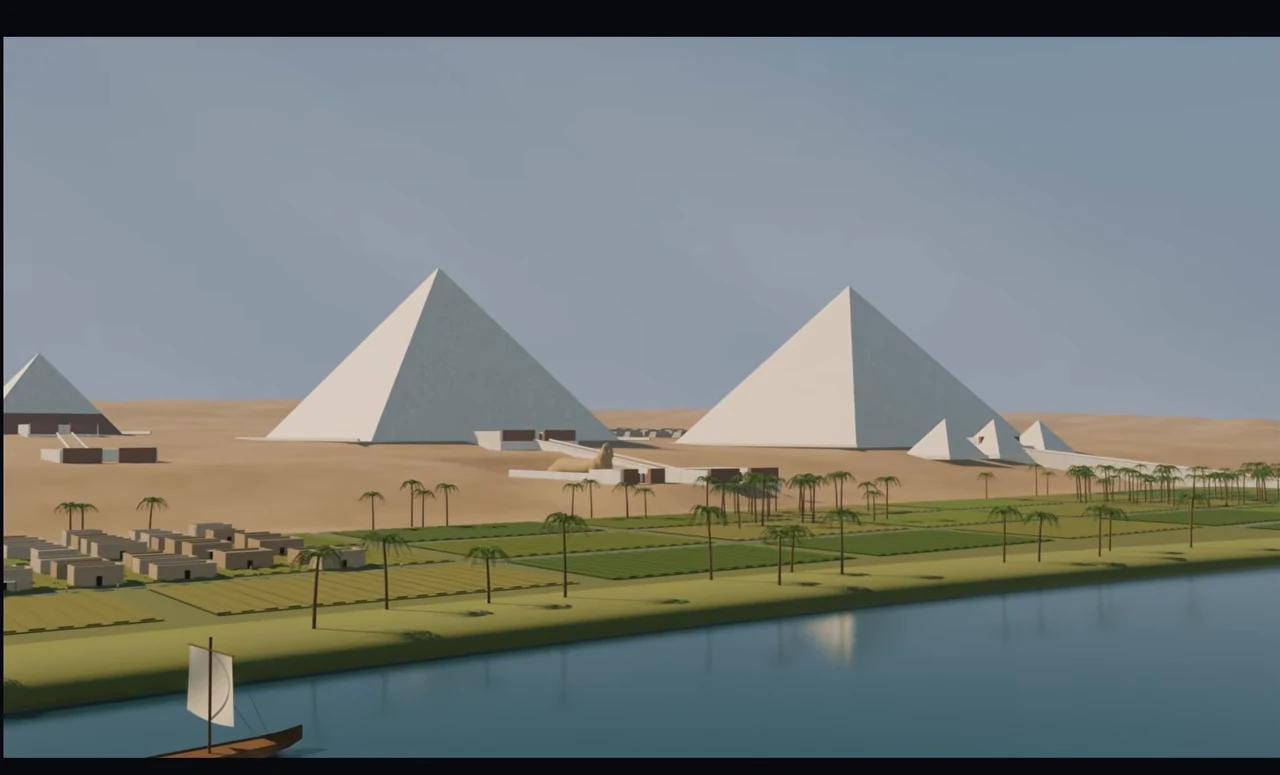
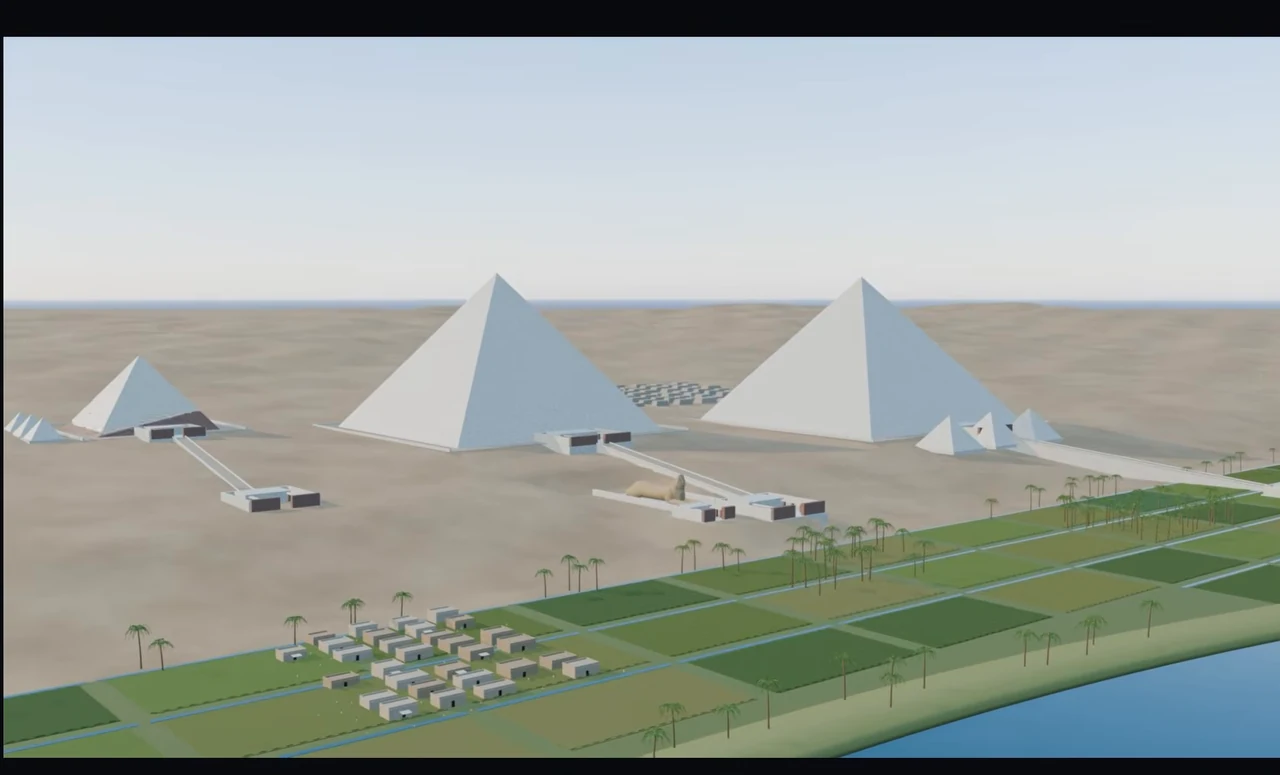
Both versions have an odd-looking artifact on the far-left pyramid. Keep that defect in the evaluation even if you prefer one image overall. Sol also had to repair the sky and render the opening again. The point goes to its finished result after that work, not to an error-free first attempt.
Review the exported sequence rather than only a preview frame. Check its duration, shot transitions and visible defects throughout. If the agent repairs an opening, inspect the new export and confirm it contains the corrected shot. A revised scene file and a finished movie are different deliverables.
Test a solar-system view through scale and selection
The final project includes planet selection, time-speed controls and navigation between a close view and the wider system. Sol deserves credit for embedding NASA imagery on Earth and Jupiter. That is an asset choice in the recorded build, not proof that every physical property of the simulation is accurate.
Saturn is the decisive visual example. Sol places the planet close to the camera with rings stretching across the view. Astra gives the ring bands a clearer angle and balances the planet with its controls. Ron prefers Astra’s composition and awards it the final point.
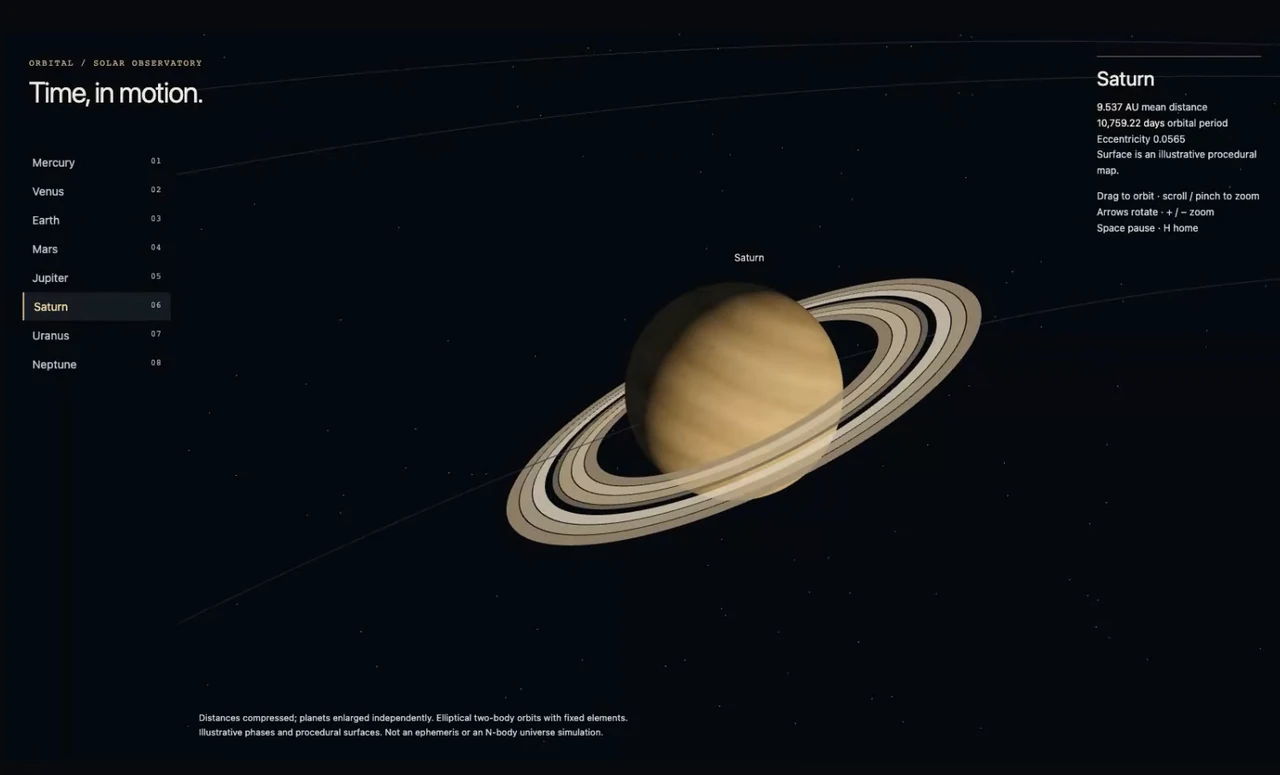
For your own test, select a planet, change the time speed, pull back and return to a close view. Check whether the controls remain available and whether the chosen object is easy to identify at each scale. If the intended use is educational, inspect the displayed information separately from the visual effect.
Keep the repair record beside the score
Keep the reason for each preference beside the score:
| Project | Recorded preference | What distinguished it |
|---|---|---|
| Mechanical watch | Astra | Explanations and controls made the mechanism easier to explore |
| Drift racer | Sol | Close camera, sunset and trails gave the action more impact |
| Timber temple | Astra | Framing and component explanations made the structure clearer |
| Blender cinematic | Sol | Preferred lighting and depth after sky/opening repairs |
| Solar system | Astra | Clearer Saturn ring composition alongside the controls |
This is a small set of particular builds, judged after iteration. It does not provide a measured cost per accepted task or a broad reliability rate. If cost is central to your choice, record the usage and review time for your own complete workflow, including repairs. The cheaper initial response may still require additional work before you accept the result.
The source also reports a substantial improvement over GPT-6 Sol in an agentic rewrite workflow: the older model made small changes when asked for a full rewrite, while 6.1 Sol handled the same workflow much better. That is an operator observation, not a guarantee that every large refactor will be complete. Define the expected scope and inspect the actual diff.
Astra remained the team’s main choice at that point. Possible future Sol availability in Dots was speculation in the source; do not turn it into a setup step or assume a model is available because it would be useful there.
Publish only after the chosen build passes its checks
The source includes a paid Hostinger segment with a separate Tokyo scrolling-site example. It demonstrates installing Hostinger Connector in Codex, connecting the hosting account through browser sign-in, then creating and uploading the site from the conversation. The scrolling reference was an existing site design, separate from the five scored model tests.
If you use that deployment route, you need the relevant active Hostinger plan. The connector itself is free to install; the current Hostinger Connector page directs users to choose their client and sign in through the browser rather than manually passing API keys. This is an optional hosting path, not a requirement for comparing the models.
Give the agent a specific tested revision to publish, then open the live site and exercise its important interaction. A deployment message alone does not establish that the chronograph, racer progression or planet controls survived the release. For a later edit, repeat the relevant checks after redeployment.
Troubleshoot a comparison that gives you no clear answer
Both outputs look good, but one is harder to use. Score the reader’s task separately from visual polish. The watch and temple examples show why explanations, component selection and framing can decide the result.
A game looks finished but progression is uncertain. Test the unlocks, saved state and replay behavior. Keep untested requirements visible rather than awarding them a pass because the first screen loads.
The models produce different repairs. Record the repair requests and operator decisions. Judge the finished results honestly, and keep that iteration cost available when comparing efficiency.
A visual defect survives in the preferred version. Preserve it in the report and ask for a targeted correction. Winning a round does not remove the far-left pyramid artifact.
A large rewrite produces only a small patch. Compare the diff with the requested scope and ask for the missing changes explicitly. A better result on one previous task is not a reason to stop checking the next one.
For more on selecting models by practical work, explore the model directory.