ChatGPT's new Intelligent UI is surprisingly useful! (Top Use Cases)

Ask ChatGPT for a recipe and you may get a long answer to scroll through. Ask for a cooking guide with ingredient checkboxes, one visible stage at a time, and separate timers, and the answer can become something you operate while cooking. The useful change is that the interface keeps your place in the task.
You can apply the same idea to study cards, a workout log, a packing list, or a small game. Start with one job and name the actions you need. Then test the entire workflow: entering information, changing it, completing a step, and finding the result again.
This guide uses the Intelligent UI examples recorded in ChatGPT, with current entry instructions checked on October 28, 2026. The suggested prompts are exercises you can run; the screenshots show the original recorded examples, not newly tested outputs from those prompts.
Before you start: choose a small task and check availability
You need a ChatGPT account with interactive visualization support and the information your tool should use. A short recipe you already trust, an existing workout plan, or a list of items is enough. Keep the first task small enough that you can inspect every control and every fact.
The recording calls the feature Intelligent UI and shows a GPT-6 chat. Current OpenAI documentation describes Visualizations. In a supported web chat, type @, search for Visualize, and select it under Plugins. The suggestion confirms availability. Desktop and mobile access are rolling out and can vary by account or workspace; a missing suggestion does not mean your prompt is wrong. Current Visualizations documentation.
You can explicitly request an interactive answer even when ChatGPT would otherwise choose the format itself. The recorded examples did not require setting up an MCP server or a separate development project. Today’s documented Visualize selection makes the request explicit; do not rely on finding the historical GPT-6 menu exactly as it appears in the video.
Choose the result by the job it must do:
| Task | Useful interaction | First thing to test |
|---|---|---|
| Follow a recipe | Check ingredients and advance one stage | Going back preserves completed steps |
| Practice recall | Reveal an answer and repeat a missed card | Missed cards really return |
| Record a workout | Enter weight and reps for each set | An entry appears in the intended exercise |
| Compare options | Filter by a budget or requirement | The filter excludes the correct items |
| Explore a concept | Change a variable and see the effect | Labels and values remain consistent |
These are design choices for your prompt, not a list of guaranteed templates. A photography slider for shutter speed, a view of changing variables in a coding loop, or a movable furniture diagram can be useful when it exposes a relationship you want to understand. An IKEA-style assembly guide needs the required parts beside the current step. Give the tool the actual instructions or data instead of asking it to invent the underlying facts.
Write the prompt around actions and source material
A request such as “make this interactive” leaves the model to guess what interaction matters. Describe the outcome, the input, and the controls. Add a sentence about what must remain visible while you work.
Use this structure with your own material:
Create an interactive tool inside this conversation for [one task].
Use only [the attached material or pasted data].

I need to [action 1], [action 2], and [action 3].
Keep [essential information] visible while I do that.
Show what is complete and what remains.
Mark missing information rather than filling it in silently.
Explain what happens to entered data if I close and reopen the chat.
The last line asks for an explanation; it does not prove that storage works. You still need to test that requirement. Likewise, a confident description of an implemented button is not evidence that pressing it does anything.
Current documentation supports follow-up requests to refine a visualization. A revision can produce a replacement rather than update the original in place, so inspect the new version and recheck any entries you care about. Refining a visualization.
Make a cooking guide that keeps your place
Start with a recipe whose quantities and preparation instructions you have already checked. The recorded Korean beef bulgogi example is useful because it combines three needs: remembering ingredients, tracking the current stage, and managing overlapping waits.
Try this prompt after selecting Visualize where available:
Turn the recipe below into an interactive cook-along guide in this chat.
Keep the original quantities and instructions.

Show ingredients beside the current stage with individual checkboxes.
Let me go back, mark a stage complete, and move to the next stage.
Provide separately labeled timers for rice and marinade using the durations
specified in the recipe. Each timer needs its own start, pause, and reset.
Do not reset ingredient checks when I move between stages.
Include a deliberate Start over action.

Recipe: [paste your checked recipe]
The actions have distinct purposes. Ingredient checks help preparation; stage completion tracks progress; timers track waits that can overlap. One generic countdown does not handle two independent activities.
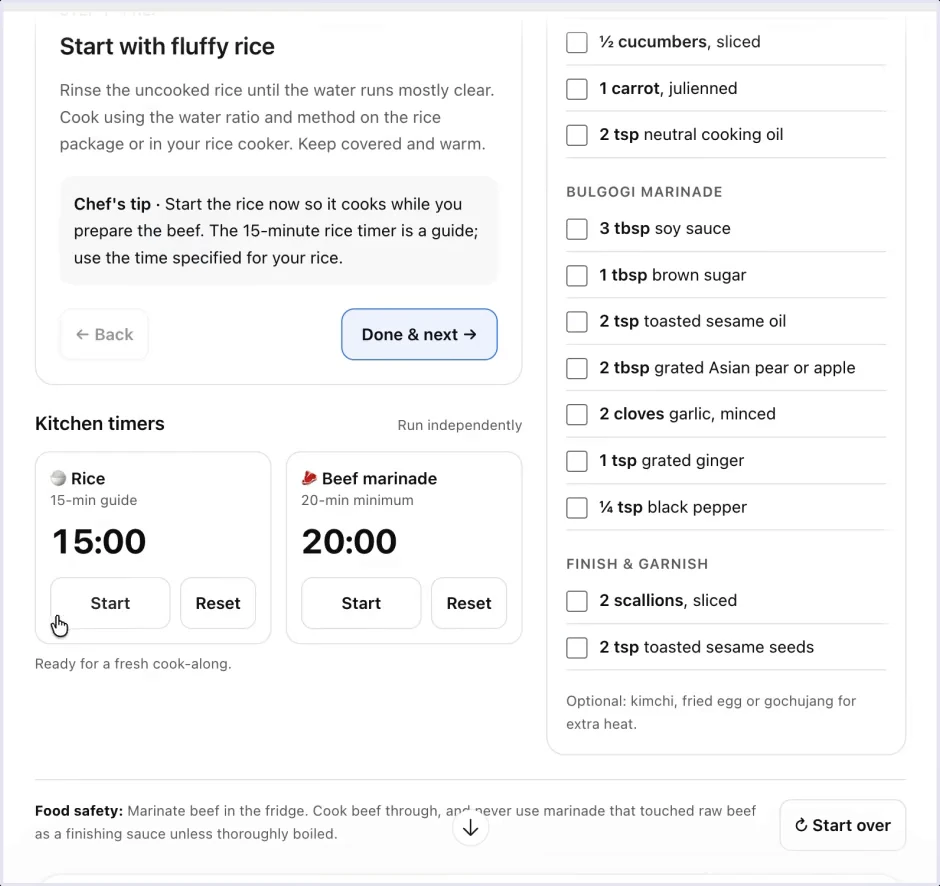
Before putting the guide on the kitchen counter, rehearse it with no food involved:
- Check two ingredients, advance a stage, then go back. Both checks should remain.
- Start one timer, then the other. Pause the first and verify that the second continues.
- Reset one timer and check that the other timer and ingredient checks are unchanged.
- Mark a stage complete and confirm that progress matches the stage you just finished.
- Try the layout on the device you will use. Text and controls should be readable without repeatedly zooming.
If a timer must alert you when the device locks or the chat is in the background, test that exact situation. The recorded demonstration establishes visible timer controls, not dependable background alarms on every device. Use a separate timer when the generated one does not meet the requirement.
The cooking demo shows an interface, not a finished meal or a validation of the recipe. Keep recipe accuracy and interface behavior as separate checks. A neatly arranged instruction can still be unsuitable or incomplete.
Build a workout log, then prove it records a workout
For a workout you already follow, ask for the fields you use between sets. The source’s push-pull-legs example has day tabs, weights, repetitions, completed-set counts, and an option to add an exercise. The completed count advances from zero to three, and the finished example includes two sets of hip thrusts.
A suitable prompt is:
Create an interactive log for my existing push-pull-legs routine below.
Use separate tabs for each day. For every set, provide weight, unit, reps,
and a completion checkbox. Show completed sets out of planned sets.
Let me add an exercise with a chosen number of sets and add session notes.
Use my routine as written; do not prescribe a new training plan.

Before I rely on it, explain how I can retrieve or export the entered records.
Routine: [paste your routine]
This specifies a logging interface, not exercise advice. If the original plan says kilograms, do not accept a display that silently changes the unit or omits it.
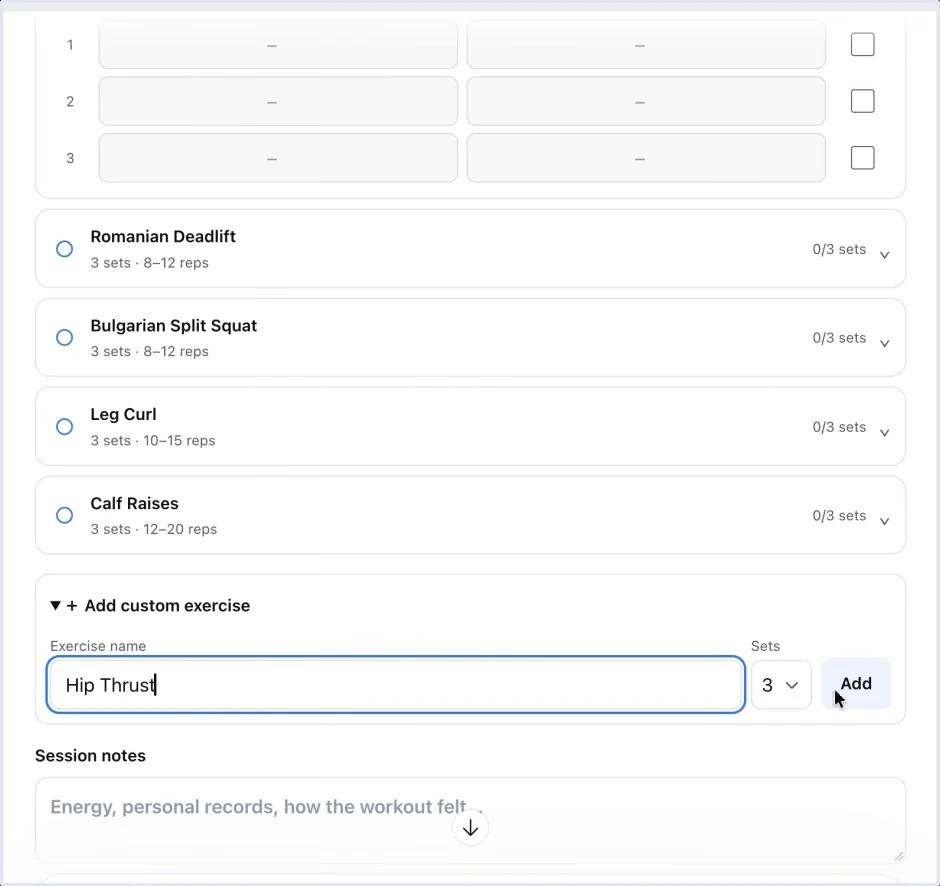
Use a disposable test session before entering real history. Add an exercise named “Test exercise,” choose two sets, and enter different values in each. For example, use 10 kg and five reps in the first row, then 12 kg and four reps in the second. These are synthetic values for testing the form, not a recommended workout.
Complete only the first row. The counter should show one completed set out of two. Change tabs and return: the entries should still belong to the same exercise. Edit the first value, then confirm that it changed only that row. A form that copies a value into every exercise needs correction before use.
Next, test the requirement the source does not establish: close and reopen the chat, and inspect the entries. If you need records across devices, repeat on the second device. If the tool offers export, open the exported file and check the exercise name, units, set values, and date. Keep a separate copy of anything important until this behavior is clear.
Ron preferred the convenience of this interface to his habit of putting workouts in an iPhone calendar or maintaining a spreadsheet. His account of difficulty retrieving older calendar entries is a personal workflow complaint, not evidence of a universal calendar retention rule. The generated log solves nothing if it makes entering data easier but retrieving it uncertain. Workout source at 3:29.
A packing checklist or project checklist needs fewer fields, but the same test applies. Mark an item, move elsewhere in the interface, then return and confirm the state matches what you did.
Check information tools at the source
Search and filters can make a long answer manageable. In the recorded travel example, a Nepali passport holder can search countries and filter by entry method, with source links available beside the conversation. That makes the information easier to inspect; it does not establish eligibility for a real journey.
For your own research, specify the facts needed to interpret each row:
Organize the supplied research into a searchable comparison.
For every entry, retain the source link, the date checked, the assumptions,
and any unresolved detail. Filters must not hide those qualifications.
Show “not verified” where the supplied evidence is missing.
Test a filter against a row you can check manually. If an item disappears, confirm that its underlying value explains why. Then open the source link and compare the claim with what the source actually says. A link that opens successfully may still point to a general page rather than evidence for that row.
For travel, follow the source’s advice to confirm actual requirements with the destination’s immigration authority. This guide supplies no visa determination. The interactive list is a research aid, and the traveler’s circumstances and travel dates still matter. Recorded travel example at 4:14.
The tax example applies the same distinction to a rough estimate and a filing checklist. A checklist can help you gather documents and see unfinished work. It does not validate a calculation or determine whether a rule applies. Use nonsensitive sample data while testing the form; get the applicable rules and any consequential conclusions checked through the relevant authority or a qualified professional.
Ron suggests that a step-by-step structure can encourage greater accuracy. That opinion is not tested in the recording. A useful way to assess the result is to expose assumptions beside each output, then check them individually. A tidy estimate with hidden assumptions remains difficult to verify. This article provides no tax calculation or jurisdiction-specific advice. Recorded tax example at 4:39.
Close the gap between an estimate and a saved record
The food example reveals a common failure in generated tools: the interface looks like a tracker before the workflow has actually logged anything. The video’s accompanying description explicitly flags the missing logging step.
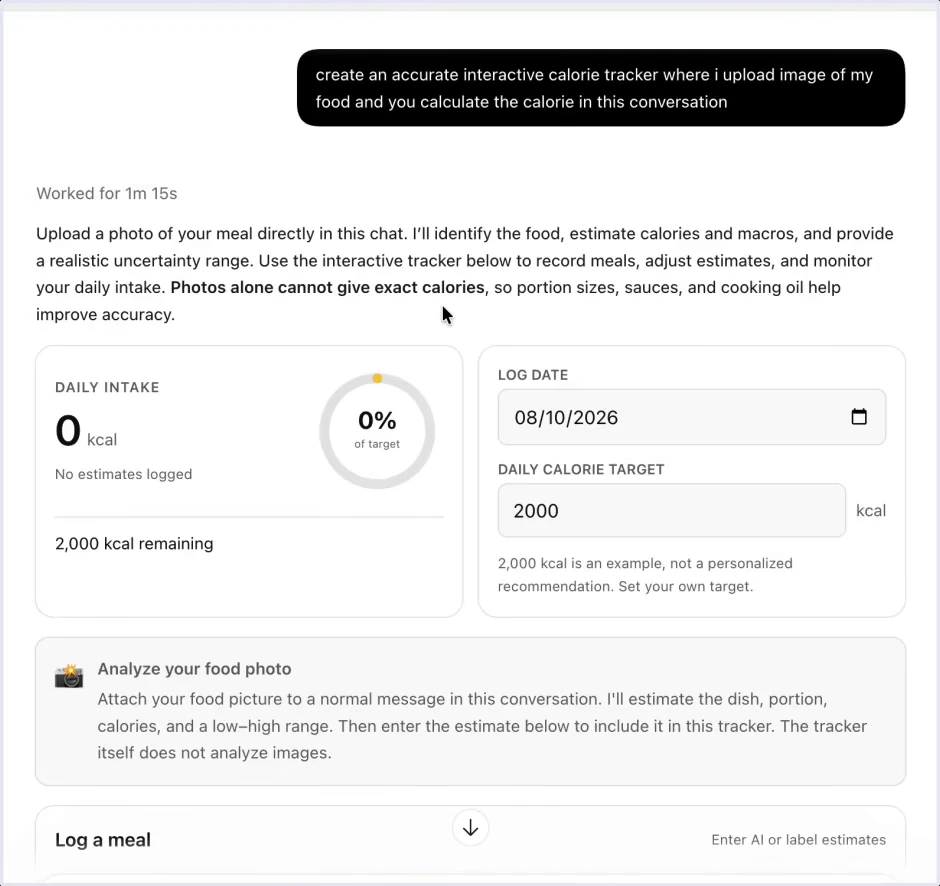
Trace the intended sequence as separate actions:
- Supply the input in the place that accepts it.
- Obtain a result with its assumptions or uncertainty.
- Transfer or submit that result to the record.
- Check that the new entry appears once and updates the appropriate total.
- Retrieve it again using the same persistence checks as the workout log.
In this example, attaching a photo to the conversation is different from uploading it into the mini-app. The screenshot’s own instructions make that distinction explicit. If you want an integrated handoff, ask for it and test it; do not infer one from an upload-looking control or a title containing “tracker.”
Food-photo estimates also remain estimates. The source interface asks for information such as portions and ingredients and explicitly describes uncertainty. This is a workflow demonstration, not a validated method for measuring intake or a dietary recommendation. A calculation can be uncertain even when its logging mechanism works perfectly. Calorie example at 5:43.
Use games to test a small interaction, not a whole product
The source chess board lets a person move both sides and inspect move history. It is local two-player play, not evidence of an opponent engine, online matchmaking, or a shareable multiplayer session. A prompt should say which version you want:
Create a local two-player chess board in this chat.
Both players will use this device. Include move history and a restart control.
State which rules you enforce and test those rules before calling it complete.
Do not imply that it includes an AI opponent or online play.
For a space shooter, define movement, firing, lives, and enemy waves, then test those controls separately. Make the intended input device explicit; a game designed around keyboard keys may not be useful on the phone where you plan to play.
Ron reports roughly one or two minutes to generate these small experiments. Treat that as his experience, not a completion-time guarantee. He also distinguishes these outputs from more complex Codex work and from the team’s Blender-to-Godot interactive apartment project, which involved hours or days of work. The benefit is the low effort needed to try a focused idea, not proof that every generated game is complete. Games and complexity discussion at 6:14.
Troubleshoot the part of the workflow that failed
If the result is blank, let generation finish, reload once, and retry. OpenAI recommends simplifying a failing visualization or asking for a simpler format. A large, ambitious request is harder to inspect than one form or one interaction. Visualization recovery guidance.
Describe an observable failure when asking for a repair:
| What happened | Useful follow-up |
|---|---|
| ChatGPT returned prose | “Build the ingredient checklist and stage controls inside the conversation.” |
| A checkbox loses its state | “Checking rice and then changing stages clears the checkbox. Preserve it across stage changes.” |
| A counter is wrong | “One of two sets is complete, but the counter says two. Count only checked rows.” |
| The result is only decorative | “This button has no visible effect. Implement the action or remove the control.” |
| The tool loses records | “Explain the storage limitation and give me a usable copy of the data before adding features.” |
| A revision replaces entered data | “Rebuild this version using these saved test entries, then repeat the retrieval check.” |
Use ordinary words and include the exact action that produced the problem. “The tracker is broken” forces the model to guess. “I entered the second set, changed tabs, and its weight became the first set’s weight” identifies a failure you can retest.
Finally, decide whether the tool’s scope still fits a chat. OpenAI directs users toward a Site when they need a durable hosted application, permissions, or persistent data. A visualization is generally a snapshot rather than an automatically synchronized dashboard. Choosing and sharing visualizations.
For a quick cook-along guide, a small interaction may be all you need. For a year of training records, an operational dashboard, or a product used by other people, storage, recovery, access, and maintenance become part of the job. The lesson on vibe coding and finished software develops those requirements. Keep the result when its behavior matches the use you intend.