MiniMax M3.1 Flash Built This?! AI Coding on a Budget


Suggested for this guide
MiniMax
Check the current MiniMax plan, available models, and API pricing before putting it into a production workflow.
Best for: Long-context work and cost-efficient execution
Check MiniMax plansPartner link. It supports Superbash Learn at no extra cost to you.MiniMax M3.1 Flash is a useful candidate for a small browser game or interactive product page when you expect several rounds of changes and want to keep model costs down. Start with one behavior you can test: an enemy reacting to a player, three lanterns that complete an objective, or a handheld console visitors can play. Get that behavior working before asking for more detailed assets.
Superbash’s three builds provide concrete examples of this approach. All three ran, and MiniMax connected Blender assets to browser code. The same builds exposed useful limitations: a requested visual upgrade mostly changed one gun, an exploration scene did not clearly improve, and a shell selector appeared to change text color instead of the product. Use those results to decide what to ask for and what to test before accepting a build.
The examples below are suggested briefs and acceptance checks, not the original prompts or a claim that these projects were reproduced for this article. The recorded builds used Codex CLI with MiniMax as the model and the Higgsfield Blender plugin for selected assets. Ron reported specific feedback and repeated checks, so treat them as iterative builds rather than one-shot successes. Source workflow and limitations.
Choose the model, the agent, and the tools separately
M3.1 Flash supplies the model’s reasoning and generated instructions. The agent harness manages the project files and tool calls. Blender creates editable 3D geometry, while the browser application loads assets and handles the player’s or visitor’s input. A success in one layer does not prove that the others work.
For example, an agent can successfully export a weapon from Blender while accidentally breaking the browser’s firing animation. It can also produce a working game whose art is no better than the earlier version. Keep three separate questions in your review: did the tool run, does the application still work, and did the change improve what the user sees?
The release was identified by Ron as the model previously tested under the anonymous name Space Bunny on OpenRouter and OpenCode. The recording names Claude Code, Codex, Pi, and MiniMax Code as possible harnesses; the three examples specifically used Codex CLI. Use the official model name for a new setup. Source identity and build setup.
Before starting, have a project folder you can edit, an account with model access, a browser for checking the result, and a saved copy or version-control checkpoint of any existing application. Blender and a working connector are prerequisites only for the asset pass; the initial game can use browser-generated geometry.
Before you start: connect MiniMax to Codex
The following setup is added documentation guidance checked on October 28, 2026; it is not a reconstruction of the team’s original installation. MiniMax’s official Codex guide recommends CLI version 0.146.0 or later. Its setup wizard can install Codex if missing and configure the provider:
npx -y mmx-cli@latest agent setupClose Codex and editors holding its configuration file before running the wizard, choose Codex, then restart it. Confirm that the selected model is MiniMax-M3.1-Flash. The wizard changes ~/.codex/config.toml and writes a model catalog. Follow the official Codex integration guide for manual configuration and backup details.
If you use the optional reasoning catalog, choose a supported effort such as low, medium, high, xhigh, or max. Do not add none: M3.1 Flash always reasons, and that setting can produce an HTTP 400 error. These instructions were checked against the documentation; the setup command was not executed for this guide. MiniMax’s reasoning configuration notes.
MiniMax Code is another access route, and M Plan can supply access through compatible tools. Check which key you are using: a Subscription Key draws on the plan and credit packs, while a pay-as-you-go key can charge the account balance. Review usage before a long build. MiniMax M Plan access and billing.
Do a small read-only check first: ask the agent to identify the project structure and explain how the app starts. Read its answer against the files. Then give it one bounded change. This separates a provider/configuration problem from a problem caused by a complicated game brief.
Build a shooter around one complete combat loop
A first-person shooter needs more than a camera and a gun-shaped object. Define a minimum loop in which the player can move, an enemy can respond, and firing changes the encounter. Leave broad environment polish for later.
A suggested starting brief is:
Build a small browser survival shooter with a playable combat loop. Begin with procedural geometry. Describe the movement and firing controls, make one enemy react to the player, and provide a way to restart. Run the app and report which interactions you actually checked. Stop before adding external 3D assets.
The restart requirement is an additional suggestion for your build, not a feature established by the recorded demo. It gives you a repeatable starting point for testing. Before accepting the result, use the controls yourself and verify that an enemy’s reaction depends on the player’s position or action. A moving object is not enough evidence of responsive enemy behavior.
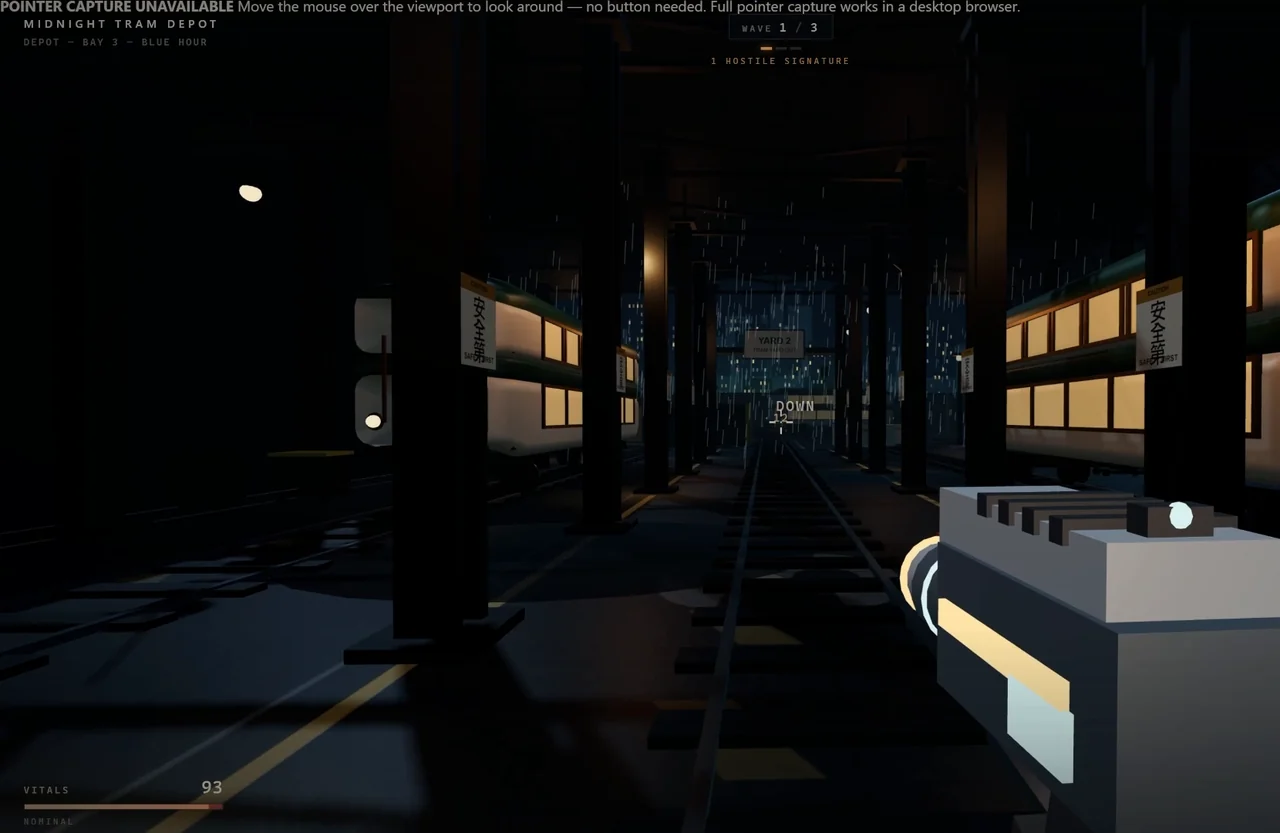
Superbash’s procedural shooter completed this narrow test. It had a working combat loop, and Ron observed an NPC becoming aggressive toward him. He also found the environment more detailed than the gray boxes and stick figures he associated with earlier cheap-model attempts. That is his visual judgment about this build, not a measured performance improvement. Shooter behavior at 1:28.
Save the working version before introducing Blender. For the next pass, identify one asset and say exactly what should improve. A request to make everything more beautiful gives the agent too much room to choose a small change and call it finished.
For a weapon replacement, specify the visible shape, the intended scale in the player’s view, and the behaviors that must survive. Ask for the editable Blender source and exported asset as well as the integrated browser result. Then compare the original and revised builds at the same camera position.
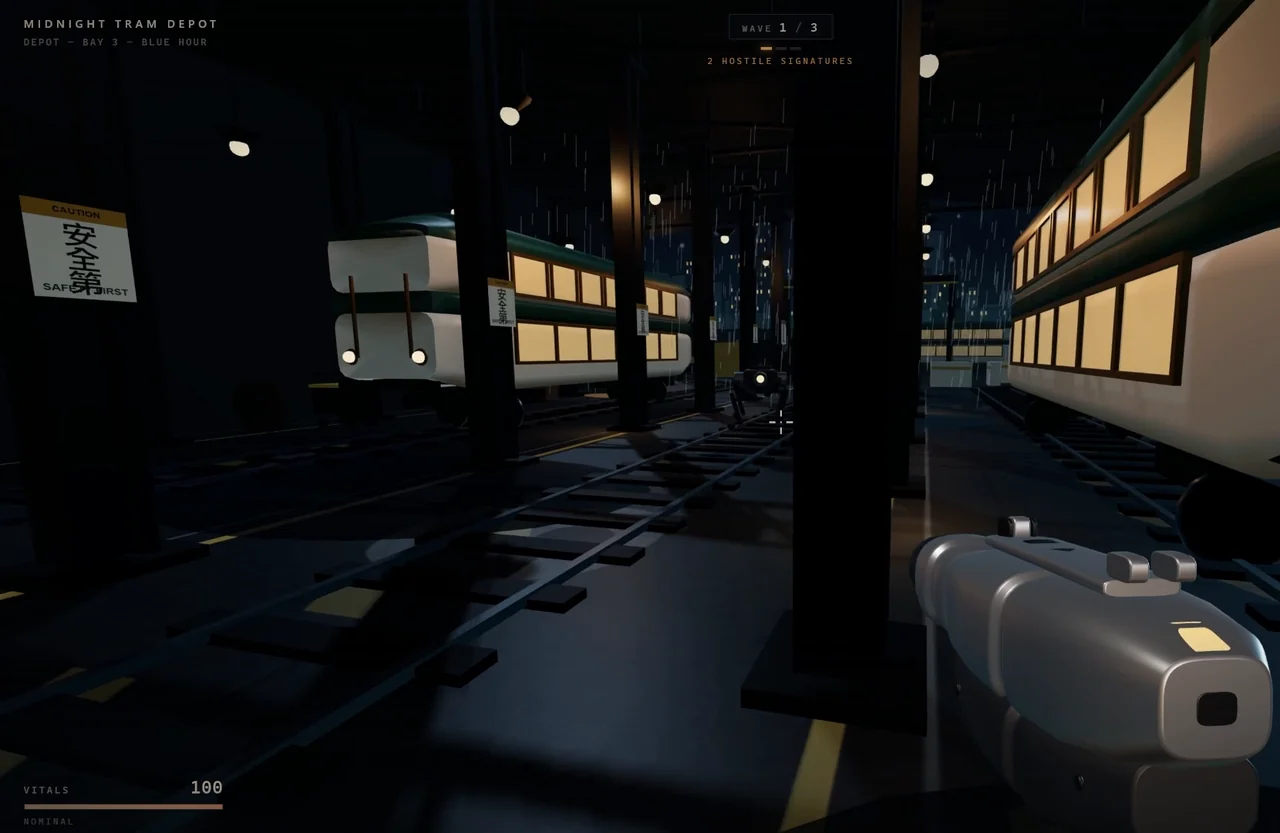
The recorded Blender pass mostly improved the gun. Ron pointed out smoother surfaces and rounded edges, while much of the scenery remained browser-generated. The replacement retained the firing and loading behavior. That is a useful integration success, but it did not fulfill his expectation of a broader visual upgrade. Weapon comparison at 2:15.
If the weapon appears but no longer fires correctly, keep the asset export and investigate the application connection separately. Ask the agent to compare the behavior before and after replacement, identify the changed files, and fix the smallest relevant part. Rebuilding the whole project makes it harder to tell whether a repair worked or merely replaced one defect with another.
Use the three-lantern game to test objectives and visual revisions
A compact exploration game gives you an easier acceptance test than a sprawling open world: the player must find and light three lanterns. Write down what counts as completion before requesting more scenery.
A suggested brief is:
Create a small exploration scene with three lanterns to activate. Make each lantern’s unlit and lit states distinguishable, show progress toward the objective, and make completion clear. Explain the interaction controls and test that the objective can be completed from a fresh start.
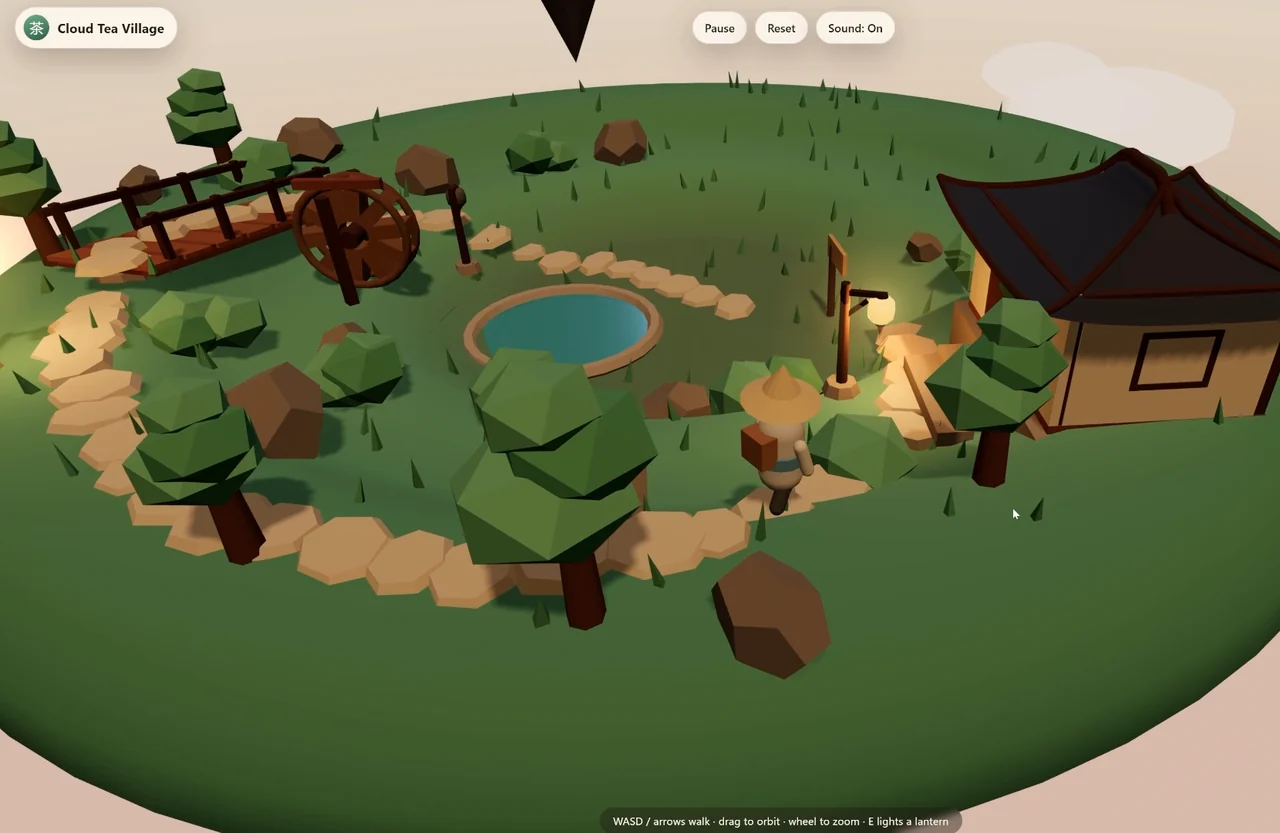
The visible progress indicator and state requirements are additions for your implementation. The source establishes the three-lantern objective and its completion, without documenting every state transition or edge case. Ron located the final lantern in the middle of the scene and finished the task. Exploration test at 2:46.
Test the objective in two ways. First, complete it normally. Then try activating an already lit lantern again. Your expected result should be that progress counts distinct lanterns, so repeating one interaction cannot finish a three-object task. This second check is a proposed regression test; Superbash did not report performing it.
For an art revision, preserve both builds and compare the same view. Look for changes that help the player: a clearer route, a lantern that stands out from the background, or geometry that makes the scene easier to read. More detailed geometry is not automatically more useful.
Ron could see little difference in the previews of the procedural and Blender versions, and preferred the earlier version after playing. No numeric visual score was reported. If your revised scene also looks similar, ask the agent to list the assets it changed and show those changes in context. Keep the earlier version if it communicates the objective better.
Test a product page as a set of promises
An interactive product page can look finished while its controls do the wrong thing. Treat each label as a promise to the visitor, and write the expected result before clicking it.
The Superbash example was a Game Boy-style handheld. Visitors could rotate it and play a game within the page. The play action did not merely redirect to another link. Ron found the page visually plain but clear about its purpose: visitors could inspect the product and try its central interaction. Product page at 3:24.
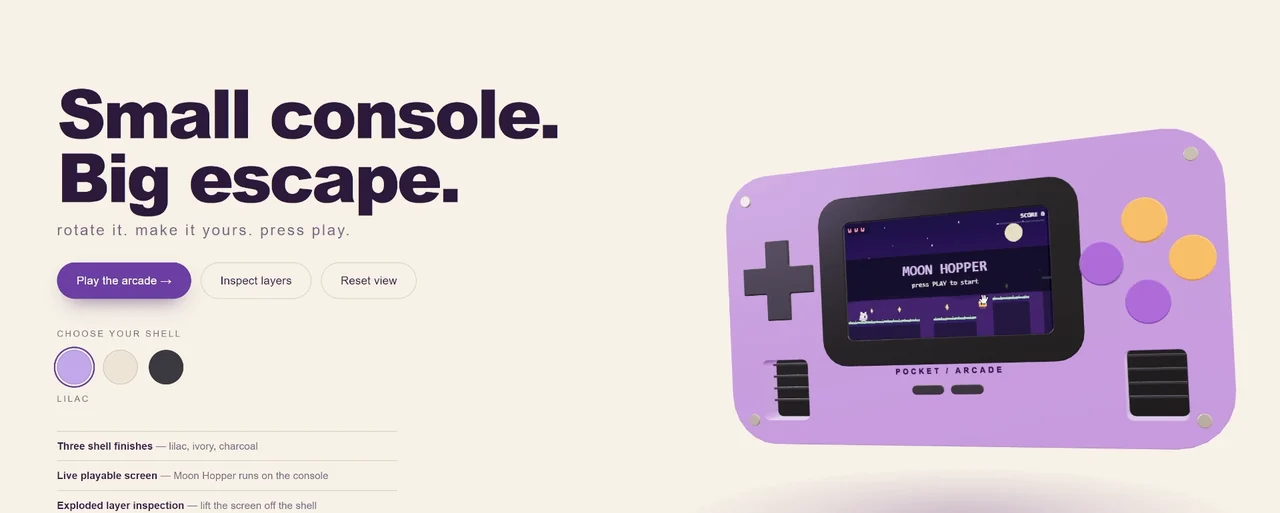
For your own page, use an acceptance table like this:
| Action | Expected result | Recorded result |
|---|---|---|
| Rotate the handheld | The product view changes orientation | Demonstrated |
| Play | A playable interaction runs within the page | Demonstrated |
| Inspect layers | The device separates into visible internal parts | Demonstrated |
| Reassemble or reset the view | The inspection can return to its assembled presentation | Controls and interaction shown |
| Choose shell | The device’s shell changes appearance | Failed Ron’s check; the apparent change was font color |
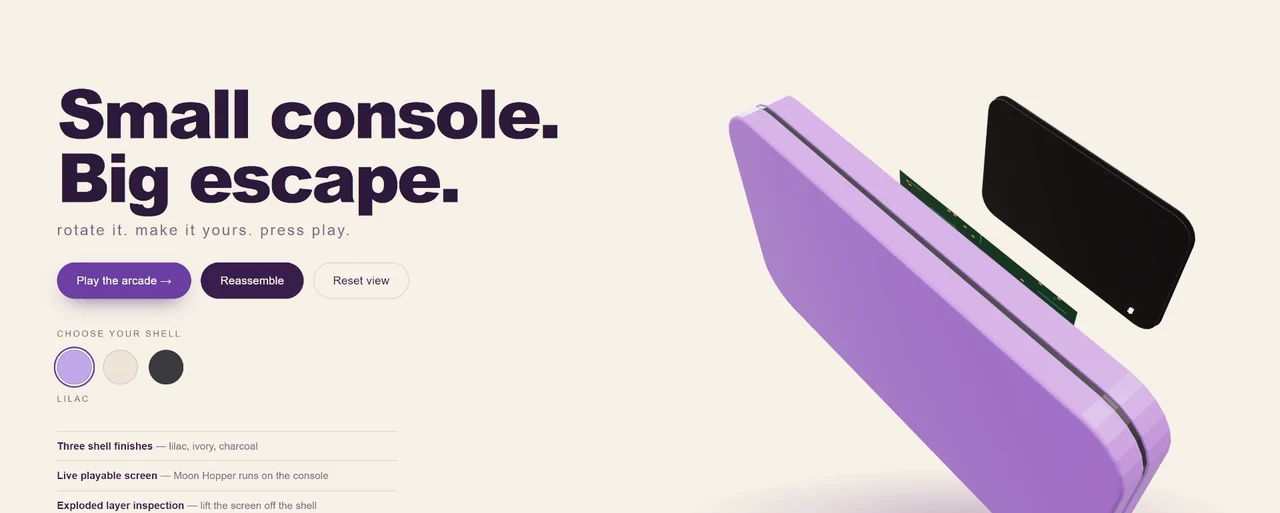
The shell problem is the most useful defect to carry into your own testing. Clicking the control caused a visible response, but that response did not match the control’s purpose. Tell the agent what object should change and what should stay unchanged:
Selecting a shell option should change the handheld housing material. The text should remain readable and keep its existing style. Check each option against the visible device, then return to the default option and confirm the housing resets.
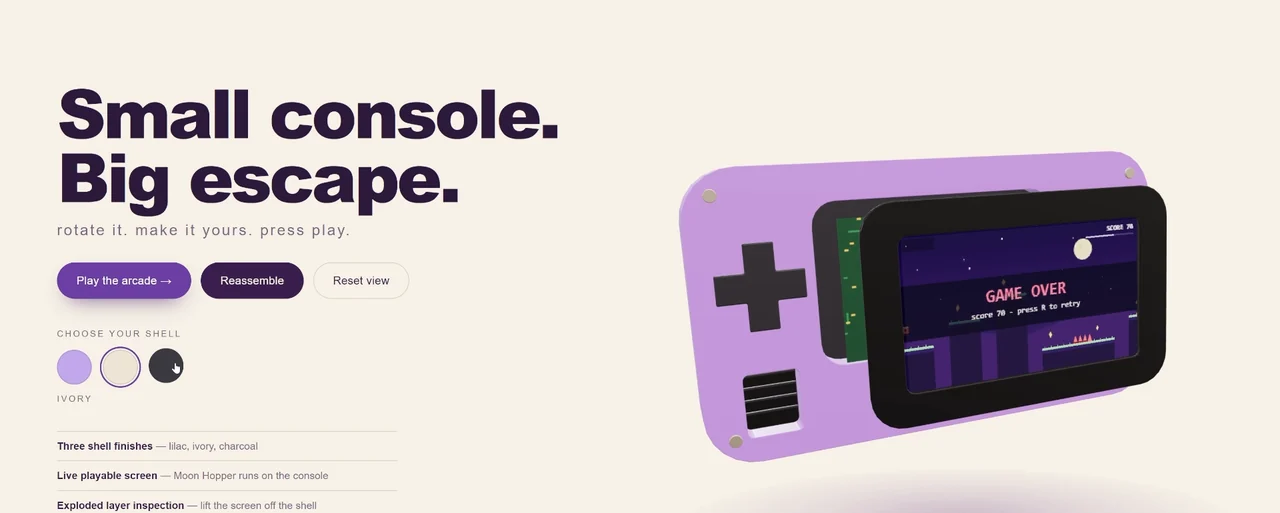
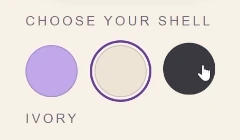
This is a suggested repair brief; the original defect was not shown being fixed. After any repair, repeat rotation, play, and exploded-view checks. Those were working interactions worth preserving. Layer inspection and shell failure at 4:22.
Troubleshoot the asset handoff before accepting a Blender pass
The Blender work in these builds was procedural: the agent instructed Blender to create geometry and export it. Ron reported modeling calls, editable source files, and exported models that appeared in the browser builds. The team did not use a paid text-to-3D service for those assets. Asset workflow evidence.
Use that chain of evidence as your deliverable list. A screenshot of Blender proves less than an editable scene plus the actual exported asset loaded by the app. Ask where each file lives, which object it replaces, and how the app refers to it. If the asset is missing in the browser, inspect the exported file, the app’s asset reference, and the browser error before asking for a new model.
A successful handoff still needs a user test. In the shooter, the revised gun had to remain connected to firing and loading. In the product page, the material selector had to change the product. Keep these behavior checks next to the asset task so visual work does not silently erase earlier progress.
Decide whether cheap iteration is saving work
Ron quoted API prices of $0.15 per million input tokens and $0.60 per million output tokens in the recording. Those are token rates, not the cost of any of these completed builds: no full usage invoice or token total was supplied. The recording also mentioned a 50% first-month M Plan promotion for new subscribers or upgrades through October 31. Treat that as a dated offer and check the current plan terms before buying.
Track the cost of reaching a working checkpoint, including retries and repairs. A cheaper response is useful when you can afford to iterate; it becomes less useful if you spend the saved money repeatedly correcting the same interaction.
Ron judged M3.1 Flash capable of some work he would otherwise hand to a flagship model. The evidence here is narrower and practical: three small interactive projects, functioning tool integration, and uneven visual polish. Begin with one clear loop, keep the working version, and make the next change specific enough to verify. The cost-efficient model lesson explains how to fit that approach into a broader model workflow.