Pi Harness Better than Codex / Claude? (Fan Favourite)

A captioning agent should not have to relearn the spelling of your product names every morning. A video coordinator should not need the full history of every subtitle correction and animation experiment. Give each job a clear owner, keep its useful instructions on disk, and pass the finished work back with enough evidence to check it.
Begin with one Pi worker. The worked example below is a recurring video edit: captions, motion graphics, silence removal, music, and the final assembly. You can use the same method for recurring website maintenance or other production tasks with identifiable inputs and outputs.
The architecture comes from Leo’s production workflow. The setup commands below are additional guidance checked against Pi’s official documentation on October 28, 2026. They establish a focused worker; they do not install Leo’s complete pane-control system or claim to reproduce his production results.
Decide whether the task deserves a specialist
Start with a job you have already completed successfully. Save the input, accepted output, instructions that mattered, and the checks that caught mistakes. That gives you something concrete to reproduce.
A first website prototype or game MVP is often too unsettled for a collection of narrowly defined workers. You may still be deciding what to build. Leo prefers Codex or Claude Code for that exploratory stage because, in his experience, they need less precise direction and keep pursuing a broad assignment more readily. He also mentions DeepSeek harnesses among his first-build choices. These are preferences from his work, not a controlled ranking of the underlying models. Source: choosing a task, 1:27.
Once the task recurs, write down what stays the same. For captions, that might be the language mix, brand vocabulary, output format, and review process. The recording and individual sentences change; the correction rules do not. That is a useful boundary for a specialist.
Do not start by creating five agents. Start by making one task repeatable. Splitting an unclear request among more workers gives you more unclear results to reconcile.
Separate the model, the worker, and the coordinator
Pi is a coding harness: software that connects a model to tools and manages the conversation and work around it. GPT and Claude are model families. Installing Pi does not install a small model called Pi.
In this arrangement, Codex or Claude Code is the coordinator. It owns the brief, assigns work, checks dependencies, and decides whether the final result satisfies the request. Pi workers handle narrower assignments. A pane-management tool is a further component that lets the coordinator reach those workers. Leo names Herder for that role and continues using it alongside Pi; Pi did not replace Herder. Source: agent arrangement, 2:44.
| Component | Responsibility in the video-editing example |
|---|---|
| Coordinator | Understand the complete recording, decide the edit, assign jobs, review and assemble results |
| Caption worker | Correct the transcript and produce captions using the known vocabulary |
| Graphics worker | Produce the requested motion graphics against the agreed timing |
| Other workers | Handle separately assigned music, silence analysis, or intro and outro assets |
| Control mechanism | Deliver tasks to the right worker and return its status and output |
Separate terminal panes are a way to operate this setup. They do not automatically supply scheduling, shared memory, or a reliable handoff protocol. Pi’s official site describes a deliberately extensible product and does not promise built-in sub-agent orchestration. Choose the control mechanism after you know what messages and files it needs to move. Pi overview.
Before you start: install Pi and confirm the first worker can read its task
You need a terminal, a working folder containing copies of your test material, and access to a supported model provider. For the npm route below, Pi’s current quickstart requires Node.js 22.19 or newer.
node --version
npm install -g --ignore-scripts @earendil-works/pi-coding-agent
pi --version
Use a dedicated folder for the experiment. Change into that folder and start Pi:
piInside Pi, enter /login and follow the prompts for your provider. Use /model to choose an available model. The expected result is an interactive session with your working folder and model visible in the interface. Begin with a read-only request such as: “List the files in this folder and identify the caption input. Do not edit anything yet.”
Pi’s quickstart says it shows the reads, commands, and edits it performs and does not ask before every tool call. Use copies of valuable source files for this trial. These installation and login steps follow the official quickstart; no production editing run was performed for this article.
Give the worker a small, explicit assignment
Create an AGENTS.md in the worker’s folder. Pi discovers context files in the working directory and its parents, as well as its agent directory. Avoid putting caption-only rules in a global file that affects unrelated projects. After editing instructions while Pi is running, use /reload. These locations and reload behavior are documented in Pi configuration.
The following is an example instruction file for the caption exercise, not a built-in Pi preset:
You handle caption correction for this project.

Read the supplied transcript and glossary before editing.
Preserve cue order and timing unless the task explicitly requests retiming.
Correct a product name only when the surrounding speech supports it.
Keep uncertain words in a review list with their cue number.
Save a new corrected file; preserve the source file.
Report the output path, changes made, and unresolved words.
Do not edit graphics, music, or the final video.
Put confirmed names in a small glossary.md alongside it. For Leo’s mixed Cantonese and English recordings, “Pi Durable” is a concrete example of a name that can emerge incorrectly from transcription. Store the intended spelling and enough context to disambiguate it. A glossary should not turn every occurrence of a similar sound into that product name. Source: reusable caption knowledge, 8:47.
Give the worker an assignment that names the files and the limit of its responsibility:
Read AGENTS.md and glossary.md. Review source.srt for product-name
errors. Write corrected.srt and review-notes.md. Preserve timing and
cue order. In the notes, list each changed cue and each uncertain word.
Do not modify source.srt or produce a final video.
The useful output is a corrected file plus a reviewable account of changes. Check a sample against the audio, especially unfamiliar names and mixed-language phrases. A fluent sentence can still be an incorrect transcription. If the input lacks the audio needed to resolve a word, the worker should leave that decision open instead of guessing.
This exercise isolates text correction. Speech recognition, subtitle timing, and burning captions into a video are separate jobs with their own tools; installing Pi does not supply a validated media pipeline.
Preserve knowledge without keeping every old conversation
A continuing specialist needs access to reliable working knowledge. It does not need an endlessly growing chat.
Keep confirmed vocabulary in the glossary, the repeatable procedure in instructions, and temporary questions in the current job’s notes. After reviewing the output, update the glossary with corrections that should apply next time. Do not turn an unverified guess into a permanent rule.
Pi saves sessions automatically by default. From the same working folder, pi --continue opens the most recent session; pi --resume opens a picker. In a running session, /resume selects a saved session and /new begins another. /session shows the current session’s details. Use those controls to verify that you are returning to the intended work. Pi sessions and context.
A saved conversation and an instruction file solve different problems. The conversation explains what happened on a particular job. The file states what should apply to future jobs. A fresh conversation can still benefit from the glossary and instructions, and a resumed conversation can still be confused by obsolete decisions.
Leo’s preference for persistent workers comes from repeatedly correcting the same vocabulary. His contrast with disposable sub-agents describes the workflows he and Michael used; it does not establish that another harness cannot preserve skills or memory. Preserve the useful information deliberately, regardless of how long a worker process stays open.
When the procedure becomes substantial, move it into a skill. Pi skills use a directory containing SKILL.md with a name and description. Pi advertises skill descriptions and reads the full instructions when needed; /skill:name can explicitly invoke one. That lets you keep detailed captioning guidance available without copying it into every prompt. Follow the official skill format when making that change.
Divide a full edit around actual dependencies
For the first edit, let the coordinator work through the complete job and document the accepted procedure. In the source example, that includes animations and a one-minute version. Only after a successful run should you turn stable parts into worker assignments. Source: the recurring video example, 6:13.
Use a task sheet like this for the next recording. The filenames are an illustrative convention you can adapt.
| Work | Input | Deliverable | What must be agreed first |
|---|---|---|---|
| Caption correction | Transcript, audio, glossary | Corrected captions and unresolved-word notes | Whether timestamps refer to raw or edited footage |
| Silence analysis | Original recording | Proposed cuts with timecodes | What pauses count as intentional |
| Motion graphics | Brief, approved text, style references | Graphics assets or renderable project | Text accuracy and target timing |
| Background music | Edit brief and available licensed tracks | Selection and placement notes | Tone, speech audibility, and rights |
| Intro and outro | Brand assets and requested ending | Prepared assets | Duration and format |
| Assembly | Accepted outputs | Review export and final export | Timeline version and remaining review decisions |
Caption correction and graphics preparation may happen together. Final caption timing cannot be treated as settled while another worker is changing the edit timeline. Make the coordinator resolve that dependency before assembly.
A practical handoff should identify the source version, output path, checks performed, and unfinished decisions. “Done” is too vague. “Corrected 12 product-name cues; cue 84 still needs an audio check; timing unchanged; output at corrected.srt” gives the coordinator something it can use. That is an illustrative report, not a result measured for this guide.
Give each worker ownership of its output files. If two workers edit the same timeline, the coordinator has to resolve competing changes as well as review their quality. Independent assets and explicit integration points are easier to inspect.
Keep coordination context focused
The coordinator needs the full creative brief and the current state of the edit. It usually does not need every unsuccessful graphics attempt or every line of a subtitle tool’s output. Ask workers to return concise findings and file paths, with detailed logs available when a problem requires them.
This is the practical response to the context problem Leo describes. Michael calls crowded context the “dumb zone” and offers roughly 60 percent usage as a rule of thumb. That percentage was not established by a controlled test and should not become a universal restart threshold. Source: context discussion, 5:14.
Pi shows context usage and normally compacts older history near the model’s limit. /compact requests compaction manually; the original session entries remain stored. A summary helps fit a conversation, but it is still worth maintaining explicit decisions and deliverables outside the chat. Pi session management.
Splitting agents also has costs. Each worker needs enough context to avoid a wrong interpretation, and the coordinator must inspect the returned work. Parallel execution helps only where jobs can run independently and the machine can support them. Several simultaneous renders can compete for the same hardware.
Add packages only for a specific missing behavior
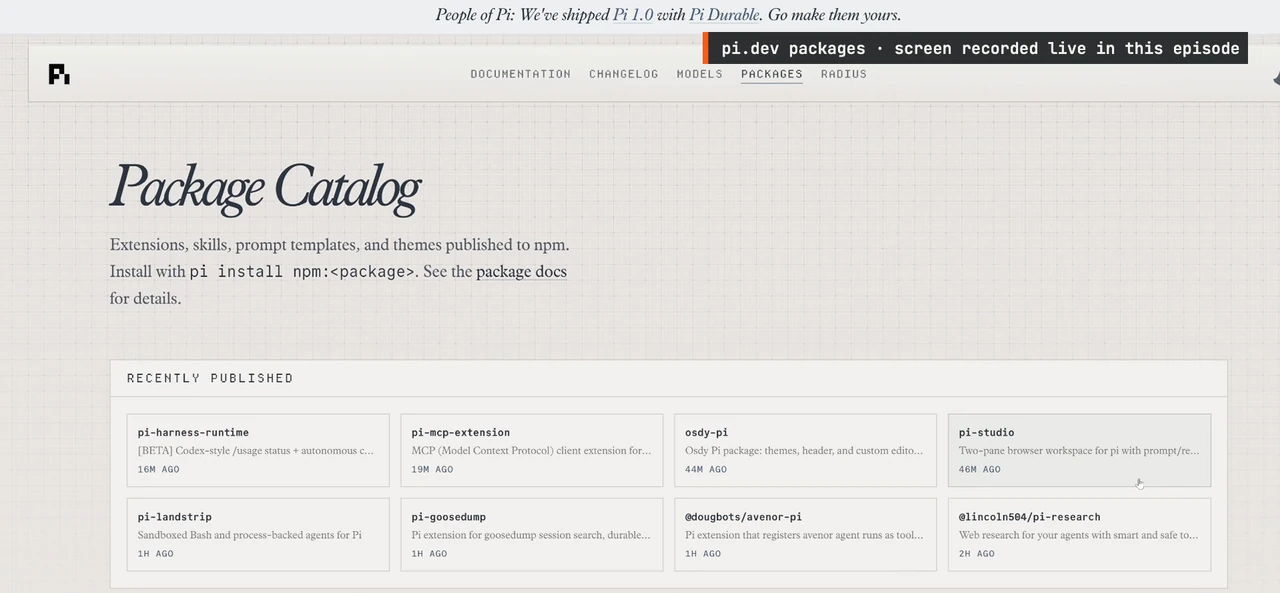
A missing retry rule, status command, or orchestration feature is a reason to inspect an extension. A large catalog is not a reason to install several packages before the first worker succeeds.
Pi packages bundle extensions, skills, prompts, and themes. The official package guide documents installs from npm, git, and local directories; pi list shows configured packages. Project-local declarations use --local, and project packages load after trust is granted. Inspect the source and choose an explicit version before adding executable extensions. Pi package management.
Leo’s package tour supports the idea of choosing your own behavior, but it does not identify a complete tested extension stack. There is no defensible one-command reproduction of his entire setup in the source. Start by specifying what the coordinator needs: how to submit work, identify the worker, inspect status, collect an output, and recover after interruption. Then select a mechanism that actually supports those operations.
Troubleshoot the first worker before adding another
If the worker stops early, reduce the assignment to a deliverable it can finish and make the missing condition explicit. Leo finds Pi less willing to pursue a long broad job without direction, which is why he prefers a capable coordinator to drive it. That is his experience, not a guarantee that adding a loop will solve every unfinished task. Source: lightweight-worker trade-offs, 10:04.
If it forgets a correction, check which working folder and session are active, whether the glossary contains the confirmed spelling, and whether the task actually asked it to consult that file. If a skill was skipped, invoke it explicitly. If results disagree, compare the input version and responsibility assigned to each worker before changing the model.
A cheaper model may be suitable for a narrow caption task, but test it against the names and languages you actually use. Count corrections and review time, not just token price. Michael reports that his sequential editing workflow took around three or four hours. He also casually recalls seeing Leo produce roughly six videos in an hour, but those jobs were not matched against his own edit. Neither estimate is a controlled throughput comparison, and the source supplies no cost accounting that proves a Pi saving. Source: the throughput observation, 4:07.
For your next recording, repeat the caption exercise with the accepted glossary and a new source file. Keep the worker only if it reuses the useful rules, produces inspectable files, and reduces work after review. Once that succeeds, give the coordinator a second independent task. Remote scheduling and recovery are a separate layer, covered in the Pi Durable workflow guide.