MiniMax Code · Tutorial 10
Custom Agents and Agent Team: Delegate Without Losing Control
Give one recurring role to a custom Agent, then use a bounded Leader–Worker–Verifier team only when parallel work earns its cost.

0 of 1 complete
Reference guide · Read when needed · View the route
Last checked and updated: August 25, 2026
A custom Agent is a durable role. MiniMax documents a display name, avatar, description, instructions, default workspace, and optional messaging-channel bindings. You return to that Agent for recurring work that needs the same responsibility and boundaries.
An Agent Team is an execution system for one complex goal. MiniMax says it coordinates decomposition, specialist execution, progress tracking, verification, and final synthesis. Its engineering article describes a Leader → Worker → Verifier loop: the Leader structures the work, Workers produce bounded outputs, and a Verifier decides whether evidence meets the acceptance criteria.
A March 19, 2026 X post by Jace J summarized the appeal as separate roles for writing, reviewing, and testing. That is a helpful community mental model, but the post is promotional and does not prove that more agents improve every task. The exercise below tests the idea with bounded roles and external evidence.
These are not synonyms:
| Tool | Reusable thing | Best for | Main risk |
|---|---|---|---|
| Memory | A stable preference or lesson | Reusing context | Stale or over-broad context |
| Skill | A repeatable procedure | Doing one job consistently | Overlapping triggers or rigid instructions |
| Custom Agent | A persistent owner with role, workspace, instructions, and capabilities | Recurring specialist responsibility | Vague or overlapping ownership |
| Agent Team | A coordinated run with decomposition and verification | Complex parallelizable delivery | Cost, handoff drift, duplicate work, and runaway retries |
By the end of this lesson, you will design one Practice Verifier Agent and a two-worker team plan with an independent final gate.
When one Agent is the better design
Stay solo when the task is:
- short enough to hold one coherent plan;
- tightly coupled, so workers would edit the same lines or depend on each other every minute;
- low-risk and easy to verify with one command or preview;
- cheaper to perform than to explain through several handoffs.
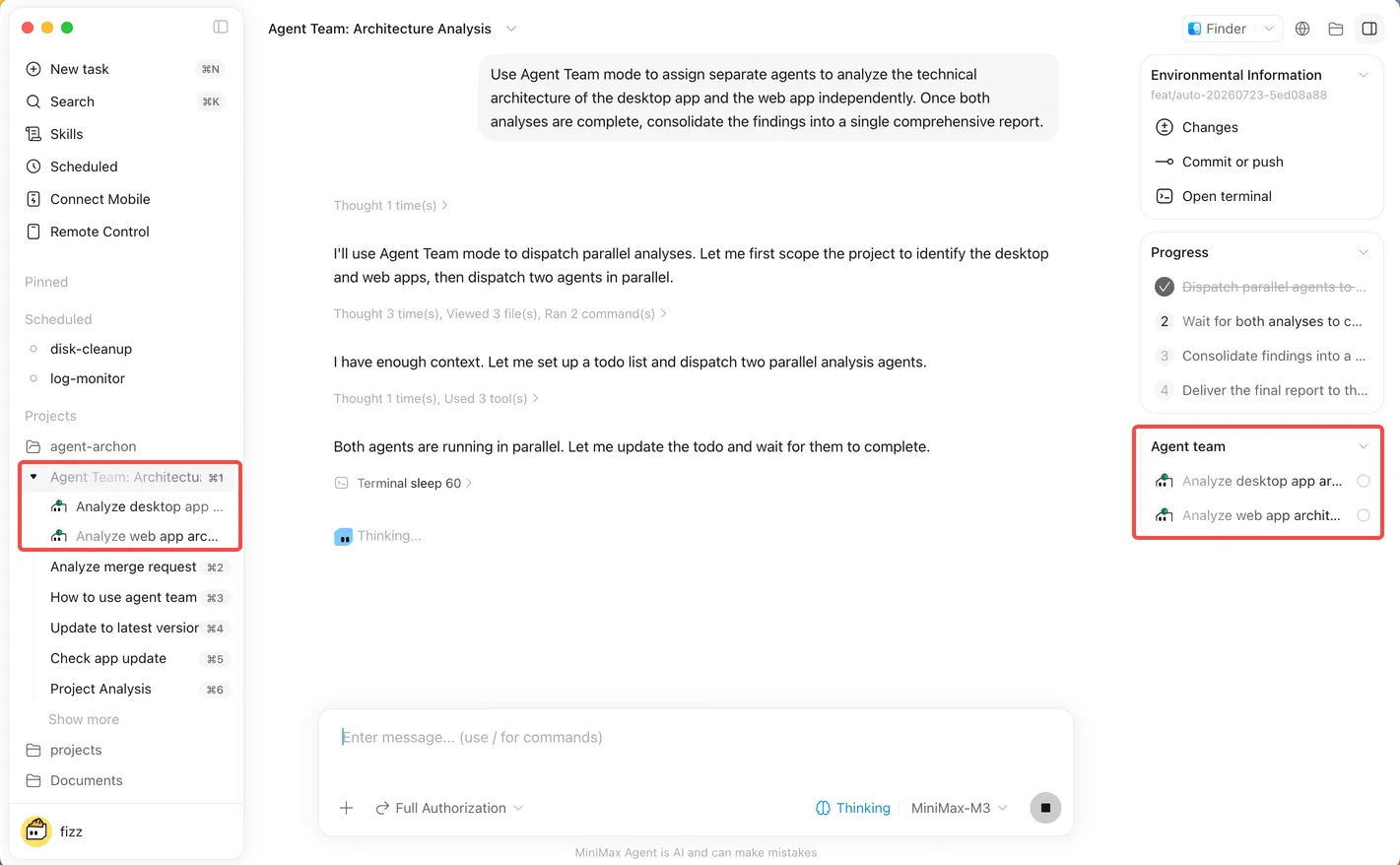
Use an Agent Team when the work has independent units and one integration point—for example:
- research several evidence streams in parallel, then synthesize;
- implement a change while another worker prepares an independent test or compatibility review;
- write a long document through content, format, and evaluation stages;
- combine code, documentation, and visual QA with distinct acceptance checks.
Do not use a team merely because the task has several bullet points. If every worker must wait for the previous worker, a single Agent with a checklist is usually clearer.
Step-by-step scenario: Agent first, team second
Design one custom Agent first
Our recurring role is a read-mostly verifier for the disposable practice workspace.
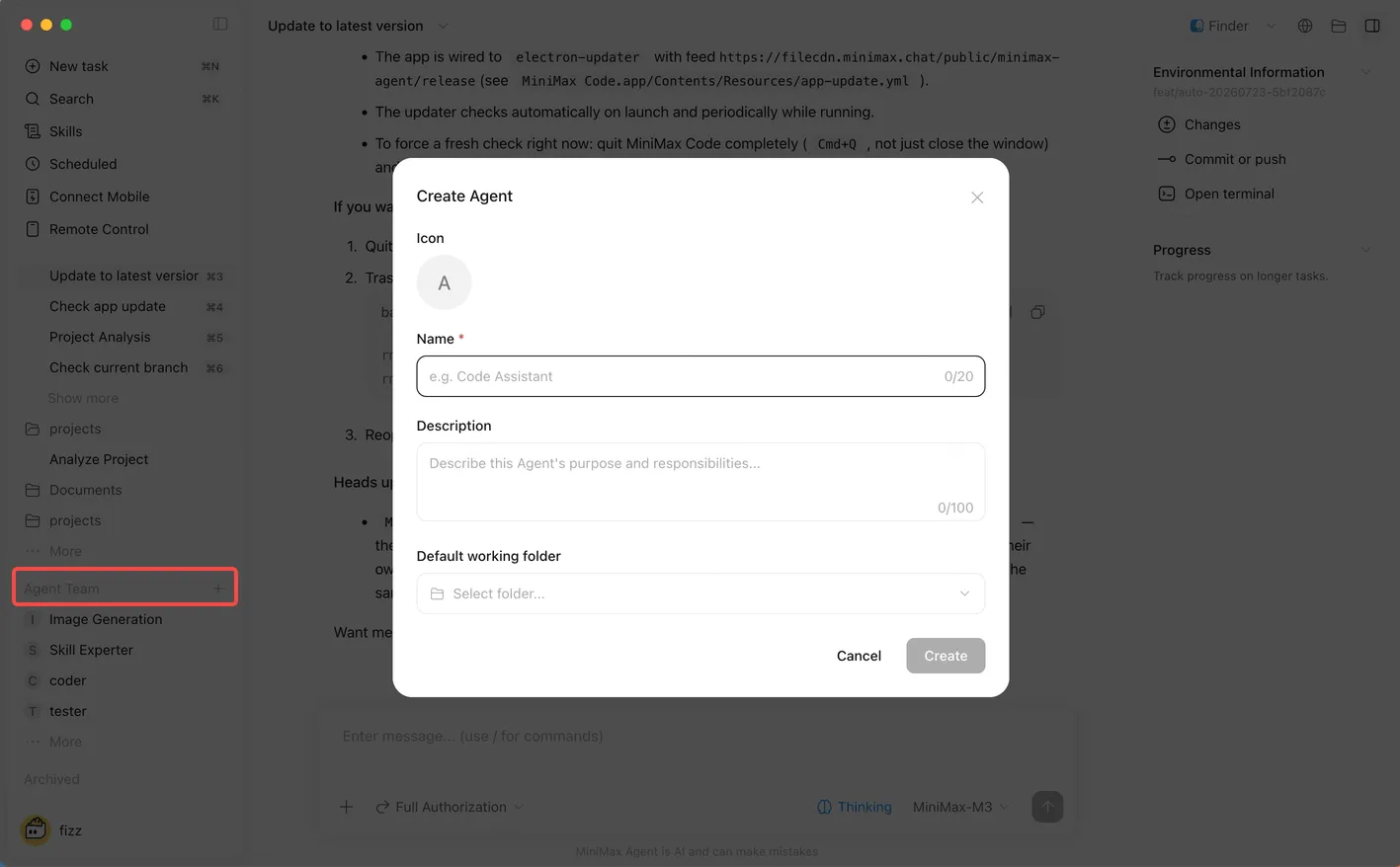
Open the Agent Team area in the sidebar and create an Agent using the controls visible in your build. Configure only what the role needs:
Display name: Practice Verifier

Description:
Independently checks practice-task results against the named requirement,
current changed paths, and actual command or preview evidence.

Instructions:
- Own verification reports for the minimax-code-practice workspace.
- Inspect before suggesting any action.
- Distinguish verified, reported-only, and not run.
- Do not edit, commit, push, deploy, publish, send, delete, or install.
- Reject out-of-scope changed paths.
- Finish with Pass, Fail, or Blocked and the evidence for that verdict.

Default workspace:
[select only the disposable minimax-code-practice folder]

Messaging channels:
None for this exercise.
Give the Agent a responsibility-based name and a measurable stop condition. “You are a brilliant senior reviewer” provides neither.
If you explicitly ask MiniMax Code to create an Agent on disk, the audited create-agent skill adds further safeguards: it requires prior approval, uses a kebab-case responsibility name, verifies that the Agent boots, and discourages overlapping ownership. Creating an Agent is different from creating a skill; the Agent can carry skills, but the role owns the outcome.
Smoke-test the custom Agent
Read-only verification task.

Requirement
README.md must contain the heading "MiniMax Code Practice" and a status line.

Scope
The current practice workspace and README.md only.

Checks
Inspect the current file and visible changed paths. Do not run commands or edit.

Verdict
Return Pass, Fail, or Blocked. Quote the observed heading and status line and state
whether any out-of-scope changed path exists.
The Agent earns its role if its verdict is evidence-led and it stays read-only. Fix the role instructions before binding external channels or adding more responsibilities.
Design an Agent Team that can actually parallelize
Scenario: prepare a release-readiness note for a small practice-site change. The work has two independent evidence streams:
- Change audit: compare the requested outcome with changed paths and diff.
- Verification audit: inspect available test/build/preview evidence and distinguish what was and was not run.
A Leader can dispatch those two read-only workers concurrently, then ask the Practice Verifier to check the integrated note. No worker edits files. That makes the first team exercise safe and makes merge conflicts impossible.
Team contract
| Role | Owns | Returns | Must not do |
|---|---|---|---|
| Leader | Goal, task split, status, stop rules, integration | One release-readiness note | Hide disagreements or widen scope |
| Change-audit Worker | Requirement, changed paths, diff | Scoped change table | Edit, test, or infer runtime success |
| Evidence Worker | Existing command output and preview evidence | Verified / reported-only / not-run table | Run unapproved commands or treat claims as proof |
| Practice Verifier | Acceptance gate on integrated note | Pass, Fail, or Blocked with reasons | Approve its own unsupported inference or rewrite the source evidence |
Use two concurrent Workers maximum for this exercise. More agents would duplicate reading and increase handoff cost without producing another independent evidence stream.
Copyable Agent Team prompt
Use Agent Team for a read-only release-readiness audit of the current disposable
practice workspace.

Goal
Produce one release-readiness note that states whether the current change matches
the requirement and what verification evidence exists.

Inputs
- The requirement in this message
- Current changed paths and diff
- Existing test/build output in the task
- Existing Markdown or browser preview observation

Plan and roles
Use one Leader. Run at most two Workers concurrently:
1. Change-audit Worker: requirement vs paths/diff.
2. Evidence Worker: actual checks vs claims.
After synthesis, use the Practice Verifier as an independent final gate.

Constraints and approvals
Read-only. Do not edit, install, run a new command, open a sibling workspace,
commit, push, deploy, publish, send, delete, or change an account. Do not create
more Agents. Current workspace evidence outranks old conversation claims.

Checks
- Every changed path is named.
- Every requirement maps to evidence or a gap.
- Every check is labeled verified, reported-only, or not run.
- Worker disagreements remain visible until the Leader resolves them with evidence.

Budgets and stop rules
- Maximum concurrent Workers: 2.
- Maximum revision cycles after verification: 1.
- Stop and ask me if the workspace is wrong, required evidence is inaccessible,
  permissions fail, usage limits intervene, or Workers need the same mutable file.

Finish line
Return one integrated note, the Verifier verdict, unresolved limits, and the next
smallest human decision. Do not report complete unless the Verifier passes it.
Supervise the run
MiniMax’s Agent Team documentation says you can add information while the task is running. Use that for evidence or correction, not casual scope growth.
Watch five things:
- Plan: Are the Worker tasks truly independent?
- Status: Is a Worker producing, verifying, done, or stuck?
- Artifacts: Does each handoff name a file, table, or concise result?
- Disagreements: Did the Leader preserve a conflict or silently average it away?
- Stop condition: Has the team hit the revision, permission, usage, or time boundary?
If you add a new requirement mid-run, say whether it replaces the goal or is a separate follow-up. Otherwise the Leader may create another branch of work while the original acceptance checklist remains unchanged.
Why verifier and reviewer are not magic shields
A verifier is valuable because it has an independent job and acceptance criteria. It is not automatically correct. The verifier needs ground truth:
- tests and commands for executable behavior;
- stable primary sources for research claims;
- rendered files for layout;
- explicit path and permission checks for local changes;
- a human signature for high-risk external or irreversible actions.
MiniMax’s engineering article also names three collaboration costs:
- handoff cost: preparing useful context for the next Agent;
- sharing cost: repeatedly exposing every Agent to unnecessary context;
- aggregation cost: merging several outputs into one coherent deliverable.
More agents are not a quality setting. Structure and verification create the value.
Safety boundary
- A default workspace supplies context; do not treat it as a guaranteed isolation boundary.
- Do not bind a messaging channel, create an account, grant OAuth scopes, or share personal data merely to finish this exercise.
- Keep publish, send, purchase, transfer, delete, production change, credential use, and account/permission changes behind exact current confirmation.
- Give Workers separate read-only artifacts or non-overlapping paths. Do not let several Workers edit the same file concurrently.
- Set concurrency, retry, and usage limits before launch. A usage-limit error is a stop signal, not permission to spawn replacement Workers.
- Keep one accountable Leader and one human final owner. “The Verifier passed” does not transfer responsibility.
Public reports: signals, not prevalence
The official MiniMax Code repository contains individual reports of an Agent Team stalling during deep research, parallel retries after a usage limit, and permission-store corruption during concurrent work. These reports do not establish frequency or prove that current v3.0.67 builds reproduce the behavior. They are useful scenario tests for your operating rules: cap fan-out, stop at usage boundaries, isolate writes, preserve status, and intervene instead of launching more retries.
Troubleshooting
| Symptom | Likely cause | Recovery |
|---|---|---|
| Two Workers return the same work | Tasks are not independent or roles overlap | Merge the roles or rewrite each Worker input/output boundary |
| The team is slower than one Agent | Handoff and aggregation cost exceed parallel benefit | Stop the team and return to one Agent with a checklist |
| A Worker stalls without an artifact | Goal or required input is ambiguous, or a tool/permission is blocked | Ask the Leader for the exact blocker; provide evidence once or stop the Worker |
| Verification loops repeatedly | Acceptance criteria are fuzzy or the same defect is being patched without new evidence | Cap revisions, identify the failed check, and escalate to the human owner |
| Usage limit triggers more Workers | Retry policy treats capacity failure as task failure | Stop fan-out; wait for allowance or reduce scope after user direction |
| Concurrent work causes permission errors | Workers share a mutable runtime, permission store, or path | Stop the team, preserve logs, inspect state, and resume with isolated/read-only roles |
| Custom Agent is chosen for unrelated work | Its description or scope overlaps another Agent | Rewrite the description around one responsibility and explicit exclusions |
FAQ
Is a custom Agent the same as a sub-agent or Worker?
No. A custom Agent is a durable configured role. A Worker is a role inside a particular team run and may be selected dynamically.
Should every custom Agent join every Agent Team?
No. Use only the roles required by the goal. Extra specialists increase context and integration work.
Can I start with a five-Agent software team?
Start with one reliable Agent. Then add one independent Worker and one Verifier for a task that can genuinely split. Expand only after the handoffs and checks work.
Does the Verifier need different tools?
Not always. Independence can come from a separate role and acceptance checklist. For stronger verification, give it the authoritative source or executable check that the producer did not control.
What should I do when the team is running but I have new information?
Send the Leader the evidence, identify which task it affects, and state whether the main goal changes. Do not silently create a second finish line.
Official sources
- Custom Agents
- Agent Team
- MiniMax Agent engineering Tech Blog
- Permissions and safety
- Tasks and history
What you can now do
You can give one recurring responsibility to a custom Agent, keep simple work solo, and use Agent Team only when independent work plus verification justifies the added cost. Preserve that discipline when you add plugins, schedules, channels, or production access later in the course.