Hermes Agent · Tutorial 15
Turn Your Best Workflow into a Hermes Command with /learn
Teach Hermes a repeatable workflow from a file, URL, or conversation, inspect the generated skill, and invoke it as your own slash command.

0 of 8 complete
Essentials · Step 7 of 8 · View the route
Last tested and updated: August 25, 2026, with Hermes Agent v0.20.5. Run /version first; commands can change in later releases.
Most people repeatedly explain the same preferences to an assistant: how to format meeting notes, what a weekly research brief must contain, or which checks belong in a release review. /learn turns that explanation into a reusable Hermes skill. If the new skill is called weekly-brief, it also becomes a command you can call with /weekly-brief.
This is one of Hermes’ best hidden gems because it converts a successful conversation into a repeatable way of working—without requiring you to write SKILL.md by hand.
What you will finish
- Create a skill from a document, URL, folder, pasted instructions, or the current conversation.
- Review the generated instructions before trusting them.
- Run the skill explicitly as a slash command.
- Update an existing skill instead of creating near-duplicates.
The simplest mental model
/learn is a small workshop:
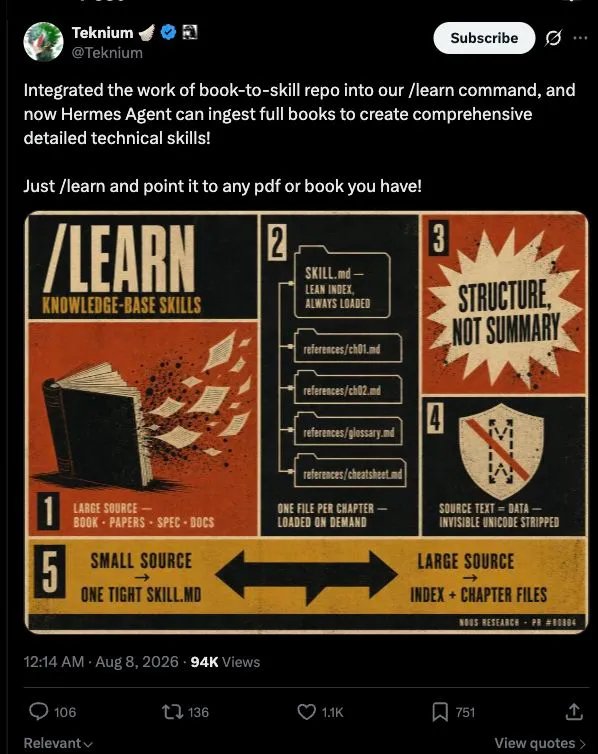
source material → extract the useful method → organise it as a skill → ask before savingHermes can split a large source into a concise main skill plus reference files that are loaded only when needed. It also checks for a matching installed skill and can improve that one instead of adding another copy.
Your first /learn
Start with a short workflow you already understand. For example, save a Markdown file named meeting-notes-method.md, then run:
/learn ./meeting-notes-method.mdYou can also combine sources:
/learn ./meeting-notes-method.md https://example.com/team-decisions-guideOr teach from the useful workflow you just worked out in chat:
/learnHermes proposes the skill and asks for approval before writing it. Read the name, description, triggers, steps, boundaries, and any bundled references. Approve only when the instructions describe the workflow you actually want repeated.
A beginner-friendly real example
Suppose your weekly research brief must always separate facts from judgment. Explain and test the process once:
Help me create a weekly competitor brief.
Use only dated sources. Put a link beside every factual claim.
Separate verified facts, interpretation, and unknowns.
End with three actions, but never contact a company or make a purchase.
After you are happy with the result:
/learnName the proposed skill weekly-competitor-brief. In a fresh session, invoke it directly:
/weekly-competitor-brief Research these three companies for this week: …Explicit invocation is useful when natural-language routing fails to select the right skill. Hermes can stack as many as five dynamic skill commands at the beginning of a prompt; the first ordinary token ends that skill stack.
/source-check /weekly-competitor-brief Compare Company A and Company BIf a newly created command does not appear, start a new session or try /reload-skills on a surface that supports it.
Inspect and maintain what you learned
Use the skills browser rather than treating your library as a black box:
/skills list
/skills inspect weekly-competitor-brief
/skills audit weekly-competitor-brief
When the workflow changes, run /learn again with the updated source. Prefer updating the matching skill over producing weekly-brief-v2-final-new.
The official Hermes skills guide documents files, URLs, pasted material, conversation learning, and dynamic commands. One open user report is also a useful warning: automatic skill routing can miss. That is why this tutorial teaches explicit /<skill-name> invocation.
Why users care
Hermes maintainer Teknium demonstrated /learn ingesting a complete book into detailed technical skills. That shows the upper end of the feature, not a promise that every book becomes a correct expert system.
A more everyday result came from Kyle Jeong, who reported that a saved browser workflow reduced one repeated task from 102 seconds and 23 turns to 35 seconds and 8 turns. The figures are self-reported and specific to his setup, but the lesson is sound: reuse a tested route instead of rediscovering it every time.
How to know it worked
/skills listshows one clearly named skill./skills inspect <name>contains the agreed steps and safety limits./<name> <task>loads the intended workflow in a fresh session.- A sample output passes the checklist you used before learning it.
Frequently asked questions
Does /learn train the model?
No. It creates local, reusable instructions and references. It does not change the model’s weights.
Can it learn from a PDF or a whole folder?
Yes. Large material may be organised into references rather than pushed into every prompt.
Can a learned skill change files or use accounts?
It can instruct Hermes to use available tools. Keep approval boundaries explicit and inspect third-party or generated instructions before running them.
Why did Hermes not use my skill automatically?
Descriptions and routing are imperfect. Invoke /<skill-name> directly when the workflow matters.
Should I make a skill for every prompt?
No. Create one when a workflow repeats, has several steps, or benefits from a stable quality checklist.
How is this different from memory?
Memory keeps durable facts and preferences. A skill describes a procedure for doing a job.