Projects & coding · Tutorial 14
Claude Unified Memory: Use It Across Chat and Cowork
Set up Claude's editable memory topics, carry context between Chat and cloud Cowork, and keep the boundaries clear.

0 of 1 complete
Reference guide · Read when needed · View the route
Last checked and updated: August 26, 2026.
Claude’s August 25 memory release is easy to overstate. It does not make every Claude product share one perfect brain. It gives Claude Chat and cloud Cowork one user-controlled memory system, built from editable topic files. Context can now move in both directions: a preference learned in Chat can inform a cloud Cowork task, and useful context from that task can be available when you return to Chat.
That is a meaningful workflow improvement. The repeated briefing that used to sit between a conversation and an execution task can shrink. You still need to inspect the brief, correct stale facts, and know where memory does not travel.
The 30-second version
- Claude adds information to topic-based memory files as you work.
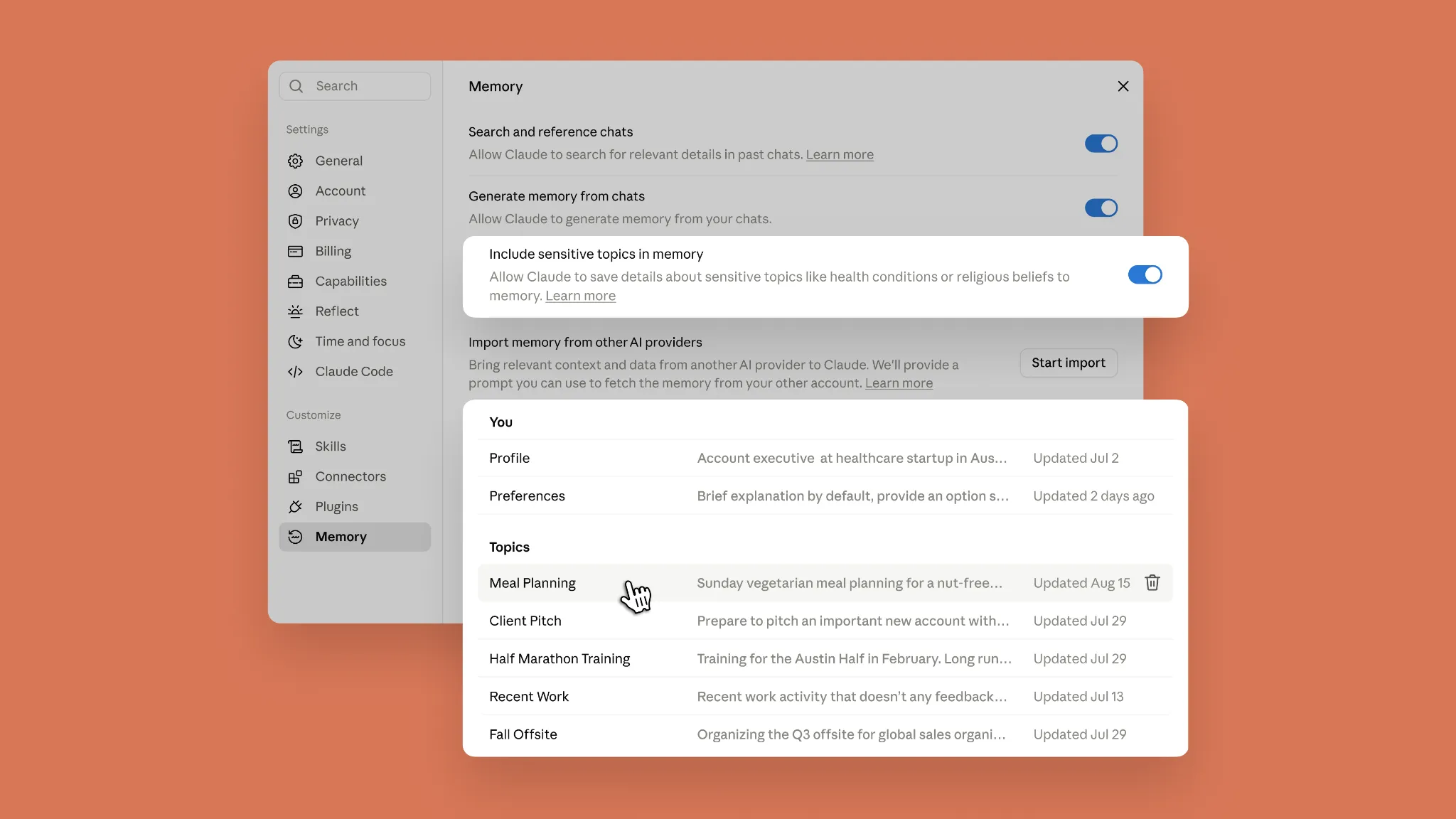
- You can review, change, or delete those files under Settings → Memory.
- Chat and cloud Cowork use the same memory. Local Cowork does not.
- Search, project memory, Claude Code memory, and incognito chats follow different rules.
- Memory reduces rebriefing. It does not guarantee that Claude’s recalled context is current or correct.
Anthropic announced the change on August 25, 2026, describing memory as something you can see and control rather than an invisible profile.
Five kinds of context that should not be confused
The word “memory” now appears in several Claude workflows. Treating all of them as one system leads to bad expectations.
| Context system | What it does | Boundary to remember |
|---|---|---|
| Memory topics | Maintains editable files about durable preferences and recurring context. | Shared by Chat and cloud Cowork; controlled in Settings. |
| Past-chat search | Lets Claude find relevant details in earlier conversations when you ask. | A separate setting, available on paid plans; it is not the same as generated memory. |
| Project memory | Builds a dedicated memory summary from chats inside one Claude Project. | Each project stays separate, and project memory does not flow into general memory or other projects. |
| Claude Code memory | Uses CLAUDE.md instructions and project-scoped auto memory to help with codebase work. | It is a different system. The Chat/Cowork unification does not include Claude Code. |
| Incognito chat | Starts a conversation that does not contribute to chat history or memory. | It is for one-off work, although Team and Enterprise retention policies can still apply. |
Anthropic documents the toggles, project boundaries, and incognito behavior in its current chat search and memory guide. Claude Code’s own documentation describes its separate CLAUDE.md and auto-memory model.
Set it up without handing over the steering wheel
1. Open Settings → Memory
On Claude web or desktop, open Settings, then Memory. Look for two separate controls:
- Search and reference chats allows Claude to search past conversations when useful.
- Generate memory from chats allows Claude to maintain the memory files shown on this page.
You can use one without the other. If you want durable preferences but do not want ad hoc retrieval from old conversations, leave memory generation on and turn chat search off.
On Free, Pro, and Max accounts, Anthropic says memory is on by default. Team and Enterprise owners decide whether the feature is available to their organization; it remains off for members until an owner enables it. Organizations with HIPAA, public-sector, or custom-retention arrangements may not have memory available.
2. Review the files Claude already created
Open Profile, Preferences, and several items under Topics. A useful memory entry should be durable enough to survive more than one task: your preferred report structure, a recurring stakeholder’s role, or a stable working convention. A one-time deadline or an unconfirmed guess should not quietly become standing context.
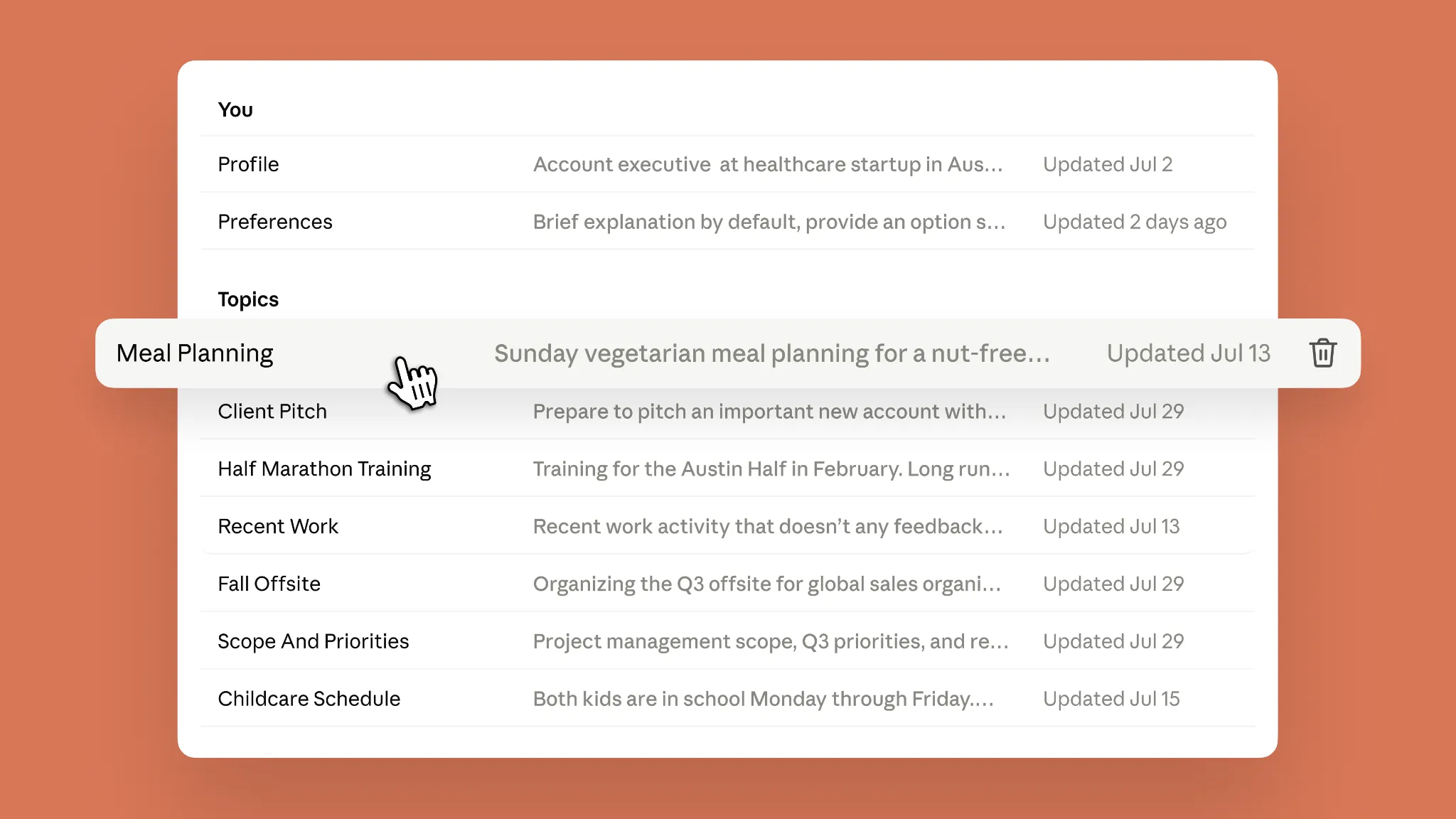
Open a topic to see its summary and supporting details. You can delete the topic or use the prompt field at the bottom to tell Claude what to change or remove. A compact instruction is enough:
Update this memory: our weekly report now starts with decisions and risks. Move detailed metrics to the appendix.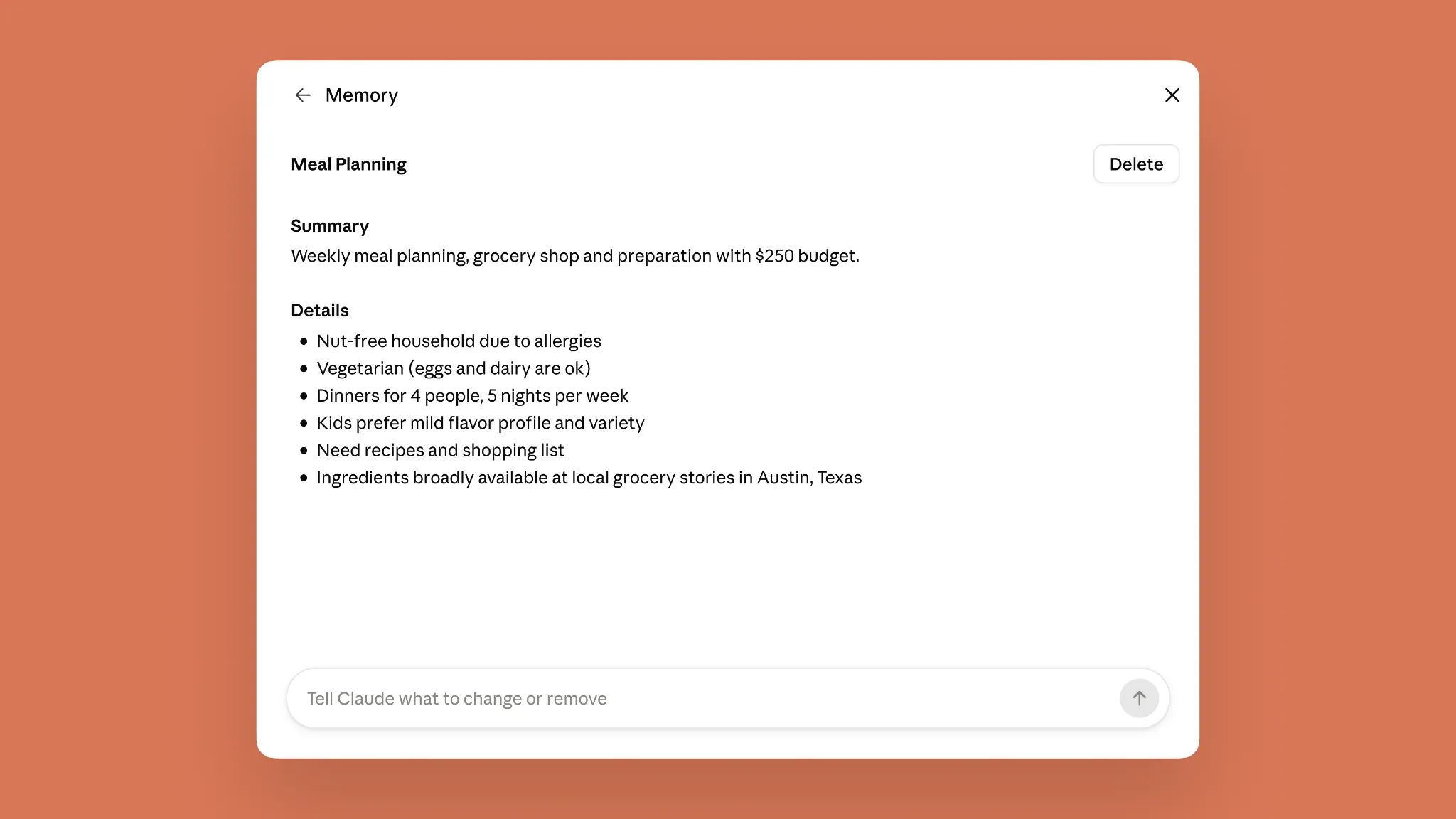
3. Make a deliberate choice about sensitive topics
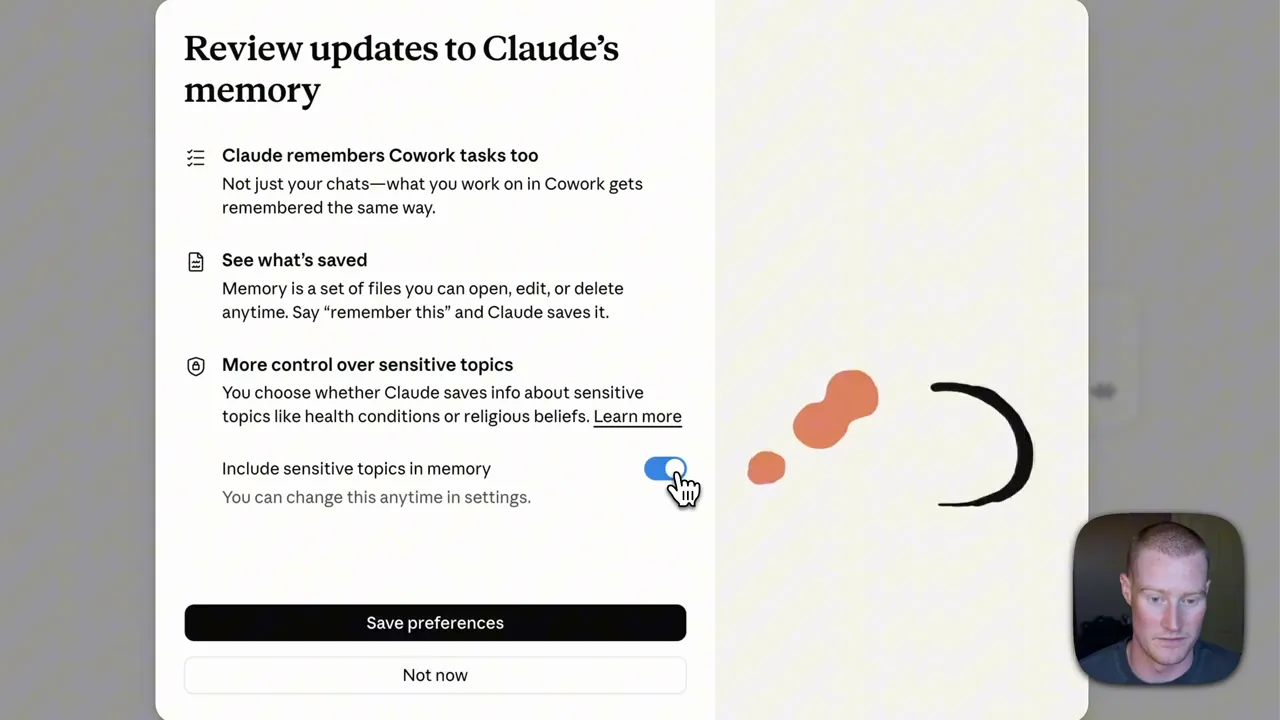
Sensitive-topic memory is a separate opt-in. Anthropic says it is off by default and shows notices when sensitive information would otherwise be remembered. Turning it on is not retroactive: Claude does not go back and populate old sensitive details automatically.
Even with the option enabled, Anthropic says certain categories are never saved in memory, including government identification numbers, financial account numbers, criminal history, and immigration status. The sensible operating rule is stricter: do not use long-term memory as a secrets manager, credential store, or authoritative personnel record.
4. Test a Chat-to-Cowork handoff
Give Claude one reusable operating preference in Chat. For example:
Remember that my weekly project update uses four sections:
decisions, risks, next actions, and metrics.
Then start a cloud Cowork task and ask it to draft this week’s update from the files you provide. Do not repeat the four-section template. Ask Claude to state the structure it intends to use before it acts. If it names the correct format, the handoff worked; if it does not, open Memory and check what was actually saved.
When the preference changes, correct it once in the topic file. That is the practical promise of unified memory: fewer copies of the same briefing, with one visible place to update the durable version.
Workflows that benefit most
Recurring reports
Store the stable reporting contract: audience, section order, tone, date convention, and where detailed evidence belongs. Keep current numbers in source files, not memory. Chat can help refine the narrative while cloud Cowork assembles the report using the same standing format.
Project-status continuity
Memory can carry durable roles, naming conventions, and decision preferences between discussion and execution. Project-specific facts should stay in a Claude Project or the working files. This prevents a temporary status from leaking into unrelated work as if it were permanent.
Communication preferences
Preferences such as “lead with the recommendation,” “spell out acronyms on first use,” or “flag uncertainty rather than smoothing it over” are good candidates. They apply often, change rarely, and are easy to audit.
Correcting stale context once
When Claude repeats an outdated preference, edit the relevant memory topic instead of correcting every new chat. After the edit, test both Chat and cloud Cowork. A corrected memory is still context, not enforcement; review important outputs.
The boundaries that can surprise you
Local Cowork is excluded. The shared-memory behavior applies to Cowork tasks that run in the cloud. Anthropic’s Help Center explicitly says local Cowork sessions do not use this memory.
Projects keep separate memories. Each Claude Project has its own summary derived from chats in that project. Those summaries do not merge into your general memory or other projects.
Deleting a chat does not delete what memory learned from it. Conversation deletion or expiry does not automatically remove related memory entries. Inspect and delete the topic separately. Memory is also included when you export your Claude data.
Pause and reset are different. Turning memory off pauses use and stops new updates while keeping existing files. Reset memory permanently deletes general and project memories. Use pause when you want a reversible break; use reset only when you intend to rebuild from zero.
Imports are experimental. Claude can import memory from other AI providers through Settings → Memory → Start import, but Anthropic warns that an import may not always be incorporated successfully. Review the result rather than assuming the transfer is complete. See the current memory import and export guide.
Legacy memory has a deadline. During the migration, Anthropic says the option to export legacy memory remains available only until September 9, 2026. If you used the older system, export it now, compare it with the new topic files, and paste back only the durable details that are missing.
Workspace policy still wins. Team and Enterprise owners separately control general memory and sensitive-topic memory. Owners cannot inspect or edit an individual member’s memory, according to Anthropic, but organizational retention and export rules still apply. If an owner disables memory for the organization, the stored memories are deleted.
An operator’s verdict
Unified memory removes a small but expensive tax: humans repeatedly translating context from a planning conversation into an execution task. Its strongest use is not remembering everything. It is maintaining a short set of durable, editable operating assumptions that both Chat and cloud Cowork can use.
The feature does not turn recalled context into truth. A memory can be incomplete, stale, or too broad. It also does not promise lower token costs; Claude still has to bring relevant context into its work, and Anthropic does not describe this release as a token-saving mechanism. The win is reduced human rebriefing and fewer inconsistent copies of the same preference.
Use memory as a controlled briefing layer:
- Save stable conventions, not volatile facts.
- Review the topic files before relying on them.
- Keep secrets and authoritative records elsewhere.
- Test a correction in both Chat and cloud Cowork.
- Use incognito for work that should not shape future memory.
That operating model captures the benefit without pretending Claude has become infallible.