Case studies · Tutorial 13

Use GLM-5.3 Free in ZCode: A Safe First Coding Workflow

Get GLM-5.3 running through Z.ai, give it one controlled repository task, review the patch, run the checks, and confirm what your free account actually includes.

Hand-cut paper coding workstation feeding a tall repository stack through a model engine, human approval lever, and green test gate
Reading time
14 min
Last updated
August 2026

0 of 13 complete

Source-checked and updated: August 20, 2026, against Z.ai’s GLM-5.3 model guide, migration guide, live ZCode download page and documentation, plus the original X post. Free-plan labels, allowances, rate limits, and availability can change; confirm the live values shown in your own account before depending on them.

GLM-5.3 is Z.ai’s new flagship coding and agent model. It keeps GLM-5.2’s base model and adds a much stronger post-training pass for software engineering, terminal work, long tasks, and security analysis. Z.ai says it improves by 50% over GLM-5.2 on its own Code Bench and reaches state-of-the-art results among open-source models on Terminal-Bench 3.0.

The development that matters for learners is access. Z.ai now presents a rate-limited free GLM-5.3 option, and ZCode—the company’s desktop coding-agent app—is already built around GLM-5.3. That gives you a way to test a frontier-scale coding workflow before deciding whether a paid coding plan or API usage earns its keep.

This is not the same as unlimited free API access. It is also not proof that GLM-5.3 replaces every paid coding tool. The useful test is simpler: can it complete one real task in your repository, leave a reviewable patch, and pass the checks without creating more cleanup than value?

By the end of this tutorial, you will have ZCode connected to your Z.ai account, a disposable Git branch, one agent-created change, a human-reviewed diff, test evidence, and a written note of the allowance your account showed that day.

What changed—and what did not

Z.ai’s official GLM-5.3 guide confirms these model characteristics:

CapabilityCurrent official positionPractical meaning
ModelSame base as GLM-5.2, improved through post-trainingThe release is mainly about better agent behaviour, not a completely new foundation model
ContextUp to 1 million tokensLong repository sessions are possible, but good file selection still matters
OutputUp to 128,000 tokensLarge patches and reports are possible; smaller reviewed changes remain safer
ReasoningAlways enabledYou cannot disable thinking; compatible clients may offer low, high, or max effort
InputsText onlyImages and screenshots need a different model or tool path
ToolsFunction calling, streaming, caching, structured outputA harness can let the model inspect files, run commands, and return structured results

The 50% coding gain is a first-party benchmark claim from Z.ai. It is worth testing, not treating as a guarantee for your stack. The one-million-token context is a capacity ceiling, not a reason to attach every file, secret, build artifact, and dependency folder to one task.

Choose the right starting route

There are three ways to try GLM-5.3. Start with the least powerful route that can answer your question.

Route A: browser chat

Use chat.z.ai if you want to inspect an error, plan a change, explain code you paste deliberately, or test the model’s writing and reasoning. This is the fastest route and does not give the model autonomous access to your local files or terminal.

Route B: ZCode desktop agent

Use ZCode when you want the model to inspect a repository, edit files, run commands, show a diff, and carry a longer task through verification. This tutorial uses that route.

Route C: model API or another coding client

Use the GLM Coding Plan or model API only when you need GLM-5.3 inside Claude Code, Cline, Kilo Code, OpenCode, or your own software. This route adds API keys, endpoint choices, usage accounting, and the possibility of charges. A free ZCode or chat allowance does not automatically become general-purpose API credit.

1. Record the offer before installing

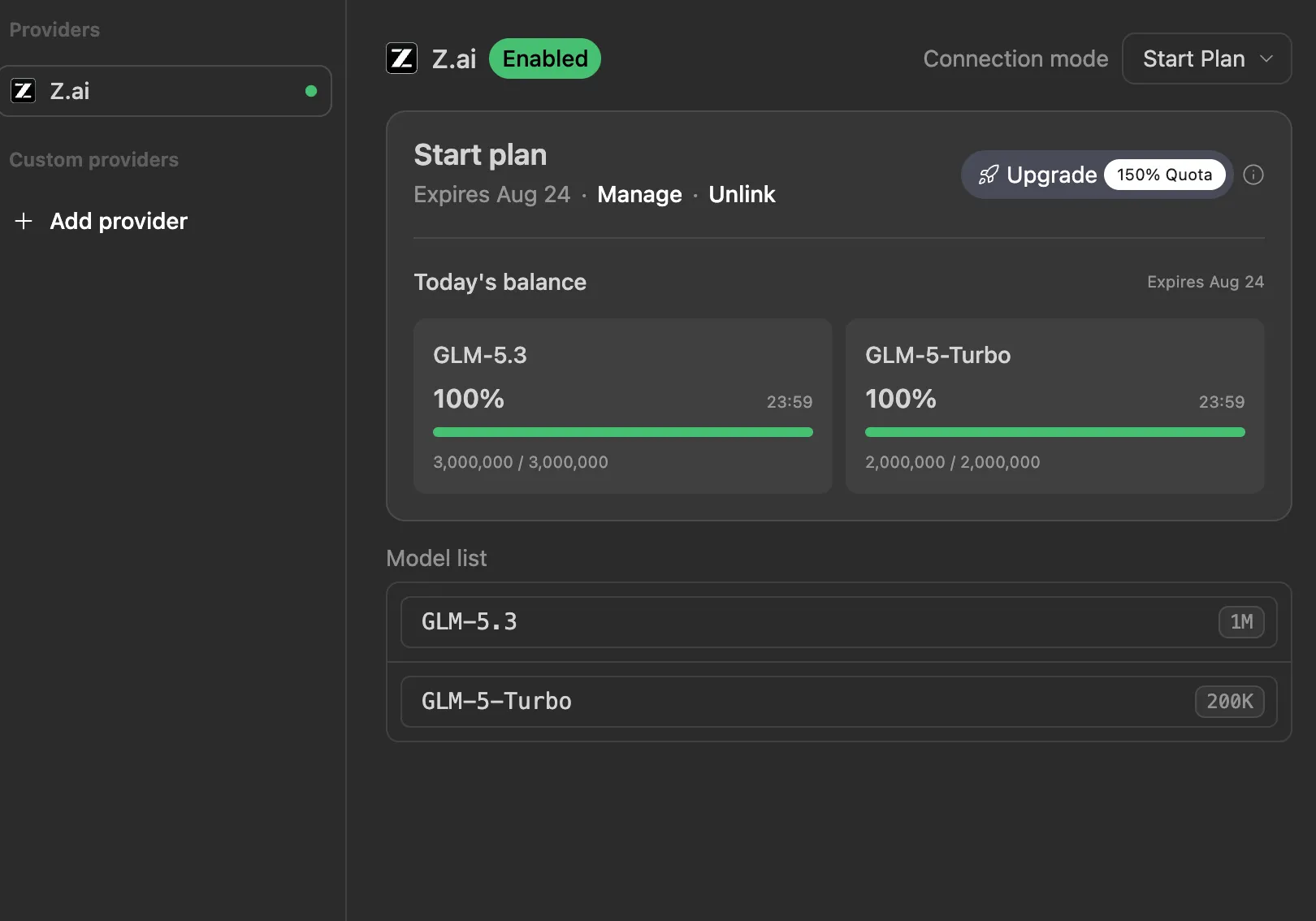
Open ZCode’s model or plan screen in your browser and note these values:

Date checked:
Plan name:
Price shown:
GLM-5.3 available: yes / no
Daily or rolling allowance:
Rate-limit wording:
Expiry or trial end date:
Payment method required: yes / no

Do this before building a workflow around the offer. The original post says the free plan supplies five million GLM tokens per day and has no announced end date. Z.ai’s public documentation available during our check did not state that as a permanent ongoing allowance. Earlier ZCode documentation described a five-day new-user trial whose combined daily allowance was five million tokens. Those are not interchangeable promises.

If your account shows a different number, your account screen wins.

2. Install ZCode from the official download page

Download ZCode from zcode.z.ai, not from a mirror or a file attached to a social post. The official page currently provides builds for:

  • macOS on Apple silicon and Intel;
  • Windows on x64 and ARM64;
  • Linux on x64 and ARM64, as .deb and AppImage packages.

Install the build for your operating system, then launch it. On first launch, choose Connect Z.ai. Sign in or create an account, return to ZCode, and confirm that the connection is active.

Open Manage Models or the model selector and look for GLM-5.3. If ZCode offers a free or trial plan, select it and reopen the usage view. Record what the application shows for today’s balance, rolling limits, weekly quota, or trial expiry.

Stop here if the interface requests a paid upgrade you did not intend to buy. You can still test GLM-5.3 in browser chat, or decide deliberately whether the paid plan is worth it.

3. Create a disposable Git branch

Do not make the first run against your only copy of important work. Open a small repository with tests and a clean baseline.

In your terminal, check the repository state:

git status --short
git branch --show-current

If the status command prints files, either commit the work, move it to a safe branch, or use a different practice repository. Then create a branch for the model’s test:

git switch -c test/glm-5-3-first-task

Open that repository as the ZCode workspace. Start with Confirm Before Changes if the execution-mode menu offers it. That mode asks before file edits and commands, which makes the first run slower but easier to understand.

4. Give GLM-5.3 one bounded task

Pick a task with an observable finish line: one bug, one small component, one documentation correction tied to code, or one missing test. Avoid “improve the whole app” and “refactor everything.”

Paste this task contract into ZCode and replace the bracketed parts:

Goal: [one concrete outcome]

Before editing:
1. Read the repository instructions and relevant files.
2. Explain the current behaviour and likely cause.
3. Propose the smallest safe change.
4. Wait for my approval before editing or running an install command.

Constraints:
- Work only inside this repository.
- Do not change dependencies, lockfiles, secrets, deployment settings, or unrelated files.
- Preserve existing behaviour outside the stated goal.
- If the requirement is ambiguous, stop and ask.

Verification:
- Run [the relevant test, check, or build command].
- Review git diff --check and git status --short.
- Report changed files, commands run, results, and anything not verified.

Done means:
[a visible result plus a passing check]

For example:

Goal: Add an empty state to the saved-search list when it has zero items.

Done means: the page shows the existing EmptyState component with a link back
to search, the populated state is unchanged, and the component test passes.

This prompt does three useful things. It forces discovery before editing, narrows the blast radius, and defines evidence that can prove completion. A stronger model still needs a clear contract.

5. Review the plan before granting access

Before approving the first edit, check the agent’s proposed files and commands.

Reject or revise the plan if it wants to:

  • rewrite unrelated architecture for a small result;
  • install a new package before checking existing components;
  • read .env, SSH keys, browser profiles, or unrelated home folders;
  • disable a test instead of fixing the behaviour;
  • run a destructive Git command;
  • publish, deploy, or open a pull request when you asked only for a local change.

GLM-5.3’s long context can help it keep more repository evidence in view, but scope control still comes from the task contract and your approvals.

If your client exposes reasoning effort, use low for a small explanation or mechanical edit, high for normal repository work, and max for a genuinely hard diagnosis or multi-stage change. Z.ai recommends max for complex coding, but always-on deep reasoning can add latency and consume allowance on work that did not need it.

6. Inspect the patch instead of accepting the summary

When the agent says it is finished, open ZCode’s Review or Changes view. Read the actual diff. Then check it independently in a terminal:

git diff --check
git diff --stat
git status --short

Inspect the complete patch:

git diff

Ask four questions:

  1. Did it change only the files the task required?
  2. Does the code solve the stated behaviour rather than hide the symptom?
  3. Did it preserve error states, accessibility, security checks, and existing data?
  4. Can you explain every changed line well enough to maintain it?

If not, do not ask for a vague cleanup. Point to the exact problem:

The new empty state is correct, but the patch also reformats two unrelated
files. Revert only those unrelated formatting changes, keep the feature and
test intact, then rerun the same verification.

7. Run the real checks

The agent’s prose is not test evidence. Run the repository’s own command and read the exit status. Depending on the project, that might be:

npm test
npm run check
npm run build

Use the commands the repository documents; do not run all three blindly. For a visual change, also open the page at the target viewport and check the real state. For an API change, send a representative request. For a bug, reproduce the old failure and confirm it no longer occurs.

Finish with:

git diff --check
git status --short

Only commit after you can describe the change and its proof in one sentence.

8. Measure useful work, not free tokens

Open ZCode’s usage statistics after the task. Record:

Task:
Elapsed time:
Allowance before:
Allowance after:
Files changed:
Verification passed:
Manual corrections needed:
Would I use this route again for this task type? yes / no

The headline number is not the decision. Five million free tokens would be poor value if the model produces wide, unreviewable patches. A smaller allowance can be useful if it reliably finishes bounded work.

Run three representative tasks before replacing a paid tool:

  1. a small bug with a known reproduction;
  2. a feature that touches two or three files;
  3. a diagnosis where the correct answer may be “do not change the code.”

Compare completion rate, corrections, latency, and review effort. Do not compare only the first impressive demo.

Optional: connect GLM-5.3 to another coding client

Z.ai officially supports GLM-5.3 through OpenAI Chat Completions, OpenAI Responses, and Anthropic-compatible protocols. The correct endpoint depends on whether you are using a Coding Plan or ordinary API balance. Mixing them can make plan quota fail to apply.

The current official model ID is:

glm-5.3

GLM-5.3 requires reasoning to remain enabled. At the API level, the important settings are:

{
  "model": "glm-5.3",
  "thinking": { "type": "enabled" },
  "reasoning_effort": "high"
}

Do not paste the free model label shown on a web page into a third-party client and assume it shares ZCode’s allowance. Follow the current guide for your specific client, use the endpoint shown for your plan, keep the API key out of source control, and set a spending limit before testing.

Troubleshooting

GLM-5.3 does not appear

Refresh the Z.ai connection, reopen Manage Models, and confirm which plan is active. Rollouts and regional availability can differ. Use browser chat while checking the official status and plan page.

The usage number differs from the viral post

Treat the logged-in account display as the current contract. Save the date and wording. Trials, campaigns, rate limits, and plan quotas can change without making the older screenshot fraudulent.

A request fails when reasoning is disabled

GLM-5.3 does not accept thinking.type: "disabled". Use enabled and reduce reasoning_effort to low when you want a lighter pass.

The model burns context too quickly

Start a fresh task, narrow the workspace or file references, exclude generated output and dependency folders, and ask for a smaller deliverable. One million tokens is a maximum capacity, not a target.

ZCode wants to change too much

Switch to a confirmation-heavy mode, reset the task to one observable outcome, name protected files explicitly, and require approval after the plan. If the patch is already tangled, do not ask the same session to improvise a large cleanup; return to the clean branch and retry with a narrower contract.

The practical verdict

GLM-5.3’s free route is a large development because it lowers the cost of testing a serious long-context coding agent. The model’s official limits and ZCode integration make it suitable for more than chat demos.

The opportunity is not “replace every subscription today.” It is to run a fair trial against work you already understand: controlled branch, bounded task, reviewed diff, real test, recorded usage. If GLM-5.3 repeatedly ships clean work under that standard, then the free access has earned a place in your tool stack.

Official sources

Continue learning